Welcome Guest ( Log In | Register )

Outline · [ Standard ] · Linear+

 how to configure DNS 1.1.1.1 on TIME router

views
     
TSarctura_kinetic
post Apr 25 2020, 07:08 PM, updated 6y ago

Getting Started
**
Junior Member
102 posts

Joined: Oct 2007
Hi
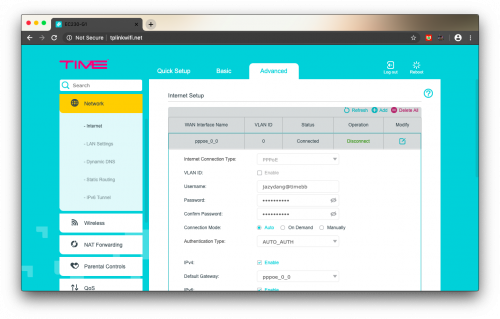
I'm using TIME internet service, i would like to change the DNS to 1.1.1.1 but not able to find the setting on the tplink router (model ec230-g1).
The advanced setting screen are not the same as what i found on internet, really dont know how.
Please someone guide me on this.

user posted image
soul78
post Apr 25 2020, 07:22 PM

Enthusiast
*****
Junior Member
933 posts

Joined: Jul 2005


user posted image
SUSnonamer
post Apr 26 2020, 09:43 AM

Getting Started
**
Junior Member
224 posts

Joined: Apr 2019
just use the isp provided dns becos u won't gain anything
public dns only needed when u have vpn for unblocking running inside ur router
TSarctura_kinetic
post Apr 28 2020, 02:17 PM

Getting Started
**
Junior Member
102 posts

Joined: Oct 2007
Solved, thanks for helping...
SleeplessEyes
post May 1 2020, 08:43 PM

Look at all my stars!!
*******
Senior Member
2,429 posts

Joined: Feb 2007
QUOTE(nonamer @ Apr 26 2020, 09:43 AM)
just use the isp provided dns becos u won't gain anything
public dns only needed when u have vpn for unblocking running inside ur router
*
Changing DNS is not the only reason to unblock "blocked" sites.
Sometimes improved latency plus DNS server efficiency attributes to noticeable faster web page loading and searching (not to be confused with download or bandwidth speeds) .

This is noticeable when trying to use some of the DNS i.e from Singapore even though a mere 10ms extra.
BTW even using 1.1.1.1 will route to their DNS servers in Malaysia, as it follows original geographical IP address.
But of course anytime faster than ISP's own DNS.
SUSnonamer
post May 1 2020, 10:11 PM

Getting Started
**
Junior Member
224 posts

Joined: Apr 2019
QUOTE(SleeplessEyes @ May 1 2020, 08:43 PM)
Changing DNS is not the only reason to unblock "blocked" sites.
Sometimes improved latency plus DNS server efficiency attributes to noticeable faster web page loading and searching (not to be confused with download or bandwidth speeds) .

This is noticeable when trying to use some of the DNS i.e from Singapore even though a mere 10ms extra.
BTW even using 1.1.1.1 will route to their DNS servers in Malaysia, as it follows original geographical IP address.
But of course anytime faster than ISP's own DNS.
*
things that cannot be proven by pingtest remain as feelings...nevertheless i using cloudflare which is the slowest of the lot but still feels fast enough
SleeplessEyes
post May 2 2020, 09:06 AM

Look at all my stars!!
*******
Senior Member
2,429 posts

Joined: Feb 2007
QUOTE(nonamer @ May 1 2020, 10:11 PM)
things that cannot be proven by pingtest remain as feelings...nevertheless i using cloudflare which is the slowest of the lot but still feels fast enough
*
If you just think for one moment I was plucking utter complete BS from thin air and from out of this earth, you're wrong.
If you have read this quote I said earlier, i mentioned the word "latency". Which part did I not prove that its from Ping Test?

QUOTE
Sometimes improved latency plus DNS server efficiency
FYI, I did extensive Ping Test on several 3rd party DNS outside Malaysia , including Cloudfare.
You would think I'm bullshitting to say Cloudfare has a DNS server in Malaysia.
It takes one to deeply research where the server would originate .

You're statement below:
QUOTE
nevertheless i using cloudflare which is the slowest of the lot but still feels fast enough
Is already contradicting. If you already said its the slowest, then why don't you use back your ISP DNS since you say it doesn't bring any benefits? I believe your theory is - ISP DNS latency is faster than 1.1.1.1, which I have to agree since its located locally (duh).

Have a good day ahead.

CypressHill88
post Dec 11 2020, 04:37 AM

New Member
*
Newbie
3 posts

Joined: Aug 2018
QUOTE(arctura_kinetic @ Apr 25 2020, 07:08 PM)
Hi
I'm using TIME internet service, i would like to change the DNS to 1.1.1.1 but not able to find the setting on the tplink router (model ec230-g1).
The advanced setting screen are not the same as what i found on internet, really dont know how.
Please someone guide me on this.

user posted image
*
How did you solve this? I not able to find DNS setting in the router.
xSean
post Sep 18 2021, 01:13 AM

Look at all my stars!!
*******
Senior Member
2,768 posts

Joined: Oct 2006
Go Network > Internet > Modify the WAN > Advanced > Tick 'Use the Following DNS Addresses' for ipv4 or Tick 'Use the Following IPV6 DNS Address:' for IPV6

This post has been edited by xSean: Sep 18 2021, 11:56 AM


Change to:
| Lo-Fi Version
0.0166sec    0.55    5 queries    GZIP Disabled
Time is now: 15th December 2025 - 06:13 AM