

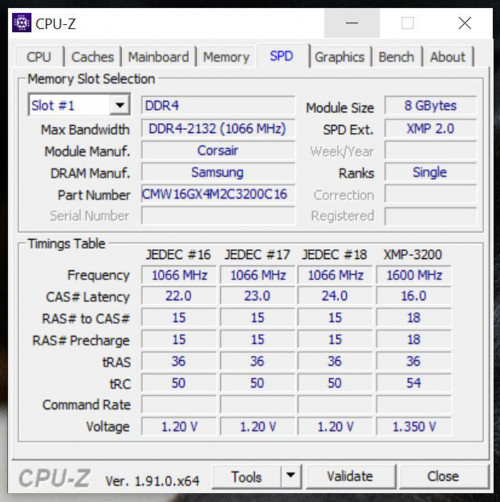
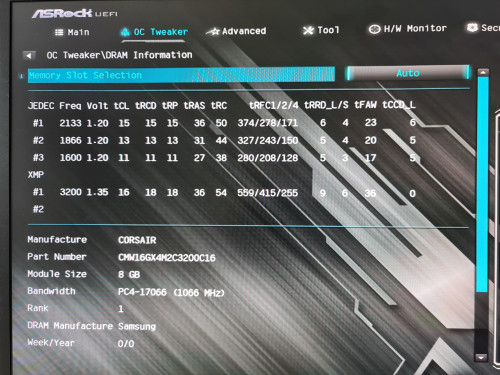
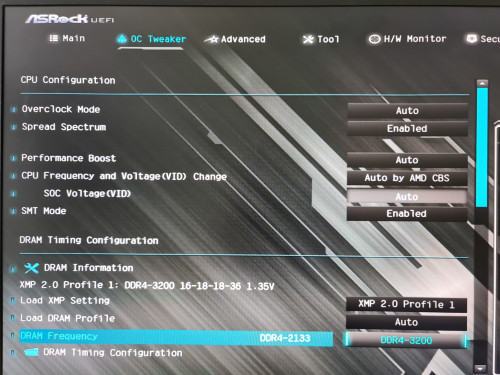
Need some guidance on this as I am not really into this oc memory thingy. No matter how I tweak the setting it keep booting to non XMP speed - 2132Mhz

This post has been edited by The Wonder: Apr 6 2020, 06:22 PM
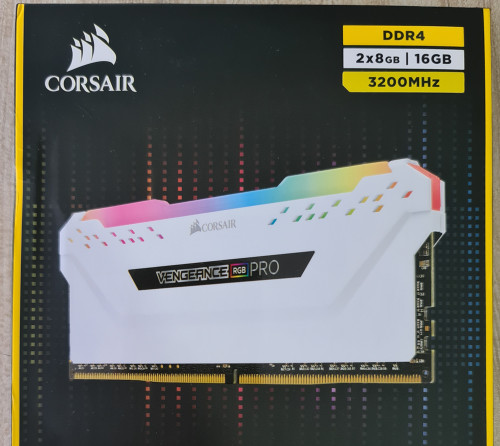
Memory not running at rated speed, Corsair RGB Pro 32gb (4x8)
|
|
 Apr 6 2020, 06:20 PM, updated 6y ago Apr 6 2020, 06:20 PM, updated 6y ago
Show posts by this member only | Post
#1
|
 
Senior Member
1,059 posts Joined: Mar 2007 From: KL  
|
Since MCO I have some times to look into my pc, to my surprise my memory actually not running to it's rated speed.
Need some guidance on this as I am not really into this oc memory thingy. No matter how I tweak the setting it keep booting to non XMP speed - 2132Mhz This post has been edited by The Wonder: Apr 6 2020, 06:22 PM |
|
|
|
|
|
Apr 6 2020, 06:40 PM
Show posts by this member only | IPv6 | Post
#2
|

Senior Member
755 posts Joined: Oct 2008 From: Taiping, Perak
|
u got set at power saving mode?
|
|
|
Apr 6 2020, 07:22 PM
Show posts by this member only | Post
#3
|
|
Senior Member
1,059 posts Joined: Mar 2007 From: KL
|
QUOTE(ukiya21 @ Apr 6 2020, 06:40 PM) u got set at power saving mode? Did not set anything related to power saving Proc - Ryzen 2700X Mobo - Asrock B450 Steel Legend RAM - 4 x 8gb Corsair RGB Pro This post has been edited by The Wonder: Apr 7 2020, 04:47 PM |
|
|
Apr 7 2020, 01:56 AM
Show posts by this member only | Post
#4
|

Junior Member
196 posts Joined: Apr 2014
|
I am also using the same motherboard. The maximum ram speed i can input is 2666mhz, pushing it above will always result bsod.
|
|
|
Apr 7 2020, 01:42 PM
Show posts by this member only | Post
#5
|
|
Senior Member
1,059 posts Joined: Mar 2007 From: KL
|
QUOTE(CrimsOn ChAos @ Apr 7 2020, 01:56 AM) I am also using the same motherboard. The maximum ram speed i can input is 2666mhz, pushing it above will always result bsod. I tried working my way up from base speed of 2133, only manage to do 2933. At 3000 it still runs but sometime froze under stress test.Am on 2700X & auto voltage. |
|
|
Apr 7 2020, 02:08 PM
Show posts by this member only | Post
#6
|

Junior Member
398 posts Joined: Jul 2014
|
Well, you're using a shitty board for ram oc on Zen+ combined with 4 sticks which put quite some stress on the CPU's IMC.
I guess when you set 3200 you either need to clear cmos or wait until the board decides to clear settings? Means super slow start? Edit: Just noticed you're the one who hitting the ceiling with 16GB last month. So you upgraded and added another 16GB of the same RAM? This post has been edited by nrw: Apr 7 2020, 02:11 PM |
|
|
|
|
|
Apr 7 2020, 03:50 PM
Show posts by this member only | Post
#7
|
|
Senior Member
1,059 posts Joined: Mar 2007 From: KL
|
QUOTE(nrw @ Apr 7 2020, 02:08 PM) Well, you're using a shitty board for ram oc on Zen+ combined with 4 sticks which put quite some stress on the CPU's IMC. yes bro - got a good deal from Lazada so might as well...I guess when you set 3200 you either need to clear cmos or wait until the board decides to clear settings? Means super slow start? Edit: Just noticed you're the one who hitting the ceiling with 16GB last month. So you upgraded and added another 16GB of the same RAM? is there any chances to get the ram to clock at rated speed of 3200 using this shitty board?  |
|
|
Apr 7 2020, 04:22 PM
Show posts by this member only | Post
#8
|
|
Junior Member
398 posts Joined: Jul 2014
|
QUOTE(The Wonder @ Apr 7 2020, 03:50 PM) yes bro - got a good deal from Lazada so might as well... there might be.is there any chances to get the ram to clock at rated speed of 3200 using this shitty board? download this: http://www.softnology.biz/files.html (freeware) and show post/pm me the screenshot for each of the 4 modules (click read header) |
|
|
Apr 7 2020, 04:39 PM
Show posts by this member only | Post
#9
|
|
Senior Member
1,059 posts Joined: Mar 2007 From: KL
|
QUOTE(nrw @ Apr 7 2020, 04:22 PM) there might be. As follow bro :download this: http://www.softnology.biz/files.html (freeware) and show post/pm me the screenshot for each of the 4 modules (click read header)  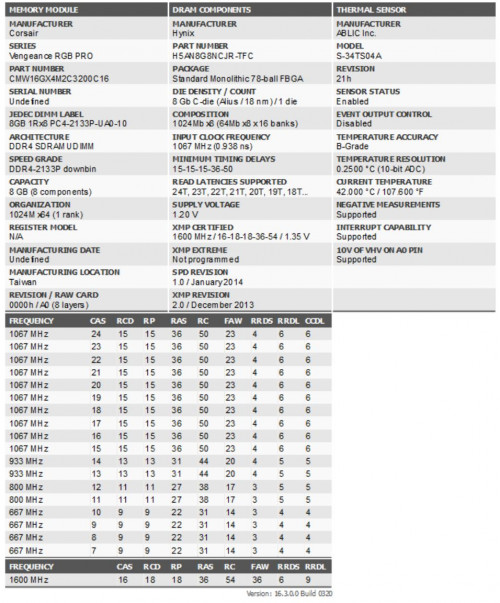 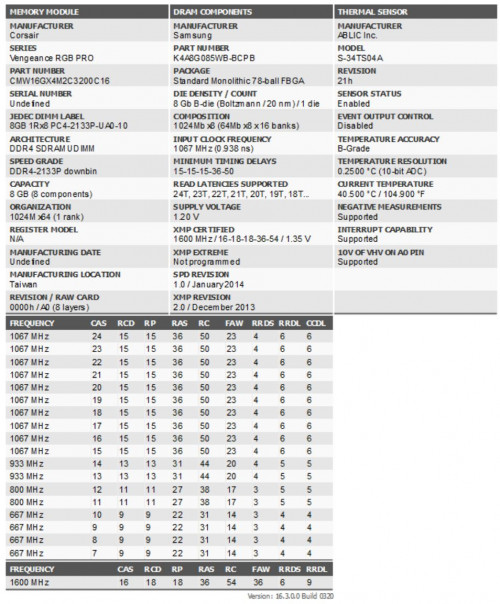 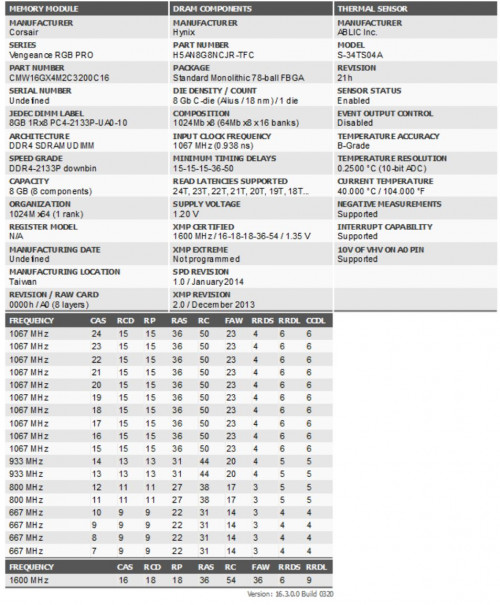 |
|
|
Apr 7 2020, 05:14 PM
|
|
Junior Member
398 posts Joined: Jul 2014
|
as expected, you have 2 different sorts of dies. the b-dies should actually be better and are worth more, I suppose that's the kit you had before.
Load XMP, go into ram timing section and set ProcODT to 48, if it doesn't boot continue step by step until you reach 60. If that doesn't work lemme know. |
|
|
Apr 7 2020, 05:30 PM
|
|
Senior Member
1,059 posts Joined: Mar 2007 From: KL
|
QUOTE(nrw @ Apr 7 2020, 05:14 PM) as expected, you have 2 different sorts of dies. the b-dies should actually be better and are worth more, I suppose that's the kit you had before. Ok thanks for the pointer bro - gonna need sometimes on this.Load XMP, go into ram timing section and set ProcODT to 48, if it doesn't boot continue step by step until you reach 60. If that doesn't work lemme know. Let me test see. |
|
|
Apr 7 2020, 05:45 PM
|
|
Junior Member
398 posts Joined: Jul 2014
|
QUOTE(The Wonder @ Apr 7 2020, 05:30 PM) Ok thanks for the pointer bro - gonna need sometimes on this. Actually quite easy once you find the ProcODT in your ram timing settings. Let me test see. I do not have an asrock board myself so I cant guide. |
|
|
Apr 7 2020, 07:00 PM
|
|
Senior Member
1,059 posts Joined: Mar 2007 From: KL
|
QUOTE(nrw @ Apr 7 2020, 05:14 PM) as expected, you have 2 different sorts of dies. the b-dies should actually be better and are worth more, I suppose that's the kit you had before. Tried 48, 53.3 & 60 ohm & it won't boot. After several restarts the bios forced it back to default non xmp value @ 2133.Load XMP, go into ram timing section and set ProcODT to 48, if it doesn't boot continue step by step until you reach 60. If that doesn't work lemme know. Do i need to set the voltage to 1.35v manually? It is under auto now. 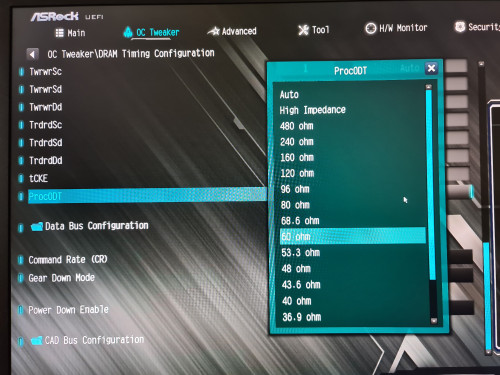 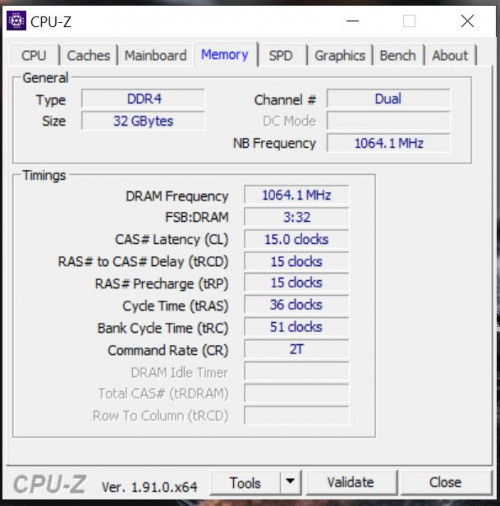 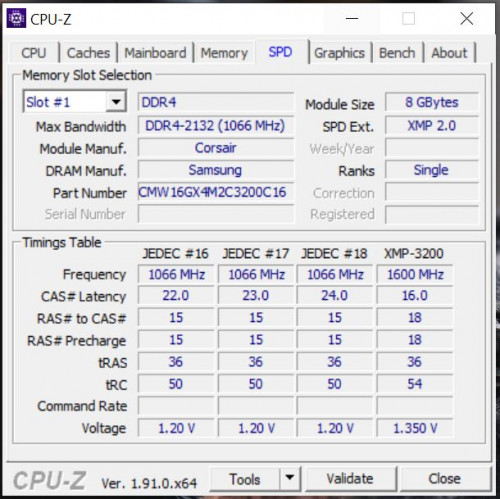 reanyalcock liked this post
|
|
|
|
|
|
Apr 7 2020, 08:20 PM
|
|
Junior Member
398 posts Joined: Jul 2014
|
if auto applies less than 1.35v, yes
|
|
|
Apr 7 2020, 08:41 PM
|
|
Senior Member
1,059 posts Joined: Mar 2007 From: KL
|
QUOTE(nrw @ Apr 7 2020, 08:20 PM) if auto applies less than 1.35v, yes it says 1.25v previously, so i set it manually to 1.35vhighest i could reached so far is 3066 @ 53.3 ohm it wont boot at 3133 no matter i use 40, 53.3 or 60 ohm i am not sure what other parameter i could play with or this is a mobo imitation  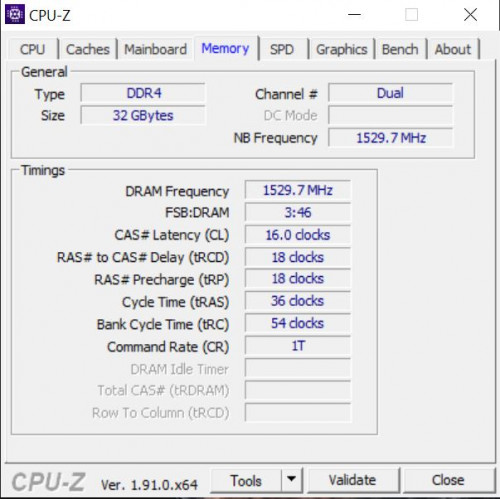 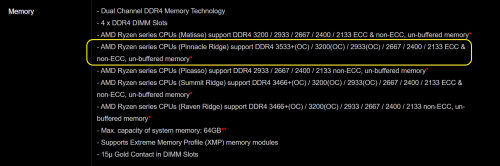 This post has been edited by The Wonder: Apr 7 2020, 08:43 PM |
|
|
Apr 7 2020, 09:20 PM
|
|
Senior Member
1,059 posts Joined: Mar 2007 From: KL
|
Not sure if this is helping but the task manager won't see the rated speed above 2933 :
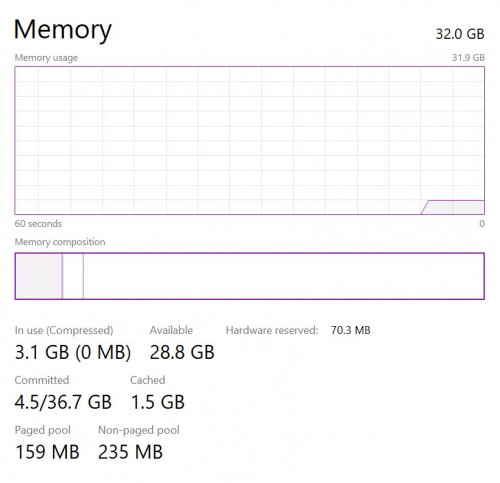 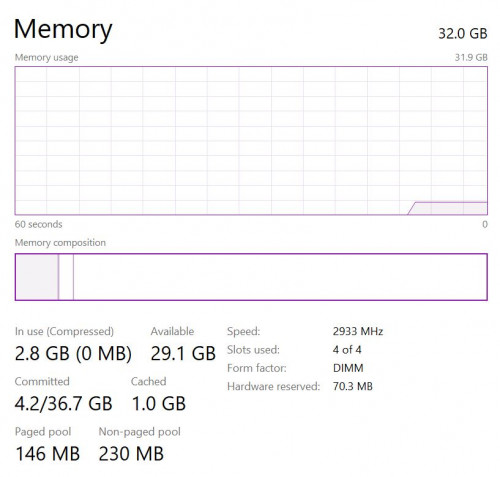 |
|
|
Apr 7 2020, 09:30 PM
|

Senior Member
1,334 posts Joined: Dec 2011
|
board might not support up to 4 sticks of 3200mhz tho
 so you might have to manually OC to 2933 and leave it there. Tightening the timings will help a little to offset the lower frequency. This post has been edited by jacktay94: Apr 7 2020, 09:32 PM |
|
|
Apr 7 2020, 09:34 PM
|
|
Junior Member
398 posts Joined: Jul 2014
|
before making it to complicated for a benefit that you won't feel most likely, call it a day. Run it at 3000(or 3666 if that works every time you boot) then, use the same values from your 2nd last post (16-18-18-36-54). This will be fine for your 2700x.
if there's any instabilities like system crashes,... after that reply and quote me. QUOTE(jacktay94 @ Apr 7 2020, 09:30 PM) board might not support up to 4 sticks of 3200mhz tho those are rather indications than rules. his problem mostly are 4 sticks at the same time (stressing the imc of his 2700x quite a bit) and 2 different sorts of dies somemore.so you might have to manually OC to 2933 and leave it there. Tightening the timings will help a little to offset the lower frequency. because of the latter tightening timings can be quite a bothersome process with quite a bit stability testing involved which is why I said it won't be worth the hassle for probably just or less than 200MHz. This post has been edited by nrw: Apr 7 2020, 09:38 PM |
|
|
Apr 7 2020, 09:57 PM
|
|
Senior Member
1,059 posts Joined: Mar 2007 From: KL
|
QUOTE(nrw @ Apr 7 2020, 09:34 PM) before making it to complicated for a benefit that you won't feel most likely, call it a day. Run it at 3000(or 3666 if that works every time you boot) then, use the same values from your 2nd last post (16-18-18-36-54). This will be fine for your 2700x. I have reverted the ProcOTD to auto, manual 1.35v & the pc boot normally @ 3066.if there's any instabilities like system crashes,... after that reply and quote me. those are rather indications than rules. his problem mostly are 4 sticks at the same time (stressing the imc of his 2700x quite a bit) and 2 different sorts of dies somemore. because of the latter tightening timings can be quite a bothersome process with quite a bit stability testing involved which is why I said it won't be worth the hassle for probably just or less than 200MHz. I think I have to live with this if it stays healthy (or 3000 / 2933 if crash), not bad from the initial pathetic 2133  Thanks much  |
|
|
May 5 2020, 04:16 PM
|

Junior Member
236 posts Joined: Jan 2010
|
i have this same series ram but is 3600mhz 18-22-22-42 timings
max can overclocked it to 3900mhz @ 17-20-20-40 with 1.380v, would not post after that unless loosen the timings to CL19 only can post 4000mhz... running on 9900k with gigabyte z390 aorus master mobo ... Aida64 extreme latency benchmark around 45.9ns This post has been edited by djandrew: May 5 2020, 04:19 PM |
|
|
May 17 2020, 07:44 AM
|
|
Junior Member
304 posts Joined: Aug 2012
|
QUOTE(The Wonder @ Apr 6 2020, 06:20 PM) Since MCO I have some times to look into my pc, to my surprise my memory actually not running to it's rated speed. Same running asrock b450m on adata spectrix d41 ram 3200Need some guidance on this as I am not really into this oc memory thingy. No matter how I tweak the setting it keep booting to non XMP speed - 2132Mhz Max i can go is 3000mhz Anything above that become unstable and game crash and bsod |
|
|
May 17 2020, 11:51 AM
|
|
Senior Member
1,059 posts Joined: Mar 2007 From: KL
|
QUOTE(Mamapapamsia @ May 17 2020, 07:44 AM) Same running asrock b450m on adata spectrix d41 ram 3200 Mine crashed at 3k, max now in 2933 for 32gb (4x8gb). Think it stressed both the imc & mobo a bit earlier.Max i can go is 3000mhz Anything above that become unstable and game crash and bsod |
|
|
May 17 2020, 12:41 PM
|
|
Junior Member
304 posts Joined: Aug 2012
|
QUOTE(The Wonder @ May 17 2020, 11:51 AM) Mine crashed at 3k, max now in 2933 for 32gb (4x8gb). Think it stressed both the imc & mobo a bit earlier. 8x4 32GB Ram? Wow thats alot |
|
|
May 17 2020, 12:43 PM
|
|
Junior Member
304 posts Joined: Aug 2012
|
QUOTE(The Wonder @ May 17 2020, 11:51 AM) Mine crashed at 3k, max now in 2933 for 32gb (4x8gb). Think it stressed both the imc & mobo a bit earlier. What voltage u set? The preset one is 1.35v right? Someone said for it to run 3200mhz stably need to put 1.4v Not sure if should try anot |
|
|
May 17 2020, 10:51 PM
|
|
Senior Member
1,059 posts Joined: Mar 2007 From: KL
|
QUOTE(Mamapapamsia @ May 17 2020, 12:41 PM) 8x4 that's right32GB Ram? Wow thats alot QUOTE(Mamapapamsia @ May 17 2020, 12:43 PM) What voltage u set? The preset one is 1.35v right? yes am on 1.35v, not too sure if it is "safe" to go above thatSomeone said for it to run 3200mhz stably need to put 1.4v Not sure if should try anot |
|
|
Aug 13 2020, 10:06 AM
Show posts by this member only | IPv6 | Post
#26
|

Junior Member
140 posts Joined: Mar 2008
|
for those who like me buying 3600mhz cl18 type of ram pls check your mobo if support or not, before this i was struggle to make the ram stable at 3600 but what ever i did it cant stable at 3600 i found my soc voltage is at 1.206v and then i lower down speed to 3200 and i check my soc is at 1.087v and it stable once i play around with the timing i set like the image below i just take from the thaipon burner and check from aida64 timing and wallaaaaa i get a stable 3200mhz running memtest64 and aida stresstest with no bsod or crash... This post has been edited by dragon360: Aug 13 2020, 10:12 AM Attached thumbnail(s) 


PGV3910 and The Wonder liked this post
|
|
|
Aug 13 2020, 09:52 PM
|
|
Senior Member
1,059 posts Joined: Mar 2007 From: KL
|
QUOTE(dragon360 @ Aug 13 2020, 10:06 AM) for those who like me buying 3600mhz cl18 type of ram pls check your mobo if support or not, before this i was struggle to make the ram stable at 3600 but what ever i did it cant stable at 3600 i found my soc voltage is at 1.206v and then i lower down speed to 3200 and i check my soc is at 1.087v and it stable once i play around with the timing i set like the image below i just take from the thaipon burner and check from aida64 timing and wallaaaaa i get a stable 3200mhz running memtest64 and aida stresstest with no bsod or crash... All the photos are upside down |
|
|
Aug 29 2020, 06:08 AM
|
|
Probation
2 posts Joined: Aug 2020
|
i have the same series and im overclocked the other day , bau when i go to this page libroslara.com computer shut dows
and i looking for taht problem , i clean my pc and stil have the same problem |
|
|
Aug 29 2020, 06:11 AM
|
|
Probation
2 posts Joined: Aug 2020
|
QUOTE(jukilsasd @ Aug 29 2020, 06:08 AM) i have the same series and im overclocked the other day , bau when i go to this page libroslara.com computer shut dows and i looking for taht problem , i clean my pc and still have the same problem |
| Change to: |  0.0268sec 0.0268sec
 0.47 0.47
 6 queries 6 queries
 GZIP Disabled GZIP Disabled
Time is now: 4th December 2025 - 03:39 PM |
 Quote
Quote