

doing 3.7 gig at 1.45v cant seems to get any higher though which is a shame.

This post has been edited by kevink82: Jul 16 2009, 07:31 PM
Q6600 Overclock and Temperature
|
|
 Jul 16 2009, 07:11 PM Jul 16 2009, 07:11 PM
Return to original view | Post
#1
|
 
Senior Member
1,134 posts Joined: Apr 2008  
|
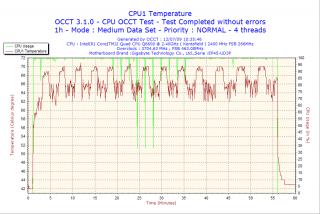
think ill post my overclock with my q6600. had it for a while just upgraded to ep45-ud3p and the results are good.
doing 3.7 gig at 1.45v cant seems to get any higher though which is a shame.
This post has been edited by kevink82: Jul 16 2009, 07:31 PM |
|
|
|
|
|
Jul 17 2009, 10:12 AM
Return to original view | Post
#2
|
|
Senior Member
1,134 posts Joined: Apr 2008
|
have to check when i get home.. i c ur load temp is way lower than mine though monsh i hit 71 max when im doing prime occt etc etc. but im on air
|
|
|
Jul 18 2009, 06:50 PM
Return to original view | Post
#3
|
|
Senior Member
1,134 posts Joined: Apr 2008
|
Here's my settings its pretty standard.... just succesfully lower the voltage to 1.43v
 but doesnt make a difference in temperature at all lol but doesnt make a difference in temperature at all lolCPU Clock Ratio ..........................: 8X CPU Host Clock Control..................: [Enabled] CPU Host Frequency (Mhz) ............: 464 PCI Express Frequency (Mhz) .........: 100 C.I.A.2 .................................:[Disabled] CPU Clock Skew (ps)....................: 50ps MCH Clock Skew (ps)...................: 100ps System Memory Multiplier ..............: 2.00D DRAM Timing Selectable ................: [Manual] CAS Latency Time........................5 tRCD ...................................5 tRP'....................................5 tRAS....................................18 LLC .....................................: ENABLED CPU Vcore .......................: 1.431 CPU Termination (1.200)..................: 1.44 CPU PLL (1.500)..........................: 1.50 MCH Core (1.100).........................: 1.30 MCH Reference (0.760)....................: AUTO MCH/DRAM Ref (0.900).....................: AUTO ICH I/O (1.500)..........................: 1.50 ICH Core (1.100).........................: 1.20 Limit CPUID Max. to 3....................: [Disabled] No-Execute Memory Protect................: [Enabled] CPU Enhanced Halt (C1E)..................: [Disabled] CPU Thermal Monitor 2(TM2) ..............: [Disabled] CPU EIST Function........................: [Disabled] Virtualization Technology................: [Disabled] 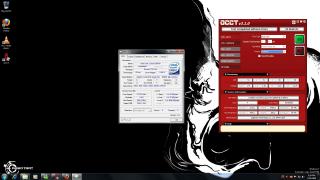
|
|
|
Jul 18 2009, 08:25 PM
Return to original view | Post
#4
|
|
Senior Member
1,134 posts Joined: Apr 2008
|
its gives u more stability in some cases for further overclocking. like x-1o8-x says it gives it more time to deal with the instructions. but the performance wont be impact by it at all in real world since u gain faster clock speed.
can read more bout it here. http://www.overclock.net/faqs/119265-how-c...-save-your.html keep in mind dont put the value too high and it only works in some cases sometimes it doesnt seems to do anything at all though. |
|
|
Jul 21 2009, 09:33 AM
Return to original view | Post
#5
|
|
Senior Member
1,134 posts Joined: Apr 2008
|
no money to buy i7 mah stick with q6600 lo
|
| Change to: |  0.0374sec 0.0374sec
 0.35 0.35
 7 queries 7 queries
 GZIP Disabled GZIP Disabled
Time is now: 12th December 2025 - 02:20 AM |
 Quote
Quote