

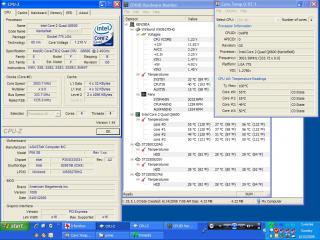
hehe
This post has been edited by TristanX: Jun 17 2008, 04:58 PM
Q6600 Overclock and Temperature
|
|
 Jun 17 2008, 04:57 PM Jun 17 2008, 04:57 PM
Return to original view | Post
#1
|
 
Elite
24,340 posts Joined: Nov 2004 From: Setapak, Kuala Lumpur  
|
Just change my FSB to from 266mhz to 333mhz for my Q6600. Don't even dare to push it further since I'm using air cooling with Asus Silent Knight II and Arctic Cooling MX2 TIM. This is the result after 10 mins of Prime95 using SmallFFT.
hehe This post has been edited by TristanX: Jun 17 2008, 04:58 PM |
|
|
|
|
|
Jun 17 2008, 08:18 PM
Return to original view | Post
#2
|
|
Elite
24,340 posts Joined: Nov 2004 From: Setapak, Kuala Lumpur
|
QUOTE(BurgerRI @ Jun 17 2008, 05:30 PM) Nice clocks....but I'm sure you can bump up the FSB Thanks for your suggestion but I usually have my PC on for 24/7. Don't wanna shorten the life of my comp even further. hehe I tried a Q6600 using a ninja sycthe running at 3.6Ghz....temps were around 65C...so go for it I tried a Q6600 using a ninja sycthe running at 3.6Ghz....temps were around 65C...so go for it   3.6Ghz with 65C on air is nice. |
|
|
Jun 17 2008, 10:09 PM
Return to original view | Post
#3
|
|
Elite
24,340 posts Joined: Nov 2004 From: Setapak, Kuala Lumpur
|
QUOTE(BurgerRI @ Jun 17 2008, 08:34 PM) The temp is nice for its not ment for long term use also...as I was using a high CFM delta fan....boy way it noisey...for long term use at 3.6Ghz its better to use water cooling....much much quieter and also cooler... I had everything on Auto except the FSB. Core temp is showing 1.275v.Whats the VID of your proc? |
|
|
Jun 23 2008, 07:48 PM
Return to original view | Post
#4
|
|
Elite
24,340 posts Joined: Nov 2004 From: Setapak, Kuala Lumpur
|
QUOTE should i prime using the small FFTs or in-place large FFTs? Small FFTs. Well, I played games with 3.01Ghz for 2-3 hours and I didn't find any problems using Auto except the FSB plus my motherboard natively supports 1333mhz bus. This post has been edited by TristanX: Jun 23 2008, 07:54 PM |
|
|
Jun 24 2008, 02:33 PM
Return to original view | Post
#5
|
|
Elite
24,340 posts Joined: Nov 2004 From: Setapak, Kuala Lumpur
|
If I'm not wrong, Small FFTs is CPU only, others will test RAM and etc.
|
|
|
Jun 25 2008, 04:59 PM
Return to original view | Post
#6
|
|
Elite
24,340 posts Joined: Nov 2004 From: Setapak, Kuala Lumpur
|
QUOTE(kmarc @ Jun 25 2008, 02:13 PM) Sometimes, an improperly seated HSF can cause a wide variation in temperature between the cores. However, some variation is normal. For example, my quad is currently folding at 60'c, 52'c, 54'c and 57'c...... One question, currently I have DDR2-800. If I set the FSB of 333mhz, it is better to have DDR2-667 instead of 800?Why not blow air away from the CPU?  Higher FSB will allow your CPU to communicate faster with the northbridge and also other components in your rig e.g. rams.... In overclocking, it is usually preferable to choose a higher FSB (hence a lower multiplier).... however, in the end, it would also depend on your rams, where ideally, you want your FSB to run 1:1 with your rams..... |
|
|
|
|
|
Jul 1 2008, 12:38 PM
Return to original view | Post
#7
|
|
Elite
24,340 posts Joined: Nov 2004 From: Setapak, Kuala Lumpur
|
QUOTE(yonglee2k @ Jun 26 2008, 12:22 AM) Here is my q6600 O/C to 3.7Ghz prime95>7hrs stable, quad damn hot over 1.5v I noticed there are >3000rpm case fans. Maybe that helped a lot on cooling because the airflow is probably a lot faster and possibly an air conditioner. i think need at least bump 1.6v to get 3.8-3.9Ghz i think need at least bump 1.6v to get 3.8-3.9GhzQUOTE this also u complain hot d? my Q6600 G0 at 3GHz (375x8) @1.375v and my coretemp showing 68C already... i'm using Hyper212. ur ram can go around 46xMHz. is that ddr 800 or 1066? Try adding more intake and exhaust fans. This post has been edited by TristanX: Jul 1 2008, 12:40 PM |
|
|
Jul 1 2008, 07:58 PM
Return to original view | Post
#8
|
|
Elite
24,340 posts Joined: Nov 2004 From: Setapak, Kuala Lumpur
|
QUOTE already 2x120mm exhaust and 1x120mm intake case fans. no more bracket to put more... You can put another at your CD/DVD bay. hehehehe |
|
|
Jul 2 2008, 03:33 AM
Return to original view | Post
#9
|
|
Elite
24,340 posts Joined: Nov 2004 From: Setapak, Kuala Lumpur
|
Tried stressing my Q6600 more than 366mhz for my Asus P5Q Deluxe but I think my power supply is stopping me. The comp doesn't start at 400mhz and I get an overclock failure after powering it off and on. I don't think I can go more than 366mhz with this heatsink anyway.
Got 68C for 366mhz on my Asus Silent Knight II and I got scared. Went back to 333mhz and it's stable after stressing for an hour. There is no vdrop with EPU-6 on. |
|
|
Jul 9 2008, 02:07 PM
Return to original view | Post
#10
|
|
Elite
24,340 posts Joined: Nov 2004 From: Setapak, Kuala Lumpur
|
You probably have to get a better heatsink to overclock further. I'm going to get Thermalright IFX-14 heatsink and Coolermaster CM690 or Stacker 832 casing soon
 This post has been edited by TristanX: Jul 9 2008, 02:08 PM |
|
|
Jul 9 2008, 02:29 PM
Return to original view | Post
#11
|
|
Elite
24,340 posts Joined: Nov 2004 From: Setapak, Kuala Lumpur
|
I just noticed that you are using 2 GPUs. Maybe it's your power supply. I'm hitting the wall at 366mhz(333mhz for this stupid heatsink) bus with my 560W PSU and Silent Knight II heatsink. Going more than 65C on your CPU is not recommended.
This post has been edited by TristanX: Jul 9 2008, 02:30 PM |
|
|
Jul 9 2008, 02:47 PM
Return to original view | Post
#12
|
|
Elite
24,340 posts Joined: Nov 2004 From: Setapak, Kuala Lumpur
|
Higher clocks means more power is required. That is why you may need a better power supply. Since you already said you can't go further on the other thread with 1 GPU then the problem is on your setup. Just wait for the sifus to point where your problem is. hehe
This post has been edited by TristanX: Jul 9 2008, 02:48 PM |
| Change to: |  0.0393sec 0.0393sec
 0.58 0.58
 7 queries 7 queries
 GZIP Disabled GZIP Disabled
Time is now: 6th December 2025 - 10:10 PM |
 Quote
Quote