

my sys locale is English (US) by the way, is there anymore settings that i have to check?
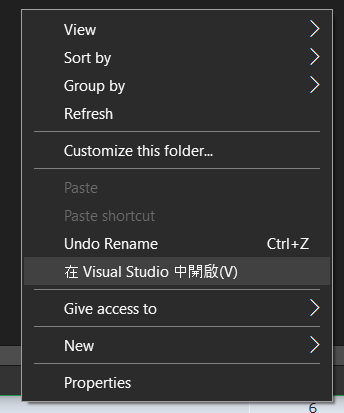
Win10 Right Click Menu Has Chinese
|
|
 Mar 30 2020, 12:33 PM, updated 6y ago Mar 30 2020, 12:33 PM, updated 6y ago
Show posts by this member only | IPv6 | Post
#1
|
 
Junior Member
194 posts Joined: Jan 2009  
|
Hi, has anyone encountered right click menu is partially rendered in Chinese? Is there a way to fix it?
my sys locale is English (US) by the way, is there anymore settings that i have to check? |
|
|
|
|
|
Mar 30 2020, 12:35 PM
Show posts by this member only | Post
#2
|

Senior Member
2,660 posts Joined: Jan 2003 From: Somewhere in the world
|
could it be your visual studio settings or something as its not build in app from windows 10
|
|
|
Mar 30 2020, 02:13 PM
Show posts by this member only | IPv6 | Post
#3
|
|
Junior Member
194 posts Joined: Jan 2009
|
QUOTE(alextan99 @ Mar 30 2020, 12:35 PM) could it be your visual studio settings or something as its not build in app from windows 10 i haven't opened visual studio since installation until just now. so i'm not sure which settings affected the menu |
|
|
Apr 17 2020, 02:45 AM
Show posts by this member only | Post
#4
|

Probation
24 posts Joined: Nov 2019
|
I do not know about you but the one thing that I am sure of is that windows 10 has never had chinese in it unless you manually switch the language to chinese. The app that is written on chinese is not part of the windows operating system if you did not know. External apps are the ones that comes with language issues. I have noticed that the app is called visual studio. I have come across this app before and it is a very popular one. I do not know where you downloaded the program but it was definetly not from the widows store. Windows store apps never come with such issues. If you want to get rid of the chines then you will have to download visual studio from its official site. The progam has been modified and from the looks of it it was done with some chinese dudes. Reinstall the software and check if the chinses is stilll there. If nothing changes then you will have to live with that. Then again, if the chinese only shows up on the right click menu and mowhere else then there is no need to worry.
|
|
|
Apr 18 2020, 04:49 PM
Show posts by this member only | Post
#5
|

All Stars
10,475 posts Joined: Jan 2003 From: Sarawak
|
Perhaps you have changed your language options before?
Settings > Time & Language > Language > Administrative Language Settings > Language for non-Unicode programs |
|
|
Jun 26 2020, 11:32 AM
Show posts by this member only | Post
#6
|

Senior Member
2,348 posts Joined: Apr 2008
|
You have installed a Traditional Chinese version Visual Studio. Please redownload and reinstall the English version.
https://visualstudio.microsoft.com/vs/whatsnew/ This post has been edited by junclj: Jun 26 2020, 11:33 AM |
| Change to: |  0.0142sec 0.0142sec
 0.32 0.32
 5 queries 5 queries
 GZIP Disabled GZIP Disabled
Time is now: 11th December 2025 - 05:52 PM |
 Quote
Quote