Outline ·
[ Standard ] ·
Linear+
I teach u how to bypass porn la, since all sangap already
|
veiven
|
 Mar 24 2020, 04:00 PM Mar 24 2020, 04:00 PM
|
Getting Started


|
Sigh 2020 still got ppl donno change dns ... IPv4 Wireless. Do this the same for lan also May need to change IPv6 as well depend on what network you use. Right click properties > Select IPv4 > Properties 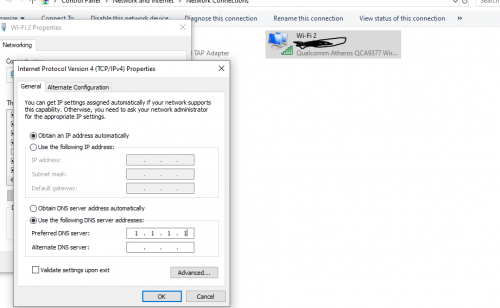 I've been doing this since I was in primary school ! This post has been edited by veiven: Mar 24 2020, 04:01 PM |
|
|
|
|
|
SUSdadah
|
Mar 24 2020, 04:02 PM
|
Getting Started
|
bro.. Y so susah put dns on all devices when u can just login to router and put dns or vpn there?
This post has been edited by dadah: Mar 24 2020, 04:04 PM
|
|
|
|
|
|
zerorating
|
Mar 24 2020, 04:03 PM
|
|
|
QUOTE(failed.hashcheck @ Mar 24 2020, 03:59 PM) Means you got isp with DPI lor God knows what else they siff from ur connection i believe it just plain firewall drop, what ISP need to know where the IP used by this porn site and block it. but it will not work if those site have region specific front-end service. |
|
|
|
|
|
patienceGNR
|
Mar 24 2020, 04:03 PM
|
|
|
DNS over HTTPS doesn't work. Good share though.
|
|
|
|
|
|
Nojo
|
Mar 24 2020, 04:04 PM
|
|
|
Cum2 I can hep claim free premium with Italy VPN, that way you can login prawnhubpremium without any tinkering
|
|
|
|
|
|
patienceGNR
|
Mar 24 2020, 04:04 PM
|
|
|
QUOTE(veiven @ Mar 24 2020, 04:00 PM) Sigh 2020 still got ppl donno change dns ... IPv4 Wireless. Do this the same for lan also May need to change IPv6 as well depend on what network you use. Right click properties > Select IPv4 > Properties I've been doing this since I was in primary school ! Kek bodoh. Prawn hub can open? Clearly you don't know what is going on. |
|
|
|
|
|
annoymous1234
|
Mar 24 2020, 04:05 PM
|
|
|
bookmark
|
|
|
|
|
|
zerorating
|
Mar 24 2020, 04:05 PM
|
|
|
QUOTE(dadah @ Mar 24 2020, 04:02 PM) bro.. Y so susah put dns on all devices when u can just login to router and put dns or vpn there? got router firmware support dns over https natively? i use openwrt also need to install extra package. https://openwrt.org/docs/guide-user/service...https-dns-proxy |
|
|
|
|
|
munak991
|
Mar 24 2020, 04:05 PM
|
|
|
With IPv4 and Ipv6 set to cloud flare DNS.
and https to DNS
still cant
|
|
|
|
|
|
veiven
|
Mar 24 2020, 04:07 PM
|
Getting Started
|
QUOTE(patienceGNR @ Mar 24 2020, 04:04 PM) Kek bodoh. Prawn hub can open? Clearly you don't know what is going on. Shit sounds like nationwide banned over dns eh |
|
|
|
|
|
whyamiblack
|
Mar 24 2020, 04:07 PM
|
Getting Started
|
QUOTE(veiven @ Mar 24 2020, 04:00 PM) Sigh 2020 still got ppl donno change dns ... IPv4 Wireless. Do this the same for lan also May need to change IPv6 as well depend on what network you use. Right click properties > Select IPv4 > Properties I've been doing this since I was in primary school ! Try opening prawnhub Also @op. Firefox network settings didn't work. Now I feel insecure with my connections. Probably gonna stick to vpn services. This post has been edited by whyamiblack: Mar 24 2020, 04:08 PM |
|
|
|
|
|
rizvanrp
|
Mar 24 2020, 04:08 PM
|
Getting Started

|
Even if you change your DNS on Unifi, they've blackholed the route to PH's IP @ 66.254.114.41. The actual fix would be to edit your Windows hosts file : CODE 66.254.114.40 p***h*b.com
66.254.114.40 www.p***h*b.com ^ Replace the asterisks ofc. Close your browser tabs, run ipconfig /flushdns and access the site. They run on a CDN so you should be able to just use a different IP in the CDN which doesn't have it's /32 blacklisted. YMMV. |
|
|
|
|
|
patienceGNR
|
Mar 24 2020, 04:09 PM
|
|
|
QUOTE(veiven @ Mar 24 2020, 04:07 PM) Shit sounds like nationwide banned over dns eh Why do you think we're discussing about this? (well, technically, without the need of VPN)  Using DNS has been known for more than a decade la. Now they've imposed a ban that even DNS change wouldn't work. Pretty much like China's great firewall. |
|
|
|
|
|
veiven
|
Mar 24 2020, 04:09 PM
|
Getting Started
|
QUOTE(whyamiblack @ Mar 24 2020, 04:07 PM) Try opening prawnhub Also @op. Firefox network settings didn't work. Now I feel insecure with my connections. Probably gonna stick to vpn services. No prob ? Please change IPv6 as well. This post has been edited by veiven: Mar 24 2020, 04:09 PM Attached thumbnail(s)
|
|
|
|
|
|
whyamiblack
|
Mar 24 2020, 04:11 PM
|
Getting Started
|
QUOTE(veiven @ Mar 24 2020, 04:09 PM) No prob ? Please change IPv6 as well. Changing DNS isn't the problem here. Everyone's been doing it for a long while. Just recently certain sites are inaccessible without some form of vpn. |
|
|
|
|
|
patienceGNR
|
Mar 24 2020, 04:11 PM
|
|
|
QUOTE(rizvanrp @ Mar 24 2020, 04:08 PM) Even if you change your DNS on Unifi, they've blackholed the route to PH's IP @ 66.254.114.41. The actual fix would be to edit your Windows hosts file : CODE 66.254.114.40 p***h*b.com
66.254.114.40 www.p***h*b.com ^ Replace the asterisks ofc. Close your browser tabs, run ipconfig /flushdns and access the site. They run on a CDN so you should be able to just use a different IP in the CDN which doesn't have it's /32 blacklisted. YMMV. Lama tak nampak. Havent heard much from you circa 2015 onwarx or so... Used to visit your sites for a lot of networking stuffs. |
|
|
|
|
|
kurangak
|
Mar 24 2020, 04:11 PM
|
|
|
to all sangaps... if ure using chrome, install hola vpn (its free) https://chrome.google.com/webstore/detail/h...cpjkiklfbnlmeioafter install, reopen ur browser,  click on the icon, and click unblock you're welcome This post has been edited by kurangak: Mar 24 2020, 04:12 PM |
|
|
|
|
|
veiven
|
Mar 24 2020, 04:12 PM
|
Getting Started
|
Idk been quite a while since I've used Unifi ... Many TIme still safe gua
|
|
|
|
|
|
TSfailed.hashcheck
|
Mar 24 2020, 04:12 PM
|
|
|
QUOTE(zerorating @ Mar 24 2020, 04:03 PM) i believe it just plain firewall drop, what ISP need to know where the IP used by this porn site and block it. but it will not work if those site have region specific front-end service. could be. but pornsites runs on CDN so they can't simply block IP without taxing some big collateral damages. they might also directly block 1.1.1.1 but that can simply be mitigated by using other DoH providers out there. |
|
|
|
|



 Quote
Quote



 0.0240sec
 0.79
0.79
 6 queries
 GZIP Disabled