

Just to check is these handphone keyboard really functionable well worth to get one for work form home?
or a piece of crap?
have anyone tried before? i dont mine to pay a little premium price let say budget RM80 to get a good one.
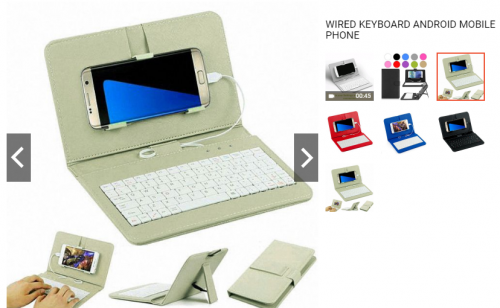
mobile phone keyboard, is worth to have?
|
|
 Mar 19 2020, 03:55 PM, updated 6y ago Mar 19 2020, 03:55 PM, updated 6y ago
Show posts by this member only | Post
#1
|
 
Junior Member
133 posts Joined: Apr 2006  
|
i have a lot whatsapp / message need to always reply by work from home, which use keyboard can be much faster to handle.
Just to check is these handphone keyboard really functionable well worth to get one for work form home? or a piece of crap? have anyone tried before? i dont mine to pay a little premium price let say budget RM80 to get a good one. |
|
|
|
|
|
Mar 19 2020, 04:11 PM
Show posts by this member only | IPv6 | Post
#2
|

Junior Member
213 posts Joined: May 2005 From: https://www.supermotoxl.com
|
QUOTE(pls @ Mar 19 2020, 03:55 PM) i have a lot whatsapp / message need to always reply by work from home, which use keyboard can be much faster to handle. I recommend you get the LOGITECH K480 because its the best true feeling of typing on the key for any finger. I've been using a lot of portable keyboard including the one you show on the picture above but nothing get more natural and fast typing on K480. Those keyboard photo you posted i have those and it felt terrible like pressing bubble sponge on the button...plus very crampy to type..plus battery charging failed too. As for K480 love it! I have black yellow color K480 and have been using it since last year for everyday typing. It felt more like typing on premium notebook keyboard than cheap ones, buttons have more engaging 'clicks' than spongy keyboards. K480 support connection via bluetooth up to 3 phones/tablets and have cradle to put more than 1 phone for simultaneous typing. Excellent size for typing on my lap without slipping around. I'm a blogger so i use this keyboard a lot when i'm outside.Just to check is these handphone keyboard really functionable well worth to get one for work form home? or a piece of crap? have anyone tried before? i dont mine to pay a little premium price let say budget RM80 to get a good one.  Here's photo of my keyboard LOGITECH K480, it runs on 1x AAA battery which i haven't replace since last year...seems to lasts forever They sell this keyboard on computer shop rather than at phone shop.  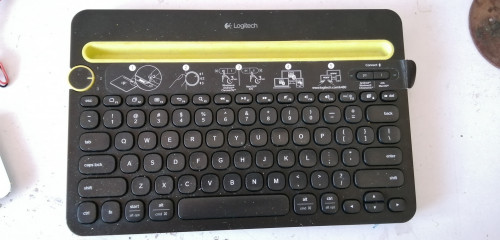 This post has been edited by SupermotoXL: Mar 19 2020, 04:16 PM |
|
|
Mar 19 2020, 04:14 PM
Show posts by this member only | Post
#3
|
|
Junior Member
133 posts Joined: Apr 2006
|
QUOTE(SupermotoXL @ Mar 19 2020, 04:11 PM) I recommend you get the LOGITECH K480 because its the best true feeling of typing on the key for any finger. I've been using a lot of portable keyboard including the one you show on the picture above but nothing get more natural and fast typing on K480. I have black yellow color K480 and have been using it since last year for everyday typing. It felt more like typing on premium notebook keyboard than cheap ones, buttons have more engaging 'clicks' than spongy keyboards. K480 support connection via bluetooth up to 3 phones/tablets and have cradle to put more than 1 phone for simultaneous typing. Excellent size for typing on my lap without slipping around. I'm a blogger so i use this keyboard a lot when i'm outside. thanks for your info!! this is very useful to me, so i dont have to search around the model.Here's photo of my keyboard LOGITECH K480, it runs on 1x AAA battery which i haven't replaced since last year. They sell this on computer shop rather than at phone shop. |
|
|
Mar 19 2020, 04:16 PM
Show posts by this member only | IPv6 | Post
#4
|
|
Junior Member
213 posts Joined: May 2005 From: https://www.supermotoxl.com
|
QUOTE(pls @ Mar 19 2020, 04:14 PM) thanks for your info!! this is very useful to me, so i dont have to search around the model. Trust me you're going to love it!  |
|
|
Mar 19 2020, 04:18 PM
Show posts by this member only | Post
#5
|

Senior Member
5,650 posts Joined: Mar 2012
|
actually, just get normal rm20 usb keyboard can liao.
use a adapter to convert the big head to small head. plug and use. want mouse? just add a usb hub |
|
|
Mar 19 2020, 04:37 PM
Show posts by this member only | IPv6 | Post
#6
|
|
Junior Member
213 posts Joined: May 2005 From: https://www.supermotoxl.com
|
Cheap keyboards connection via OTG usb cable to phone works too but lots of cons that hinder mobility such as:
(1) Dangling long wire hinders movement. (2) Wire pulling around my cause small USB port to loosen overtime. (2) Drain phone battery to power keyboard. (3) No craddle to support the phone upright when typing on the lap if you're doing it at bustop, transit, cafe and places. I've been through that route and here's my photo how it looks like for wired OTG USB setup. Very klunky and messy setup. Thats why i bought K480...problem solve. Now i can travel better. 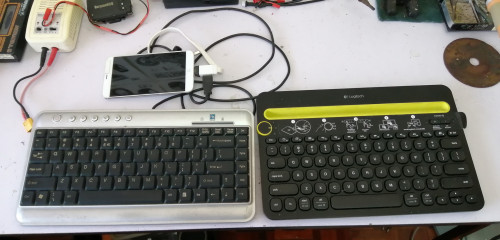 This post has been edited by SupermotoXL: Mar 19 2020, 04:38 PM |
|
|
|
|
|
Mar 19 2020, 04:46 PM
Show posts by this member only | Post
#7
|
|
Junior Member
133 posts Joined: Apr 2006
|
QUOTE(SupermotoXL @ Mar 19 2020, 04:37 PM) Cheap keyboards connection via OTG usb cable to phone works too but lots of cons that hinder mobility such as: i just bought through shoppee, hope i can recevied stock very soon within 2 dAYS i hope.(1) Dangling long wire hinders movement. (2) Wire pulling around my cause small USB port to loosen overtime. (2) Drain phone battery to power keyboard. (3) No craddle to support the phone upright when typing on the lap if you're doing it at bustop, transit, cafe and places. I've been through that route and here's my photo how it looks like for wired OTG USB setup. Very klunky and messy setup. Thats why i bought K480...problem solve. Now i can travel better. |
|
|
Mar 19 2020, 04:47 PM
Show posts by this member only | IPv6 | Post
#8
|
|
Junior Member
213 posts Joined: May 2005 From: https://www.supermotoxl.com
|
What color did you bought? I remember it has white color too.
|
|
|
Mar 19 2020, 05:07 PM
Show posts by this member only | Post
#9
|
|
Junior Member
133 posts Joined: Apr 2006
|
QUOTE(SupermotoXL @ Mar 19 2020, 04:47 PM) What color did you bought? I remember it has white color too. the seller only have black. but i like black too... not to get dirt easily |
|
|
Mar 19 2020, 05:13 PM
Show posts by this member only | IPv6 | Post
#10
|
|
Junior Member
213 posts Joined: May 2005 From: https://www.supermotoxl.com
|
QUOTE(pls @ Mar 19 2020, 05:07 PM) the seller only have black. but i like black too... not to get dirt easily Oh yes i have to remind you that the keyboard slightly heavy than ordinary keyboard. I realized the keyboard was intentionally made heavy to make it more stable when seated on the lap or any unstable places so your phone won't tip over which is helpfull. |
|
|
Mar 19 2020, 11:17 PM
|
|
Senior Member
5,144 posts Joined: Oct 2009
|
|
|
|
Mar 21 2020, 01:40 PM
Show posts by this member only | IPv6 | Post
#12
|
|
Junior Member
133 posts Joined: Apr 2006
|
QUOTE(SupermotoXL @ Mar 19 2020, 05:13 PM) Oh yes i have to remind you that the keyboard slightly heavy than ordinary keyboard. I realized the keyboard was intentionally made heavy to make it more stable when seated on the lap or any unstable places so your phone won't tip over which is helpfull. can teach me some function? i found that there is no menu book actually. just received the products, i when i connected to whatsapp (my android phone), the enter actually is "next line", not the "send" function for enter. so how to set that? sorry that i am asking this noob question, cuz i really cannot find it. |
|
|
Mar 21 2020, 11:35 PM
Show posts by this member only | IPv6 | Post
#13
|
|
Junior Member
213 posts Joined: May 2005 From: https://www.supermotoxl.com
|
QUOTE(pls @ Mar 21 2020, 01:40 PM) can teach me some function? i found that there is no menu book actually. Its easy, The instruction already written on top of the keyboards sticker. If you're on android press the Android button on the keyboard until the lights flicker, then on your phone with bluetooth enabled scan and select the appearing keyboard. Once connected then you can use your WhatsApp or anything the requires typing.just received the products, i when i connected to whatsapp (my android phone), the enter actually is "next line", not the "send" function for enter. so how to set that? sorry that i am asking this noob question, cuz i really cannot find it. This post has been edited by SupermotoXL: Mar 21 2020, 11:36 PM |
|
|
|
|
|
Mar 21 2020, 11:47 PM
|

All Stars
12,059 posts Joined: Oct 2017 
|
QUOTE(pls @ Mar 21 2020, 01:40 PM) can teach me some function? i found that there is no menu book actually. I think you mix up whatsapp on pcjust received the products, i when i connected to whatsapp (my android phone), the enter actually is "next line", not the "send" function for enter. so how to set that? sorry that i am asking this noob question, cuz i really cannot find it. Whatsapp on pc when enter always send, shift+enter will next line But on phone enter will next line, if want to send, tap TAB, ENTER, Or go to whatsapp setting ENTER is send, but doing so you will not able to create msg format that need next line |
|
|
Mar 22 2020, 10:10 PM
Show posts by this member only | IPv6 | Post
#15
|
|
Junior Member
133 posts Joined: Apr 2006
|
QUOTE(PJng @ Mar 21 2020, 11:47 PM) I think you mix up whatsapp on pc thanks, this info help!!!Whatsapp on pc when enter always send, shift+enter will next line But on phone enter will next line, if want to send, tap TAB, ENTER, Or go to whatsapp setting ENTER is send, but doing so you will not able to create msg format that need next line This post has been edited by pls: Mar 22 2020, 10:14 PM |
|
|
Mar 22 2020, 10:11 PM
Show posts by this member only | IPv6 | Post
#16
|
|
Junior Member
133 posts Joined: Apr 2006
|
QUOTE(SupermotoXL @ Mar 21 2020, 11:35 PM) Its easy, The instruction already written on top of the keyboards sticker. If you're on android press the Android button on the keyboard until the lights flicker, then on your phone with bluetooth enabled scan and select the appearing keyboard. Once connected then you can use your WhatsApp or anything the requires typing. thanks bro~~This post has been edited by pls: Mar 22 2020, 10:13 PM |
|
|
Mar 22 2020, 10:26 PM
|
|
All Stars
12,059 posts Joined: Oct 2017
|
On keyboard also can do simple windows shortcut
Shift+arrow, highlight word Ctrl+c or v copy or paste Ctrl+z undo If using pc keyboard press ctrl alt delete will instant restart |
| Change to: |  0.0203sec 0.0203sec
 0.52 0.52
 5 queries 5 queries
 GZIP Disabled GZIP Disabled
Time is now: 21st December 2025 - 05:14 PM |
 Quote
Quote