Outline ·
[ Standard ] ·
Linear+
Intel® Core(tm)2 Duo/Quad Overhauled Rev. 3, The journey continues....
|
v1rtual
|
 Oct 24 2007, 11:40 PM Oct 24 2007, 11:40 PM
|

|
need some little help here guys my specs are ASUSP5KR, E6750 --1.4v, 2GB Kingston Ram 800Mhz anyone experience OC-ing this board before?? cause when i put the fsb to 450 with 8 multiplier, the system failed to boot windows and as seen in the snap shot my idle temperature is only 29c using gigabyte G power-pro why is it so?? i have checked from the bios, same temp thx in advance   This post has been edited by v1rtual: Oct 25 2007, 02:35 PM
 |
|
|
|
|
|
v1rtual
|
Oct 25 2007, 06:54 PM
|
|
|
QUOTE(AceCombat @ Oct 25 2007, 06:42 PM) bro,my friend having problem booting the mobo beyond 450fsb too,maybe u try to increase the chipset voltage a bit see got help or not? has your friend tried to to increase the chipset voltage?? what ram is he using btw?? i just tried fsb 335 x8 @ 1.45v and kingston 800mhz ram latency 5 5 5 20 @ 1.9v, after 1hour50mins the prime95 error ady what should i do yeah?? This post has been edited by v1rtual: Oct 25 2007, 07:04 PM |
|
|
|
|
|
v1rtual
|
Oct 25 2007, 09:59 PM
|
|
|
i have another question here..
i checked from cpu-z for my e750 1 of the core the multiplier is x6 and the other one is x8 even though i have disabled the speed step in the bios, y is it so??
can anyone help me pls
|
|
|
|
|
|
v1rtual
|
Oct 26 2007, 05:24 PM
|
|
|
QUOTE(zeustronic @ Oct 26 2007, 04:38 PM) Got CPU config disable C1E yeah, found it ady  thx for the help
Added on October 26, 2007, 5:29 pmQUOTE(salimbest83 @ Oct 19 2007, 08:47 AM) yep.. already set to 100Mhz..but after kill my x300 la.. lucky me its not happen on my x1950GT..  and honestly.... e6750 steeping can go higher if using perf rams la... currently just using 2GB of kingston value ram only... max @880MHz.. now my proc running @ 430x8@3440Mhz @ 1.424v.. rams 5,5,5,20 @ 880Mhz temp okay la.. around 55+ only bro, mind telling me whats the voltage do u put for ur kingston value ram run stable at 5,5,5,20 @ 880mhz?? i cant tends to do so, even running at 860 @ 1.9v ady shown error after 30 mins prime95 This post has been edited by v1rtual: Oct 26 2007, 05:29 PM |
|
|
|
|
|
v1rtual
|
Nov 13 2007, 12:05 AM
|
|
|
QUOTE(gengstapo @ Nov 12 2007, 11:11 PM) guys, what the pr0b mostly when fail at FFT length 8K orthos/ prime95? anyone? u should tell us more about ur system i guess processor and ram u r using?? and the OC-ing This post has been edited by v1rtual: Nov 13 2007, 12:07 AM |
|
|
|
|
|
v1rtual
|
Nov 15 2007, 12:09 PM
|
|
|
wanna ask u guys who are familiar with oc-ing
is it necessary to upgrade northbridge heatsink as well??
cause my asus P5K-R board sometimes can go up to a very high temperature (100c) when running stress testing around 8 hours...then it will auto restart it self..idle is around 40+c..
checked using the PC probe is 100+c, and checked from bios it shows "minus" -92c..really weird
This post has been edited by v1rtual: Nov 15 2007, 12:11 PM
|
|
|
|
|
|
v1rtual
|
Nov 15 2007, 01:54 PM
|
|
|
QUOTE(prescott @ Nov 15 2007, 01:27 PM) depends ur OC level. If u push ur mobo to max, its better to install heatsink. since stock heatsink is for stock speed. . Did u update latast bios? i dont really push to max though if im not mistake northbridge control cpu, ram, and gpu rite?? mine is E6750 @ 3.5Ghz 1.4v using G-power pro, KVR 4-4-4-12 @ 2.1v @ 840mhz the problem is the cpu doesnt give me a problem with temperature only the mobo temp is higher than cpu temp  and my northbridge heatsink already has the heat pipe, so wouldnt it be a waste?? or should i just get a fan sticked on the heatsink?? This post has been edited by v1rtual: Nov 15 2007, 01:56 PM |
|
|
|
|
|
v1rtual
|
Nov 15 2007, 03:38 PM
|
|
|
QUOTE(kennji @ Nov 15 2007, 02:24 PM) try to wire up a fan to blow at your NB and see if it helps. most probably bad airflow in your case? those factory heatpipes fitted in newer mobo should generally be enough even for your current oc settings, of course with decent airflow that is... 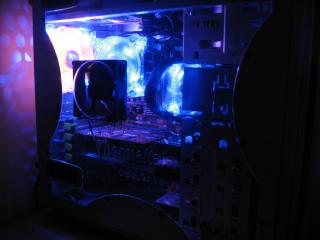
thats the pic, and i dont think the airflow is bad though yeah maybe i should just try wiring up a small fan on the NB btw, the mobo temp showing in the PC probe is it NB temp or SB?? or it is combined?? |
|
|
|
|
|
v1rtual
|
Nov 18 2007, 07:25 PM
|
|
|
QUOTE(kmarc @ Nov 18 2007, 06:30 PM) I don't think anybody knows. Some say it should be less than 45-50'c...... mine is 42c idle which i found it very high, cause it is even higher than the temp of my processor |
|
|
|
|
|
v1rtual
|
Nov 21 2007, 03:02 PM
|
|
|
QUOTE(§layerXT @ Nov 21 2007, 01:27 AM) Mine idle at 50C and load can reach until 60C++ for 965P running @ 400MHz. Should put on fan later. u better do bro, 60c++ is consider quite high rite???  |
|
|
|
|
|
v1rtual
|
Feb 3 2008, 10:50 PM
|
|
|
im running E6750 on asus P5KR and corsair XMS2 DHX 2GB 800Mhz
i need help with OC-ing it
cause i still cant go higher than FSB 420 where others can go up to 450+ pretty easily
i need help with all those setting in my bios..im still new in OC-ing
thx for the help and time first of all
FSB Strap to North Bridge 200Mhz,266,333Mhz
FSB Freq 420
PCIE Freq 101
DRAM Freq DDR2-840
DRAM Command Rate Auto,1T,2T ?
DRAM Timing Control 5,5,5,18
RAS# to RAS# Delay: Auto or Choose 1-15 DRAM clocks?
Row Refresh Cycle Time: Auto or 20,25,30,35,42 DRAM clocks?
Write Recovery Time: Auto or choose1-15 DRAM clocks?
Write to Read Delay: Auto or ?
Read to precharge time?
DRAM static read control: Auto, disabled, enabled?
Transaction Booster: Auto, disabled, enabled?
Clock over-charging mode: Auto, 0.7-1V?
CPU spread spectrum: disabled
PCIE spread spectrum: disabled
CPU coltage:1.425V
CPU voltage reference: auto or ?
CPU voltage damper: auto, disabled, enabled?
CPU PLL voltage: auto, 1.5v,1.7v?
DRAM voltage: 2.1v
FSB termination voltage: auto or ?
North Bridge voltage: 1.25v
North Bridge voltage reference: auto or 0.67x,0,61x
This post has been edited by v1rtual: Feb 3 2008, 10:51 PM
|
|
|
|
|
|
v1rtual
|
Feb 3 2008, 11:30 PM
|
|
|
QUOTE(a1098113 @ Feb 3 2008, 11:11 PM) you will need around 1.45V to be at least able to do 440Mhz on the FSB. and a bump on the Vnb and put a fan on the NB. Check your heat dissipation on the proc as well. now im putting Vnb @ 1.25..how much higher should i put?? the next level is 1.4v, isn't that a little too high?? for now, i dont think i have a problem with temp, idle around 26-30c running @ 3.36Ghz i will try increasing the Vcore again then |
|
|
|
|
|
v1rtual
|
Feb 4 2008, 08:39 AM
|
|
|
QUOTE(salimbest83 @ Feb 4 2008, 05:51 AM) so..do u mean ur e6750 stable around 3.36GHz only.. no, its just me i could only go till 3.36Ghz, thats why im not satisfied and ask for help here  go above that i cant reboot to windows ady  |
|
|
|
|
|
v1rtual
|
Feb 4 2008, 05:26 PM
|
|
|
may i know what are the possible caused that my mobo temp go up to 150c when i only increase my Vcore to 1.425?? 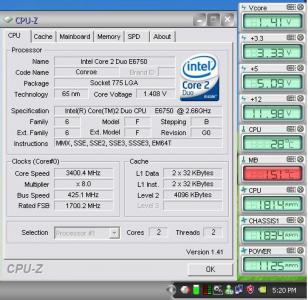 This post has been edited by v1rtual: Feb 4 2008, 05:39 PM
 |
|
|
|
|
|
v1rtual
|
Feb 4 2008, 10:08 PM
|
|
|
QUOTE(gengstapo @ Feb 4 2008, 08:41 PM) its shall be wrong reading by ur software try reset BIOS & OC once again.. its not only a reading from the PC probe i have tried to check from the bios, it shows -150c instead, why minus??  |
|
|
|
|
|
v1rtual
|
Feb 4 2008, 11:36 PM
|
|
|
QUOTE(gengstapo @ Feb 4 2008, 10:46 PM) well, its shud be technical error have u try reset to default BIOS setting?? after i changed back to 1.4v and 420fsb and restart, it is back to normal temp will be trying more OC next week, and update here for more help going back hometown tomorow morning, busy with packing and stuff Happy Chinese New Year for all  This post has been edited by v1rtual: Feb 4 2008, 11:37 PM This post has been edited by v1rtual: Feb 4 2008, 11:37 PM |
|
|
|
|



 Quote
Quote

 0.0200sec
 0.31
0.31
 7 queries
 GZIP Disabled