Welcome Guest ( Log In | Register )

5 Pages < 1 2 3 4 5 >Bottom

Outline · [ Standard ] · Linear+

 2020 Apple iPad Pro Discussion Thread | V1

views
     
scarxxx
post Jun 1 2020, 10:45 AM

Regular
******
Senior Member
1,509 posts

Joined: Feb 2008


QUOTE(lilredridinghood @ Jun 1 2020, 09:50 AM)
I’m using the ESR SP just FYI.

Unlike writing on a glass screen, the rougher surface of the screen protector makes it a lot realistic and enjoyable. The drawbacks are:

- Matte screen meaning, dimmed screen but there will not be any finger prints smudges on the screen, which is a plus for me
- Read that the Apple Pencil tip will be worn off quicker but thus far I’ve read that even heavy users of the Apple Pencil only replacing their tip once every year
- There will be “Apple Pencil” marks which aren’t at all visible from afar but for the compulsive ones, they might not be thrilled by this

Depending on your personal preference, I love to write things down work and I do occasionally doodle. If I don’t use the pencil too often, I wouldn’t have gone with it because of the darker screen, I read it’s the same for the original Paperlike and it cost a little more.

I can’t say for sure that I will buy the same thing again because the matte screen is a huge deal for me but would I enjoy writing on a smooth slippery glassy surface? Definitely not.

I weigh experience more than ostensible beauty perhaps, it’s not horrible, it’s just not perfect.
*
On top of your comment as bold above, the tips is available now at the Apple Store. RM69 for 4 tips consider cheap by Apple's standard pricing. biggrin.gif

By the way, thanks for the feedback and I hope your post can help those who are still deciding to get those type of screen protector. thumbsup.gif thumbup.gif
scarxxx
post Jun 2 2020, 07:06 AM

Regular
******
Senior Member
1,509 posts

Joined: Feb 2008


QUOTE(J.alexander @ Jun 1 2020, 10:19 PM)
thanks a lot. I’m using Benks, really rough even on my fingers.
*
I believe this is the one you are referring to.

---

Time to update your iDevices: Apple Watch, iPhones and iPad Pros. biggrin.gif

This post has been edited by scarxxx: Jun 2 2020, 07:12 AM
scarxxx
post Jun 2 2020, 09:12 AM

Regular
******
Senior Member
1,509 posts

Joined: Feb 2008


QUOTE(un_id @ Jun 2 2020, 09:07 AM)
Spftware updates? I read there are problems with the update
*
So far so good for me. Able to update without any hiccup.
scarxxx
post Jun 2 2020, 09:37 AM

Regular
******
Senior Member
1,509 posts

Joined: Feb 2008


Oh, by the way, after purchasing the iPad Pro, do you guys get the free trial of Apple TV+. One year free subscription.
scarxxx
post Jun 2 2020, 03:27 PM

Regular
******
Senior Member
1,509 posts

Joined: Feb 2008


QUOTE(lilredridinghood @ Jun 2 2020, 09:48 AM)
Yes but I don’t really use it, nothing inside for us to watch anyway
*
Yeah, I just browse around and most of the movies need to buy or rent. I rather stick with my Netflix instead. biggrin.gif
scarxxx
post Jun 2 2020, 05:37 PM

Regular
******
Senior Member
1,509 posts

Joined: Feb 2008


QUOTE(ahlin @ Jun 2 2020, 04:05 PM)
I'm trying to utilise my lighting headphone that come with every iPhone purchase with iPad Pro which having a USB type C port biggrin.gif
*
Are you looking for this?
scarxxx
post Jun 2 2020, 09:05 PM

Regular
******
Senior Member
1,509 posts

Joined: Feb 2008


QUOTE(canaviso @ Jun 2 2020, 08:24 PM)
Thanks! This should fit my needs.
*
Quality is so so but it works.

This post has been edited by scarxxx: Jun 2 2020, 09:06 PM
scarxxx
post Jun 3 2020, 10:23 AM

Regular
******
Senior Member
1,509 posts

Joined: Feb 2008


QUOTE(ahlin @ Jun 3 2020, 09:13 AM)
Yea you're right, mostly do not transfer the audio. cry.gif
I did found this, but unfortunately review said it didn't work for Lighting Earpods.
*
Yeah. I read the feedback after I posted here. Perhaps you want to check at AliExpress?

QUOTE(TongCN @ Jun 3 2020, 09:18 AM)
https://www.lowyat.net/2020/214214/ipados-1...o-reboot-often/

Anyone facing this ?

Wonder what's the OS comes with new one
*
Come with 13.4.1 if not mistaken. I upgraded the iPadOS after I turned on the device. Haha!

scarxxx
post Jun 4 2020, 07:44 AM

Regular
******
Senior Member
1,509 posts

Joined: Feb 2008


QUOTE(bluxzof @ Jun 3 2020, 10:43 PM)
user posted image

Didn’t get magic keyboard but this set up already good enough for typing. I prefer the compact yet larger keyboard (Logitech K380)

We might not need an iPad Pro but it’s really a laptop alternative. It does all my computing needs and then more. I prefer using apps than dealing with installation on windows. Windows 10 also doesn’t have any apps for casual users, so most of the time just using browser.
*
I am still waiting for my K380 to be shipped. With this keyboard, I am able to switch between iPad and my Windows machine.
scarxxx
post Jun 4 2020, 11:42 AM

Regular
******
Senior Member
1,509 posts

Joined: Feb 2008


QUOTE(lilredridinghood @ Jun 4 2020, 10:04 AM)
Most of us here do not need an iPad Pro. Most of us here do not even need a MacBook Pro. Most of us here were happy to pay a premium for the stability of Mac OSX and in this active thread, the iPad OS.

There are limitations of iPad OS as a laptop replacement but to those of us who find it sufficient:

- with the Magic Keyboard(optional), it only cost a little more than the base MacBook Pro if you are using the 12.9 inch(RM4399 + RM1549) compared to RM5599.00
- even with the Magic Keyboard, I find it a lot more portable than the larger but lighter MacBook Air
- it cannot be a full laptop replacement but a laptop can never be a tablet(don’t bring up the Surface Book, bringing up Windows is sacrilegious over here) 
- multitasking on an iPad is arguably more organised with split views and slide overs than the OSX and the OSX is inferior to Windows when it comes to managing multitasks devil.gif
- Google docs on iPad Pro is crap, no way to spin it, I use Numbers alone so I’m good with it but OSX is slightly better and a lot more versatile in this case
- USE YOUR DOCK! It will make your iPad OS a lot better looking, also USE YOUR WIDGETS!
- volume control is a bit of a bummer here because even though it’s not difficult to just scroll the track pad to the top right hand corner, tap and pull down the control centre, my gripe is that with certain apps, the sound stops as soon as the control panel is out. I hope they change it
- print screen with the visible “circle”, not a big problem but it can be annoying

Also I’m not gonna lie, I do have the FOMO of using a proper desktop OSX, I guess it comes with me being an Apple product user since the mid 2000s. This iPad Pro gives me the option to widen my array of choices, perhaps an iMac in future
*
I am currently using iOS Shortcuts to deal with this. I place the Shortcuts at my widget area so that I can change the volume based on the level of sound i set it up.
scarxxx
post Jun 4 2020, 01:12 PM

Regular
******
Senior Member
1,509 posts

Joined: Feb 2008


QUOTE(TongCN @ Jun 4 2020, 12:24 PM)
Dunno why Sarawak need 2 stages , ugh ..

MY hands super itchy wanna touch liao  rclxs0.gif

If really no SMS from DHL Express, i do hope now they otw XD

Cause i have one order by DHL Ecommerce yesterday and they did SMS

Note: Both these DHL are differ entities.
*
Totally understand!
Finally all my items arrived from Apple Store. rclxm9.gif

ps: I touch my Magic Trackpad 2 more than my iPad Pro. tongue.gif
scarxxx
post Jun 4 2020, 03:32 PM

Regular
******
Senior Member
1,509 posts

Joined: Feb 2008


QUOTE(TongCN @ Jun 4 2020, 01:51 PM)
Cause Screen protector not yet arrive?

My ESR accessories touched down Kota Kinabalu already yesterday afternoon from China

But no movement again today

EDIT: My IPP touch down my town already >.< Gotta self collect later
*
All my accessories (except Logitech K380) arrived and installed. My iPad Pro act like a companion device during my work in MS Windows so I usually use the Magic TrackPad 2 for the navigation. With the keyboard in, my setup will be completed. rclxm9.gif
scarxxx
post Jun 5 2020, 07:19 AM

Regular
******
Senior Member
1,509 posts

Joined: Feb 2008


QUOTE(J.alexander @ May 2 2020, 11:04 PM)
My review of Benk screen protector. Finally it arrived after a long long time. Came together with my small purchase to make my ipad “float” haha.

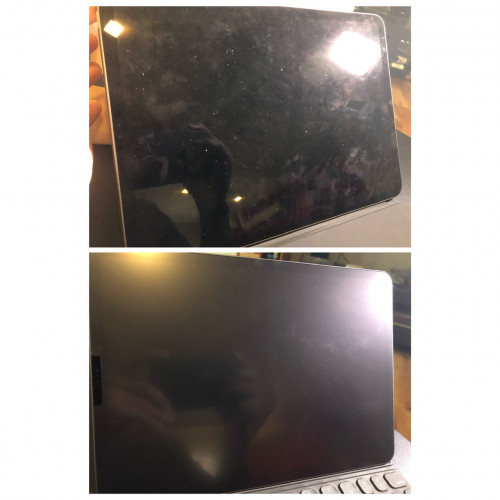
General impression: It’s my first time touching matte film. Very rough feeling even touching it using fingers. Totally unexpected as compared to my matte sp on my phone but one’s a film and one’s matte glass. Very good reviews on lazada though by other ipad users who used it for writing purposes.

Installation: Easy and straight forward, comes with necessary wet wipes, stickers, and stickers. It’s a U - cut out at the camera section, its easier than those hole cut out like iPhones. Semi rigid film so alignment is easy.

Writing experience : after reading reviews of how it might eats at the Apple Pencil nibs, can’t stop feeling painful haha, I think the “loud” scratching sound makes it worse. But think its very psychology. It does make writing very paper like and somehow makes the writing looks nicer than on glass which is very easily “watery” if it makes sense. Really have to compare w the real Paperlike version soon.

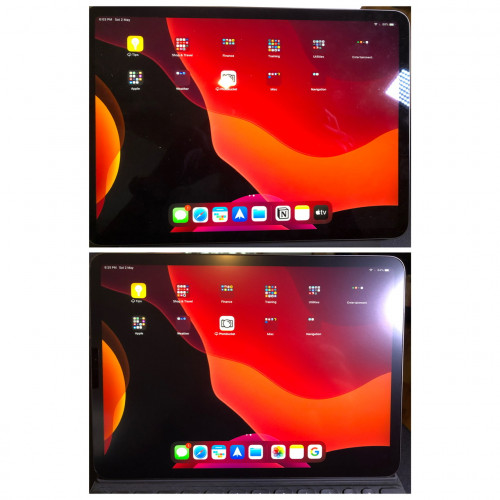
Screen quality: Below are some comparisons. Don’t think it’s very much degraded but happy with the lessen finger smudges.

user posted image

user posted image

user posted image
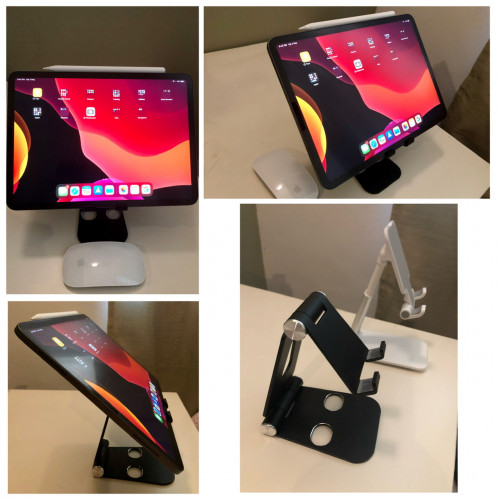
My metal desktop stand has arrived. Holds up well and could help with a much more better viewing angle when typing. 
user posted image
*
Found the post about the screen protector. biggrin.gif

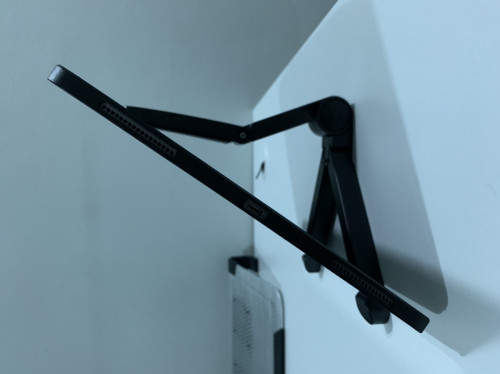
By the way, does that metal stand sturdy enough to hold your iPad.

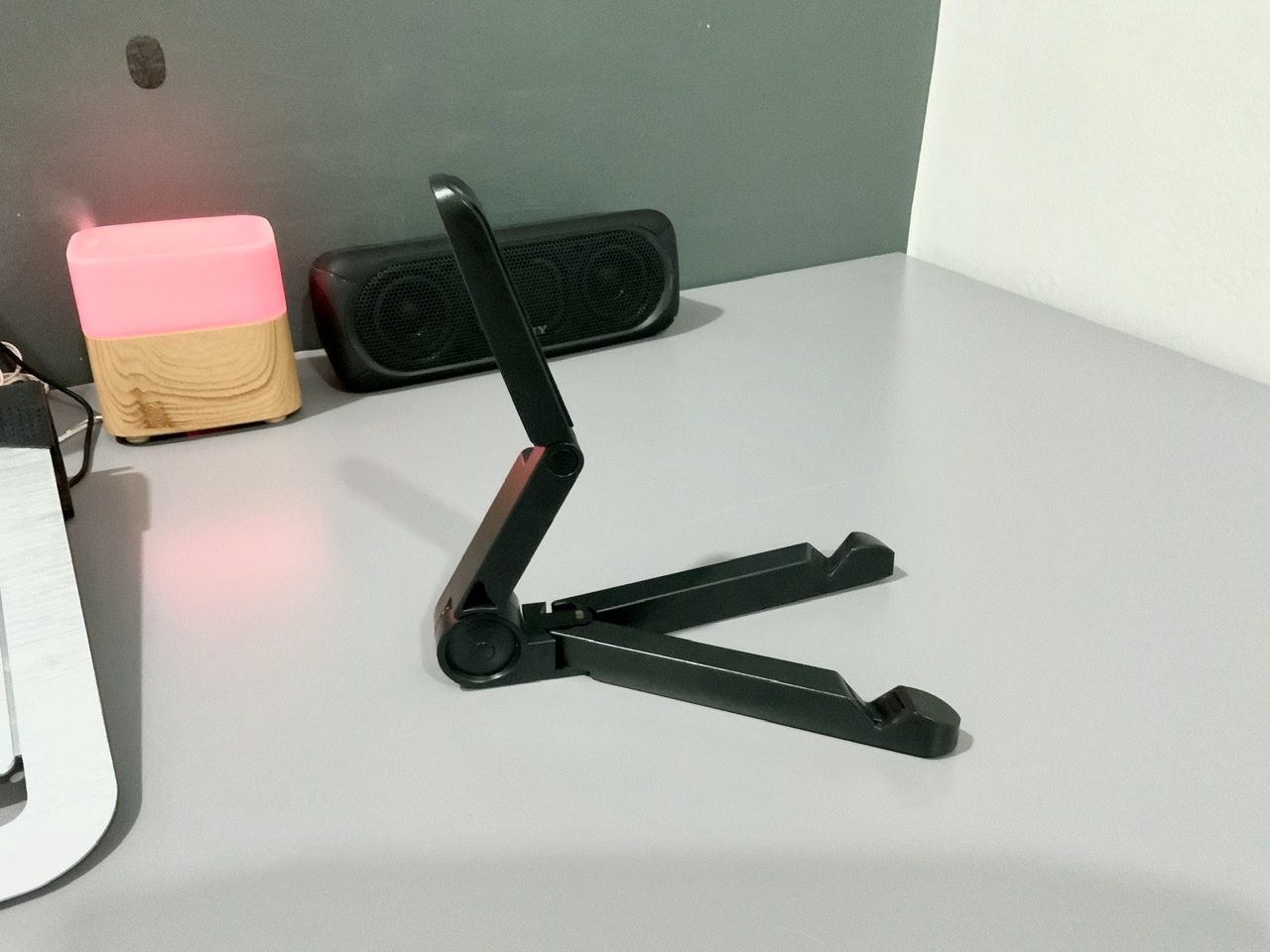
Currently I am using this which I took from my daughter tongue.gif :
user posted image

This post has been edited by scarxxx: Jun 5 2020, 07:27 AM
scarxxx
post Jun 5 2020, 02:37 PM

Regular
******
Senior Member
1,509 posts

Joined: Feb 2008


Great news for MK owners:
https://www.macrumors.com/2020/06/04/apple-...ard-brightness/

scarxxx
post Jun 5 2020, 09:45 PM

Regular
******
Senior Member
1,509 posts

Joined: Feb 2008


QUOTE(un_id @ Jun 5 2020, 06:14 PM)
Pro tip,

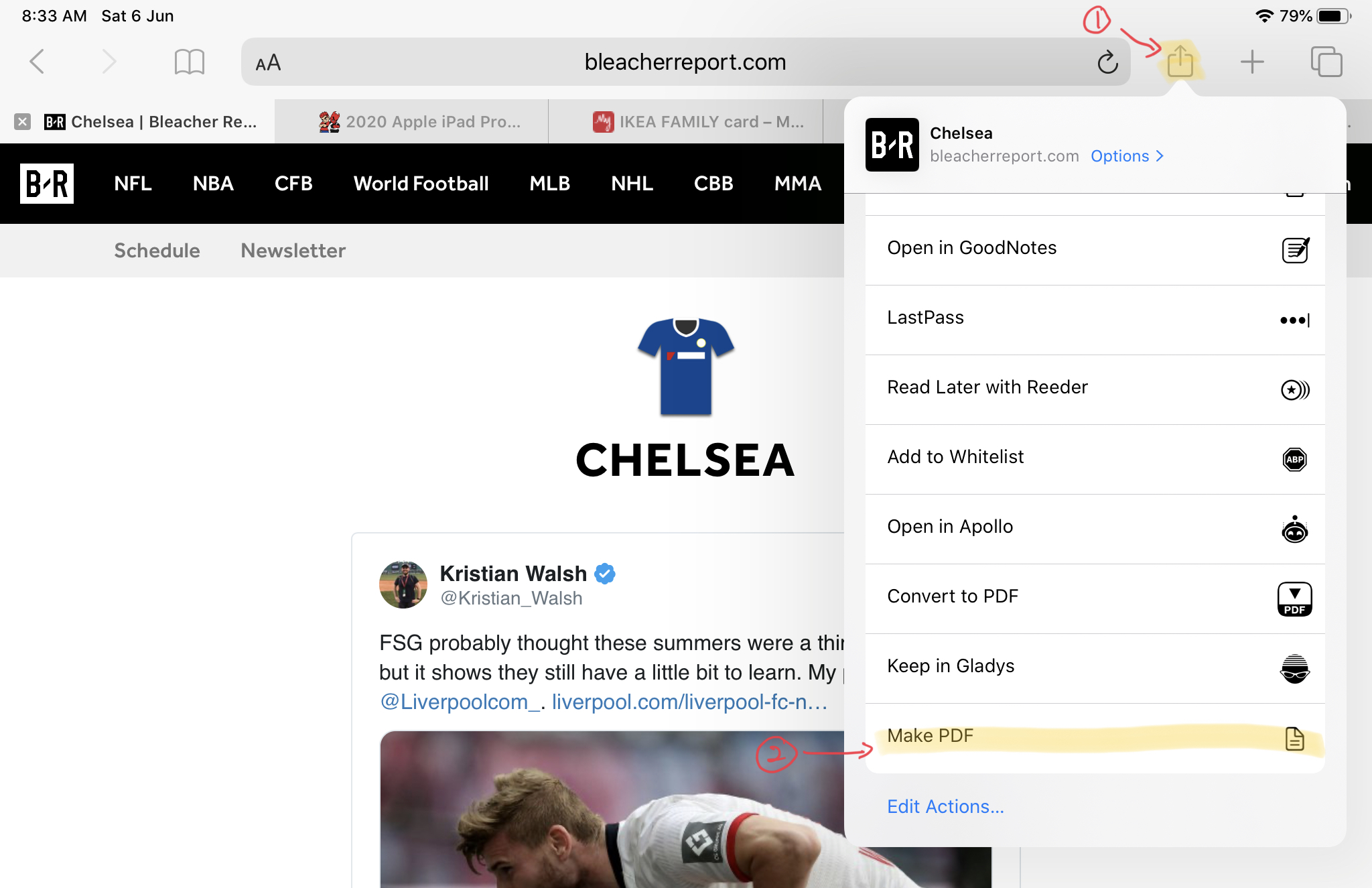
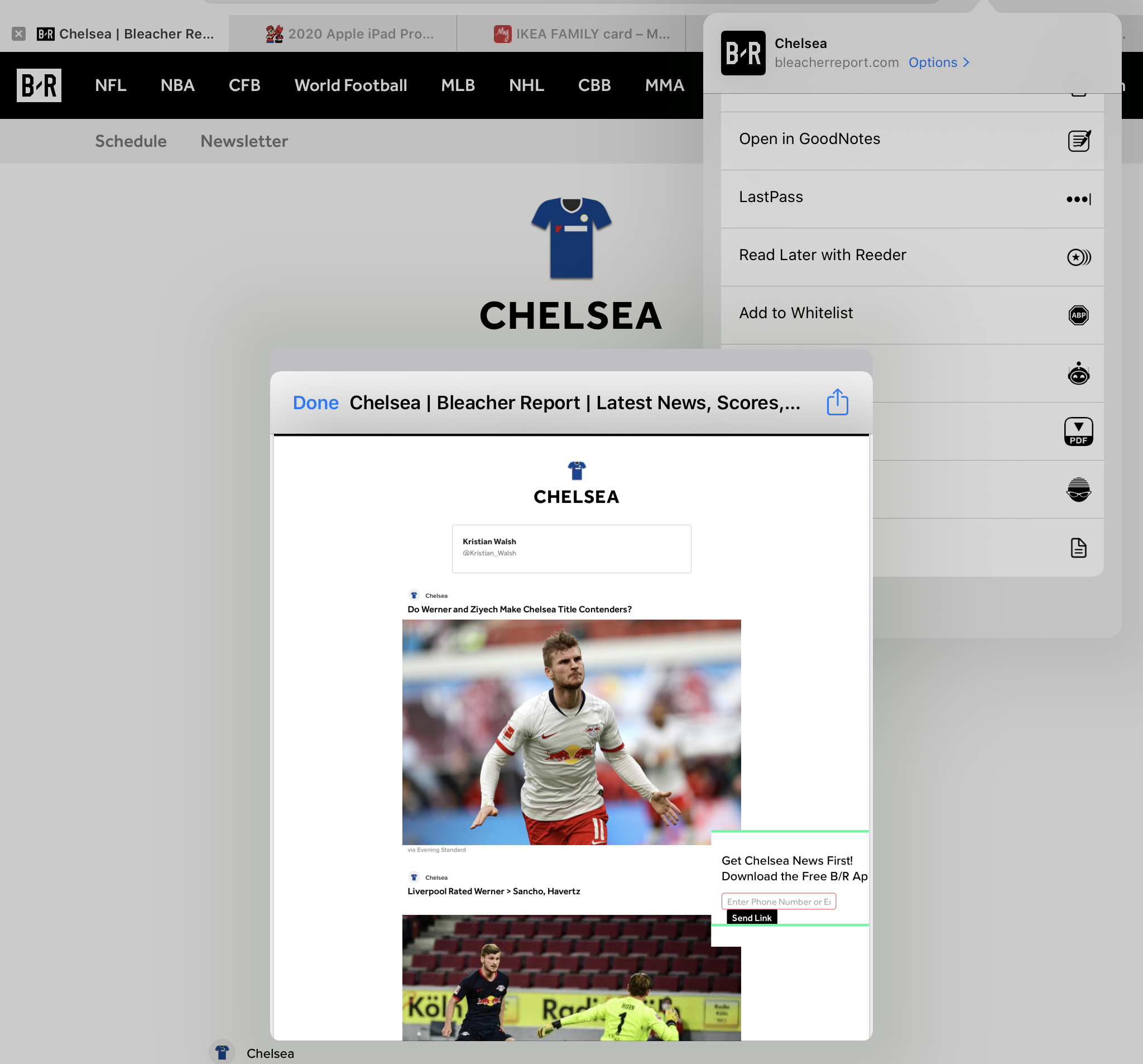
I don’t know about u guys, but I accidentally found out this. Sometime we want to keep a webpage or anything we view, if on normal pc we could sent to out printer to print. Obviously i did not have any wireless printer, so previously i was frustrated. But I accidentally discovered like a month ago,

1. Click share button, then click print
2. In the printing prompt, use 2 fingers to swipe like you are zooming the page
3. It will open like a preview, from there you can save it as PDF  laugh.gif

Very useful to me

[attachmentid=10509483]
[attachmentid=10509484]
[attachmentid=10509486]
*
If you use iOS Shortcuts app, this can be done in 2 taps.
scarxxx
post Jun 5 2020, 10:06 PM

Regular
******
Senior Member
1,509 posts

Joined: Feb 2008


QUOTE(un_id @ Jun 5 2020, 09:49 PM)
Ios shortcuts?
*
The app previously was called Workflow but after Apple bought the company over, they renamed it as Shortcuts. The app actually came pre-installed with your device.

This guy in the video below is actually the ex-employee of Workflow and produce lots Shortcuts automation.

https://www.youtube.com/watch?v=xgub6c1u-AA&feature=youtu.be

FYI, I use this to
- calculate my TNB bill and store all the information in a CSV file.
- take photo via Siri and save it to my Photos
- automatically rename all my PDF bills and store to my iCloud

Here’s the Shortcuts where it will convert the webpage into PDF. What you need to do is click on the Share Sheet and select the shortcut.

This post has been edited by scarxxx: Jun 5 2020, 10:11 PM
scarxxx
post Jun 6 2020, 06:49 AM

Regular
******
Senior Member
1,509 posts

Joined: Feb 2008


QUOTE(un_id @ Jun 5 2020, 10:43 PM)
Cool.. i checked the app, but i have no idea how to make that actions 😆
*
There are tons of tutorial available in YouTube. You can try to learn from there. Basically this app is an automation tool where it can help you to automate some of the steps.

Here is how it look when you have that Shortcuts triggered:

user posted image

user posted image

This post has been edited by scarxxx: Jun 6 2020, 08:39 AM
scarxxx
post Jun 7 2020, 07:20 AM

Regular
******
Senior Member
1,509 posts

Joined: Feb 2008


QUOTE(J.alexander @ Jun 6 2020, 10:42 PM)
haha how did you managed to search for it? What’s the function?

As for the metal stand, that’s one of the best investment I’ve gotten, very sturdy and solid for ipad pro. Just have to be careful as the edges could be quite sharp and might scratch your pretty ipad =p
*
user posted image

This is how it works. Lol! This unit I bought it quite a long time ago. I still managed to find one near my area and gave it to my daughter because it is pink.

This post has been edited by scarxxx: Jun 7 2020, 08:02 AM
scarxxx
post Jun 7 2020, 02:21 PM

Regular
******
Senior Member
1,509 posts

Joined: Feb 2008


QUOTE(J.alexander @ Jun 7 2020, 12:27 PM)
haha thanks, i was referring to searching of my old post 😅
*
Just refer to your posting history. biggrin.gif

This post has been edited by scarxxx: Jun 7 2020, 02:21 PM
scarxxx
post Jun 7 2020, 08:41 PM

Regular
******
Senior Member
1,509 posts

Joined: Feb 2008


QUOTE(SNHY693 @ Jun 7 2020, 05:14 PM)
Any suggestions for USB-C to 3.5 mm adapter that is compatible with iPad Pro? The RM49 apple adapter feels quite expensive for an adapter. The wire looks quite prone to breaking from bending and white gets dirty easily.
*
I didn’t use any sort of converter but I preferred Baseus brand. Here’s the Baseus USB C to 3.5mm Earphone Converter.

Feedbacks and ratings are good. On the plus side, ship from local and it is from a preferred seller.

Hope this help.

5 Pages < 1 2 3 4 5 >Top
 

Change to:
| Lo-Fi Version
0.0902sec    0.45    7 queries    GZIP Disabled
Time is now: 4th December 2025 - 11:36 AM