Welcome Guest ( Log In | Register )

Outline · [ Standard ] · Linear+

Home Networking Ditch ONU, use GPON SFP on Business Grade Router, 2.5G ONU for Unifi & Maxis, NO NEED VLAN

views
     
aztech
post Jul 31 2023, 08:39 PM

Getting Started
**
Junior Member
134 posts

Joined: Jan 2003
From: Miri <-> KL <-> Penang
QUOTE(Anime4000 @ Jul 31 2023, 06:33 PM)
Intel variant

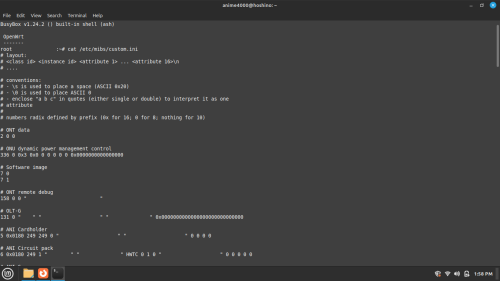
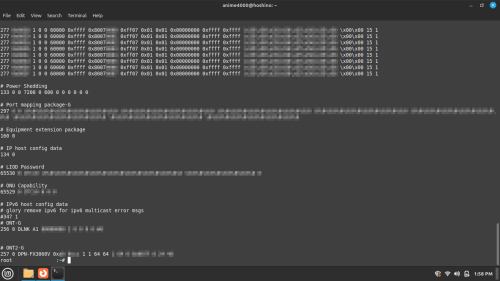
someone do factory reset the GPON ONU SFP and cause TM MIB (management information base) get erased, thus OLT denied authenticated at stuck at O7 State
had to re-import MIB from D-LINK ONR to GPON ONU SFP
user posted image
user posted image

This MIB what I got from D-LINK ONR should respect TM OLT.

if OLT OMCI said VLAN400 should stay inside ONU, GPON ONU SFP also follow and wont bridge VLAN400

apparently Scammer use ODI to force bridge VLAN400, many customer don't use VoIP and Scammer simply rent it,
as owner of VoIP account got huge sum and give it away the VoIP Credential, this very reasons TM don't tell your VoIP password
unless you persuade the on-site  technician.

I think TM need detect one IP login multiple VoIP, but this will hurt legitimate as-well.

I had no idea how to prevent it, I hope my Maxis VoIP wont cause of that bangwall.gif
*
I am currently running the vlan400 bridge to freepbx, is there any risk at the moment? Need analog line for home alarm use only. Using Linksys ATA to freepbx
aztech
post Jul 31 2023, 09:46 PM

Getting Started
**
Junior Member
134 posts

Joined: Jan 2003
From: Miri <-> KL <-> Penang
QUOTE(Anime4000 @ Jul 31 2023, 08:41 PM)
no risk at the moment, just use legally 😅

I just don't want this GPON ONU SFP become bad stuff that disturb TM network
*
Thanks bro. For now still testing. Just migrate from 750gr3 a few days ago. Crossing fingers hopefully stable set up. Appreciate all the knowledge from sifus here.
aztech
post Aug 9 2023, 09:31 PM

Getting Started
**
Junior Member
134 posts

Joined: Jan 2003
From: Miri <-> KL <-> Penang
QUOTE(Anime4000 @ Aug 9 2023, 09:20 PM)
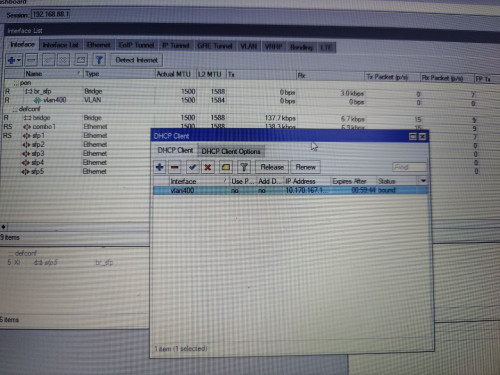
Today I had test GPON ONU SFP (non-Realtek) with TM and check if OMCI and MIB is acceptable,
well, it is, abide all TM OLT playbook, no issue using it for 1/2Gbps customers.

plus, it respect OLT bandwidth management (GEM), so, no speed hacking that violate TM Terms and Condition

user posted image
user posted image

to check OLT is allow bridging VLAN 400 (VoIP) and it's works.

any update I will update here
*
Kindly provide link to buy this SFP thanks. Want to keep spare around.
aztech
post Aug 9 2023, 10:45 PM

Getting Started
**
Junior Member
134 posts

Joined: Jan 2003
From: Miri <-> KL <-> Penang
QUOTE(Anime4000 @ Aug 9 2023, 10:03 PM)
not available on the market 😅
take from somewhere else Deployment, I can provide it with manual.
*
I am very interested bro. Let u finish all your test and once 'certified' in compliance will pm u to get 1 unit for spare eheheheh
aztech
post Aug 17 2023, 01:29 PM

Getting Started
**
Junior Member
134 posts

Joined: Jan 2003
From: Miri <-> KL <-> Penang
QUOTE(Deslack @ Aug 17 2023, 12:43 PM)
Guys, have any of you successfully set the PPPoE MTU to 1500? At most I can get 1488 on my Unifi.
*
Mine max 1480 - if i put more than 1480 my log file will be full of notification ehehe.
aztech
post Oct 14 2023, 01:58 AM

Getting Started
**
Junior Member
134 posts

Joined: Jan 2003
From: Miri <-> KL <-> Penang
QUOTE(Anime4000 @ Oct 13 2023, 11:34 PM)
Today, I made the switch from Maxis fiber to Unifi Ultra 2Gbps. This upgrade allows me to thoroughly test, troubleshoot, and engage in reverse engineering of PON Firmware to optimize throughput.

Then I can experimenting Unifi VoIP
*
GO GO GO ahaha. I like. Ahaha
aztech
post Nov 25 2023, 05:48 PM

Getting Started
**
Junior Member
134 posts

Joined: Jan 2003
From: Miri <-> KL <-> Penang
QUOTE(kwss @ Nov 5 2023, 03:22 AM)
I have successfully made voip call works on Android phone using the built-in SIP client. Router is Mikrotik.

High level Steps:
1. Add a VLAN. I use name "voip", tag it to ID 400.
2. Attach DHCP client to VLAN "voip". Don't use peer DNS, NTP or default route.
3. Once the DHCP client successfully get an address, check the Status and get it's default gateway address.
4. Add a static route with Dst Address 10.225.0.0/16, and put the default gateway address you copied above. Immediate Gateway should show something like this: 10.40.255.254%voip
5.Add a NAT rule. Chain=srcnat. Out Interface=voip. Action=masquerade
6. Add another NAT rule. Chain=dstnat. In Interface=voip. Action=dst-nat. To Addresses=<IP address of your phone>

Step 6 is necessary for RTP packet to reach you. For Cisco IOS, use the following instead:
ip nat service allow-sip-even-rtp-ports

Obviously for Mikrotik you can only use 1 phone. Cisco allow you to use multiple phone with one router configuration.

Android phone overview:
1. I use the Phone app
2. Go to Settings
3. Calling accounts
4. SIP accounts

I set "Send keep-alive" to "Always send"
After that just enable "Receive incoming calls"

Go to "All calling accounts" and enable the voip account.
*
This is how it works for me previously - using ODI XPON stick. but i route/fwd the VLAN and bridge it to 1 eth port and assigned FreePBX raspberry PI to get the VLAN400 IP.

Now it's not working - seems like VLAN400 is not able to get IP anymore. Torching the sfp1-plus interface I can see that the DHCP server from VLAN400 is sending offer but without tagged VLAN id 400.

Another weird observation - I could get the IP from DHCP after I bridge VLAN400+sfp1-plus+any eth port or i put dhcp client on that new bridge - but it won't be able to route/traffic not working even after static route added.
aztech
post Nov 27 2023, 07:09 AM

Getting Started
**
Junior Member
134 posts

Joined: Jan 2003
From: Miri <-> KL <-> Penang
QUOTE(kwss @ Nov 27 2023, 02:48 AM)
It seems like you have at least 2 separate issues.
First one is DHCP. Instead of using Torch, you need to use Packet Sniffer to see how packets traverse your network.
Sniff at the ONU port to see if things are working. Then sniff again at your bridged eth port.

The second issue is a common one. TM will change the Outbound Proxy of the VoIP once in a while. For me it has happened twice. Put back the TM ONU and verify VoIP is working. Then login the ONU and get the new Outbound Proxy. Configure the static route and your FreePBX accordingly.
[Firmware Feature Request]
Maybe a method to list configuration for VoIP?
*
Update : downgraded odi firmware to 220414 and voila, everything's back to normal. Not sure what's the diff with the latest 220923 but only 220414 working for me so far.


Change to:
| Lo-Fi Version
0.0673sec    0.17    7 queries    GZIP Disabled
Time is now: 6th December 2025 - 07:33 AM