

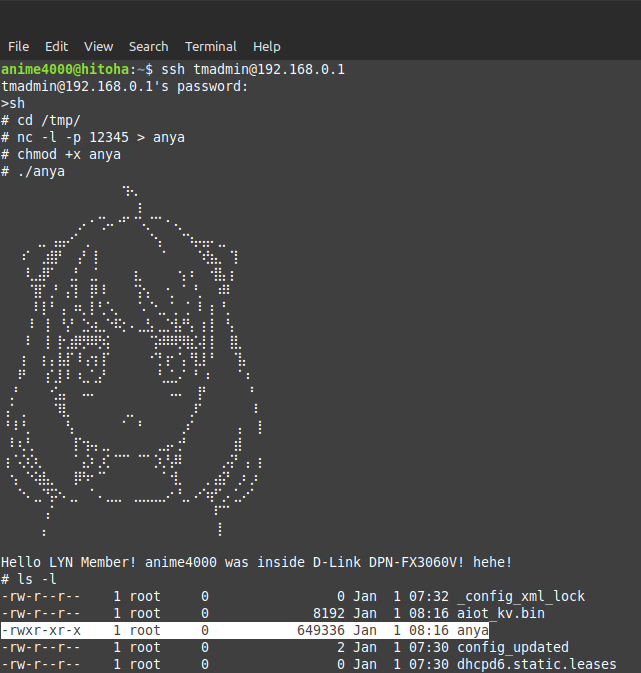
I wonder what I could do with it
also rootfs can be extracted as usual
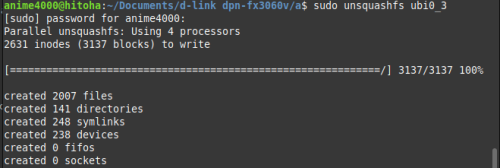
matter of time to flash back without having firmware file
This post has been edited by Anime4000: Nov 3 2023, 01:03 AM
Home Networking Ditch ONU, use GPON SFP on Business Grade Router, 2.5G ONU for Unifi & Maxis, NO NEED VLAN
|
|
 Nov 3 2023, 01:02 AM Nov 3 2023, 01:02 AM
Show posts by this member only | IPv6 | Post
#941
|
 
Senior Member
2,399 posts Joined: Jul 2009 From: /dev/null  
|
beside that, I managed to run own program inside D-Link ONR I wonder what I could do with it also rootfs can be extracted as usual matter of time to flash back without having firmware file This post has been edited by Anime4000: Nov 3 2023, 01:03 AM lwk523 liked this post
|
|
|
|
|
|
Nov 3 2023, 07:26 AM
|

Junior Member
932 posts Joined: Dec 2019
|
QUOTE(Anime4000 @ Nov 2 2023, 11:14 PM) D-Link and Hisense using newer SDK (Luna 3) So there's hope for straight PnP PON stick in the future? beside higher SDK, I need to solve upload issue on this expensive stick  ... as for now, yeah, need to spoof the info. need send my modified PON stick to TM to validate   |
|
|
Nov 3 2023, 10:31 AM
Show posts by this member only | IPv6 | Post
#943
|
|
Senior Member
2,399 posts Joined: Jul 2009 From: /dev/null
|
QUOTE(yenchenje @ Nov 3 2023, 07:26 AM) So there's hope for straight PnP PON stick in the future? yea, just PLOAM Password, still, they need validate my PON Stick |
|
|
Nov 5 2023, 03:22 AM
Show posts by this member only | IPv6 | Post
#944
|
|
Senior Member
1,207 posts Joined: Aug 2018
|
I have successfully made voip call works on Android phone using the built-in SIP client. Router is Mikrotik.
High level Steps: 1. Add a VLAN. I use name "voip", tag it to ID 400. 2. Attach DHCP client to VLAN "voip". Don't use peer DNS, NTP or default route. 3. Once the DHCP client successfully get an address, check the Status and get it's default gateway address. 4. Add a static route with Dst Address 10.225.0.0/16, and put the default gateway address you copied above. Immediate Gateway should show something like this: 10.40.255.254%voip 5.Add a NAT rule. Chain=srcnat. Out Interface=voip. Action=masquerade 6. Add another NAT rule. Chain=dstnat. In Interface=voip. Action=dst-nat. To Addresses=<IP address of your phone> Step 6 is necessary for RTP packet to reach you. For Cisco IOS, use the following instead: ip nat service allow-sip-even-rtp-ports Obviously for Mikrotik you can only use 1 phone. Cisco allow you to use multiple phone with one router configuration. Android phone overview: 1. I use the Phone app 2. Go to Settings 3. Calling accounts 4. SIP accounts I set "Send keep-alive" to "Always send" After that just enable "Receive incoming calls" Go to "All calling accounts" and enable the voip account. |
|
|
Nov 5 2023, 10:42 AM
Show posts by this member only | IPv6 | Post
#945
|
|
Junior Member
932 posts Joined: Dec 2019
|
QUOTE(Anime4000 @ Nov 3 2023, 10:31 AM) yea, just PLOAM Password, still, they need validate my PON Stick Placed my order for ODI stick, hopefully it’ll arrive soon and I can swap it out from my D-Link ONR  |
|
|
Nov 5 2023, 01:17 PM
Show posts by this member only | IPv6 | Post
#946
|
|
Senior Member
2,399 posts Joined: Jul 2009 From: /dev/null
|
QUOTE(kwss @ Nov 5 2023, 03:22 AM) I have successfully made voip call works on Android phone using the built-in SIP client. Router is Mikrotik. Nice, I link this from front pageHigh level Steps: 1. Add a VLAN. I use name "voip", tag it to ID 400. 2. Attach DHCP client to VLAN "voip". Don't use peer DNS, NTP or default route. 3. Once the DHCP client successfully get an address, check the Status and get it's default gateway address. 4. Add a static route with Dst Address 10.225.0.0/16, and put the default gateway address you copied above. Immediate Gateway should show something like this: 10.40.255.254%voip 5.Add a NAT rule. Chain=srcnat. Out Interface=voip. Action=masquerade 6. Add another NAT rule. Chain=dstnat. In Interface=voip. Action=dst-nat. To Addresses=<IP address of your phone> Step 6 is necessary for RTP packet to reach you. For Cisco IOS, use the following instead: ip nat service allow-sip-even-rtp-ports Obviously for Mikrotik you can only use 1 phone. Cisco allow you to use multiple phone with one router configuration. Android phone overview: 1. I use the Phone app 2. Go to Settings 3. Calling accounts 4. SIP accounts I set "Send keep-alive" to "Always send" After that just enable "Receive incoming calls" Go to "All calling accounts" and enable the voip account. QUOTE(yenchenje @ Nov 5 2023, 10:42 AM) Placed my order for ODI stick, hopefully it’ll arrive soon and I can swap it out from my D-Link ONR Good Luck! |
|
|
|
|
|
Nov 5 2023, 04:11 PM
Show posts by this member only | IPv6 | Post
#947
|
|
Senior Member
2,399 posts Joined: Jul 2009 From: /dev/null
|
One little update reverse engineering on D-Link DPN-FX3060V.
I tried add 802.3ad into the kernel modprobe bonding CODE mode 0 miimon 100 primary eth0 primary_reselect always updelay 200 downdelay 200 use_carrier on slaves eth0 eth1 eth2 ifconfig bond0 up brctl addif br0 bond0 Upload speed is horrible, ~500 to ~300Mbps: 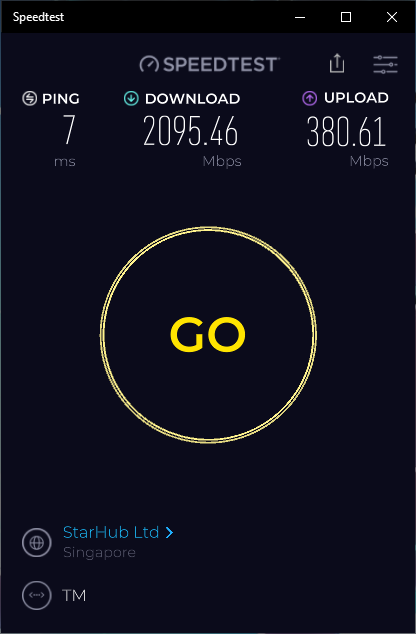 Same issue stock ODI stick and Poland Stick, hard to get 960Mbps upload speed, if user don't mind, no problem... but for me, I mind the upload speed during upload speedtest, DPN-FX3060V CPU usage quite high... This post has been edited by Anime4000: Nov 5 2023, 04:13 PM |
|
|
Nov 6 2023, 08:50 PM
Show posts by this member only | IPv6 | Post
#948
|
|
Senior Member
2,399 posts Joined: Jul 2009 From: /dev/null
|
Documentation,
Before Upgrade to 2Gbps (TM-Maxis): 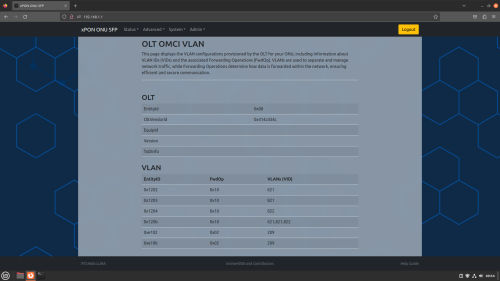 After Upgrade to 2Gbps (TM-Unifi): 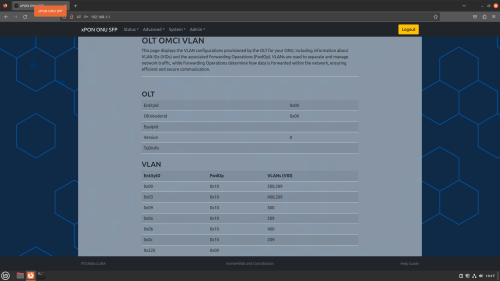 These are reference of OLT change, I try finding about OLT that TM use, either ready 10G PON or not I got news about 10G PON readiness, time to invest on 10G PON SFP+ This post has been edited by Anime4000: Nov 6 2023, 08:55 PM |
|
|
Nov 6 2023, 10:20 PM
Show posts by this member only | IPv6 | Post
#949
|

Senior Member
4,034 posts Joined: Dec 2019
|
QUOTE(Anime4000 @ Nov 5 2023, 04:11 PM) during upload speedtest, DPN-FX3060V CPU usage quite high... it's probably the reason why ookla's speedtest cli never get beyong 1Gbps...i can see CPU consumed 90%++ whenever executed. |
|
|
Nov 6 2023, 11:54 PM
Show posts by this member only | IPv6 | Post
#950
|
|
Senior Member
2,399 posts Joined: Jul 2009 From: /dev/null
|
QUOTE(Oltromen Ripot @ Nov 6 2023, 10:20 PM) it's probably the reason why ookla's speedtest cli never get beyong 1Gbps... this very odd issue, even D-Link ONR with bond driver injected into the Kernel, I run as GPON Bridge, not as Router.i can see CPU consumed 90%++ whenever executed. with 4 Core 1GHz, CPU spike when upload, some memory leak. compared with puny MIPS 400MHz Single Core PON Stick manage to upload at full speed. Either D-Link SoC (Realtek) are not designed to have 802.3ad cause using Software Emulation instead of hardware acceleration... 🤔 overall, I have uploaded D-Link UBI partition to xPON hacking community, the boot is secured, SPI Flash is encrypted, but with root access can override the partition. this way PON Laser calibration is kept/intact |
|
|
Nov 7 2023, 07:19 AM
Show posts by this member only | IPv6 | Post
#951
|
|
Junior Member
932 posts Joined: Dec 2019
|
QUOTE(Anime4000 @ Nov 6 2023, 08:50 PM) Documentation, XGPON? Or EPON Before Upgrade to 2Gbps (TM-Maxis): After Upgrade to 2Gbps (TM-Unifi): These are reference of OLT change, I try finding about OLT that TM use, either ready 10G PON or not I got news about 10G PON readiness, time to invest on 10G PON SFP+ Need go find the proper stick to buy when that comes Hopefully my new house area already upgraded to NGN, or else when the 2024 2Gbps upgrade come and I can’t even utilize the bandwidth fully  |
|
|
Nov 7 2023, 12:30 PM
Show posts by this member only | IPv6 | Post
#952
|
|
Senior Member
2,399 posts Joined: Jul 2009 From: /dev/null
|
QUOTE(yenchenje @ Nov 7 2023, 07:19 AM) XGPON? Or EPON don't know, I wait engineer answerNeed go find the proper stick to buy when that comes Hopefully my new house area already upgraded to NGN, or else when the 2024 2Gbps upgrade come and I can’t even utilize the bandwidth fully then, avoid FS.com stick, not very customized, no WebGUI, expensive also waiting Japanese friend to donate one to run the test |
|
|
Nov 7 2023, 04:21 PM
|
|
Junior Member
932 posts Joined: Dec 2019
|
QUOTE(Anime4000 @ Nov 7 2023, 12:30 PM) don't know, I wait engineer answer Keep us posted! Want to try and find a cheap used stick on Chinese market if its EPON cause I’ve seen a few then, avoid FS.com stick, not very customized, no WebGUI, expensive also waiting Japanese friend to donate one to run the test |
|
|
|
|
|
Nov 9 2023, 06:39 AM
|

Junior Member
117 posts Joined: Feb 2008 From: Ampang
|
Hi all sifu out there,
Am currently using xdi zte xpon (with media converter) so far after free upgrade get around 8xx / 2xx, when doing load balance (with yes5g and umobile 5g) using openwrt x86 .. can get 1.4~gbps while not yet able to do proper load balance with mikrotik router os 7 (x86 version 😅… kind of hard to setup pcc when using dynamic ip). Now thinking to upgrade to unifi 1Gbps (rm289) or 2Gbps (rm 319) (without unifi tv / uni5g package) Currently still awaiting for tm reply email since am currently on contract (500Mbps ~ rm2xx). The thing is i would want to invest with Tp-Link ER8411 which have sfp+ 10G port. Anybody / sifu out there have try this? If any.. which multi gigabit xpon can be use directly with this model?. 😄 Not sure will my xdi zte can work directly witj er8411 or not.. 😂 This post has been edited by liquid.D: Nov 9 2023, 06:48 AM |
|
|
Nov 9 2023, 08:27 AM
Show posts by this member only | IPv6 | Post
#955
|
|
Junior Member
932 posts Joined: Dec 2019
|
QUOTE(liquid.D @ Nov 9 2023, 06:39 AM) Hi all sifu out there, Not sure about premade routers and prebuilt a but I found a x86 box (Lenovo M910x) for about 1.2k MYR on Xianyu for sale that has the ability to take a 8x card in a 16x slot. Am currently using xdi zte xpon (with media converter) so far after free upgrade get around 8xx / 2xx, when doing load balance (with yes5g and umobile 5g) using openwrt x86 .. can get 1.4~gbps while not yet able to do proper load balance with mikrotik router os 7 (x86 version 😅… kind of hard to setup pcc when using dynamic ip). Now thinking to upgrade to unifi 1Gbps (rm289) or 2Gbps (rm 319) (without unifi tv / uni5g package) Currently still awaiting for tm reply email since am currently on contract (500Mbps ~ rm2xx). The thing is i would want to invest with Tp-Link ER8411 which have sfp+ 10G port. Anybody / sifu out there have try this? If any.. which multi gigabit xpon can be use directly with this model?. 😄 Not sure will my xdi zte can work directly witj er8411 or not.. 😂 One of the config includes BCM57840(Quad port SFP+ card, 4 port variant of the BCM57810S) which has support for HiSGMII. If you’re looking into still running x86, might be a viable option to invest in. Low profile, low power requirements and SFF as well I’m planning to buy this during Dec, and run 1 GPON stick, 1 10GBe, 1 2.5GBe and 1 1GBe with the 4 SFP+ ports, with “low temps” Aquantia transceivers as my main router box 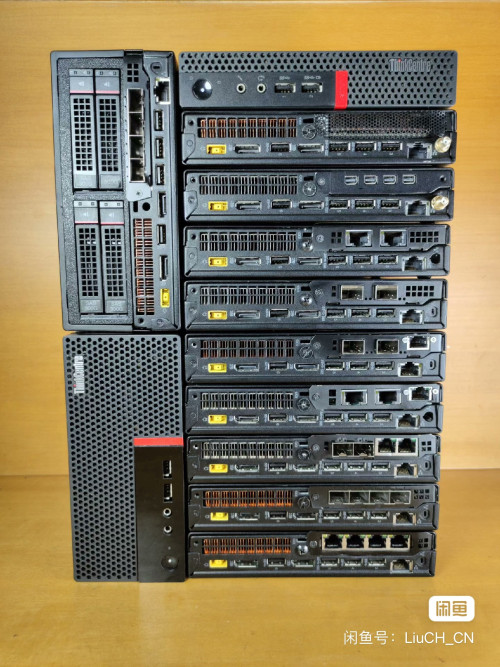 This post has been edited by yenchenje: Nov 9 2023, 08:27 AM |
|
|
Nov 9 2023, 10:07 AM
|

Senior Member
1,130 posts Joined: Jan 2003
|
QUOTE(yenchenje @ Nov 9 2023, 08:27 AM) Not sure about premade routers and prebuilt a but I found a x86 box (Lenovo M910x) for about 1.2k MYR on Xianyu for sale that has the ability to take a 8x card in a 16x slot. Why use these instead of Mikrotik which much low profile? What are the pro of using these?One of the config includes BCM57840(Quad port SFP+ card, 4 port variant of the BCM57810S) which has support for HiSGMII. If you’re looking into still running x86, might be a viable option to invest in. Low profile, low power requirements and SFF as well I’m planning to buy this during Dec, and run 1 GPON stick, 1 10GBe, 1 2.5GBe and 1 1GBe with the 4 SFP+ ports, with “low temps” Aquantia transceivers as my main router box |
|
|
Nov 9 2023, 11:54 AM
Show posts by this member only | IPv6 | Post
#957
|
|
Junior Member
117 posts Joined: Feb 2008 From: Ampang
|
QUOTE(cyberic @ Nov 9 2023, 10:07 AM) Why use these instead of Mikrotik which much low profile? What are the pro of using these? I guess some people like x86 due to the horse power and more customisation.. i’m also the one using x86 as router for nearly 5 yr, but now thinking to change to vpn premaid router, perhaps want to try avoid any extra overhead layer.Mikrotik is nice.. but after buying license level 4 for my x86, i found it’s troublesome for multiwan pcc setup with multiple isp that give public ip / dynamic ip.. try to write scripts and end up just using back openwrt x86.. haha I saw in internet tplink omada vpn router setup seems straightforward, that why looking for any sfp gpon that might compatible with fibre direct connection .. Btw i also use omada ap wifi 6 already. But still not sure how to set 1st port (xpon) unifi fibre ..2nd sfp as 2.5gb ethernet (LAN) and 3rd / 4th gigabit port as the 2nd isp and 3rd isp, hard to judge from youtube tutorials for tp-link routers setup. Maybe Anybody have exp setup multiwan on tp-link vpn router also can give some advice to me 😄 This post has been edited by liquid.D: Nov 9 2023, 11:58 AM |
|
|
Nov 9 2023, 02:41 PM
|
|
Senior Member
1,130 posts Joined: Jan 2003
|
QUOTE(liquid.D @ Nov 9 2023, 11:54 AM) I guess some people like x86 due to the horse power and more customisation.. i’m also the one using x86 as router for nearly 5 yr, but now thinking to change to vpn premaid router, perhaps want to try avoid any extra overhead layer. I tried pfsense using old computer, give up on that. Prefer lower power usage, low profile network devices.Mikrotik is nice.. but after buying license level 4 for my x86, i found it’s troublesome for multiwan pcc setup with multiple isp that give public ip / dynamic ip.. try to write scripts and end up just using back openwrt x86.. haha I saw in internet tplink omada vpn router setup seems straightforward, that why looking for any sfp gpon that might compatible with fibre direct connection .. Btw i also use omada ap wifi 6 already. But still not sure how to set 1st port (xpon) unifi fibre ..2nd sfp as 2.5gb ethernet (LAN) and 3rd / 4th gigabit port as the 2nd isp and 3rd isp, hard to judge from youtube tutorials for tp-link routers setup. Maybe Anybody have exp setup multiwan on tp-link vpn router also can give some advice to me 😄 |
|
|
Nov 9 2023, 02:56 PM
|
|
Junior Member
932 posts Joined: Dec 2019
|
QUOTE(cyberic @ Nov 9 2023, 10:07 AM) Why use these instead of Mikrotik which much low profile? What are the pro of using these? Proxmox, and virtualizationPre-made boxes are nice but I want more power and more control over my hardware and do whatever I want. Mikrotik is no way in shape or form bad by any means, just not for me. Another reason why I'm currently just using OPNSense virtualize on my homelab |
|
|
Nov 9 2023, 03:09 PM
Show posts by this member only | IPv6 | Post
#960
|
|
Senior Member
4,034 posts Joined: Dec 2019
|
those lazada/shopee mini pc with multiple (claimed) 2.5Gbps. running on intel celeron etc.
are they powerful and stable to be turned into ultra router? i'm waiting to see what "token of appreciation" is first. if really getting 2.5Gbps BTU, then this will be sweet. |
| Change to: |  0.0205sec 0.0205sec
 0.16 0.16
 6 queries 6 queries
 GZIP Disabled GZIP Disabled
Time is now: 7th December 2025 - 09:26 AM |
 Quote
Quote