Welcome Guest ( Log In | Register )

83 Pages « < 35 36 37 38 39 > » Bottom

Outline · [ Standard ] · Linear+

Home Networking Ditch ONU, use GPON SFP on Business Grade Router, 2.5G ONU for Unifi & Maxis, NO NEED VLAN

views
     
PRSXFENG
post Jun 30 2023, 08:02 PM

Look at all my stars!!
*******
Senior Member
2,608 posts

Joined: Nov 2020


QUOTE(Jjuggler @ Jun 30 2023, 06:30 PM)
They have rights to ban the unifi account if they identified users using custom ONU? Walao... Shitty company that provides lousy CPE can do that meh?
*
They probably do somewhere in ToS

I wonder if this is a "no you're not supposed to be able to pull 2Gbps, we give 1+1 intentionally as most people won't be able to saturate the connection (but pay us more)"


chong601
post Jun 30 2023, 08:57 PM

New Member
*
Newbie
11 posts

Joined: Aug 2017
QUOTE(Anime4000 @ Jun 30 2023, 02:27 PM)
I got call from someone claiming be TM...

tldr; TM want user to stop using ODI DFP-34X-2C2 on 2Gbps:
1. Conflict OMCI parameter with D-Link (I blame Realtek for this, inconsistency between RTL960x family)
2. Don't call 100 to troubleshoot ODI DFP-34X-2C2
3. Keep old ONU (when technician come, revert back to original ONU)
4. Using custom ONU, please clone ONU properties properly, no missing single property or even one character! (if this keep wrong or wrong place, TM has right to ban your unifi)

TM not saying this illegal, but trouble for them and technician team

I been instruct to edit main thread and my GitHub about these

I hope this not haram  mega_shok.gif
*
This wouldn't be an issue if the device they provide at the very least can handle the speeds it should be able to handle in the first place.

But hey, the saving grace is at least they don't say it's illegal though! (for now)


TSAnime4000
post Jun 30 2023, 09:02 PM

Look at all my stars!!
*******
Senior Member
2,399 posts

Joined: Jul 2009
From: /dev/null


QUOTE(Jjuggler @ Jun 30 2023, 06:30 PM)
TM's technician knows nothing about networking lol. Their SOP is just to come, basic troubleshoot, change device and go. You initiate any conversation  with them related to advance networking, they will be passive and remain unresponsive all the time.

They have rights to ban the unifi account if they identified users using custom ONU? Walao... Shitty company that provides lousy CPE can do that meh?
*
QUOTE(PRSXFENG @ Jun 30 2023, 08:02 PM)
They probably do somewhere in ToS

I wonder if this is a "no you're not supposed to be able to pull 2Gbps, we give 1+1 intentionally as most people won't be able to saturate the connection (but pay us more)"
*
user posted image

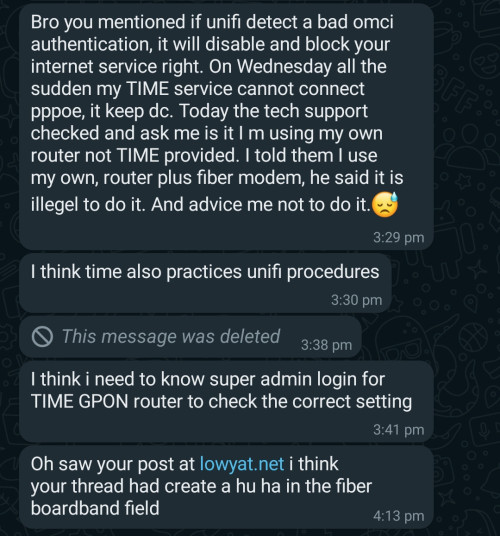
not just TM, same with TIME. since GPON ONU SFP is rooted, you basically can do anything, including "force TX laser on" and this will cause other user lose their internet connection.

and you can sniff down stream packet, even with AES encryption, I guess this can be crack, most GPON use basic 128-bit just fast enough to decrypt.

also hijacking GEM Port to by pass OLT speed cap, if OLT is configured badly.

fiber is shared connection...

so, TM just don't want another RTL960x GPON ONU on their fiber, this clash with D-Link that use RTL9607DQ (part of RTL960x family)

as we know, ODI Stick unable to saturate upload speed, because OLT use different parameters that RTL9607DQ understand, not RTL9601D/CI

buying ODI Stick now can be risky if you don't set ONU Information properly, TM or other ISP has right to ban,

bad setting ONU information mean not hiding enough,
check what OLT, if OLT is Nokia, avoid using Nokia ONU info, etc...

I am NOT RESPONSIBLE for this, I merely share what can be done if you do it correctly.

I am looking another solution, most GPON ONU SFP that I sell lately is not Realtek based, it's Intel based SFP which is hard to get since it's part of 4G/5G Cell Tower

This post has been edited by Anime4000: Jun 30 2023, 11:07 PM
go626201
post Jun 30 2023, 09:51 PM

Regular
******
Senior Member
1,882 posts

Joined: Sep 2017
QUOTE(Anime4000 @ Jun 30 2023, 09:02 PM)
user posted image

not just TM, same with TIME. since GPON ONU SFP is rooted, you basically can do anything, including "force TX laser on" and this will cause other user lose their internet connection.

and you can sniff down stream packet, even with AES encryption, I guess this can be crack, most GPON use basic 128-bit just fast enough to decrypt.

also hijacking GEM Port to by pass OLT speed cap, if OLT is configured badly.

fiber is shared connection...

so, TM just don't want another RTL960x GPON ONU on their fiber, this clash with D-Link that use RTL9607DQ (part of RTL960x family)

as we know, ODI Stick unable to saturate upload speed, because OLT use different parameters that RTL9607DQ understand, not RTL9601D/CI

buying ODI Stick now can be risky if you don't set ONU Information properly, TM or other ISP has right to ban,

bad setting ONU information mean not hiding enough,
check what OLT, if OLT is Nokia, avoid using Nokia ONU info, etc...

I am NOT RESPONSIBLE for this, I merely share what can be done if you do it correctly.

I am looking another solution, most GPON ONU SFP that I sell lately is not Realtek based, it's Intel based SFP which is hard to get since it's part of 4G/5G Cell Tower
*
So it mean Vsol 2.5G (V2802RH) that using RTL9601D should not be used with unifi right? bangwall.gif

This post has been edited by go626201: Jun 30 2023, 09:52 PM
Jjuggler
post Jun 30 2023, 09:58 PM

Narcissistic Genius
******
Senior Member
1,341 posts

Joined: Dec 2016
QUOTE(Anime4000 @ Jun 30 2023, 09:02 PM)
user posted image

not just TM, same with TIME. since GPON ONU SFP is rooted, you basically can do anything, including "force TX laser on" and this will cause other user lose their internet connection.

and you can sniff down stream packet, even with AES encryption, I guess this can be crack, most GPON use basic 128-bit just fast enough to decrypt.

also hijacking GEM Port to by pass OLT speed cap, if OLT is configured badly.

fiber is shared connection...

so, TM just don't want another RTL960x GPON ONU on their fiber, this clash with D-Link that use RTL9607DQ (part of RTL960x family)

as we know, ODI Stick unable to saturate upload speed, because OLT use different parameters that RTL9607DQ understand, not RTL9601D/CI

buying ODI Stick now can be risky if you don't set ONU Information properly, TM or other ISP has right to ban,

bad setting ONU information mean not hiding enough,
check what OLT, if OLT is Nokia, avoid using Nokia ONU info, etc...

I am NOT RESPONSIBLE for this, I merely share what can be done if you do it correctly.

I am looking another solution, most GPON ONU SFP that I sell lately is not Realtek based, it's Intel based SFP which is hard to get since it's part of 4G/5G Cell Tower
*
Understood. I don't think casual users willing to take risk into doing this. Power users will utilize this with compatible equipment with right ONU information correctly without getting their account to be banned. They still using 128-bit, still in 2023? Very bad CS practice.

TSAnime4000
post Jun 30 2023, 10:12 PM

Look at all my stars!!
*******
Senior Member
2,399 posts

Joined: Jul 2009
From: /dev/null


QUOTE(go626201 @ Jun 30 2023, 09:51 PM)
So it mean Vsol 2.5G (V2802RH) that using RTL9601D should not be used with unifi right?  bangwall.gif
*
If you set properly that make OLT think you using actual ONU, no problem

QUOTE(Jjuggler @ Jun 30 2023, 09:58 PM)
Understood. I don't think casual users willing to take risk into doing this. Power users will utilize this with compatible equipment with right ONU information correctly without getting their account to be banned. They still using 128-bit, still in 2023? Very bad CS practice.
*
GPON is old, and old standard,
all GPON ONU is cheap and cheap SoC

what I read, same with XGPON/XGSPON, just need better down stream encryption at 256 or above, if SoC manufacturer willing sell it cheap...
Jjuggler
post Jun 30 2023, 10:19 PM

Narcissistic Genius
******
Senior Member
1,341 posts

Joined: Dec 2016
QUOTE(Anime4000 @ Jun 30 2023, 10:12 PM)
what I read, same with XGPON/XGSPON, just need better down stream encryption at 256 or above, if SoC manufacturer willing sell it cheap...
*
Good things doesn't comes cheap. Sigh. sweat.gif

TSAnime4000
post Jun 30 2023, 11:43 PM

Look at all my stars!!
*******
Senior Member
2,399 posts

Joined: Jul 2009
From: /dev/null


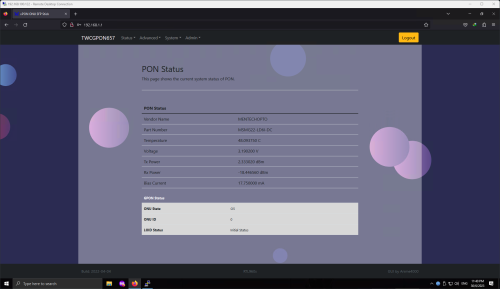
up checking on my Friend TIME, non ODI Stick, so far working as expected
user posted image

I modified the WebGUI on RTL9601CI during PKP cool2.gif

now no time to do that, keep flashing will kill the SPI NAND Flash
blacktubi
post Jul 2 2023, 12:22 PM

-
Group Icon
Elite
8,413 posts

Joined: Jul 2008

RTL960x user reporting in and it's still running strong with pink fibre 1Gbps.

It wouldn't bypass speedcap as TIME uses XGPON for 2Gbps.

However, I can get 1040Mbps instead of 940Mbps now.

And, it does have better fibre reading than my Huawei ONU so that's a plus too.
TSAnime4000
post Jul 3 2023, 12:28 AM

Look at all my stars!!
*******
Senior Member
2,399 posts

Joined: Jul 2009
From: /dev/null


QUOTE(blacktubi @ Jul 2 2023, 12:22 PM)
RTL960x user reporting in and it's still running strong with pink fibre 1Gbps.

It wouldn't bypass speedcap as TIME uses XGPON for 2Gbps.

However, I can get 1040Mbps instead of 940Mbps now.

And, it does have better fibre reading than my Huawei ONU so that's a plus too.
*
Lucky you...

your PINK is only have PINK ISP or got other ISP?

some user can't use GPON ONU SFP on PINK

after O5, OLT reject and stuck at O2
tng55
post Jul 3 2023, 02:18 AM

Regular
******
Senior Member
1,441 posts

Joined: Sep 2021


QUOTE(Anime4000 @ Jun 30 2023, 09:02 PM)
user posted image

not just TM, same with TIME. since GPON ONU SFP is rooted, you basically can do anything, including "force TX laser on" and this will cause other user lose their internet connection.

and you can sniff down stream packet, even with AES encryption, I guess this can be crack, most GPON use basic 128-bit just fast enough to decrypt.

also hijacking GEM Port to by pass OLT speed cap, if OLT is configured badly.

fiber is shared connection...

so, TM just don't want another RTL960x GPON ONU on their fiber, this clash with D-Link that use RTL9607DQ (part of RTL960x family)

as we know, ODI Stick unable to saturate upload speed, because OLT use different parameters that RTL9607DQ understand, not RTL9601D/CI

buying ODI Stick now can be risky if you don't set ONU Information properly, TM or other ISP has right to ban,

bad setting ONU information mean not hiding enough,
check what OLT, if OLT is Nokia, avoid using Nokia ONU info, etc...

I am NOT RESPONSIBLE for this, I merely share what can be done if you do it correctly.

I am looking another solution, most GPON ONU SFP that I sell lately is not Realtek based, it's Intel based SFP which is hard to get since it's part of 4G/5G Cell Tower
*
so avoid using ODI Realtek right
this Intel based SFP ODI IS Best ??? like without Trouble right ?
blacktubi
post Jul 3 2023, 02:41 PM

-
Group Icon
Elite
8,413 posts

Joined: Jul 2008

QUOTE(Anime4000 @ Jul 3 2023, 12:28 AM)
Lucky you...

your PINK is only have PINK ISP or got other ISP?

some user can't use GPON ONU SFP on PINK

after O5, OLT reject and stuck at O2
*
Don't think got other ISP since no other VLANs detected apart from the usual TIME VLAN.

There's a built-in tool to detect rogue ONU within Huawei OLT. Since TIME's network is almost fully Huawei infra, they can use it to find those non Huawei ONUs easily.
TSAnime4000
post Jul 3 2023, 07:59 PM

Look at all my stars!!
*******
Senior Member
2,399 posts

Joined: Jul 2009
From: /dev/null


QUOTE(tng55 @ Jul 3 2023, 02:18 AM)
so avoid using ODI Realtek right
this Intel based SFP ODI IS Best ??? like without Trouble right ?
*
So far, Intel based SFP is very respectful...

even I as Maxis on TM, using Intel one:
1. SFP only have single LAN
2. MIB matched
3. OMCI kick in
4. SFP disconnect LAN interface between Host
5. Sad, Maxis/DiGi/Celcom/Viewquest can't use cry.gif

only reason ODI can use because, ODI and VSOL impliment quick code hacks that remap all EntityId into single LAN, this will cause VLAN clashed

2 Gbps User A:
CODE

omcicli mib get 84
XXXXXXXXXXXXXXXXXXXXXXXXXXXXXXXXX
VlanTagFilterData
XXXXXXXXXXXXXXXXXXXXXXXXXXXXXXXXX
=================================
EntityID: 0x03
FilterTbl[0]: PRI 0,CFI 0, VID 500
FwdOp:  0x10
NumOfEntries: 1
=================================
=================================
EntityID: 0x04
FilterTbl[0]: PRI 0,CFI 0, VID 400
FwdOp:  0x10
NumOfEntries: 1
=================================
=================================
EntityID: 0x05
FilterTbl[0]: PRI 0,CFI 0, VID 600
FwdOp:  0x10
NumOfEntries: 1
=================================
=================================
EntityID: 0x06
FilterTbl[0]: PRI 0,CFI 0, VID 209
FwdOp:  0x10
NumOfEntries: 1
=================================


2G Gbps User B:
CODE

omcicli mib get 84
XXXXXXXXXXXXXXXXXXXXXXXXXXXXXXXXX
VlanTagFilterData
XXXXXXXXXXXXXXXXXXXXXXXXXXXXXXXXX
=================================
EntityID: 0x1202
FilterTbl[0]: PRI 0,CFI 0, VID 500
FwdOp:  0x10
NumOfEntries: 1
=================================
=================================
EntityID: 0x1203
FilterTbl[0]: PRI 0,CFI 0, VID 400
FwdOp:  0x10
NumOfEntries: 1
=================================
=================================
EntityID: 0x1204
FilterTbl[0]: PRI 0,CFI 0, VID 600
FwdOp:  0x10
NumOfEntries: 1
=================================
=================================
EntityID: 0x120a
FilterTbl[0]: PRI 0,CFI 0, VID 400
FilterTbl[0]: PRI 0,CFI 0, VID 500
FilterTbl[0]: PRI 0,CFI 0, VID 600
FwdOp:  0x10
NumOfEntries: 3
=================================
=================================
EntityID: 0xe101
FilterTbl[0]: PRI 0,CFI 0, VID 209
FwdOp:  0x10
NumOfEntries: 1
=================================
=================================
EntityID: 0xe102
FilterTbl[0]: PRI 0,CFI 0, VID 209
FwdOp:  0x10
NumOfEntries: 1
=================================


My Maxis on TM:
CODE

XXXXXXXXXXXXXXXXXXXXXXXXXXXXXXXXX
VlanTagFilterData
XXXXXXXXXXXXXXXXXXXXXXXXXXXXXXXXX
=================================
EntityID: 0x1202
FilterTbl[0]: PRI 0,CFI 0, VID 621
FwdOp:  0x10
NumOfEntries: 1
=================================
=================================
EntityID: 0x1203
FilterTbl[0]: PRI 0,CFI 0, VID 821
FwdOp:  0x10
NumOfEntries: 1
=================================
=================================
EntityID: 0x1204
FilterTbl[0]: PRI 0,CFI 0, VID 822
FwdOp:  0x10
NumOfEntries: 1
=================================
=================================
EntityID: 0x120b
FilterTbl[0]: PRI 0,CFI 0, VID 621
FilterTbl[2]: PRI 0,CFI 0, VID 821
FilterTbl[4]: PRI 0,CFI 0, VID 822
FwdOp:  0x10
NumOfEntries: 3
=================================
=================================
EntityID: 0xe102
FilterTbl[0]: PRI 0,CFI 0, VID 209
FwdOp:  0x10
NumOfEntries: 1
=================================
=================================
EntityID: 0xe10b
FilterTbl[0]: PRI 0,CFI 0, VID 209
FwdOp:  0x10
NumOfEntries: 1
=================================

as you can see, some Unifi user have different VLAN mapping, ODI/VSOL hack is EntityId map horrible and clash


QUOTE(blacktubi @ Jul 3 2023, 02:41 PM)
Don't think got other ISP since no other VLANs detected apart from the usual TIME VLAN.

There's a built-in tool to detect rogue ONU within Huawei OLT. Since TIME's network is almost fully Huawei infra, they can use it to find those non Huawei ONUs easily.
*
Indeed, need OMCI emulation to that specific Huawei request

tng55
post Jul 3 2023, 10:47 PM

Regular
******
Senior Member
1,441 posts

Joined: Sep 2021


QUOTE(Anime4000 @ Jul 3 2023, 07:59 PM)
So far, Intel based SFP is very respectful...

even I as Maxis on TM, using Intel one:
1. SFP only have single LAN
2. MIB matched
3. OMCI kick in
4. SFP disconnect LAN interface between Host
5. Sad, Maxis/DiGi/Celcom/Viewquest can't use cry.gif

only reason ODI can use because, ODI and VSOL impliment quick code hacks that remap all EntityId into single LAN, this will cause VLAN clashed

2 Gbps User A:
CODE

omcicli mib get 84
XXXXXXXXXXXXXXXXXXXXXXXXXXXXXXXXX
VlanTagFilterData
XXXXXXXXXXXXXXXXXXXXXXXXXXXXXXXXX
=================================
EntityID: 0x03
FilterTbl[0]: PRI 0,CFI 0, VID 500
FwdOp:  0x10
NumOfEntries: 1
=================================
=================================
EntityID: 0x04
FilterTbl[0]: PRI 0,CFI 0, VID 400
FwdOp:  0x10
NumOfEntries: 1
=================================
=================================
EntityID: 0x05
FilterTbl[0]: PRI 0,CFI 0, VID 600
FwdOp:  0x10
NumOfEntries: 1
=================================
=================================
EntityID: 0x06
FilterTbl[0]: PRI 0,CFI 0, VID 209
FwdOp:  0x10
NumOfEntries: 1
=================================


2G Gbps User B:
CODE

omcicli mib get 84
XXXXXXXXXXXXXXXXXXXXXXXXXXXXXXXXX
VlanTagFilterData
XXXXXXXXXXXXXXXXXXXXXXXXXXXXXXXXX
=================================
EntityID: 0x1202
FilterTbl[0]: PRI 0,CFI 0, VID 500
FwdOp:  0x10
NumOfEntries: 1
=================================
=================================
EntityID: 0x1203
FilterTbl[0]: PRI 0,CFI 0, VID 400
FwdOp:  0x10
NumOfEntries: 1
=================================
=================================
EntityID: 0x1204
FilterTbl[0]: PRI 0,CFI 0, VID 600
FwdOp:  0x10
NumOfEntries: 1
=================================
=================================
EntityID: 0x120a
FilterTbl[0]: PRI 0,CFI 0, VID 400
FilterTbl[0]: PRI 0,CFI 0, VID 500
FilterTbl[0]: PRI 0,CFI 0, VID 600
FwdOp:  0x10
NumOfEntries: 3
=================================
=================================
EntityID: 0xe101
FilterTbl[0]: PRI 0,CFI 0, VID 209
FwdOp:  0x10
NumOfEntries: 1
=================================
=================================
EntityID: 0xe102
FilterTbl[0]: PRI 0,CFI 0, VID 209
FwdOp:  0x10
NumOfEntries: 1
=================================


My Maxis on TM:
CODE

XXXXXXXXXXXXXXXXXXXXXXXXXXXXXXXXX
VlanTagFilterData
XXXXXXXXXXXXXXXXXXXXXXXXXXXXXXXXX
=================================
EntityID: 0x1202
FilterTbl[0]: PRI 0,CFI 0, VID 621
FwdOp:  0x10
NumOfEntries: 1
=================================
=================================
EntityID: 0x1203
FilterTbl[0]: PRI 0,CFI 0, VID 821
FwdOp:  0x10
NumOfEntries: 1
=================================
=================================
EntityID: 0x1204
FilterTbl[0]: PRI 0,CFI 0, VID 822
FwdOp:  0x10
NumOfEntries: 1
=================================
=================================
EntityID: 0x120b
FilterTbl[0]: PRI 0,CFI 0, VID 621
FilterTbl[2]: PRI 0,CFI 0, VID 821
FilterTbl[4]: PRI 0,CFI 0, VID 822
FwdOp:  0x10
NumOfEntries: 3
=================================
=================================
EntityID: 0xe102
FilterTbl[0]: PRI 0,CFI 0, VID 209
FwdOp:  0x10
NumOfEntries: 1
=================================
=================================
EntityID: 0xe10b
FilterTbl[0]: PRI 0,CFI 0, VID 209
FwdOp:  0x10
NumOfEntries: 1
=================================

as you can see, some Unifi user have different VLAN mapping, ODI/VSOL hack is EntityId map horrible and clash
Indeed, need OMCI emulation to that specific Huawei request
*
no problem for me 5.Maxis/DiGi/Celcom/Viewquest can't use i am not sad

i wont switch other ISP

so i will stay UNIFI so i am sure wont trouble i think Intel based SFP are Safety
my area most BTU IS Huawei mean my area tm infra using huawei right
i check my area many place i saw all they still use BTU Huawei
no other brand btu like nokia
TSAnime4000
post Jul 3 2023, 11:11 PM

Look at all my stars!!
*******
Senior Member
2,399 posts

Joined: Jul 2009
From: /dev/null


QUOTE(tng55 @ Jul 3 2023, 10:47 PM)
no problem for me 5.Maxis/DiGi/Celcom/Viewquest can't use i am not sad

i wont switch other ISP

so i will stay UNIFI so i am sure wont trouble i think Intel based SFP are Safety
my area most BTU IS Huawei mean my area tm infra using huawei right
i check my area many place i saw all they still use BTU Huawei
no other brand btu like nokia
*
Seremban use Nokia OLT,
and default ONU on Nokia OLT:
1. Huawei
2. Nokia
3. ZTE
4. Fiberhome
5. D-Link (Ultra Plan)

I use D-Link information on the SFP and it works,
D-Link information with Huawei S/N

this might TM able to catch me by reading OLT with mismatched information lol
tng55
post Jul 3 2023, 11:13 PM

Regular
******
Senior Member
1,441 posts

Joined: Sep 2021


QUOTE(Anime4000 @ Jul 3 2023, 11:11 PM)
Seremban use Nokia OLT,
and default ONU on Nokia OLT:
1. Huawei
2. Nokia
3. ZTE
4. Fiberhome
5. D-Link (Ultra Plan)

I use D-Link information on the SFP and it works,
D-Link information with Huawei S/N

this might TM able to catch me by reading OLT with mismatched information lol
*
ohhh
i am from Penang my area how i check what tm infra they use OLT and default ONU on OLT


how i find to easy to found
TSAnime4000
post Jul 3 2023, 11:32 PM

Look at all my stars!!
*******
Senior Member
2,399 posts

Joined: Jul 2009
From: /dev/null


QUOTE(tng55 @ Jul 3 2023, 11:13 PM)
ohhh
i am from Penang my area how i check what tm infra they use OLT and default ONU on OLT
how i find to easy to found
*
OLT can be check via OMCI CLI.
ONU is, I went every customer house and do the check that way...

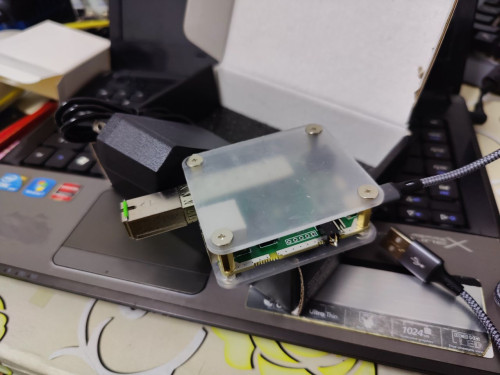
my old SFP programmer is dead, flash many sticks
I bought new one that use USB instead of plugging UART pin out.
user posted image

in case my customers broke their SFP with wrong command, I can reprogramming it back

with Intel Lantiq based SFP, no need tear down.

but with Realtek based SFP, need to tear down and desolder SPI Flash (can't flash directly it will fried the SoC processor, because it directly access)

by design, Intel is superior, as always.

This post has been edited by Anime4000: Jul 3 2023, 11:34 PM
tng55
post Jul 4 2023, 01:39 AM

Regular
******
Senior Member
1,441 posts

Joined: Sep 2021


QUOTE(Anime4000 @ Jul 3 2023, 11:32 PM)
OLT can be check via OMCI CLI.
ONU is, I went every customer house and do the check that way...

my old SFP programmer is dead, flash many sticks
I bought new one that use USB instead of plugging UART pin out.
user posted image

in case my customers broke their SFP with wrong command, I can reprogramming it back

with Intel Lantiq based SFP, no need tear down.

but with Realtek based SFP, need to tear down and desolder SPI Flash (can't flash directly it will fried the SoC processor, because it directly access)

by design, Intel is superior, as always.
*
hmm i think you can't go Penang

how i check OLT can be check via OMCI CLI
can check my BTU can view for details OMCI CLI ?

let say i disconnect fiber cable then i go ip via firefox and login in and can find ???

This post has been edited by tng55: Jul 4 2023, 01:40 AM
TSAnime4000
post Jul 4 2023, 08:19 PM

Look at all my stars!!
*******
Senior Member
2,399 posts

Joined: Jul 2009
From: /dev/null


QUOTE(blacktubi @ Jul 2 2023, 12:22 PM)
RTL960x user reporting in and it's still running strong with pink fibre 1Gbps.

It wouldn't bypass speedcap as TIME uses XGPON for 2Gbps.

However, I can get 1040Mbps instead of 940Mbps now.

And, it does have better fibre reading than my Huawei ONU so that's a plus too.
*
user posted image

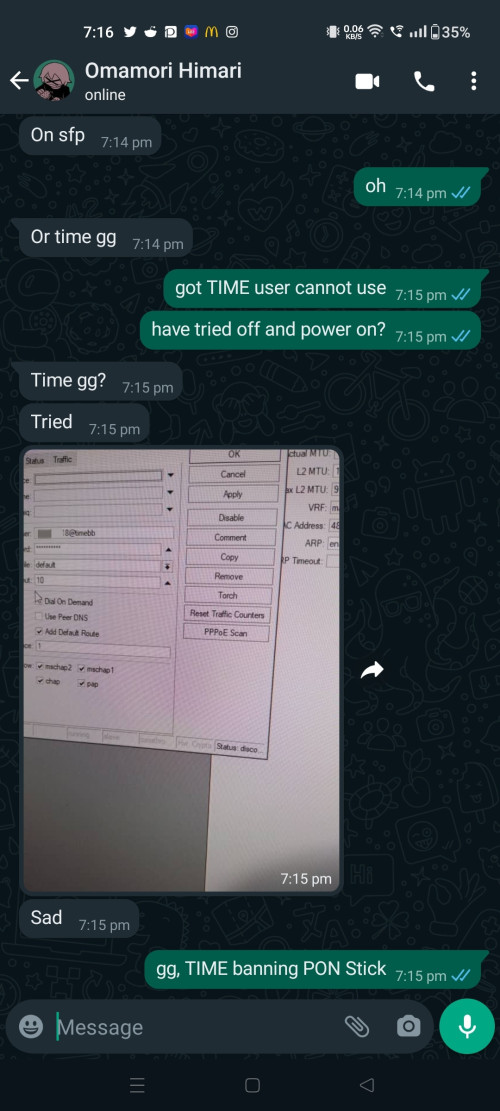
my friend can't use GPON ONU SFP on TIME...

TIME use a lot of Huawei, I am sure TIME starting to crack down illegal ONU
yenchenje
post Jul 4 2023, 09:43 PM

Enthusiast
*****
Junior Member
932 posts

Joined: Dec 2019
So currently still feasible to run ONU stick? Plan to buy one but from all the info I've been seeing, may still have to continue using TM's own crappy ONU..

But might be changing over to Maxis at my parents new place from Unifi currently, but not sure if still can be reliable atm Hmm

83 Pages « < 35 36 37 38 39 > » Top
 

Change to:
| Lo-Fi Version
0.0201sec    1.26    6 queries    GZIP Disabled
Time is now: 9th December 2025 - 02:07 PM