It's working fine... ODI GPON Stick is compatible with EdgeRouter. I'm able to connect to Unifi with following configuration:
The configuration was tested on ER-12, will work with ER-4/ER-6P/ER-X-SFP
eth0-7 = switch0 (192.168.88.0/24)
eth8 = LAN2 (192.168.89.0/24)
eth11 = ODI GPON SFP
1) Plug-in ODI GPON Stick to eth11
2) create br0
CODE
Config Tree >> interfaces >> bridge
3) Back to Dashboard, bridge eth8 & eth11
4) Connect to eth8, change LAN IP -> 192.168.1.2/24
5) Open browser, connect to ODI GPON web interface
CODE
http://192.168.1.1
admin:admin
Telnet
root:PON521
6) ODI GPON main page
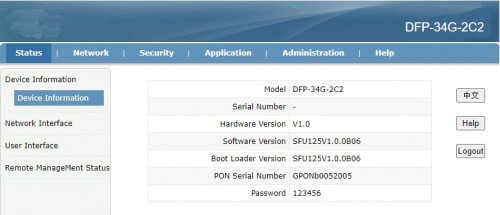
7) Update SN/Password
CODE
NETWORK >> PON
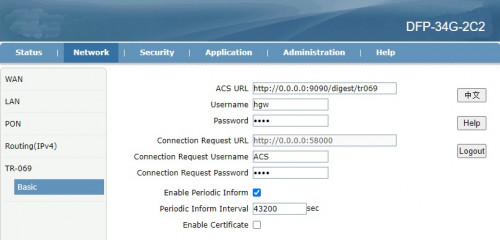
8) Just to be safe, nothing overwrites the ODI GPON Stick, I've changed TR-069 password as well.
» Click to show Spoiler - click again to hide... «
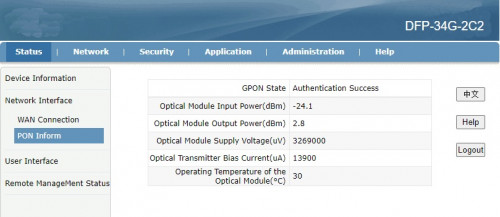
9) You should get the following status once GPON Stick is restarted.
» Click to show Spoiler - click again to hide... «
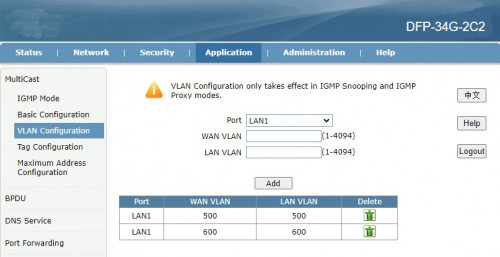
10) Make sure LAN1 (SFP -> ER) is tagged. Unifi 500/600
» Click to show Spoiler - click again to hide... «
Back to ER-12
11) Remove eth8/eth11 from br0 then disable br0 (Optional)
12) Create VLAN 500 on eth11 (SFP)
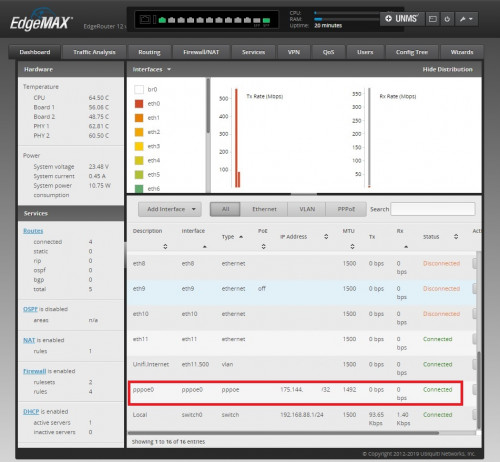
13) Create PPPoE, that's it!


 Jul 19 2020, 12:06 PM



 Quote
Quote



 0.0305sec
 0.22
0.22
 6 queries
 GZIP Disabled