Welcome Guest ( Log In | Register )

83 Pages < 1 2 3 4 > » Bottom

Outline · [ Standard ] · Linear+

Home Networking Ditch ONU, use GPON SFP on Business Grade Router, 2.5G ONU for Unifi & Maxis, NO NEED VLAN

views
     
TSAnime4000
post Jun 28 2020, 05:48 PM

Look at all my stars!!
*******
Senior Member
2,399 posts

Joined: Jul 2009
From: /dev/null


QUOTE(miloaisdino @ Jun 27 2020, 12:44 PM)
sounds good that omci can be bypassed just by using a 3rd party onu. hopefully the huawei olt wont know how to provision the hard cap on the zte onu stick doh.gif
*
This what I hope for, just wanted a fair speed and better latency

QUOTE(miloaisdino @ Jun 27 2020, 12:44 PM)
(actually the maxis issued btu should be tm property, maybe the hard cap is tm's way of unfairly limiting maxis bw?)
*
Yes, my 300Mbps become 280Mbps in real world, same with upload become 42Mbps, and worst like streamyx, high jitter and lags,
I choose maxis because of routing to SG and no port get block, like TCP 6667, game will run perfectly with better NAT status.

QUOTE(miloaisdino @ Jun 27 2020, 12:44 PM)
any idea what brand of onu that maxis user used?
*
I got HG8240H5 as TM gave me.
I remember when I press "reset" button, and internet speed become 4mbps, this show speed is capped on ONT, not OLT. even tho I put correct password.

---

I kind give up on Hacking Huawei HG8240H5, didn't find any exploit.
if thankyou manage to get ONU SFP stick to work on EdgeRouter 12, I will follow the same, and money well spend biggrin.gif
aneip
post Jun 28 2020, 07:15 PM

Look at all my stars!!
*******
Senior Member
2,466 posts

Joined: Nov 2004


Is this for Huawei ONU? or now got universal ONU which can use all the places? My house use alcatel. love to use SFP if possible..
miloaisdino
post Jun 28 2020, 07:27 PM

Regular
******
Senior Member
1,418 posts

Joined: Jul 2015
QUOTE(Anime4000 @ Jun 28 2020, 05:48 PM)
This what I hope for, just wanted a fair speed and better latency
Yes, my 300Mbps become 280Mbps in real world, same with upload become 42Mbps, and worst like streamyx, high jitter and lags,
I choose maxis because of routing to SG and no port get block, like TCP 6667, game will run perfectly with better NAT status.
I got HG8240H5 as TM gave me.
I remember when I press "reset" button, and internet speed become 4mbps, this show speed is capped on ONT, not OLT. even tho I put correct password.

---

I kind give up on Hacking Huawei HG8240H5, didn't find any exploit.
if thankyou manage to get ONU SFP stick to work on EdgeRouter 12, I will follow the same, and money well spend  biggrin.gif
*
ah that makes sense. at first when you connect without pppoe login your line will be capped to 4mbps (probably for hypptv stb), then upon pppoe login the olt will retroactively increase the speed cap of the ont by omci.

i wonder having 2 pppoe dialers behind the ont to different accounts can confuse the olt doh.gif

edit: maybe thats the key, omci configures a speed limit for port 2 on the huawei onu for maxis, but if the onu can be hacked for maxis to be on eg port 3 instead maybe omci will fail to speed cap?

This post has been edited by miloaisdino: Jun 28 2020, 07:32 PM
TSAnime4000
post Jun 28 2020, 09:01 PM

Look at all my stars!!
*******
Senior Member
2,399 posts

Joined: Jul 2009
From: /dev/null


QUOTE(aneip @ Jun 28 2020, 07:15 PM)
Is this for Huawei ONU? or now got universal ONU which can use all the places? My house use alcatel. love to use SFP if possible..
*
SFP stick is more to universal version

QUOTE(miloaisdino @ Jun 28 2020, 07:27 PM)
ah that makes sense. at first when you connect without pppoe login your line will be capped to 4mbps
*
No, it was under my PPPoE and get 4mbps ONT default settings

QUOTE(miloaisdino @ Jun 28 2020, 07:27 PM)
i wonder having 2 pppoe dialers behind the ont to different accounts can confuse the olt doh.gif
*
I have tried, not working, the ONT speed is shared.

QUOTE(miloaisdino @ Jun 28 2020, 07:27 PM)
edit: maybe thats the key, omci configures a speed limit for port 2 on the huawei onu for maxis, but if the onu can be hacked for maxis to be on eg port 3 instead maybe omci will fail to speed cap?
*
If can hack and override, we have custom OMCI settings.

I thinking, upgrade to 500Mbps for a week and downgrade back 300Mbps, will ONT speed remain cap at 500?
Need call 123 for this.
miloaisdino
post Jun 28 2020, 10:18 PM

Regular
******
Senior Member
1,418 posts

Joined: Jul 2015
QUOTE(Anime4000 @ Jun 28 2020, 09:01 PM)
SFP stick is more to universal version
No, it was under my PPPoE and get 4mbps ONT default settings
I have tried, not working, the ONT speed is shared.
If can hack and override, we have custom OMCI settings.

I thinking, upgrade to 500Mbps for a week and downgrade back 300Mbps, will ONT speed remain cap at 500?
Need call 123 for this.
*
i meant there will be a time lag between pppoe login and increase of speed cap.. all the onts in the same area share the same pw so i guess the speed cap is by detecting your account on pppoe?

taken from tm alcatel ont provisioning guide online:
Service Provisioning – Sample Service Configuration
7.1 Create ONT Infrastructure
Create ONTs using SLID Password.
configure equipment ont interface 1/1/5/1/10 sw-ver-pland AUTO
sernum ALCL:00000000 subslocid 0000000001 voip-allowed enable enable-aes enable

so any match for alcl sn or huawei sn ont will be allowed as long the pw (replaced by 0000000001) is correct for any speed

thankyou
post Jun 29 2020, 01:15 AM

Regular
******
Senior Member
1,941 posts

Joined: Jan 2003
It's going to be a long wait for my GPON Stick...

It has been the same status since 21st June...


QUOTE
Departed country of origin

2020-06-21 23:30:59 [GMT+8]

Shipment accepted by airline

2020-06-21 02:21:33 [GMT+8]


It seems forever now... biggrin.gif

Seems like the guy complain after few days of usage:

QUOTE
I wasn't happy long. .. The module worked for a couple of days, and then stopped establishing a connection with Olt. GPON state: Init state. Contacted the technical support of the provider, they reported that they do not even see authorization attempts. The configuration provider did not change. The ont provider from which the serial number for authorization was taken was connected without problems. Numerous reboot and reset to factory settings did not help. Apparently SFP module marriage. I will contact the seller.


This post has been edited by thankyou: Jun 29 2020, 01:16 AM
TSAnime4000
post Jun 29 2020, 11:18 AM

Look at all my stars!!
*******
Senior Member
2,399 posts

Joined: Jul 2009
From: /dev/null


QUOTE(thankyou @ Jun 29 2020, 01:15 AM)
It's going to be a long wait for my GPON Stick...

It has been the same status since 21st June...
It seems forever now...  biggrin.gif

Seems like the guy complain after few days of usage:
*
oh wow, being stuck in shipping delivery.

if you got extra money, what about Ubiquiti UFiber Nano G:
https://community.ui.com/questions/UFiber-N...dc-cdbcf6939617

that ONT looks awesome to, can be powered by Passive PoE.
thankyou
post Jun 29 2020, 04:24 PM

Regular
******
Senior Member
1,941 posts

Joined: Jan 2003
QUOTE(Anime4000 @ Jun 29 2020, 11:18 AM)
oh wow, being stuck in shipping delivery.

if you got extra money, what about Ubiquiti UFiber Nano G:
https://community.ui.com/questions/UFiber-N...dc-cdbcf6939617

that ONT looks awesome to, can be powered by Passive PoE.
*
It should work but I'm more interested in All-In-One device... I'm currently upgrading switches to CRS309-1G-8S+IN so that's additional RM3k +- to spend including all the SPF modules.

Skipping Nano G smile.gif

This post has been edited by thankyou: Jun 29 2020, 04:24 PM
thankyou
post Jul 17 2020, 03:30 PM

Regular
******
Senior Member
1,941 posts

Joined: Jan 2003
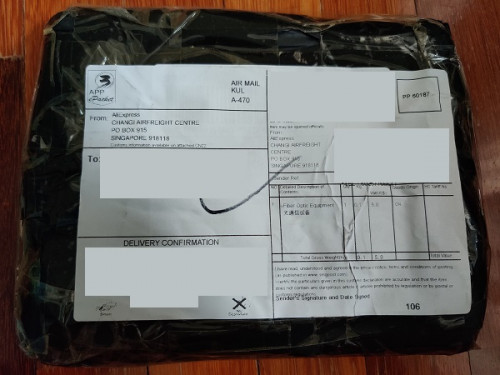
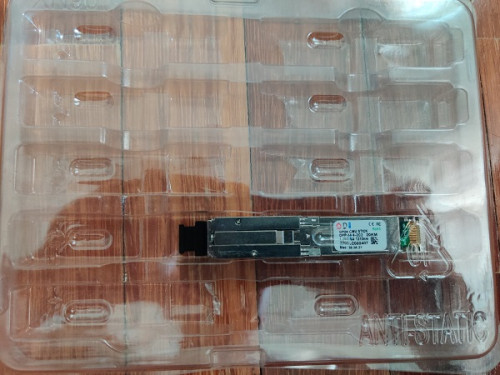
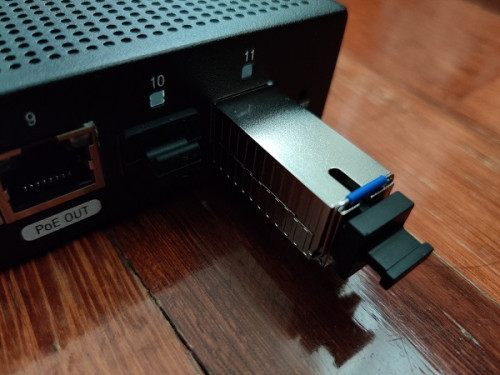
Finally it has arrived... I won't be replacing the router until midnight as there's other family members who are WFH.

user posted image
user posted image
user posted image
TSAnime4000
post Jul 17 2020, 05:08 PM

Look at all my stars!!
*******
Senior Member
2,399 posts

Joined: Jul 2009
From: /dev/null


QUOTE(thankyou @ Jul 17 2020, 03:30 PM)
Finally it has arrived... I won't be replacing the router until midnight as there's other family members who are WFH.
user posted image
*
Wow nice, we wait for the results!
thankyou
post Jul 18 2020, 04:04 AM

Regular
******
Senior Member
1,941 posts

Joined: Jan 2003
It's working fine... ODI GPON Stick is compatible with EdgeRouter. I'm able to connect to Unifi with following configuration:

The configuration was tested on ER-12, will work with ER-4/ER-6P/ER-X-SFP

eth0-7 = switch0 (192.168.88.0/24)
eth8 = LAN2 (192.168.89.0/24)
eth11 = ODI GPON SFP

1) Plug-in ODI GPON Stick to eth11

2) create br0
CODE
Config Tree >> interfaces >> bridge


3) Back to Dashboard, bridge eth8 & eth11

4) Connect to eth8, change LAN IP -> 192.168.1.2/24

5) Open browser, connect to ODI GPON web interface
CODE
http://192.168.1.1
admin:admin
Telnet
root:PON521


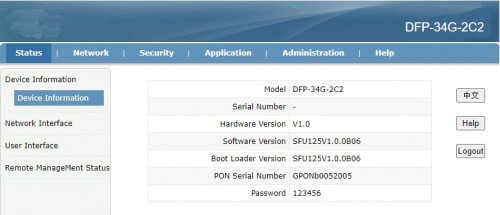
6) ODI GPON main page
user posted image

7) Update SN/Password
CODE
NETWORK >> PON


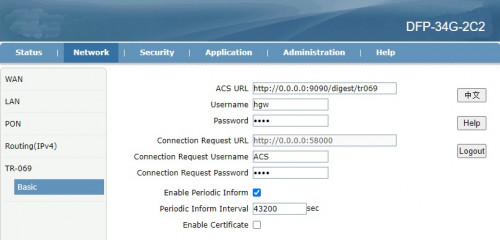
8) Just to be safe, nothing overwrites the ODI GPON Stick, I've changed TR-069 password as well.
» Click to show Spoiler - click again to hide... «


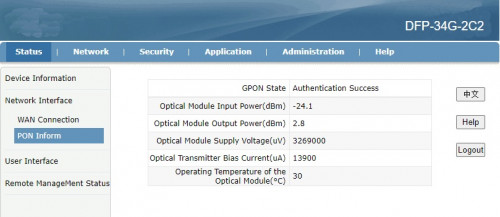
9) You should get the following status once GPON Stick is restarted.
» Click to show Spoiler - click again to hide... «


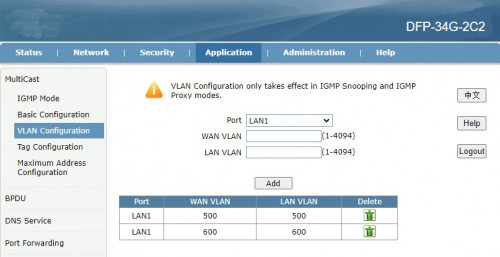
10) Make sure LAN1 (SFP -> ER) is tagged. Unifi 500/600
» Click to show Spoiler - click again to hide... «


Back to ER-12

11) Remove eth8/eth11 from br0 then disable br0 (Optional)

12) Create VLAN 500 on eth11 (SFP)

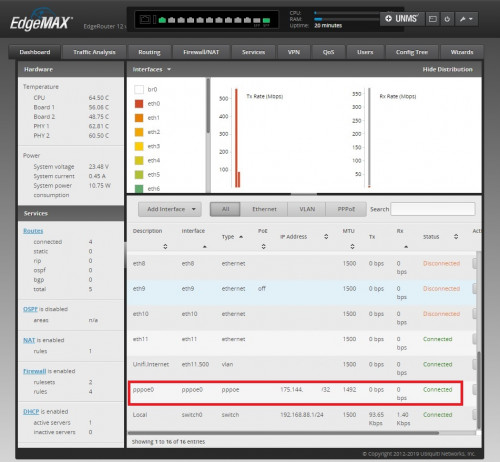
13) Create PPPoE, that's it!
user posted image

This post has been edited by thankyou: Jul 18 2020, 04:16 AM
Azusa_San
post Jul 18 2020, 11:11 AM

Casual
***
Junior Member
309 posts

Joined: Mar 2015
if we replace the ONT with GPON SFP, this means we cannot use the VOIP / unifi phone anymore?

thankyou
post Jul 18 2020, 12:01 PM

Regular
******
Senior Member
1,941 posts

Joined: Jan 2003
QUOTE(Azusa_San @ Jul 18 2020, 11:11 AM)
if we replace the ONT with GPON SFP, this means we cannot use the VOIP / unifi phone anymore?
*
You can with following:

1) if you know the SIP credential
2) SIP phone/adapter that uses RJ45
TSAnime4000
post Jul 18 2020, 07:50 PM

Look at all my stars!!
*******
Senior Member
2,399 posts

Joined: Jul 2009
From: /dev/null


QUOTE(thankyou @ Jul 18 2020, 04:04 AM)
It's working fine... ODI GPON Stick is compatible with EdgeRouter. I'm able to connect to Unifi with following configuration:

The configuration was tested on ER-12, will work with ER-4/ER-6P/ER-X-SFP

eth0-7 = switch0 (192.168.88.0/24)
eth8 = LAN2 (192.168.89.0/24)
eth11 = ODI GPON SFP

1) Plug-in ODI GPON Stick to eth11

2) create br0
CODE
Config Tree >> interfaces >> bridge


3) Back to Dashboard, bridge eth8 & eth11

4) Connect to eth8, change LAN IP -> 192.168.1.2/24

5) Open browser, connect to ODI GPON web interface
CODE
http://192.168.1.1
admin:admin
Telnet
root:PON521


6) ODI GPON main page
user posted image

7) Update SN/Password
CODE
NETWORK >> PON


8) Just to be safe, nothing overwrites the ODI GPON Stick, I've changed TR-069 password as well.
» Click to show Spoiler - click again to hide... «


9) You should get the following status once GPON Stick is restarted.
» Click to show Spoiler - click again to hide... «


10) Make sure LAN1 (SFP -> ER) is tagged. Unifi 500/600
» Click to show Spoiler - click again to hide... «


Back to ER-12

11) Remove eth8/eth11 from br0 then disable br0 (Optional)

12) Create VLAN 500 on eth11 (SFP)

13) Create PPPoE, that's it!
user posted image
*
Neat! Finally I can start saving some cash for this kind of setup!
Have you find that able to override OLT Speed Cap? Curious 3rd Party ONT able to override OLT settings


This make some serious Networking!

This post has been edited by Anime4000: Jul 18 2020, 07:50 PM
TSAnime4000
post Jul 18 2020, 07:51 PM

Look at all my stars!!
*******
Senior Member
2,399 posts

Joined: Jul 2009
From: /dev/null


QUOTE(Azusa_San @ Jul 18 2020, 11:11 AM)
if we replace the ONT with GPON SFP, this means we cannot use the VOIP / unifi phone anymore?
*
Some Business have Unifi and 3 telephone line, since ONT have 2, TM forward VLAN400 to LAN3 and use this device (D-LINK DVG-5004S) to add another telephone line.

You can make VLAN Bridge, it works with my ER-X Maxis Setup:
CODE

eth0.621--pppoe0
eth0.821--br0--eth4.821 (Maxis Remote Management)
eth0.822--br1--eth4.822 (VoIP)

aneip
post Jul 18 2020, 09:27 PM

Look at all my stars!!
*******
Senior Member
2,466 posts

Joined: Nov 2004


QUOTE(thankyou @ Jul 17 2020, 03:30 PM)
Finally it has arrived... I won't be replacing the router until midnight as there's other family members who are WFH.

*
Can I know your original model of BTU? Or confirm compatible will all brand?
thankyou
post Jul 18 2020, 09:34 PM

Regular
******
Senior Member
1,941 posts

Joined: Jan 2003
QUOTE(aneip @ Jul 18 2020, 09:27 PM)
Can I know your original model of BTU? Or confirm compatible will all brand?
*
It's Huawei HG8240H, replace Huawei BTU is fine... No promise for any other models...
papyrous
post Jul 18 2020, 10:30 PM

Getting Started
**
Junior Member
214 posts

Joined: May 2017
cool. was thinking of possibly going for this to ditch ONU

https://www.turris.com/en/omnia/specifications/

TSAnime4000
post Jul 18 2020, 10:58 PM

Look at all my stars!!
*******
Senior Member
2,399 posts

Joined: Jul 2009
From: /dev/null


QUOTE(papyrous @ Jul 18 2020, 10:30 PM)
cool. was thinking of possibly going for this to ditch ONU

https://www.turris.com/en/omnia/specifications/
*
That thing have SIM Card slot!
My ZTE 4G Backup Dongle not reliable, overheat and no internet.
This make ultimate ALL on One!
thankyou
post Jul 18 2020, 11:58 PM

Regular
******
Senior Member
1,941 posts

Joined: Jan 2003
QUOTE(Anime4000 @ Jul 18 2020, 07:50 PM)
Neat! Finally I can start saving some cash for this kind of setup!
Have you find that able to override OLT Speed Cap? Curious 3rd Party ONT able to override OLT settings
This make some serious Networking!
*
Any sample command or anything I can refer to regarding to the OMCI commands?

83 Pages < 1 2 3 4 > » Top
 

Change to:
| Lo-Fi Version
0.0150sec    0.36    6 queries    GZIP Disabled
Time is now: 2nd December 2025 - 09:22 PM