Welcome Guest ( Log In | Register )

83 Pages « < 4 5 6 7 8 > » Bottom

Outline · [ Standard ] · Linear+

Home Networking Ditch ONU, use GPON SFP on Business Grade Router, 2.5G ONU for Unifi & Maxis, NO NEED VLAN

views
     
TSAnime4000
post Sep 21 2020, 11:00 PM

Look at all my stars!!
*******
Senior Member
2,399 posts

Joined: Jul 2009
From: /dev/null


QUOTE(thankyou @ Sep 21 2020, 12:29 PM)
It has been quite awhile since I last worked on GPON ONU... I've basically "given up" trying to use GPON ONU on ER-12. So far it has been stored in cold storage for sometime.

A little regret getting ER-12 as my heart still with Mikrotik... Maybe my next project is to build a pfsense with SFP slot...
*
need find pfSense box with SFP~ x86 can handle gigabit easily biggrin.gif

QUOTE(miloaisdino @ Sep 21 2020, 12:32 PM)
i suspect this is a TTL issue! its similar to how people used TTL changers to bypass tethering caps. try incrementing/decrementing the ttl of traffic destined to the dongle under "mangle" in mikrotik until it works
*
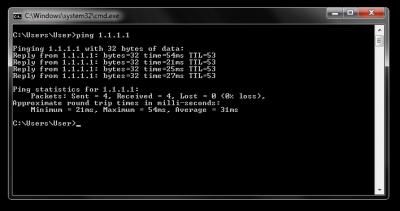
I have test ping ttl under Maxis TP-Link - ZTE Dongle

CODE
TTL:
Address         PC          TP-Link > ZTE Dongle
------------------------------------------------
1.1.1.1         53          54
google.com      112         113
facebook.com    49          50


PC:
Attached Image

TP-Link Router with ZTE Dongle Attached:
Attached Image

53 < 54 is decrease by 1,

So, I do test Firewall Mangle on pppoe-out1:
CODE
Chain: prerouting
In. Interface: pppoe-out1

Action: change TTL
TTL Action: decrement by 1

it's worked! so I change pppoe-out1 to lte1, not working!

I wonder why not work on lte1, maybe dongle detect by MAC Address?

miloaisdino
post Sep 21 2020, 11:36 PM

Regular
******
Senior Member
1,418 posts

Joined: Jul 2015
QUOTE(Anime4000 @ Sep 21 2020, 11:00 PM)
need find pfSense box with SFP~ x86 can handle gigabit easily biggrin.gif
I have test ping ttl under Maxis TP-Link - ZTE Dongle

CODE
TTL:
Address         PC          TP-Link > ZTE Dongle
------------------------------------------------
1.1.1.1         53          54
google.com      112         113
facebook.com    49          50


PC:
Attached Image

TP-Link Router with ZTE Dongle Attached:
Attached Image

53 < 54 is decrease by 1,

So, I do test Firewall Mangle on pppoe-out1:
CODE
Chain: prerouting
In. Interface: pppoe-out1

Action: change TTL
TTL Action: decrement by 1

it's worked! so I change pppoe-out1 to lte1, not working!

I wonder why not work on lte1, maybe dongle detect by MAC Address?
*
hmm so currently:
dongle +sim works when connected to pc --> maxis tplink
dongle doesnt work on mikrotik, sim doesnt work on phone

maxis detects ttl via Outgoing packets to their gateway, so Out Interface should be used instead of In Interface for mangle
https://forum.mikrotik.com/viewtopic.php?t=144140 (example of working for mikrotik dongle).

https://answers.microsoft.com/en-us/windows...3e-92fa5ca0bd16 the ttl from the ping is actually the "final" decremented ttl at the destination and is not what maxis receives! what i suspected was that the "original source" ttl value when dongle is connected to tplink is different from when dongle/sim is plugged anywhere else, so we need to "offset" the ttl somehow...

maybe can try connecting dongle by usb directly into pc instead then ping? that might rule out dongle detect mac address or other problems?

This post has been edited by miloaisdino: Sep 21 2020, 11:43 PM
TSAnime4000
post Sep 22 2020, 12:24 AM

Look at all my stars!!
*******
Senior Member
2,399 posts

Joined: Jul 2009
From: /dev/null


QUOTE(miloaisdino @ Sep 21 2020, 11:36 PM)
hmm so currently:
dongle +sim works when connected to pc --> maxis tplink
dongle doesnt work on mikrotik, sim doesnt work on phone
*
Yeah,
PC > Maxis TP-Link + 4G Dongle = Works
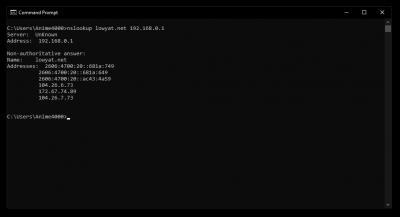
PC > Mikrotik + 4G Dongle = Not Working, only "nslookup" works

QUOTE(miloaisdino @ Sep 21 2020, 11:36 PM)
maxis detects ttl via Outgoing packets to their gateway, so Out Interface should be used instead of In Interface for mangle
https://forum.mikrotik.com/viewtopic.php?t=144140 (example of working for mikrotik dongle).

https://answers.microsoft.com/en-us/windows...3e-92fa5ca0bd16 the ttl from the ping is actually the "final" decremented ttl at the destination and is not what maxis receives! what i suspected was that the "original source" ttl value when dongle is connected to tplink is different from when dongle/sim is plugged anywhere else, so we need to "offset" the ttl somehow...
*
I been thinking the same, I want to know what TTL is set in Maxis TP-Link,
If have tool to crack USB Ethernet between Dongle and Router, inspect packet that way?

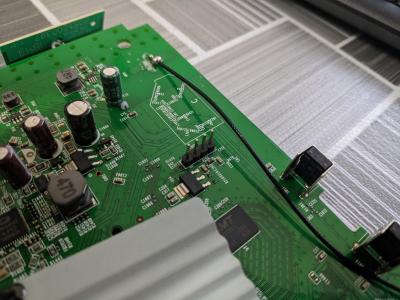
Or crack TP-Link router?

I managed to open since I have extra during PKP, put UART header and putty serial console, I stuck at Login, dont know what username and password doh.gif
» Click to show Spoiler - click again to hide... «


QUOTE(miloaisdino @ Sep 21 2020, 11:36 PM)
maybe can try connecting dongle by usb directly into pc instead then ping? that might rule out dongle detect mac address or other problems?
*
Plugging Maxis ZTE 4G Dongle into PC is same like plugging into Mikrotik, only "nslookup" works
Attached Image
Attached Image

I try follow that guide carefully, and do one by one finding, make Mikrotik ALL in One rclxm9.gif
miloaisdino
post Sep 22 2020, 12:27 AM

Regular
******
Senior Member
1,418 posts

Joined: Jul 2015
QUOTE(Anime4000 @ Sep 22 2020, 12:24 AM)
Yeah,
PC > Maxis TP-Link + 4G Dongle = Works
PC > Mikrotik + 4G Dongle = Not Working, only "nslookup" works
I been thinking the same, I want to know what TTL is set in Maxis TP-Link,
If have tool to crack USB Ethernet between Dongle and Router, inspect packet that way?

Or crack TP-Link router?

I managed to open since I have extra during PKP, put UART header and putty serial console, I stuck at Login, dont know what username and password  doh.gif
» Click to show Spoiler - click again to hide... «

Plugging Maxis ZTE 4G Dongle into PC is same like plugging into Mikrotik, only "nslookup" works
Attached Image
Attached Image

I try follow that guide carefully, and do one by one finding, make Mikrotik ALL in One rclxm9.gif
*
haha. maybe try static ttl first, easier than cracking tplink (there are only 255 combinations to try! (much fewer since ttl 1-35 will pretty much kill lots of websites)try near 64, 128, 255 +- or other common ttl maybe?)


This post has been edited by miloaisdino: Sep 22 2020, 12:32 AM
TSAnime4000
post Sep 22 2020, 12:34 AM

Look at all my stars!!
*******
Senior Member
2,399 posts

Joined: Jul 2009
From: /dev/null


QUOTE(miloaisdino @ Sep 22 2020, 12:27 AM)
haha. maybe try static ttl first, easier than cracking tplink (there are only 255 combinations to try! (much fewer since ttl 1-35 will pretty much kill lots of websites)try near 64, 128, 255 +- or other common ttl maybe?)
*
Do I need to disable FastTrack Connection?
miloaisdino
post Sep 22 2020, 12:35 AM

Regular
******
Senior Member
1,418 posts

Joined: Jul 2015
QUOTE(Anime4000 @ Sep 22 2020, 12:34 AM)
Do I need to disable FastTrack Connection?
*
for traffic destined to the dongle only, yes! anyway 4g isnt that fast shouldn't have any bottlenecks doh.gif
QUOTE(calvin1688 @ Apr 16 2019, 04:05 PM)
from the photo indicate you must insert the modem into the pc.FYi although you can plug your usb dongle into your pc & the usb dongle can shown blue light but due to maxis had lock the usb dongle thus the usb dongle will only work when you plug into the maxis tp-link router.
*
QUOTE(G K Lai @ Apr 16 2019, 11:09 PM)
Yup! You are right, I plug it to PC just for testing purpose.
Because it can't seems to work on Maxis' TP-Link router so I try it on PC.
That was last night when Maxis Fibre were down for many people, so I have to try hard for this backup SIM to work.
There was once when I plug it to PC, it seems so have connection, then it ask new software is available and if I would like to update.
I clicked [Yes] then... never get it to work again since then... bangwall.gif
The update should came from either Maxis or ZTE, I can't tell when the message simply pops-up just like that.   sad.gif
*
hmm could be mac address? maybe clone the tplink mac onto mikrotik too?!
https://wiki.mikrotik.com/wiki/Manual:Interface/LTE

QUOTE(trix @ May 28 2019, 02:08 PM)
for those with dongle that has been updated and unable to connect anymore, try these steps:

1. browse to the dongle IP address using firefox
2. go to Settings -> Dial-up settings
3. right click in the page -> Inspect Element
4. search for #auto_mode, double click on disabled="" on the highlighted line, delete it, press enter
old value =
CODE
<input type="radio" name="modeGroup" id="auto_mode" value="auto_dial" data-bind="checked: selectMode, enable: false" disabled="">

new value =
CODE
<input type="radio" name="modeGroup" id="auto_mode" value="auto_dial" data-bind="checked: selectMode, enable: false" >

5. Automatic radio button is now enabled, click on it
6. search for apply, delete disabled="" as well
old value =
CODE
<input type="button" class="btn-1" data-bind="click: save, enable: false" trans="apply" disabled="" value="Apply">

new value =
CODE
<input type="button" class="btn-1" data-bind="click: save, enable: false" trans="apply" value="Apply">

7. Apply button is now enabled, click on it, you should receive success message

Now, the dongle should be usable again with maxis router archer c5v and should auto connect if fiber connection is down.
*
QUOTE(Connexiionz @ Oct 24 2019, 01:52 AM)
Pls note that there is a mac address lock in place... The dongle will only work properly with c5v with firmware 190304 because of dhcp addressing issue... BTW 190304 is the latest version of the routers firmware.
With the mac address lock... U will not be able to use the dongle anywhere else besides ur router.

Latest news.

The sim will not work on anything other than maxis routers or dongle. You maybe the lucky few whose sim is not locked to the maxis devices...
*
confirm mac address!! not TTL!! mac address for maxis usb should be maxis router mac +- a few digits on the last octet!

This post has been edited by miloaisdino: Sep 22 2020, 12:46 AM

TSAnime4000
post Sep 22 2020, 01:57 AM

Look at all my stars!!
*******
Senior Member
2,399 posts

Joined: Jul 2009
From: /dev/null


QUOTE(miloaisdino @ Sep 22 2020, 12:35 AM)
for traffic destined to the dongle only, yes! anyway 4g isnt that fast shouldn't have any bottlenecks doh.gif
hmm could be mac address? maybe clone the tplink mac onto mikrotik too?!
https://wiki.mikrotik.com/wiki/Manual:Interface/LTE
confirm mac address!! not TTL!! mac address for maxis usb should be maxis router mac +- a few digits on the last octet!
*
No wonder, I type TTL value from 1 until 255 no luck doh.gif

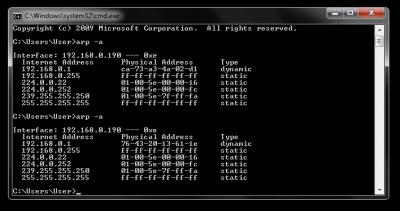
some digging:
Attached Image
in maxis router show some list mac address

Attached Image
when 4G backup plug into PC, this mac address kind static across connect-disconnect

Attached Image
Attached Image
Attached Image
the Dongle MAC address will generate randomly every USB plugged

Question is, can Mikrotik act like TP-Link? fool ZTE Dongle, or TP-Router has "special" driver for dongle hmm.gif
miloaisdino
post Sep 22 2020, 11:05 AM

Regular
******
Senior Member
1,418 posts

Joined: Jul 2015
QUOTE(Anime4000 @ Sep 22 2020, 01:57 AM)
No wonder, I type TTL value from 1 until 255 no luck doh.gif

some digging:
Attached Image
in maxis router show some list mac address

Attached Image
when 4G backup plug into PC, this mac address kind static across connect-disconnect

Attached Image
Attached Image
Attached Image
the Dongle MAC address will generate randomly every USB plugged

Question is, can Mikrotik act like TP-Link? fool ZTE Dongle, or TP-Router has "special" driver for dongle hmm.gif
*
maybe the dongle sees the mac address of the tplink/mikrotik and decides whether to block the connection. so maybe try using /interface on mikrotik to set the mac address of the maxis router facing the dongle to "fool" the dongle? arp -a shows the mac address of the dongle itself after every reboot (not the pc)

or maybe theres a hidden mac address filtering page on the dongle webui itself that can be found by inspect element. then we can just disable it!

This post has been edited by miloaisdino: Sep 22 2020, 11:23 AM
pacat
post Sep 22 2020, 04:00 PM

New Member
*
Newbie
16 posts

Joined: Aug 2006
From: bendang, paya, selut, parit, etc.


QUOTE(Anime4000 @ Sep 22 2020, 12:24 AM)
Plugging Maxis ZTE 4G Dongle into PC is same like plugging into Mikrotik, only "nslookup" works
Attached Image
The reason resolve work because Mikrotik is a client behind the dongle network, thus the packet involved was only outgoing packet.
Forwarding on lte1 interface will be confusing cause duplicate route to internet. In your screenshot, active flag was on pppoe-out1 interface, so your connection will not go through lte1 interface.

Have you tried to disable the pppoe-out1 interface first then check whether internet works with lte?

If you want to test specific client to use on lte, you can try this
1. Disable add default route on dhcp client on lte1 interface
CODE
/ip dhcp-client set add-default-route=no [find interface=lte1]

2. Add route to with
2.a Dst addr = 0.0.0.0/0
2.b Gateway = lte1
2.c Routing mark = lte_route (any name to be used later)
CODE
/ip route add dst-address=0.0.0.0/0 gateway=lte1 routing-mark=lte_route


After fixing the route, next is prerouting decision what/when packet to go through this route in IP>Firewall>Mangle.
3. Then add new mangle rule with
3.a Chain = prerouting
3.b Action = mark routing
3.c New routing mark = lte_route (whatever routing mark set in 2.c)
3.d Src address = x.x.x.x (ip address)
CODE
/ip firewall mangle add chain=prerouting action=mark-routing new-routing-mark=lte in-interface=bridge src-address=192.168.88.x


Then the device with specified ip in mangle rule will be using the dongle internet, assuming you have added NAT masquerade rule for outgoing interface lte1, since you can open the dongle webUI.


TSAnime4000
post Sep 22 2020, 10:35 PM

Look at all my stars!!
*******
Senior Member
2,399 posts

Joined: Jul 2009
From: /dev/null


QUOTE(pacat @ Sep 22 2020, 04:00 PM)
Have you tried to disable the pppoe-out1 interface first then check whether internet works with lte?
*
Yes, I simply delete pppoe-out1

I can nslookup 192.168.0.1 on PC through Mikrotik > ZTE Dongle
However other traffic are not get through!

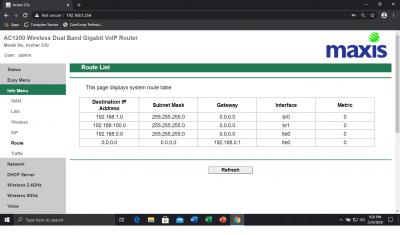
If Dongle looking for specific Device MAC Address, how to fool [data] > [dongle interface]

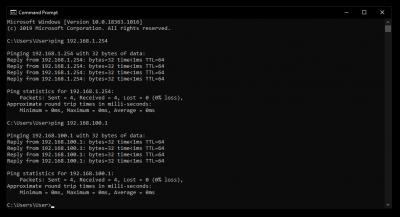
after some digging, I saw Maxis Router can be access via 192.168.100.1 (br1) under 192.168.1.0/24 (br0) network, I guess some NAT happening

Attached Image
Attached Image

cant get br1 MAC Address since 192.168.100.1 is behind 192.168.1.1
pacat
post Sep 23 2020, 12:15 AM

New Member
*
Newbie
16 posts

Joined: Aug 2006
From: bendang, paya, selut, parit, etc.


QUOTE(Anime4000 @ Sep 22 2020, 01:57 AM)
some digging:
Attached Image
in maxis router show some list mac address
I believe mac address seen by the dongle in the maxis router was at dhcp_USB_4G. Try put that mac address into lte interface in Mikrotik.
TSAnime4000
post Sep 23 2020, 02:36 AM

Look at all my stars!!
*******
Senior Member
2,399 posts

Joined: Jul 2009
From: /dev/null


QUOTE(pacat @ Sep 23 2020, 12:15 AM)
I believe mac address seen by the dongle in the maxis router was at dhcp_USB_4G. Try put that mac address into lte interface in Mikrotik.
*
I tried to change in "Interface" > LTE. it revert back to original MAC.

What if bridge > dummy interface > lte1.

the dummy interface is using maxis router mac address, some kind change mac address
pacat
post Sep 23 2020, 09:36 AM

New Member
*
Newbie
16 posts

Joined: Aug 2006
From: bendang, paya, selut, parit, etc.


QUOTE(Anime4000 @ Sep 23 2020, 02:36 AM)
I tried to change in "Interface" > LTE. it revert back to original MAC.

What if bridge > dummy interface > lte1.

the dummy interface is using maxis router mac address, some kind change mac address
*
Maybe. Try putting the mac address into that bridge and dhcp client interface point to that bridge.

I think lte interface can be added as port into the bridge. Just create a new bridge then add the lte interface as port. No need of dummy interface in between.

This post has been edited by pacat: Sep 23 2020, 09:41 AM
TSAnime4000
post Sep 23 2020, 04:28 PM

Look at all my stars!!
*******
Senior Member
2,399 posts

Joined: Jul 2009
From: /dev/null


QUOTE(pacat @ Sep 23 2020, 09:36 AM)
Maybe. Try putting the mac address into that bridge and dhcp client interface point to that bridge.
*
I have tried this, and not working. bridge > lte1

QUOTE(pacat @ Sep 23 2020, 09:36 AM)
I think lte interface can be added as port into the bridge. Just create a new bridge then add the lte interface as port. No need of dummy interface in between.
*
You mean: bridge > bridgeLTE---lte1 ?
I create bridgeLTE and add a port, the lte1 interface are not exist sad.gif
miloaisdino
post Sep 23 2020, 04:49 PM

Regular
******
Senior Member
1,418 posts

Joined: Jul 2015
QUOTE(Anime4000 @ Sep 23 2020, 04:28 PM)
I have tried this, and not working. bridge > lte1
You mean: bridge > bridgeLTE---lte1 ?
I create bridgeLTE and add a port, the lte1 interface are not exist sad.gif
*
https://forum.mikrotik.com/viewtopic.php?t=113569#p614298
this might be helpful!
pacat
post Sep 23 2020, 05:31 PM

New Member
*
Newbie
16 posts

Joined: Aug 2006
From: bendang, paya, selut, parit, etc.


QUOTE(Anime4000 @ Sep 23 2020, 04:28 PM)
I have tried this, and not working. bridge > lte1
You mean: bridge > bridgeLTE---lte1 ?
I create bridgeLTE and add a port, the lte1 interface are not exist sad.gif
*
QUOTE(miloaisdino @ Sep 23 2020, 04:49 PM)
Yup maybe can try set passthrough to bridgeLTE interface.
https://help.mikrotik.com/docs/display/ROS/...sthroughExample
TSAnime4000
post Sep 24 2020, 02:49 AM

Look at all my stars!!
*******
Senior Member
2,399 posts

Joined: Jul 2009
From: /dev/null


QUOTE(miloaisdino @ Sep 23 2020, 04:49 PM)
QUOTE(pacat @ Sep 23 2020, 05:31 PM)
Yup maybe can try set passthrough to bridgeLTE interface.
https://help.mikrotik.com/docs/display/ROS/...sthroughExample
*
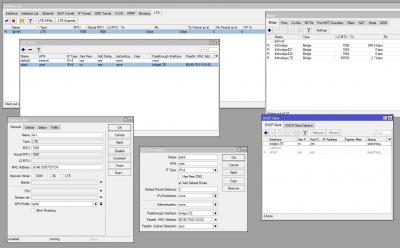
tried, lte1 passthrough to bridge adapter not work:
Attached Image

I guess, time to UART console for some iptables:
Attached Image
WebGUI login not work in UART console, I dont know what is the valid login
UART log here: https://gist.github.com/Anime4000/4dd729dc4...7eec36121184992

This post has been edited by Anime4000: Sep 24 2020, 03:30 AM
pacat
post Sep 24 2020, 05:21 AM

New Member
*
Newbie
16 posts

Joined: Aug 2006
From: bendang, paya, selut, parit, etc.


QUOTE(Anime4000 @ Sep 24 2020, 02:49 AM)
tried, lte1 passthrough to bridge adapter not work:
Attached Image

I guess, time to UART console for some iptables:
Attached Image
WebGUI login not work in UART console, I dont know what is the valid login
UART log here: https://gist.github.com/Anime4000/4dd729dc4...7eec36121184992
*
Have you put the mac address into bridgeLTE's mac address? Passthrough mac address is only a filter to pass a client's mac address to the dongle (in case the interface connected to multiple hosts).

Searching for your dongle vid and pid leads to this https://www.development-cycle.com/2017/04/2...e-mf823-inside/. Though not same as yours, is it able to telnet into? Password might not be same.
miloaisdino
post Sep 24 2020, 09:57 AM

Regular
******
Senior Member
1,418 posts

Joined: Jul 2015
QUOTE(Anime4000 @ Sep 24 2020, 02:49 AM)
tried, lte1 passthrough to bridge adapter not work:
Attached Image

I guess, time to UART console for some iptables:
Attached Image
WebGUI login not work in UART console, I dont know what is the valid login
UART log here: https://gist.github.com/Anime4000/4dd729dc4...7eec36121184992
*
can't switch usb device
sd 0:0:0:1: [sda] we have tried 10 times, but the USB device is still not ready, just return here!
sd 0:0:0:1: [sda] media is not present, wait for 0.5 seconds
getConfigFromMergeFile 150 decrypt mode_switch.conf successfully

and

usbcore: registered new interface driver cdc_ether
usbcore: registered new interface driver rndis_host
Failed to to open /proc/tty/driver/usbserial

clue from here onwards

and maybe the uart password can be found from router backup config file (downloaded from webui)?

This post has been edited by miloaisdino: Sep 24 2020, 10:09 AM
TSAnime4000
post Sep 24 2020, 08:55 PM

Look at all my stars!!
*******
Senior Member
2,399 posts

Joined: Jul 2009
From: /dev/null


QUOTE(pacat @ Sep 24 2020, 05:21 AM)
Have you put the mac address into bridgeLTE's mac address? Passthrough mac address is only a filter to pass a client's mac address to the dongle (in case the interface connected to multiple hosts).

Searching for your dongle vid and pid leads to this https://www.development-cycle.com/2017/04/2...e-mf823-inside/. Though not same as yours, is it able to telnet into? Password might not be same.
*
I tried run nmap scan, none sad.gif
» Click to show Spoiler - click again to hide... «


QUOTE(miloaisdino @ Sep 24 2020, 09:57 AM)
can't switch usb device
sd 0:0:0:1: [sda] we have tried 10 times, but the USB device is still not ready, just return here!
sd 0:0:0:1: [sda] media is not present, wait for 0.5 seconds
getConfigFromMergeFile 150 decrypt mode_switch.conf successfully

and

usbcore: registered new interface driver cdc_ether
usbcore: registered new interface driver rndis_host
Failed to to open /proc/tty/driver/usbserial

clue from here onwards

and maybe the uart password can be found from router backup config file (downloaded from webui)?
*
router backup config is encrypted, cannot see inside, unless I extract router flash and binwalk it, find shadow file and run password crack?

This post has been edited by Anime4000: Sep 24 2020, 09:56 PM

83 Pages « < 4 5 6 7 8 > » Top
 

Change to:
| Lo-Fi Version
0.0214sec    0.60    6 queries    GZIP Disabled
Time is now: 8th December 2025 - 06:07 AM