Welcome Guest ( Log In | Register )

83 Pages  1 2 3 > » Bottom

Outline · [ Standard ] · Linear+

Home Networking Ditch ONU, use GPON SFP on Business Grade Router, 2.5G ONU for Unifi & Maxis, NO NEED VLAN

views
     
TSAnime4000
post Mar 18 2020, 12:26 PM, updated 3 months ago

Look at all my stars!!
*******
Senior Member
2,399 posts

Joined: Jul 2009
From: /dev/null


2.5G ONT for Unifi Ultra & Maxis Fiber (Maxis own Infra)
For Unifi Ultra customers subscribing to 1Gbps or 2Gbps plans, looking to maximize performance and resolve the 1+1 GbE issue to attain a pure 2Gbps connection through a single LAN.

Note to Foreigner
This post is specifically for Malaysia Fiber ISP (Telekom Malaysia). You can use this guide as a reference. Keep in mind that some ISPs may have a closed ecosystem, restricting users from using custom ONT. Be aware that this information may vary in other countries.

Where to buy
Contact Anime4000 via WhatsApp (click)
The PON Stick comes pre-installed with my customized firmware (Nijika/OpenWRT) tailored to the OLT vendor serving your area. This device arrives fully configured and is ready for immediate use, adhering to TM Standards.

NOTE: Not all OLT is configured equal, each area is behave differently, ISP may use many OLT Brands that respond differently,
many OLT giving O5 status but doesn't provide VLAN's. Investigation is required so I can properly configure and provide correct PON model,
don't worry, I can help you find it.

ONU Box
2.5G ONU Bridge (BTU) is available! Yes, typical BTU like Modem + Router.
Also no need VLAN support, you can use any router that don't support VLAN rclxm9.gif
Also... using same Nijika Firmware for additional improvement and bug fix rclxms.gif
Post about 2.5G ONU Bridge here!


List of 2.5Gb Enjoyer
1Gbps subscriber can break Gigabit barrier!
1. lwk523 Breaking 1Gbps barrier!
2. izhamsatria (Recorded Maximum Unifi Biz Speed @ 2.1Gbps (12/Aug/2022))

Successful Client
3. ididhaiqal Unifi Ultra (2Gbps) SpeedTest Result
4. khjh1976 Unifi Ultra (2Gbps) SpeedTest Result
5. darkearth Unifi Ultra (2Gbps) SpeedTest Result
6. Off Lowyat User #6240 Breaking 1Gbps barrier: 1043Mbps DL, 522Mbps UP
7. Off Lowyat User #5740 #2 in Malaysia, 2118Mbps DL, 1043Mbps UP
8. powertech #7181 (Unifi, Unifi, Allo)
9. kinghz
10. jeebsion
11. dingo7
12. 5hinn
13. bigmojo
14. asellus
15. aztech
16. akifrabbani multiple 2Gbps deployment
17. sya102003
18. Silvermage93
19. Facebook User #1 in Malaysia, 2125.68Mbps DL, 1054.5Mbps UP Using Nijika Firmware Rel.: 240330
20. bigmojo Maxis own Infra, 2Gbps Plan: 2185Mbps DL, 950Mbps UP
21. petrofsky77
22. anthrax33
23. hizadzahid GPON ONU Box, FHTT OLT

2.5G ONU Box
1. OKLY
2. TM Employee (compatibility research)
3.

Supported ISP
ISP Support Universal ME 171 Proprietary OMCI
TM-Unifi
TM-Maxis
TM-DiGi
TM-Celcom
Maxis NGBB Huawei Huawei Specific OMCI
TIME Huawei <1G Huawei Only
Allo Huawei & Nokia Calix Specific OMCI (Cyberjaya)*
*Has been verified with Pendakwah Teknologi, Calix has Proprietary OMCI and disallow non Calix ONT, only Cyberjaya use Calix OLT so far


Highest Speed Rank
Username Download Speed ISP OLT
BigMojo 2185Mbps Maxis own Infra Huawei (Proprietary)
FB User 2126Mbps Unifi ZTE
Off LYN #5740 2118Mbps Unifi Alcatel-Lucent/Nokia

Username Uplaod Speed ISP OLT
FB User 1054Mbps Unifi ZTE
Off LYN #5740 1043Mbps Unifi Alcatel-Lucent/Nokia
Off LYN #???? 971Mbps Unifi Huawei


List High Performance Unifi OLT Rank
LOCATION OLT Max DL Max UP DSCP Priority Queue
Shah Alam ZTEG 2129Mb 1054Mb
Cyberjaya ALCL 2118Mb 1043Mb
Kajang HWTC 2098Mb 971Mb
Terengganu FHTT 2080Mb 941Mb Broken*
Kuching, Sarawak FHTT 609Mb 826Mb ⚠️ Broken**
NOTE:
* FHTT has broken Priority Queue cause Download and Upload speed are unstable and unbalance (example: 2047Mbps DL, 67Mbps Up)
** 1Gbps customer having broken OLT traffic queue where using PON Stick and stock ZTE ONT cause 1Gbps customer get +800Mbps upload speed!
Maximum ever recorded by my customer using my GPON

Verified 2.5G Capable Device
Here is a list of devices that have been personally verified by myself and the community to effectively handle 2Gbps without any speed issues.

Brand Model Type Info
Mikrotik CRS305-1G-4S+IN Switch 4*SFP+, 1*GbE
Mikrotik CRS354-48G-4S+2Q+RM Switch 2*QSFP, 4*SFP+, 48*1GbE
Mikrotik RB5009UG+S+IN Router 1*SFP+, 1*2.5GbE 7*1GbE
Mikrotik CCR2004-1G-12S+2XS Router 2*SFP28, 12*SFP+, 1*1GbE
Mikrotik CCR2116-12G-4S+ Router 4*SFP+, 12*1GbE
TP-Link ER2260T VPN Router 2*SFP+, 4*1GbE
TP-Link ER707-M2 VPN Router 2*2.5GbE, 4*1GbE, 1*SFP+ via HiSGMII to 2.5GbE
TP-Link Archer BE550 WiFi7 Router 1*2.5GbE, 4*2.5GbE. via HiSGMII to 2.5GbE
TP-Link Archer BE800 WiFi7 Router 1*SFP+, 1*10GbE, 4*2.5GbE. via debug firmware
TP-Link Archer BE900 WiFi7 Router 1*SFP+, 1*10GbE, 4*2.5GbE, 1*1GbE. via debug firmware
Asus RT-AX89X WiFi6 Router 1*SFP+, via beta firmware, no 2.5GbE LAN
Asus ROG Rapture GT-AX11000 PRO WiFi6 Router via 2.5GbE WAN, 1*10GbE LAN
Asus ROG Rapture GT-AXE16000 WiFi6e Router via 2.5GbE WAN, 2*10GbE LAN
Asus RT-BE88U WiFi7 Router via SFP+ (HiSGMII/2500Base-X Support)

Take Note!
Not all 2.5GbE routers can effectively handle 2Gbps via PPPoE. Some Mesh WiFi routers in Router Mode struggle to manage 2Gbps download traffic from the PPPoE interface, and certain routers experience buffer overruns due to the GPON upload limit (1244Mbps), resulting in reduced upload speeds.

List of known issue 2.5G device
Brand Model Type Issue
Ubiquiti UDM SE Router SFP+ incapable to support HiSGMII, PPPoE Client runs on CPU, 1.3Gbps is max download via PPPoE
Ubiquiti UDM Pro Router SFP+ incapable to support HiSGMII, PPPoE Client runs on CPU, 1.3Gbps is max download via PPPoE
TP-Link Deco BE65 WiFi7 Router Downstream buffer overruns, limiting download speed to a maximum of 300Mbps.
TP-Link Deco BE85 WiFi7 Router Uptream buffer overruns, limiting upload speed to a maximum of 500Mbps via LAN, 100Mbps via WiFi
Several WiFi 7 SoCs may struggle to handle speeds over 2Gbps via PPPoE due to added overhead causing buffer issues. Running without PPPoE should resolve this.

2.5G Auto Neg
Next release will be 2.5G by default (HiSGMII/2.5G baseX) as SFP in Linux Kernel, Next revision info should look like this:
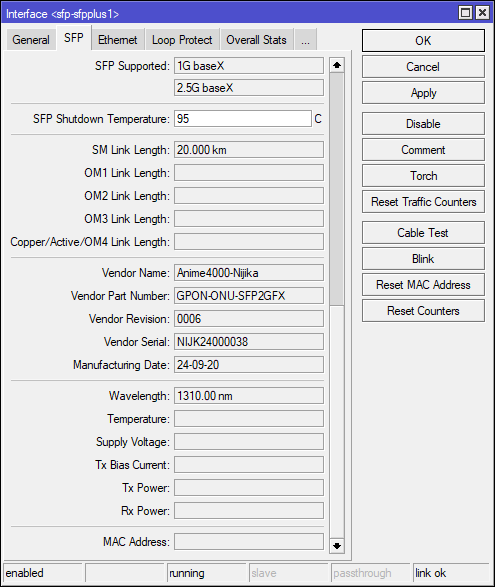
user posted image

Typical Layout
The setup involves a GPON ONU Stick with an SFP+Router (AIO). If a specific router lacks an SFP slot, you'll need an SFP to 2.5GbE Converter via Ethernet cable.

Example use SFP+ Router
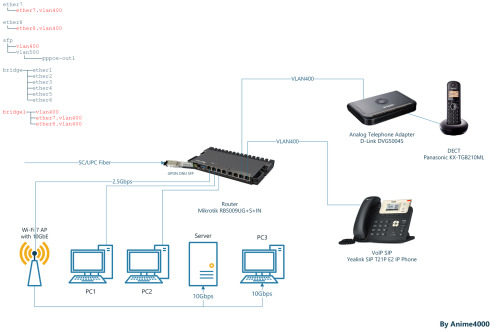
user posted image

GPON ONU Stick Setup
In this guide, I'll show you how to setup quickly and safely for your fiber subscription. (Nijika based Firmware)

PRELIMINARY
1. Take note that GPON ONU Stick take time to boot, please wait around 1 minute.
2. Mikrotik require fiber to be connected inorder to access, it's safe to plug the fiber into my GPON ONU Stick (it wont trigger the OLT of rouge ONT)
3. All my GPON ONU Stick has been set to use D-Link DPN-FX3060V OMCI Information

Default Login
My GPON ONU Stick comes with default WebGUI and Telnet enabled. I suggest setting it up through the WebGUI rather than using command-line Telnet.

Address 192.168.1.1
Username admin
Password admin
NOTE: As SFP devices lack a factory reset button, it's not advisable to change the default IP address, username, and password. Forgetting these details can result in a bricked device that is challenging to configure. If security is a concern, make sure to note down the new IP address and password.

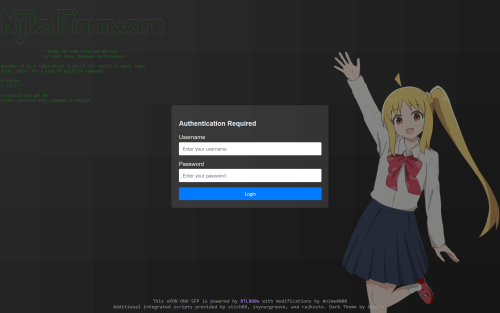
Login
Login with default credential
user posted image

Device Status
You will greet with the Device Status page, take note on the Interface Speed, which mode and speed currently on.
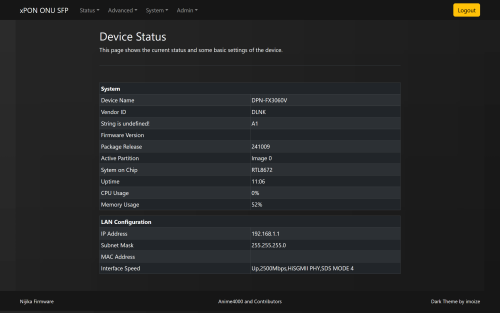
user posted image

PON Status
Usual PON Fiber status (Optical Reading) and ONT Authentication
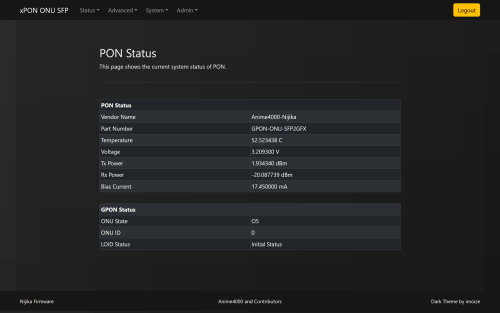
user posted image

PLOAM/ONU Password & Serial Number
Go to Advanced ➡️ GPON. Enter the Password and S/N from your D-Link. Press Apply once done.
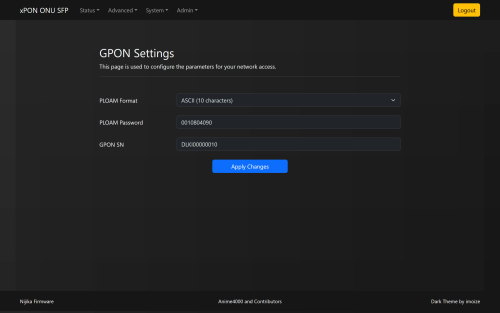
user posted image

Commit & Reboot
Once you have set the PLOAM Password and S/N, reboot the GPON ONU Stick, navigate to: System ➡️ Commit & Reboot

VLAN
When using PON Stick, use of VLAN is a must! The PON Stick ignore some OMCI, refer to VLAN page to check which VLAN is used
ISP Internet VoIP IPTV Management
Unifi 500 400 600 209
TM-Maxis 621 822 823 209, 821
TM-Celcom 623 - - 209, 819
TM-DiGi 629 - - 209, ?
TIME 499 140 - 121
Allo 990 (PPPoE), 992 (DHCP) - - 995➡️1501
Allo-Celcom 101 - - 819

VoIP
If you plan to use VoIP, please bridge appropriate VLAN and keep in mind Tagging or Untag. Many home router like TP-Link, Asus, ... will untag the VLAN when bridge, mind this.
Second, ISP may filter DHCP request, make sure check your DHCP Option.
1. Unifi
2. Maxis
3. TIME by PRSXFENG

NOTE:
For Unifi, if VLAN400 not exist on LAN 1 (ME Point: 0x101, UNI: LAN 1), you can request VLAN400/VoIP on LAN 1, so GPON Stick/Box can use it

Troubleshoot
In the OMCI Specification, OLTs are responsible for provisioning VLANs, specifying which ones to bridge, the LAN port for bridging, and termination inside the ONT (IPoE) for TR069, VoIP, or both; the PON Terminal supports two methods of link termination, PPTP (bridging) and VEIP (bridging, IPoE).

In rare cases, the OLT may provision differently, leading the GPON ONU Stick to follow suit and bridge into non-existence. This need to override and correct the bridging...

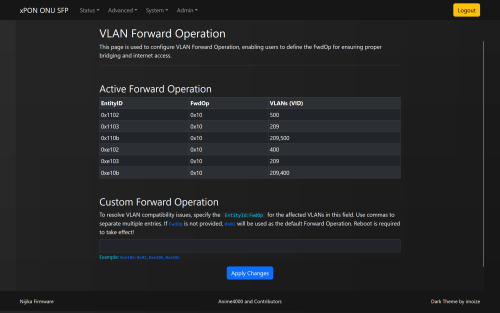
Override the Forward Operation
Navigate to Advanced ➡️ OMCI FwdOp
user posted image

Quick understanding the Entity Id
Type FwdOp Prefix
PPTP 0x01XX
PPTP 0x1XXX
VEIP 0x0eXX
PPP 0x4XXX
POTS 0xffXX

VEIP is most common use for TR069 and VoIP, as these are stay inside ONT

Quick understanding the FwdOp (Forward Operation)
Forward operation Received frame: Tagged Received frame: Untagged
0x00 Bridging (a) (no investigation) Bridging (a)
0x01 Discarding © Bridging (a)
0x02 Bridging (a) (no investigation) Discarding ©
0x03 Action (h) (VID investigation) Bridging (a)
0x04 Action (h) (VID investigation) Discarding ©
0x10 Action (h) (VID investigation) Discarding ©

Learn More OMCI specification Table 9.3.11-1:
Attached File  T_REC_G.988_202211_I__PDF_E.pdf ( 9mb ) Number of downloads: 503


Most common FwdOp is 0x10 and in rare case using 0x04

Example
user posted image

If you see, the VLAN has multiple entry, if you like to bridge all except 209,

Syntax
EntityId , EntityId , EntityId : FwdOp (optional) , EntityId
0x1202 , 0x1203 , 0x120b : 0x02 , 0x1204
FwdOp can be left off, it will use 0x02 as default FwdOp

So, you can enter like this:
CODE

0x1202,0x1203,0x120b:0x02,0x1204


Press Apply then System ➡️ Commit & Reboot to take effect.

FwdOp also tell what to do with VLAN, thus setting to 0x02 to bridge as always

PPTP vs VEIP
Overriding Forward Operation is useful for emulating 4-port ONT, back then TM specifically force non Unifi use on LAN 2 ONT, since GPON ONU Stick only have 1 MII interface, override it useful to prevent provision into non-existence.

To learn more quickly about LAN Provisioning that TM use, click here

By default, firmware ignore LAN Provisioning, this make non-Unifi able to use GPON ONU Stick.

Multiple PPPoE on Same Interface
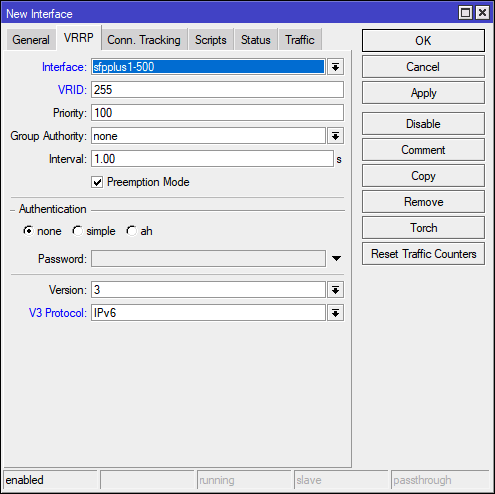
Many PPPoE servers dislike having the same MAC address. To address this, consider employing VRRP tricks, which may involve integrating your router into the ISP's VRRP. This ensures that each VRRP interface has its own MAC address corresponding to the VRID.

* Remap VLAN when using same ISP, example:
Interface VLAN IN VLAN OUT
sfp-sfpplus 2 500 500
sfp-sfpplus 3 500 501
sfp-sfpplus 4 500 502

VRRP
Navigate to Interface ➡️ ➕ ➡️ VRRP
user posted image
VRID can from 1 to 255, then move your pppoe-out1 to new vrrp1

GPON vs NBase-T
Reasons why many ISP giving 1+1Gbps plan because Ethernet is symmetrical, More Info

Advanced Stuff
Risk of D.I.Y.

user posted image

Internal
D-Link DPN-FX3060V: A1 | B1

Disclaimer
I, We, and LYN members cannot take responsibility for individuals engaging in DIY activities outside of the specified design, causing network disturbances (not limited to the entire city), and risking bans or summons by ISPs and OLT vendors.

If you like to tinkering, bricking the stuff, headache, wasting time and own the OLT @ Home, you can take a look at my GitHub Repo

Previous Post
Web Archive Checkpoint #2
Web Archive Checkpoint #1

This post has been edited by Anime4000: Dec 8 2024, 02:56 AM
Doraku
post Jun 25 2020, 03:28 PM

Old threads digger
******
Senior Member
1,155 posts

Joined: Apr 2016


This is kinda super late, but i did ask this kinda question before.

Here a answer from soonwai
https://forum.lowyat.net/index.php?showtopi...post&p=89527265
miloaisdino
post Jun 25 2020, 03:44 PM

Regular
******
Senior Member
1,418 posts

Joined: Jul 2015
QUOTE(Doraku @ Jun 25 2020, 03:28 PM)
This is kinda super late, but i did ask this kinda question before.

Here a answer from soonwai
https://forum.lowyat.net/index.php?showtopi...post&p=89527265
*
iirc tm doesnt do auth based on gpon sn anymore. as long as the password is correct it should work

This post has been edited by miloaisdino: Jun 25 2020, 03:45 PM
TSAnime4000
post Jun 25 2020, 05:58 PM

Look at all my stars!!
*******
Senior Member
2,399 posts

Joined: Jul 2009
From: /dev/null


QUOTE(Doraku @ Jun 25 2020, 03:28 PM)
This is kinda super late, but i did ask this kinda question before.

Here a answer from soonwai
https://forum.lowyat.net/index.php?showtopi...post&p=89527265
*
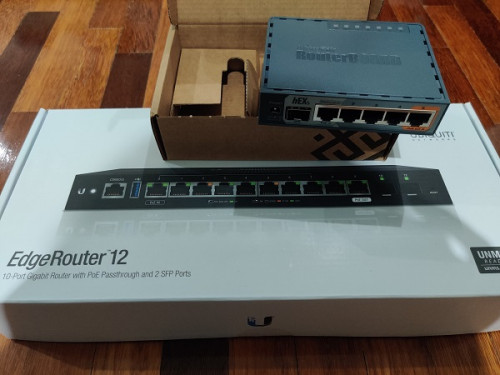
I just got direct Fiber, wanted to use EdgeRouter 12 with GPON SFP
not sure how to auth with password

QUOTE(miloaisdino @ Jun 25 2020, 03:44 PM)
iirc tm doesnt do auth based on gpon sn anymore. as long as the password is correct it should work
*
What I observe, I tried change ONT and put my ONT Password, it works.
Maybe TM OLT looking for SN: 48575443 (HWTC) ?
SUSCandy12
post Jun 25 2020, 07:56 PM

Regular
******
Senior Member
1,878 posts

Joined: Apr 2019
QUOTE(Anime4000 @ Jun 25 2020, 05:58 PM)
What I observe, I tried change ONT and put my ONT Password, it works.
Maybe TM OLT looking for SN: 48575443 (HWTC) ?
*
The SN differs by area. Different area has different ONT password. You can even backup your ONT config save it somewhere safe than upload back to your new ONT which now can easily be bought online.

They place the guide video now all over Youtube teaching users how to replace the ONT by yourself.


TSAnime4000
post Jun 25 2020, 11:14 PM

Look at all my stars!!
*******
Senior Member
2,399 posts

Joined: Jul 2009
From: /dev/null


QUOTE(Candy12 @ Jun 25 2020, 07:56 PM)
The SN differs by area. Different area has different ONT password. You can even backup your ONT config save it somewhere safe than upload back to your new ONT which now can easily be bought online.

They place the guide video now all over Youtube teaching users how to replace the ONT by yourself.
*
I have 2 ONT, stock TM give me and TIME ONT,
I simply put Password and it works,
Both ONT have SN: 48575443 (HWTC)

The config file I got was not encrypted, and didn't store any SN or ONT Password:
https://github.com/Anime4000/Hacking_Huawei...ee_modified.xml

What I do, enable Telnet and SSH with it
amirsubhi
post Jun 26 2020, 11:00 AM

The Power Is IN Your Hand!
******
Senior Member
1,472 posts

Joined: Apr 2005
From: SumwHeRe In MaLaYsIa


QUOTE(Anime4000 @ Jun 25 2020, 11:14 PM)
I have 2 ONT, stock TM give me and TIME ONT,
I simply put Password and it works,
Both ONT have SN: 48575443 (HWTC)

The config file I got was not encrypted, and didn't store any SN or ONT Password:
https://github.com/Anime4000/Hacking_Huawei...ee_modified.xml

What I do, enable Telnet and SSH with it
*
as long as Mikrotik GPON SFP/Huawei support OMCI required by TM than it may work,

I haven't try it though for mikrotik.


miloaisdino
post Jun 26 2020, 12:10 PM

Regular
******
Senior Member
1,418 posts

Joined: Jul 2015
QUOTE(amirsubhi @ Jun 26 2020, 11:00 AM)
as long as Mikrotik GPON SFP/Huawei support OMCI required by TM than it may work,

I haven't try it though for mikrotik.
*
https://blog.csdn.net/zhidc/article/details...Pai2-4.nonecase
Some gpon sticks are actually full fledged onts, even come with web interface. omci might work then
TSAnime4000
post Jun 26 2020, 04:24 PM

Look at all my stars!!
*******
Senior Member
2,399 posts

Joined: Jul 2009
From: /dev/null


QUOTE(miloaisdino @ Jun 26 2020, 12:10 PM)
https://blog.csdn.net/zhidc/article/details...Pai2-4.nonecase
Some gpon sticks are actually full fledged onts, even come with web interface. omci might work then
*
This stick is ONU, might can work?
https://s.lazada.com.my/s.bI2ov
miloaisdino
post Jun 26 2020, 04:34 PM

Regular
******
Senior Member
1,418 posts

Joined: Jul 2015
QUOTE(Anime4000 @ Jun 26 2020, 04:24 PM)
This stick is ONU, might can work?
https://s.lazada.com.my/s.bI2ov
*
it might.. but some gpon sticks come without user interface with "locked loid and password" so you cant really use it unless someone has access to the olt side for whitelisting.. bummer
TSAnime4000
post Jun 26 2020, 05:40 PM

Look at all my stars!!
*******
Senior Member
2,399 posts

Joined: Jul 2009
From: /dev/null


QUOTE(miloaisdino @ Jun 26 2020, 04:34 PM)
it might.. but some gpon sticks come without user interface with "locked loid and password" so you cant really use it unless someone has access to the olt side for whitelisting.. bummer
*
ah, need ask seller for WebUI
thankyou
post Jun 26 2020, 07:00 PM

Regular
******
Senior Member
1,941 posts

Joined: Jan 2003
QUOTE(Anime4000 @ Jun 26 2020, 05:40 PM)
ah, need ask seller for WebUI
*
You can't use this unless you have SFP programmer... My ONU stick w/ web interface is otw... Will update once it's proven working....

If you can find MA5671A with programmer, this is the best in terms of compatibility...

Just noticed you've gotten EdgeRouter 12, I've just gotten this as well! Definitely will update if it's compatible with the ONU Stick I ordered... Most likely compatible since it supports bridge and changeable LOID/GPON PN.

Costly experiment
user posted image

This post has been edited by thankyou: Jun 26 2020, 07:16 PM
TSAnime4000
post Jun 26 2020, 07:33 PM

Look at all my stars!!
*******
Senior Member
2,399 posts

Joined: Jul 2009
From: /dev/null


QUOTE(thankyou @ Jun 26 2020, 07:00 PM)
You can't use this unless you have SFP programmer... My ONU stick w/ web interface is otw... Will update once it's proven working....

If you can find MA5671A with programmer, this is the best in terms of compatibility...

Just noticed you've gotten EdgeRouter 12, I've just gotten this as well! Definitely will update if it's compatible with the ONU Stick I ordered... Most likely compatible since it supports bridge and changeable LOID/GPON PN.

Costly experiment
user posted image
*
May I know which model ONU stick you bought? I wait you for testing, I in tight budget, just can't simply buy and fail blush.gif
thankyou
post Jun 26 2020, 08:07 PM

Regular
******
Senior Member
1,941 posts

Joined: Jan 2003
QUOTE(Anime4000 @ Jun 26 2020, 07:33 PM)
May I know which model ONU stick you bought? I wait you for testing, I in tight budget, just can't simply buy and fail  blush.gif
*
#Aliexpress MYR 208.80 25%OFF | GPON SFP ONU Stick With MAC SC Connector DDM pon module
https://a.aliexpress.com/_dTNv9ks

This is the stick... It's proven working with Mikrotik routers... That's the reason I get Hex S to test it out as well.

Ordered 2 weeks ago and still waiting...

This post has been edited by thankyou: Jun 26 2020, 08:08 PM
thankyou
post Jun 26 2020, 08:10 PM

Regular
******
Senior Member
1,941 posts

Joined: Jan 2003
QUOTE(miloaisdino @ Jun 25 2020, 03:44 PM)
iirc tm doesnt do auth based on gpon sn anymore. as long as the password is correct it should work
*
I don't think they ever authenticate with GPON SN or MAC as long as the password is correct. I've replace the ONU since 2012 and it was working all the while...
miloaisdino
post Jun 26 2020, 09:46 PM

Regular
******
Senior Member
1,418 posts

Joined: Jul 2015
QUOTE(thankyou @ Jun 26 2020, 08:10 PM)
I don't think they ever authenticate with GPON SN or MAC as long as the password is correct. I've replace the ONU since 2012 and it was working all the while...
*
It's like some gpon sticks have their passwords locked to 123456780 so the only way is loid/sn auth but we know thats not what tm does.
TSAnime4000
post Jun 26 2020, 10:32 PM

Look at all my stars!!
*******
Senior Member
2,399 posts

Joined: Jul 2009
From: /dev/null


QUOTE(thankyou @ Jun 26 2020, 08:07 PM)
#Aliexpress MYR 208.80  25%OFF | GPON SFP ONU Stick With MAC SC Connector DDM pon module
https://a.aliexpress.com/_dTNv9ks

This is the stick... It's proven working with Mikrotik routers... That's the reason I get Hex S to test it out as well.

Ordered 2 weeks ago and still waiting...
*
See feedback that, they show have WebUI to configure ONT Authentication
Since you have ER-12, test if that works.
Also, if possible, try override OLT OMCI command or manual OMCI, try remove/adjust Hardware Speed Capping, I like to remove speed cap VLAN 621 to achieve A+ Anti Bufferbloat. let PPPoE based speed limit.

SSH Log OLT of HG8240H5, OLT Provisioning:
CODE
1981-01-01 00:01:43 [Critical][Config-Log] Terminal:OLT(-),Result:Success,Type:Set,Msg:Me[11] Inst[257] Att[5] Val[0]
1981-01-01 00:01:43 [Critical][Config-Log] Terminal:OLT(-),Result:Success,Type:Set,Msg:Me[11] Inst[258] Att[5] Val[0]
1981-01-01 00:01:43 [Critical][Config-Log] Terminal:OLT(-),Result:Success,Type:Set,Msg:Me[11] Inst[259] Att[5] Val[0]
1981-01-01 00:01:43 [Critical][Config-Log] Terminal:OLT(-),Result:Success,Type:Set,Msg:Me[11] Inst[260] Att[5] Val[0]


QUOTE(miloaisdino @ Jun 26 2020, 09:46 PM)
It's like some gpon sticks have their passwords locked to 123456780 so the only way is loid/sn auth but we know thats not what tm does.
*
I also have change TM to TIME ONT, what I do simply put my ONT Authentication Password.
Maybe TM OLT have list or SN check, between new HG8240 and HG8240H5, both have same "48575443" (HWTC) SN at first 8 HEX digit,
miloaisdino
post Jun 27 2020, 01:17 AM

Regular
******
Senior Member
1,418 posts

Joined: Jul 2015
QUOTE(Anime4000 @ Jun 26 2020, 10:32 PM)
See feedback that, they show have WebUI to configure ONT Authentication
Since you have ER-12, test if that works.
Also, if possible, try override OLT OMCI command or manual OMCI, try remove/adjust Hardware Speed Capping, I like to remove speed cap VLAN 621 to achieve A+ Anti Bufferbloat. let PPPoE based speed limit.

SSH Log OLT of HG8240H5, OLT Provisioning:
CODE
1981-01-01 00:01:43 [Critical][Config-Log] Terminal:OLT(-),Result:Success,Type:Set,Msg:Me[11] Inst[257] Att[5] Val[0]
1981-01-01 00:01:43 [Critical][Config-Log] Terminal:OLT(-),Result:Success,Type:Set,Msg:Me[11] Inst[258] Att[5] Val[0]
1981-01-01 00:01:43 [Critical][Config-Log] Terminal:OLT(-),Result:Success,Type:Set,Msg:Me[11] Inst[259] Att[5] Val[0]
1981-01-01 00:01:43 [Critical][Config-Log] Terminal:OLT(-),Result:Success,Type:Set,Msg:Me[11] Inst[260] Att[5] Val[0]

I also have change TM to TIME ONT, what I do simply put my ONT Authentication Password.
Maybe TM OLT have list or SN check, between new HG8240 and HG8240H5, both have same "48575443" (HWTC) SN at first 8 HEX digit,
*
nice. looking at the ui screenshots from the reviews, it is an unlocked rebranded zte onu stick!
edit: it seems to be quite beefy, with 600mhz cpu and 256mb of ram. heck i wonder if it can hardware nat too!

also i used RED qos algorithm to improve bufferbloat on my mikrotik. needs quite a bit of tuning tho

This post has been edited by miloaisdino: Jun 27 2020, 01:27 AM
TSAnime4000
post Jun 27 2020, 03:32 AM

Look at all my stars!!
*******
Senior Member
2,399 posts

Joined: Jul 2009
From: /dev/null


QUOTE(miloaisdino @ Jun 27 2020, 01:17 AM)
nice. looking at the ui screenshots from the reviews, it is an unlocked rebranded zte onu stick!
edit: it seems to be quite beefy, with 600mhz cpu and 256mb of ram. heck i wonder if it can hardware nat too!

also i used RED qos algorithm to improve bufferbloat on my mikrotik. needs quite a bit of tuning tho
*
Oh! I didn't know that was unlocked rebranded ZTE ONU stick.
I plan to have ER-X-SFP or ER-12, if that stick works, currently I using ER-X.

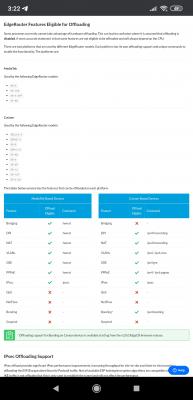
ER-X have "offload hwnat" to offload NAT to Hardware Level.
Attached Image

However, enable Smart QoS will make "hwnat" render useless,
plus very taxing CPU cycle and strain 12V 1A adapter.
I simply enable Smart QoS at Upload:
Attached Image

I saw some Maxis Fibre user able to get more speed than advertised, removing/increasing ONT Speed Limit help eliminate Bufferbloat, and no need QoS to be enable, and reduce router CPU usage!
miloaisdino
post Jun 27 2020, 12:44 PM

Regular
******
Senior Member
1,418 posts

Joined: Jul 2015
QUOTE(Anime4000 @ Jun 27 2020, 03:32 AM)
Oh! I didn't know that was unlocked rebranded ZTE ONU stick.
I plan to have ER-X-SFP or ER-12, if that stick works, currently I using ER-X.

ER-X have "offload hwnat" to offload NAT to Hardware Level.
Attached Image

However, enable Smart QoS will make "hwnat" render useless,
plus very taxing CPU cycle and strain 12V 1A adapter.
I simply enable Smart QoS at Upload:
Attached Image

I saw some Maxis Fibre user able to get more speed than advertised, removing/increasing ONT Speed Limit help eliminate Bufferbloat, and no need QoS to be enable, and reduce router CPU usage!
*
sounds good that omci can be bypassed just by using a 3rd party onu. hopefully the huawei olt wont know how to provision the hard cap on the zte onu stick doh.gif (actually the maxis issued btu should be tm property, maybe the hard cap is tm's way of unfairly limiting maxis bw?)

any idea what brand of onu that maxis user used?

This post has been edited by miloaisdino: Jun 27 2020, 01:23 PM

83 Pages  1 2 3 > » Top
 

Change to:
| Lo-Fi Version
0.0282sec    0.84    6 queries    GZIP Disabled
Time is now: 2nd December 2025 - 12:16 PM