Welcome Guest ( Log In | Register )

Outline · [ Standard ] · Linear+

 What Android framework/tech that thy used?

views
     
TSeddymohd
post Mar 7 2020, 12:33 AM, updated 6y ago

New Member
*
Junior Member
18 posts

Joined: Oct 2004


Hi,
I am very new to Android apps development. Tng E-Wallet, Amonline, Myunifi, shopee kind of have the same theme or maybe the same framework/technologies. Do anyone have info about this? I would like to develop apps with similar interface.

Thanks
SUSjbcoder
post Mar 7 2020, 01:48 AM

Enthusiast
*****
Junior Member
783 posts

Joined: Sep 2019
Read up on Material Design.
FlierMate
post May 19 2022, 08:01 PM

On my way
****
Validating
543 posts

Joined: Nov 2020
(To avoid opening too many threads at my own, I will post my findings as a reply)

Just started Flutter programming, after loading Demo project, my first step was to learn how to deploy to phone. tongue.gif

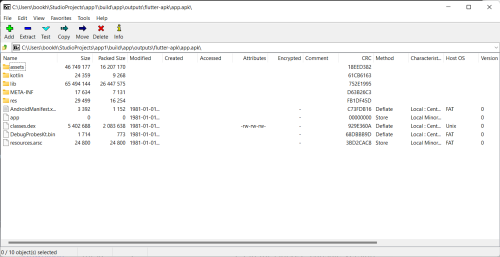
Surprisingly, APK can be extracted (in my case, I use 7zip)
user posted image

CODE
Directory of C:\Users\bookh\StudioProjects\app1\build\app\outputs\flutter-apk\apk_arm

19/05/2022  05:15 PM    <DIR>          .
19/05/2022  05:15 PM    <DIR>          ..
01/01/1981  01:01 AM             3,160 AndroidManifest.xml
01/01/1981  01:01 AM                 0 app-arm64-v8a-release
19/05/2022  05:15 PM    <DIR>          assets
01/01/1981  01:01 AM           610,160 classes.dex
01/01/1981  01:01 AM             1,714 DebugProbesKt.bin
19/05/2022  05:15 PM    <DIR>          kotlin
01/01/1981  01:01 AM               599 kotlin-tooling-metadata.json
19/05/2022  05:15 PM    <DIR>          lib
19/05/2022  05:15 PM    <DIR>          META-INF
19/05/2022  05:15 PM    <DIR>          res
01/01/1981  01:01 AM            23,340 resources.arsc


From the lib folder, I found libflutter.so and libapp.so, both are ELF Linux binary file! (after inspecting the header)

user posted image

But it is a bit shocking, to find out app-arm64-v8a-release is 0 byte, means what?

---

I built the release APK according to ABI, according to Flutter documentation:

QUOTE
Enter cd [project]
Run flutter build apk --split-per-abi
(The flutter build command defaults to --release.)


Has anyone tried to reverse-engineer Android app, or has figured out how to port Android Runtime to x86, or managed to generate minimal binary app
for Android directly (i.e. without using Flutter or can even bypass Android Studio )?

-----

UPDATE:

CODE
Directory of C:\Users\bookh\StudioProjects\xapp2\app\release\apk

20/05/2022  12:13 AM    <DIR>          .
20/05/2022  12:13 AM    <DIR>          ..
01/01/1981  01:01 AM             2,388 AndroidManifest.xml
01/01/1981  01:01 AM                 0 app-release
01/01/1981  01:01 AM         4,269,520 classes.dex
20/05/2022  12:13 AM    <DIR>          META-INF
20/05/2022  12:13 AM    <DIR>          res
01/01/1981  01:01 AM           698,400 resources.arsc


I built another signed APK from Java (Android Studio) directly, and there is no binary (ELF or whatever). How come?

Android Runtime is Java , so ......

This post has been edited by FlierMate: May 20 2022, 12:16 AM

angch
post May 20 2022, 07:02 AM

On my way
****
Junior Member
636 posts

Joined: Jul 2006
QUOTE(FlierMate @ May 19 2022, 08:01 PM)
(To avoid opening too many threads at my own, I will post my findings as a reply)

Just started Flutter programming, after loading Demo project, my first step was to learn how to deploy to phone.  tongue.gif

Surprisingly, APK can be extracted (in my case, I use 7zip)

user posted image

CODE
Directory of C:\Users\bookh\StudioProjects\app1\build\app\outputs\flutter-apk\apk_arm

19/05/2022  05:15 PM    <DIR>          .
19/05/2022  05:15 PM    <DIR>          ..
01/01/1981  01:01 AM             3,160 AndroidManifest.xml
01/01/1981  01:01 AM                 0 app-arm64-v8a-release
19/05/2022  05:15 PM    <DIR>          assets
01/01/1981  01:01 AM           610,160 classes.dex
01/01/1981  01:01 AM             1,714 DebugProbesKt.bin
19/05/2022  05:15 PM    <DIR>          kotlin
01/01/1981  01:01 AM               599 kotlin-tooling-metadata.json
19/05/2022  05:15 PM    <DIR>          lib
19/05/2022  05:15 PM    <DIR>          META-INF
19/05/2022  05:15 PM    <DIR>          res
01/01/1981  01:01 AM            23,340 resources.arsc


From the lib folder, I found libflutter.so and libapp.so, both are ELF Linux binary file! (after inspecting the header)
user posted image

But it is a bit shocking, to find out app-arm64-v8a-release is 0 byte, means what?

---

I built the release APK according to ABI, according to Flutter documentation:
Has anyone tried to reverse-engineer Android app, or has figured out how to port Android Runtime to x86, or managed to generate minimal binary app
for Android directly (i.e. without using Flutter or can even bypass Android Studio )?

-----

UPDATE:

CODE
Directory of C:\Users\bookh\StudioProjects\xapp2\app\release\apk

20/05/2022  12:13 AM    <DIR>          .
20/05/2022  12:13 AM    <DIR>          ..
01/01/1981  01:01 AM             2,388 AndroidManifest.xml
01/01/1981  01:01 AM                 0 app-release
01/01/1981  01:01 AM         4,269,520 classes.dex
20/05/2022  12:13 AM    <DIR>          META-INF
20/05/2022  12:13 AM    <DIR>          res
01/01/1981  01:01 AM           698,400 resources.arsc


I built another signed APK from Java (Android Studio) directly, and there is no binary (ELF or whatever). How come?

Android Runtime is Java , so ......
*
.dex is the binary. https://source.android.com/devices/tech/dalvik/dex-format

Not Java bytecodes, but equivalent.
malleus
post May 20 2022, 07:44 AM

Look at all my stars!!
*******
Senior Member
2,096 posts

Joined: Dec 2011
QUOTE(FlierMate @ May 19 2022, 08:01 PM)
From the lib folder, I found libflutter.so and libapp.so, both are ELF Linux binary file! (after inspecting the header)
user posted image

But it is a bit shocking, to find out app-arm64-v8a-release is 0 byte, means what?

I built another signed APK from Java (Android Studio) directly, and there is no binary (ELF or whatever). How come?

Android Runtime is Java , so ......
*
There are certain low level stuff where the app utilises native shared libraries (hence the .so files). you can refer to this for further reading: https://developer.android.com/ndk/guides/concepts

libflutter.so from the name seems to be the native shared lib for Flutter, and I suspect libapp.so is the same (never used Flutter before so not sure).

Your other project that does not have the .so files just means that it does not use any native shared libs.

These native shared libs can potentially be the cause of binary file size bloat in Android, as they tend to be fat binaries. If you're to do something like `file <.so filename>`, it'll print out for you the different architectures that the file contains. usually it'll consist of x86, x64, arm32 and arm64

What's normally done to reduce APK size is to split your APKs. you can read up further here: https://developer.android.com/studio/build/...gure-apk-splits

This article starts off by talking about splitting by resolution size, but as you go down further, it goes into splitting by architecture as well. Take note that the architecture split is applicable only to the .so files

However if you utilise app signing by google (only if you're distributing your app on the Playstore), google can now do this splitting for you automatically, where you just upload your single fat APK.

Android Studio the way I see it, it's just a convenient wrapper around gradle, which does the actual build. So yes, if you really want to, you can do without Android Studio as long as you have the Android SDK installed.

Another hint: you can drag and drop the APK file into Android Studio for easier inspection of the APK

This post has been edited by malleus: May 20 2022, 07:44 AM
FlierMate
post May 20 2022, 03:28 PM

On my way
****
Validating
543 posts

Joined: Nov 2020
QUOTE(angch @ May 20 2022, 07:02 AM)
.dex is the binary. https://source.android.com/devices/tech/dalvik/dex-format

Not Java bytecodes, but equivalent.
*
Thank you for shedding light on this. biggrin.gif Android (and Flutter) documentation is ample and huge, I couldn't have known this unless someone point me in the right direction.
There seems like no mystery in either byte-code or Dalvik executable format.


QUOTE(malleus @ May 20 2022, 07:44 AM)
There are certain low level stuff where the app utilises native shared libraries (hence the .so files). you can refer to this for further reading: https://developer.android.com/ndk/guides/concepts

libflutter.so from the name seems to be the native shared lib for Flutter, and I suspect libapp.so is the same (never used Flutter before so not sure).

Your other project that does not have the .so files just means that it does not use any native shared libs.

These native shared libs can potentially be the cause of binary file size bloat in Android, as they tend to be fat binaries. If you're to do something like `file <.so filename>`, it'll print out for you the different architectures that the file contains. usually it'll consist of x86, x64, arm32 and arm64

What's normally done to reduce APK size is to split your APKs. you can read up further here: https://developer.android.com/studio/build/...gure-apk-splits

This article starts off by talking about splitting by resolution size, but as you go down further, it goes into splitting by architecture as well. Take note that the architecture split is applicable only to the .so files

However if you utilise app signing by google (only if you're distributing your app on the Playstore), google can now do this splitting for you automatically, where you just upload your single fat APK.

Android Studio the way I see it, it's just a convenient wrapper around gradle, which does the actual build. So yes, if you really want to, you can do without Android Studio as long as you have the Android SDK installed.

Another hint: you can drag and drop the APK file into Android Studio for easier inspection of the APK
*
Yes, the shared libs generated by Flutter already accounted for 11MB (uncompressed).
Both projects (Flutter and Java) use basic activity (demo code), but I can notice Java's APK is smaller (2.7MB) than Flutter's APK (5.9MB for armv8a) -- both in release build.

Flutter provides split by ABI, I think that would split its internal .so by architecture as well?

Yes, I will notice the Analyze APK function in Android Studio. Too new to Android stuff, I really enjoyed reading your comment. Thank you. smile.gif

FlierMate
post May 20 2022, 06:00 PM

On my way
****
Validating
543 posts

Joined: Nov 2020
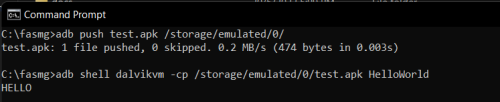
Someone wrote a "Hello, world" example for Dalvik executable (to be compiled by FASMg)

https://board.flatassembler.net/topic.php?p=222849#222849

Although his example runs the code through Dalvik VM (Android Runtime?) but the "HELLO" string is displayed on PC's terminal window, not on Android device.

user posted image

Something to work on!
FlierMate
post May 22 2022, 03:17 PM

On my way
****
Validating
543 posts

Joined: Nov 2020
The author of an ARM assembler confirmed, that Android apps are not using assembly code, all are written in High Level Language (HLL) like what I have discovered - Dalvik bytecode (thanks angch).
So people are frustrated because they were expecting to write ARM assembly code for Android.

user posted image
flashang
post May 22 2022, 09:44 PM

Casual
***
Junior Member
355 posts

Joined: Aug 2021


QUOTE(FlierMate @ May 22 2022, 03:17 PM)
The author of an ARM assembler confirmed, that Android apps are not using assembly code, all are written in High Level Language (HLL) like what I have discovered - Dalvik bytecode (thanks angch).
So people are frustrated because they were expecting to write ARM assembly code for Android.

user posted image
*
Android phone have arm, arm64, i386 and x86_64 CPU.

if most of the app can run on all devices,
it shouldn't be machine code.

Only those people who develop hardware driver,
or android sdk is not enough for them (e.g. Unity or Unreal Engine),
they use c/c++.

smile.gif


angch
post May 23 2022, 10:09 AM

On my way
****
Junior Member
636 posts

Joined: Jul 2006
Most react native .apks have native libjsc for the all supported platforms (arm, x86_64, etc) bundled in lib/*. No one writes specific Android apps directly in ARM. That's silly.

Anyway, for funsies, note that jadx decompiles .dex (well, .apk) into Java.

https://github.com/skylot/jadx


flashang
post May 23 2022, 11:44 PM

Casual
***
Junior Member
355 posts

Joined: Aug 2021


QUOTE(angch @ May 23 2022, 10:09 AM)
Most react native .apks have native libjsc for the all supported platforms (arm, x86_64, etc) bundled in lib/*. No one writes specific Android apps directly in ARM. That's silly.

Anyway, for funsies, note that jadx decompiles .dex (well, .apk) into Java.

https://github.com/skylot/jadx
*
If the os not allow (decode the file differently),
there is no way to write the app by using native machine code (or asm)

the code may be run under a sandbox environment, which might not understand machine code.

smile.gif


Change to:
| Lo-Fi Version
0.2623sec    0.63    5 queries    GZIP Disabled
Time is now: 25th December 2025 - 01:07 AM