Welcome Guest ( Log In | Register )

Outline · [ Standard ] · Linear+

Unifi Unifi offer tp link Deco M4 2 unit RM 360.

views
     
TSzemega
post Mar 4 2020, 02:09 PM, updated 5y ago

Enthusiast
*****
Junior Member
723 posts

Joined: Jul 2008
I got offer by Unifi for 2 units of tp link Deco M4 for RM 15 per month for 24 months, so total RM 360. Separate contract than Unifi. Is that a good deal? On a glance it's a bit cheaper than Deco M4 listing in shopee.

To be honest, it's a 2 storey house, and only 2 farthest room and kitchen has low signal. So at most only 1 unit needed I guess. I'm also using dir 842 c2 router.

Cost aside, do you think I should get it? Im not sure installation comes with the package or not.

Edit. I'm willing to pull and route cat6 cable from dir 842 to other spots.

This post has been edited by zemega: Mar 4 2020, 02:19 PM
hightechgadgets8
post Mar 4 2020, 02:13 PM

\(^o^)/
*******
Senior Member
6,022 posts

Joined: Sep 2011


it works in 2 units and above, 1 unit connects to the internet and the extends the signal to the other unit
TSzemega
post Mar 4 2020, 02:18 PM

Enthusiast
*****
Junior Member
723 posts

Joined: Jul 2008
QUOTE(hightechgadgets8 @ Mar 4 2020, 02:13 PM)
it works in 2 units and above, 1 unit connects to the internet and the extends the signal to the other unit
*
Can't both unit as as AP and connect to the existing dir 842?
hightechgadgets8
post Mar 4 2020, 02:34 PM

\(^o^)/
*******
Senior Member
6,022 posts

Joined: Sep 2011


QUOTE(zemega @ Mar 4 2020, 02:18 PM)
Can't both unit as as AP and connect to the existing dir 842?
*
it works as an AP with lan cable attached, hence are you gonna pull lan cable thru your house to connect the units to your Dir 842
TSzemega
post Mar 4 2020, 02:42 PM

Enthusiast
*****
Junior Member
723 posts

Joined: Jul 2008
QUOTE(hightechgadgets8 @ Mar 4 2020, 02:34 PM)
it works as an AP with lan cable attached, hence are you gonna pull lan cable thru your house to connect the units to your Dir 842
*
Yeah, I'm willing to pull Lan cable through the house. Not that hard.
hightechgadgets8
post Mar 4 2020, 02:57 PM

\(^o^)/
*******
Senior Member
6,022 posts

Joined: Sep 2011


QUOTE(zemega @ Mar 4 2020, 02:42 PM)
Yeah, I'm willing to pull Lan cable through the house. Not that hard.
*
if you can pull lan cable, then there are many options for AP besides Deco
SUSnonamer
post Mar 4 2020, 03:10 PM

Getting Started
**
Junior Member
224 posts

Joined: Apr 2019
put router at the middle of the staircase...1 unit of tplink c1200 can cover 7000sf 2sty bungalow already
soonwai
post Mar 5 2020, 01:11 AM


********
All Stars
11,460 posts

Joined: Oct 2007
From: KL


QUOTE(zemega @ Mar 4 2020, 02:09 PM)
I got offer by Unifi for 2 units of tp link Deco M4 for RM 15 per month for 24 months, so total RM 360. Separate contract than Unifi. Is that a good deal? On a glance it's a bit cheaper than Deco M4 listing in shopee.

To be honest, it's a 2 storey house, and only 2 farthest room and kitchen has low signal. So at most only 1 unit needed I guess. I'm also using dir 842 c2 router.

Cost aside, do you think I should get it? Im not sure installation comes with the package or not.

Edit. I'm willing to pull and route cat6 cable from dir 842 to other spots.
*
It's a really good deal considering that it's 24 months to pay the RM360. I'll probably get a set when I have the time. Wonder if I can do it over the phone or if I have to go TMPoint. Shopee cheapest is RM328 or RM359 with 15% coins cashback.

I plan to use it as APs too. My main router is a Mikrotik. Very curious about its mesh implementation.

Are you sure that it's a separate contract? If it is, even better.

This post has been edited by soonwai: Mar 5 2020, 01:38 AM
TSzemega
post Mar 5 2020, 09:51 AM

Enthusiast
*****
Junior Member
723 posts

Joined: Jul 2008
QUOTE(soonwai @ Mar 5 2020, 01:11 AM)
It's a really good deal considering that it's 24 months to pay the RM360. I'll probably get a set when I have the time. Wonder if I can do it over the phone or if I have to go TMPoint. Shopee cheapest is RM328 or RM359 with 15% coins cashback.

I plan to use it as APs too. My main router is a Mikrotik. Very curious about its mesh implementation.

Are you sure that it's a separate contract? If it is, even better.
*
I specifically ask whether its a new contract or its going to extend the original unifi contract. The operator says it won't, it will be a new contract.

In the end after consideration of the ohuse I'm in, I only need another unit of router to act as AP, if I even want to. At this point this is not a necessity to me.
taqu
post Mar 9 2020, 10:57 AM

Enthusiast
*****
Junior Member
864 posts

Joined: May 2005
If all you need is a second AP, you can get another DIR-842 or another D-Link eg DIR-868L. Wifi roaming normally works better with same brand.

If you want faster/seamless Wifi roaming when you move, 2 Deco M4 are good choice.
squall0833
post Mar 12 2020, 02:34 AM

Regular
******
Senior Member
1,473 posts

Joined: Oct 2006
From: Jupiter


QUOTE(zemega @ Mar 5 2020, 09:51 AM)
I specifically ask whether its a new contract or its going to extend the original unifi contract. The operator says it won't, it will be a new contract.

In the end after consideration of the ohuse I'm in, I only need another unit of router to act as AP, if I even want to. At this point this is not a necessity to me.
*
separate contract just for the deco m4?

so lets say my unifi current contract has ended

and i apply for deco m4 2 years to pay rm 360

so it's a new contract just for deco?

wont affect my current unifi package right? i can still change my unifi package without contract bound? as long as i keep to pay that RM 15/month for 24 months?

This post has been edited by squall0833: Mar 12 2020, 02:35 AM
TSzemega
post Mar 12 2020, 01:02 PM

Enthusiast
*****
Junior Member
723 posts

Joined: Jul 2008
QUOTE(squall0833 @ Mar 12 2020, 02:34 AM)
separate contract just for the deco m4?

so lets say my unifi current contract has ended

and i apply for deco m4 2 years to pay rm 360

so it's a new contract just for deco?

wont affect my current unifi package right? i can still change my unifi package without contract bound? as long as i keep to pay that RM 15/month for 24 months?
*
What I understand is that you can even terminate your unifi contract while still paying the m4 deco contract.
soonwai
post Mar 12 2020, 01:24 PM


********
All Stars
11,460 posts

Joined: Oct 2007
From: KL


QUOTE(zemega @ Mar 12 2020, 01:02 PM)
What I understand is that you can even terminate your unifi contract while still paying the m4 deco contract.
*
Just ordered mine through 100 a minute ago. Did you get a set too?

Anyway CS states quite clearly that the Deco M4 contract is independent from the UniFi contract. Minimum 7 days to process the order, damn slow. Then another few days for delivery by J&T.
TSzemega
post Mar 12 2020, 02:50 PM

Enthusiast
*****
Junior Member
723 posts

Joined: Jul 2008
QUOTE(soonwai @ Mar 12 2020, 01:24 PM)
Just ordered mine through 100 a minute ago. Did you get a set too?

Anyway CS states quite clearly that the Deco M4 contract is independent from the UniFi contract. Minimum 7 days to process the order, damn slow. Then another few days for delivery by J&T.
*
No, the router I have is already good enough for the whole house. I don't need another two unit of repeater (since I'm willing to pull cable). If the router breakdown I can purchase router off market.

Although if its for a new house, I think Unifi should have given option for a single router or 2 mesh units like this.
squall0833
post Mar 12 2020, 03:01 PM

Regular
******
Senior Member
1,473 posts

Joined: Oct 2006
From: Jupiter


QUOTE(zemega @ Mar 12 2020, 01:02 PM)
What I understand is that you can even terminate your unifi contract while still paying the m4 deco contract.
*
great, i might get a set too lol

since i already have two cables at the exact point thats great for deco backhaul
Jjuggler
post Mar 13 2020, 01:00 PM

Narcissistic Genius
******
Senior Member
1,343 posts

Joined: Dec 2016
I just placed an order and as mentioned by brother soonwai, the delivery will take time from 3 to 7 working days and the company responsible to delivery the item to house is J&T.
soonwai
post Mar 13 2020, 08:28 PM


********
All Stars
11,460 posts

Joined: Oct 2007
From: KL


QUOTE(Jjuggler @ Mar 13 2020, 01:00 PM)
I just placed an order and as mentioned by brother soonwai, the delivery will take time from 3 to 7 working days and the company responsible to delivery the item to house is J&T.
*
Any ticket created in myunifi or email or sms acknowledgement for your order? Mine nothing yet. My order done over the phone about 1pm yesterday.
Jjuggler
post Mar 13 2020, 09:45 PM

Narcissistic Genius
******
Senior Member
1,343 posts

Joined: Dec 2016
QUOTE(soonwai @ Mar 13 2020, 08:28 PM)
Any ticket created in myunifi or email or sms acknowledgement for your order? Mine nothing yet. My order done over the phone about 1pm yesterday.
*
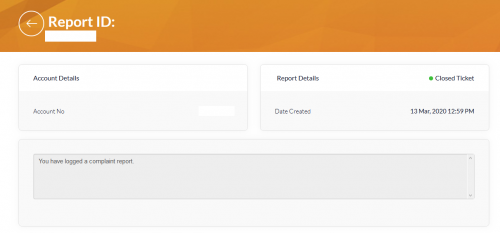
I didn't receive any smses neither do any emails. There is a ticket created and marked as closed ticket. Just want to see the status tomorrow. Keep on checking my mail for this lol. sweat.gif sweat.gif

user posted image
soonwai
post Mar 13 2020, 10:02 PM


********
All Stars
11,460 posts

Joined: Oct 2007
From: KL


QUOTE(Jjuggler @ Mar 13 2020, 09:45 PM)
I didn't receive any smses neither do any emails. There is a ticket created and marked as closed ticket. Just want to see the status tomorrow. Keep on checking my mail for this lol.  sweat.gif  sweat.gif

user posted image
*
Oh yeah, same here. A closed "complaint" ticket for my call to 100.
Jjuggler
post Mar 13 2020, 10:16 PM

Narcissistic Genius
******
Senior Member
1,343 posts

Joined: Dec 2016
QUOTE(soonwai @ Mar 13 2020, 10:02 PM)
Oh yeah, same here. A closed "complaint" ticket for my call to 100.
*
Do update me if there is any news from your side bro.
soonwai
post Mar 14 2020, 01:50 AM


********
All Stars
11,460 posts

Joined: Oct 2007
From: KL


QUOTE(Jjuggler @ Mar 13 2020, 10:16 PM)
Do update me if there is any news from your side bro.
*
Will do, I just hope we don't have to wait 2-4 weeks for them to process it. sad.gif

This post has been edited by soonwai: Mar 14 2020, 01:50 AM
Jjuggler
post Mar 14 2020, 10:10 AM

Narcissistic Genius
******
Senior Member
1,343 posts

Joined: Dec 2016
QUOTE(soonwai @ Mar 14 2020, 01:50 AM)
Will do, I just hope we don't have to wait 2-4 weeks for them to process it.  sad.gif
*
Thank you [for the bold sentence]. They informed me that it will take roughly 3 to 4 days to process the order/subscription of the mesh unit. As you said, I hope the process don't really take too much of time.
TSzemega
post Mar 14 2020, 11:30 AM

Enthusiast
*****
Junior Member
723 posts

Joined: Jul 2008
QUOTE(Jjuggler @ Mar 14 2020, 10:10 AM)
Thank you [for the bold sentence]. They informed me that it will take roughly 3 to 4 days to process the order/subscription of the mesh unit. As you said, I hope the process don't really take too much of time.
*
I think this is a trial run by TM. They don't have stock at each branch unlike the common DIR 842 router. Maybe they need to flash the firmware of the Deco units one by one before sending them out.

I didn't mention this before, but the operator did ask why I rejected the offer.

So maybe after some time, the Deco M4 will be the standard unit instead of the DIR 842.
Jjuggler
post Mar 14 2020, 11:49 AM

Narcissistic Genius
******
Senior Member
1,343 posts

Joined: Dec 2016
QUOTE(zemega @ Mar 14 2020, 11:30 AM)
I think this is a trial run by TM. They don't have stock at each branch unlike the common DIR 842 router. Maybe they need to flash the firmware of the Deco units one by one before sending them out. 

I didn't mention this before, but the operator did ask why I rejected the offer.

So maybe after some time, the Deco M4 will be the standard unit instead of the DIR 842.
*
My friend, thank you for your point of view. But please to inform you that, the Deco M4 is non-accessible via a standard web-interface. And TM won't even bother to pump in cash to make changes for the iOS and android Deco app. The changes in settings only can be done via the application which I feel.... for those who intend to set it up as an AP, shouldn't be a problem at all unless for those who wish to use the Deco M4 as router and pair another deco to form mesh network. Anyhow, full comments only can be given/reviewed once the unit received from unifi.

This post has been edited by Jjuggler: Mar 14 2020, 11:50 AM
blacktubi
post Mar 14 2020, 10:37 PM

-
Group Icon
Elite
8,430 posts

Joined: Jul 2008

QUOTE(Jjuggler @ Mar 14 2020, 11:49 AM)
My friend, thank you for your point of view. But please to inform you that, the Deco M4 is non-accessible via a standard web-interface. And TM won't even bother to pump in cash to make changes for the iOS and android Deco app. The changes in settings only can be done via the application which I feel.... for those who intend to set it up as an AP, shouldn't be a problem at all unless for those who wish to use the Deco M4 as router and pair another deco to form mesh network. Anyhow, full comments only can be given/reviewed once the unit received from unifi.
*
There's a web interface for Deco M4 though it is mainly for basic monitoring function.

The Deco is basically a different product lineup and will not support OneMesh from TP-Link.
TSzemega
post Mar 14 2020, 11:47 PM

Enthusiast
*****
Junior Member
723 posts

Joined: Jul 2008
Well, I have a question for those that will get the M4 units. Can you set Google and cloudflare DNS? And you know access certain sites like fa*fictio*.
Jjuggler
post Mar 15 2020, 01:11 AM

Narcissistic Genius
******
Senior Member
1,343 posts

Joined: Dec 2016
QUOTE(blacktubi @ Mar 14 2020, 10:37 PM)
There's a web interface for Deco M4 though it is mainly for basic monitoring function.

The Deco is basically a different product lineup and will not support OneMesh from TP-Link.
*
Thank you for the exposure there. biggrin.gif Will play around once I receive the unit.

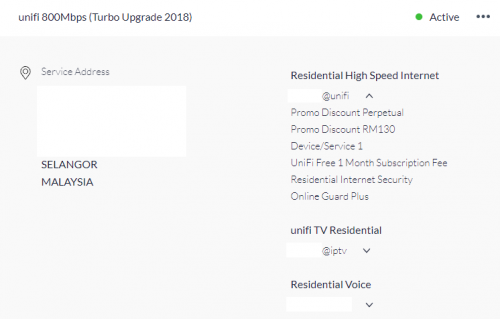
Update: You are right. Deco only compatible with another decos.

This post has been edited by Jjuggler: Mar 15 2020, 01:27 AM
soonwai
post Mar 17 2020, 02:27 AM


********
All Stars
11,460 posts

Joined: Oct 2007
From: KL


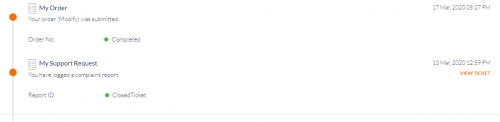
Deco M4 Order Update:
Mar 12: "Complaint" ticket made over 100 and closed.
Mar 16: Modify Order created and completed.
Mar 17: Order processed & shipped email with J&T tracking number received from Lapasar SB.
Mar 25: Picked up: J&T Alam Damai
Mar 28: Delivered

Still nothing in email nor sms.

user posted image
There is a new item "Device/Service 1" added to me subscription.

This post has been edited by soonwai: Feb 27 2021, 10:49 PM
Jjuggler
post Mar 17 2020, 03:44 AM

Narcissistic Genius
******
Senior Member
1,343 posts

Joined: Dec 2016
QUOTE(soonwai @ Mar 17 2020, 02:27 AM)
Deco M4 Order Update:
Mar 12: "Complaint" ticket made over 100 and closed.
Mar 16: Modify Order created and completed.

Still nothing in email nor sms.

user posted image
There is a new item "Device/Service 1" added to me subscription.
*
I believe that should be the hint. I've just checked mine and there are no new updates for me. I yet to receive the status, "Device/Service". sweat.gif Will double-confirm it tomorrow if there are any changes.
soonwai
post Mar 17 2020, 09:40 PM


********
All Stars
11,460 posts

Joined: Oct 2007
From: KL


QUOTE(Jjuggler @ Mar 17 2020, 03:44 AM)
I believe that should be the hint. I've just checked mine and there are no new updates for me. I yet to receive the status, "Device/Service".  sweat.gif Will double-confirm it tomorrow if there are any changes.
*
Update: Got an email at 6pm just now saying order has been processed and shipped by Lapasar Sdn Bhd with J&T tracking no.
Jjuggler
post Mar 17 2020, 10:14 PM

Narcissistic Genius
******
Senior Member
1,343 posts

Joined: Dec 2016
QUOTE(soonwai @ Mar 17 2020, 09:40 PM)
Update: Got an email at 6pm just now saying order has been processed and shipped by Lapasar Sdn Bhd with J&T tracking no.
*
I also entitled with "device/service 1" status there. I yet to receive a confirmation sms/email. Perhaps by tomorrow.

user posted image
soonwai
post Mar 17 2020, 10:19 PM


********
All Stars
11,460 posts

Joined: Oct 2007
From: KL


QUOTE(Jjuggler @ Mar 17 2020, 10:14 PM)
I also entitled with "device/service 1" status there. I yet to receive a confirmation sms/email. Perhaps by tomorrow.

user posted image
*
Should be tomorrow. I got my Device/Service 1 yesterday. Email today.
Jjuggler
post Mar 17 2020, 10:31 PM

Narcissistic Genius
******
Senior Member
1,343 posts

Joined: Dec 2016
QUOTE(soonwai @ Mar 17 2020, 10:19 PM)
Should be tomorrow. I got my Device/Service 1 yesterday. Email today.
*
Will update tomorrow. biggrin.gif
soonwai
post Mar 18 2020, 11:01 PM


********
All Stars
11,460 posts

Joined: Oct 2007
From: KL


QUOTE(Jjuggler @ Mar 17 2020, 10:31 PM)
Will update tomorrow.  biggrin.gif
*
Today 18th, no movement on the J&T parcel yet. Maybe this Lapsapar kena lockdown.
Jjuggler
post Mar 19 2020, 12:46 AM

Narcissistic Genius
******
Senior Member
1,343 posts

Joined: Dec 2016
QUOTE(soonwai @ Mar 18 2020, 11:01 PM)
Today 18th, no movement on the J&T parcel yet. Maybe this Lapsapar kena lockdown.
*
I yet to receive any emails from tm's side. Haha. It is okay. Just let them take time. biggrin.gif
TSzemega
post Mar 19 2020, 07:35 AM

Enthusiast
*****
Junior Member
723 posts

Joined: Jul 2008
It can't be helped that with the virus and the lockdown, reduced personal may have caused your package in a corner somewhere.
soonwai
post Mar 19 2020, 03:36 PM


********
All Stars
11,460 posts

Joined: Oct 2007
From: KL


So excited when I saw update of J&T tracking. Turns out it's for a Shopee order which I made early this morning. False alarm.

This post has been edited by soonwai: Mar 19 2020, 04:34 PM
Jjuggler
post Mar 19 2020, 03:38 PM

Narcissistic Genius
******
Senior Member
1,343 posts

Joined: Dec 2016
QUOTE(soonwai @ Mar 19 2020, 03:36 PM)
So exited when I saw update of J&T tracking. Turns out it's for a Shopee order which I made early this morning. False alarm.
*
Just received sms from unifi just now, stating that I will be receiving an email from Lapsar on the order & deliver details.

UPDATE: Just checked my unifi dashboard. Yes. Order completed. Image as follows:

user posted image

UPDATE as 24 March 2020: Just received J&T Express tracking code through sms. Weirdly, I don't receive any emails from TM or the courier company. confused.gif

This post has been edited by Jjuggler: Mar 24 2020, 06:16 PM
soonwai
post Mar 25 2020, 06:39 PM


********
All Stars
11,460 posts

Joined: Oct 2007
From: KL


Till today, J&T tracking still not in the system yet. Just now received this.
user posted image
This Lapasar not working? They should be under eCommerce right.
Jjuggler
post Mar 25 2020, 07:34 PM

Narcissistic Genius
******
Senior Member
1,343 posts

Joined: Dec 2016
QUOTE(soonwai @ Mar 25 2020, 06:39 PM)
Till today, J&T tracking still not in the system yet. Just now received this.
user posted image
This Lapasar not working? They should be under eCommerce right.
*
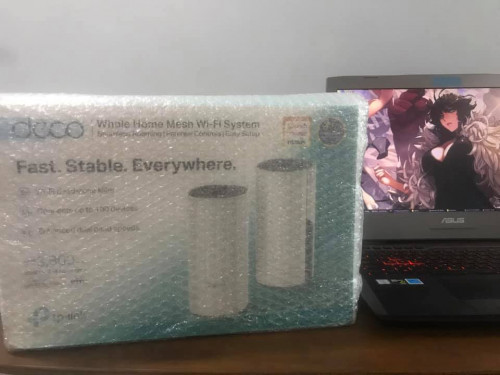
I already receive my unit today morning. rclxm9.gif

user posted image

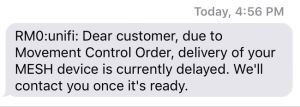
Once the item was sent to me, I received the delay sms. Not sure why they did such act, perhaps miscommunication among the vendor, courier and tm at this time point maybe?

This post has been edited by Jjuggler: Mar 25 2020, 07:35 PM
soonwai
post Mar 25 2020, 09:47 PM


********
All Stars
11,460 posts

Joined: Oct 2007
From: KL


QUOTE(Jjuggler @ Mar 25 2020, 07:34 PM)
I already receive my unit today morning.  rclxm9.gif

user posted image

Once the item was sent to me, I received the delay sms. Not sure why they did such act, perhaps miscommunication among the vendor, courier and tm at this time point maybe?
*
LOL, me too. Haven't received the unit yet but a few hours after the SMS, the Status updated to arrived at and then picked up from Alam Damai drop point. Should have ask me go collect. Alam Damai is like 6KM from my house.

This post has been edited by soonwai: Mar 25 2020, 09:49 PM
Jjuggler
post Mar 26 2020, 01:45 AM

Narcissistic Genius
******
Senior Member
1,343 posts

Joined: Dec 2016
QUOTE(soonwai @ Mar 25 2020, 09:47 PM)
LOL, me too. Haven't received the unit yet but a few hours after the SMS, the Status updated to arrived at and then picked up from Alam Damai drop point. Should have ask me go collect. Alam Damai is like 6KM from my house.
*
Ow.. Too bad for you brother. Do you planning to pick up the unit by yourself?
soonwai
post Mar 26 2020, 02:03 AM


********
All Stars
11,460 posts

Joined: Oct 2007
From: KL


QUOTE(Jjuggler @ Mar 26 2020, 01:45 AM)
Ow.. Too bad for you brother. Do you planning to pick up the unit by yourself?
*
No, lah, just saying. Now it has to go all the way to Klang and then back to my area. Sometimes I think all these online shopping business is making things worse for the environment.
Jjuggler
post Mar 26 2020, 03:06 AM

Narcissistic Genius
******
Senior Member
1,343 posts

Joined: Dec 2016
QUOTE(soonwai @ Mar 26 2020, 02:03 AM)
No, lah, just saying. Now it has to go all the way to Klang and then back to my area. Sometimes I think all these online shopping business is making things worse for the environment.
*
I feel you bro. nod.gif
squall0833
post Mar 26 2020, 03:50 AM

Regular
******
Senior Member
1,473 posts

Joined: Oct 2006
From: Jupiter


mine still on the way , ordered few days before MCO

Sigh... it will be delay and going to pick it up will be a problem

since it's shipped to a shop address and all shows are closed for now :/
TSzemega
post Mar 26 2020, 09:45 AM

Enthusiast
*****
Junior Member
723 posts

Joined: Jul 2008
QUOTE(squall0833 @ Mar 26 2020, 03:50 AM)
mine still on the way , ordered few days before MCO

Sigh... it will be delay and going to pick it up will be a problem

since it's shipped to a shop address and all shows are closed for now :/
*
Couldn't you call the courier and change the delivery address?
squall0833
post Mar 26 2020, 11:25 PM

Regular
******
Senior Member
1,473 posts

Joined: Oct 2006
From: Jupiter


QUOTE(zemega @ Mar 26 2020, 09:45 AM)
Couldn't you call the courier and change the delivery address?
*
they will call me anyway. then i go pick up lo, not far away from here

just maybe takes longer to reach here

soonwai
post Mar 28 2020, 01:30 AM


********
All Stars
11,460 posts

Joined: Oct 2007
From: KL


QUOTE(Jjuggler @ Mar 26 2020, 03:06 AM)
I feel you bro.  nod.gif
*
Finally got mine in the afternoon. rclxms.gif

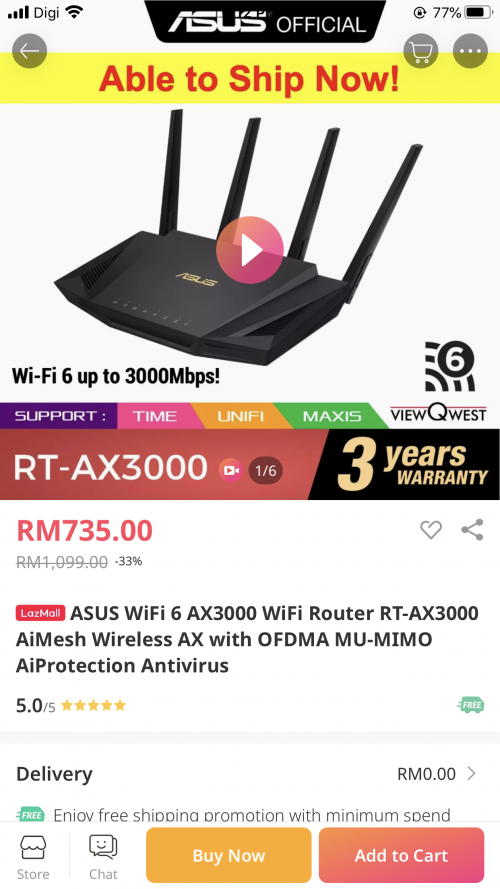
And then I go and buy this from Lazada. smile.gif Too many discounts to ignore.

user posted image
Around RM828.50 since I used TNG topped up with Shopee coins.

This post has been edited by soonwai: Mar 28 2020, 01:31 AM
Jjuggler
post Mar 28 2020, 06:13 PM

Narcissistic Genius
******
Senior Member
1,343 posts

Joined: Dec 2016
QUOTE(soonwai @ Mar 28 2020, 01:30 AM)
Finally got mine in the afternoon. rclxms.gif

And then I go and buy this from Lazada. smile.gif Too many discounts to ignore.
user posted image
Around RM828.50 since I used TNG topped up with Shopee coins.
*
Congrats bro. Haha. I do agree. Even the RT-AX58 costs 700++. Just holding my cash for AX86U. sweat.gif

user posted image
koja6049
post Apr 1 2020, 10:50 PM

On my way
****
Junior Member
615 posts

Joined: Feb 2018
just received mine. anyone knows how to setup the dns in this router?
soonwai
post Apr 3 2020, 03:42 PM


********
All Stars
11,460 posts

Joined: Oct 2007
From: KL


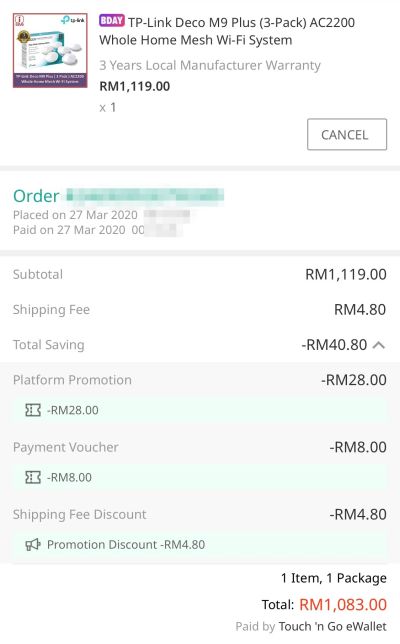
Received my Deco M9 from Lazada today. Ordered on 27/3.

QUOTE(koja6049 @ Apr 1 2020, 10:50 PM)
just received mine. anyone knows how to setup the dns in this router?
*
Haven't setup yet. Dunno why but I seem to be busier during MCO.
Jjuggler
post Apr 3 2020, 05:05 PM

Narcissistic Genius
******
Senior Member
1,343 posts

Joined: Dec 2016
QUOTE(soonwai @ Apr 3 2020, 03:42 PM)
Received my Deco M9 from Lazada today. Ordered on 27/3.
Enjoy brows.gif brows.gif
soonwai
post Apr 17 2020, 06:56 PM


********
All Stars
11,460 posts

Joined: Oct 2007
From: KL


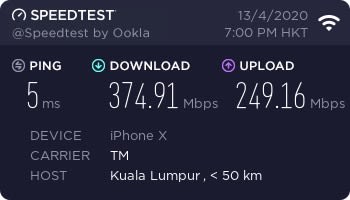
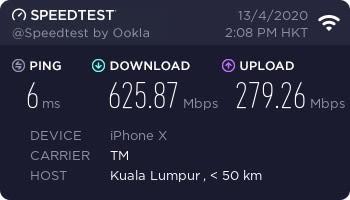
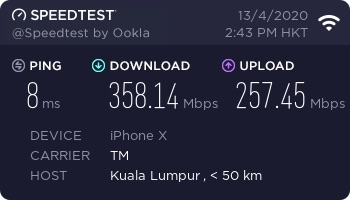
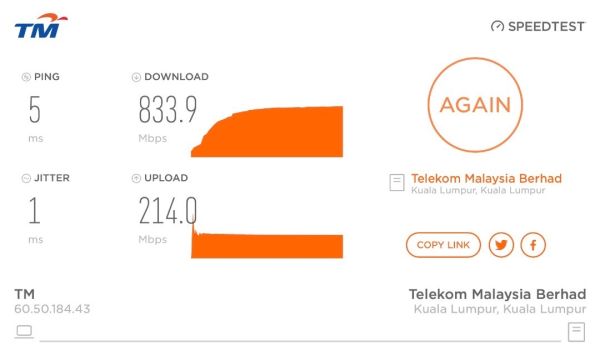
A few quick tests with new toys. UniFi 800Mbps. iPhone X. MacBook Pro Retina 15" 2013.

Deco M4
user posted image
Deco M4 as wired AP (Router: Mikrotik hAP AC2) to iPhone

Deco M9
user posted image
Deco M9 #1 as Router/AP Upstairs to iPhone

user posted image
Deco M9 #2 as wireless AP Downstairs to iPhone

user posted image
Deco M9 #1 as Router/AP Upstairs to MacBook ethernet

This post has been edited by soonwai: Oct 10 2023, 02:01 PM
neekun
post Apr 18 2020, 06:37 AM

I'm a Mac
*******
Senior Member
2,573 posts

Joined: Jun 2006


QUOTE(soonwai @ Apr 17 2020, 06:56 PM)
A few quick tests with new toys. UniFi 800Mbps. iPhone X. MacBook Pro Retina 15" 2013.

Deco M4
user posted image
Deco M4 as AP (Router: Mikrotik hAP AC2)

Deco M9
user posted image
Deco M9 #1 as Router/AP Upstairs

user posted image
Deco M9 #2 Downstairs (not wired)

user posted image
Deco M9 #1 as Router/AP Ethernet
*
Both your m9 are connected via mesh ethernet or mesh wifi?

I have weak wifi issue on upstairs too before this with Apple AirPort Extreme downstairs with modem. Then I got myself TP-Link wpa8630p, the wifi speed upstairs now around 200Mbps. Been thinking to further improve the speed at upstairs by using mesh m9 but not sure worth the money considering the speed I will be getting. Btw my unifi is 800Mbps.
soonwai
post Apr 18 2020, 12:07 PM


********
All Stars
11,460 posts

Joined: Oct 2007
From: KL


QUOTE(neekun @ Apr 18 2020, 06:37 AM)
Both your m9 are connected via mesh ethernet or mesh wifi?

I have weak wifi issue on upstairs too before this with Apple AirPort Extreme downstairs with modem. Then I got myself TP-Link wpa8630p, the wifi speed upstairs now around 200Mbps. Been thinking to further improve the speed at upstairs by using mesh m9 but not sure worth the money considering the speed I will be getting. Btw my unifi is 800Mbps.
*
In my tests above Deco M9 #1 is wired and #2 is not wired.

AirPort Extreme and Express already have the same features (802.11k,v,r) that makes up mesh wifi. You've already been using it for years. Just that Apple never marketed it as such.

A wireless M9 upstairs may increase your speed but a wired one will be optimal.
blacktubi
post Apr 18 2020, 12:13 PM

-
Group Icon
Elite
8,430 posts

Joined: Jul 2008

QUOTE(neekun @ Apr 18 2020, 06:37 AM)
Both your m9 are connected via mesh ethernet or mesh wifi?

I have weak wifi issue on upstairs too before this with Apple AirPort Extreme downstairs with modem. Then I got myself TP-Link wpa8630p, the wifi speed upstairs now around 200Mbps. Been thinking to further improve the speed at upstairs by using mesh m9 but not sure worth the money considering the speed I will be getting. Btw my unifi is 800Mbps.
*
200Mbps is already pretty decent across a floor.

I doubt the Deco M9 on wireless backhaul mode will make it significantly faster.

You will need to wait for WiFi 6 mesh WiFi system from TP-Link Deco.
neekun
post Apr 18 2020, 12:58 PM

I'm a Mac
*******
Senior Member
2,573 posts

Joined: Jun 2006


QUOTE(blacktubi @ Apr 18 2020, 12:13 PM)
200Mbps is already pretty decent across a floor.

I doubt the Deco M9 on wireless backhaul mode will make it significantly faster.

You will need to wait for WiFi 6 mesh WiFi system from TP-Link Deco.
*
Thanks! Better save my money then smile.gif
Khan92
post Apr 19 2020, 04:04 PM

To live is to die
****
Junior Member
558 posts

Joined: Aug 2017


Apologies in advance if this is a dumb question :

What was the difference the Tm one with this one?

I saw Rin Mansor IG how to setup Asus mesh wifi, look pretty easy.

Found this in lazada

user posted image
soonwai
post Apr 19 2020, 04:51 PM


********
All Stars
11,460 posts

Joined: Oct 2007
From: KL


QUOTE(Khan92 @ Apr 19 2020, 04:04 PM)
Apologies in advance if this is a dumb question :

What was the difference the Tm one with this one?

I saw Rin Mansor IG how to setup Asus mesh wifi, look pretty easy.

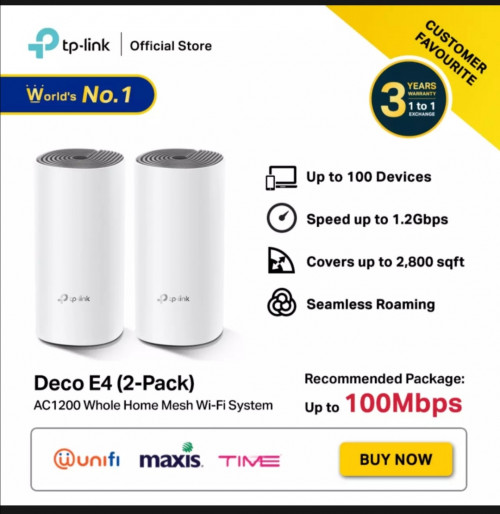
Found this in lazada

user posted image
*
The E4 has 100Mbps network ports while the M4 has 1000Mbps network ports. Processor and the WiFi part I'm not sure. Maybe same.
Khan92
post Apr 19 2020, 06:24 PM

To live is to die
****
Junior Member
558 posts

Joined: Aug 2017


QUOTE(soonwai @ Apr 19 2020, 04:51 PM)
The E4 has 100Mbps network ports while the M4 has 1000Mbps network ports. Processor and the WiFi part I'm not sure. Maybe same.
*
So better buy m4 then?
soonwai
post Apr 19 2020, 09:32 PM


********
All Stars
11,460 posts

Joined: Oct 2007
From: KL


QUOTE(Khan92 @ Apr 19 2020, 06:24 PM)
So better buy m4 then?
*
What's the price difference? Me, I would go for M9 as the router and M4 as APs. The M9 got a lot of features. M4 quite basic.
Khan92
post Apr 19 2020, 10:17 PM

To live is to die
****
Junior Member
558 posts

Joined: Aug 2017


QUOTE(soonwai @ Apr 19 2020, 09:32 PM)
What's the price difference? Me, I would go for M9 as the router and M4 as APs. The M9 got a lot of features. M4 quite basic.
*
M9 is really out of my budget, I think would go for M4

For 300MBPS would be suffice right?
achong09
post Apr 20 2020, 08:48 AM

Regular
******
Senior Member
1,280 posts

Joined: Nov 2016
QUOTE(zemega @ Mar 4 2020, 02:09 PM)
I got offer by Unifi for 2 units of tp link Deco M4 for RM 15 per month for 24 months, so total RM 360. Separate contract than Unifi. Is that a good deal? On a glance it's a bit cheaper than Deco M4 listing in shopee.

To be honest, it's a 2 storey house, and only 2 farthest room and kitchen has low signal. So at most only 1 unit needed I guess. I'm also using dir 842 c2 router.

Cost aside, do you think I should get it? Im not sure installation comes with the package or not.

Edit. I'm willing to pull and route cat6 cable from dir 842 to other spots.
*
yes i also got that offer... applied already... cause alot of "noise"cannot access from upstairs back room.. need mesh desperately otherwise the "noise"wont stop.... cry.gif
achong09
post Apr 20 2020, 08:49 AM

Regular
******
Senior Member
1,280 posts

Joined: Nov 2016
QUOTE(Jjuggler @ Mar 25 2020, 07:34 PM)
I already receive my unit today morning.  rclxm9.gif

user posted image

Once the item was sent to me, I received the delay sms. Not sure why they did such act, perhaps miscommunication among the vendor, courier and tm at this time point maybe?
*
have u installed??? mind share some tips how to configure it??? i will receive this week but i dont know how to install... i google it very confusing leh... cry.gif
achong09
post Apr 20 2020, 08:52 AM

Regular
******
Senior Member
1,280 posts

Joined: Nov 2016
QUOTE(Jjuggler @ Mar 14 2020, 11:49 AM)
My friend, thank you for your point of view. But please to inform you that, the Deco M4 is non-accessible via a standard web-interface. And TM won't even bother to pump in cash to make changes for the iOS and android Deco app. The changes in settings only can be done via the application which I feel.... for those who intend to set it up as an AP, shouldn't be a problem at all unless for those who wish to use the Deco M4 as router and pair another deco to form mesh network. Anyhow, full comments only can be given/reviewed once the unit received from unifi.
*
bro,

ask u a question..

existing already got tm black color router ( tplink brand) with the 3 anthena one. so for this M4 should i configure it as router or AP?? my intention is to have wifi covergae upstairs room... and i dont intend to modify or change the black router cause all its setup nice nice by tm engineer last year.... so if i configure M4 as router i dont know the settings or password leh... so which you recommend?
dannychen
post Apr 20 2020, 11:17 AM

Regular
******
Senior Member
1,264 posts

Joined: Dec 2009
QUOTE(achong09 @ Apr 20 2020, 08:49 AM)
have u installed??? mind share some tips how to configure it??? i will receive this week but i dont know how to install... i google it very confusing leh... cry.gif
*
download deco app and they will guide you how to setup step by step.
achong09
post Apr 20 2020, 11:28 AM

Regular
******
Senior Member
1,280 posts

Joined: Nov 2016
QUOTE(dannychen @ Apr 20 2020, 11:17 AM)
download deco app and they will guide you how to setup step by step.
*
download already... it ask me install 1st unit demo m4 as router or AP?? i dont know what to select leh.....
soonwai
post Apr 20 2020, 02:22 PM


********
All Stars
11,460 posts

Joined: Oct 2007
From: KL


QUOTE(Khan92 @ Apr 19 2020, 10:17 PM)
M9 is really out of my budget, I think would go for M4

For 300MBPS would be suffice right?
*
Yes, M4 is sufficient for 300Mbps. 800 also should be no problem.
Jjuggler
post Apr 20 2020, 03:17 PM

Narcissistic Genius
******
Senior Member
1,343 posts

Joined: Dec 2016
QUOTE(achong09 @ Apr 20 2020, 08:49 AM)
have u installed??? mind share some tips how to configure it??? i will receive this week but i dont know how to install... i google it very confusing leh... cry.gif
*
You can refer to my guide here.

QUOTE(achong09 @ Apr 20 2020, 08:52 AM)
bro,

ask u a question..

existing already got tm black color router ( tplink brand) with the 3 anthena one. so for this M4 should i configure it as router or AP?? my intention is to have wifi covergae upstairs room... and i dont intend to modify or change the black router cause all its setup nice nice by tm engineer last year.... so if i configure M4 as router i dont know the settings or password leh... so which you recommend?
*
I would recommend you to set the deco m4 as an ap and not main router. the deco is too basic, even basic than the basic c1200 (black color router with 3 antenna). I am using 800Mbps and with one single unit of deco m4, my parent's 20x70 double storey house don't have any wifi deadspot. I make the deco m4 as an AP to my ageing ac68U (only act as a router w/out wireless). You only need your username and password, often referred as PPPoE credentials by pros. You can get your username and password from the blue-color installation (agreement or whatsoever I can't remember) or call directly to tm. After that, you're free to use any router. Use the c1200 as a router and deco m4 as AP (wireless broadcaster). With this you can save up some cash from buying a new router if the current issue solved by following this try-and-error process. biggrin.gif

TSzemega
post Apr 20 2020, 03:48 PM

Enthusiast
*****
Junior Member
723 posts

Joined: Jul 2008
QUOTE(Jjuggler @ Apr 20 2020, 03:17 PM)
You can refer to my guide here.
I would recommend you to set the deco m4 as an ap and not main router. the deco is too basic, even basic than the basic c1200 (black color router with 3 antenna). I am using 800Mbps and with one single unit of deco m4, my parent's 20x70 double storey house don't have any wifi deadspot. I make the deco m4 as an AP to my ageing ac68U (only act as a router w/out wireless). You only need your username and password, often referred as PPPoE credentials by pros. You can get your username and password from the blue-color installation (agreement or whatsoever I can't remember) or call directly to tm. After that, you're free to use any router. Use the c1200 as a router and deco m4 as AP (wireless broadcaster). With this you can save up some cash from buying a new router if the current issue solved by following this try-and-error process.  biggrin.gif
*
Just a question. The id and password is in this page for Dir-842, is the PPPoE credentials?


Attached thumbnail(s)
Attached Image
Jjuggler
post Apr 20 2020, 04:02 PM

Narcissistic Genius
******
Senior Member
1,343 posts

Joined: Dec 2016
QUOTE(zemega @ Apr 20 2020, 03:48 PM)
Just a question. The id and password is in this page for Dir-842, is the PPPoE credentials?
*
Yes mate. You're right. Keep that credentials because you will be needing that in future if in case you decided to use your own third-party router.
achong09
post Apr 21 2020, 06:32 AM

Regular
******
Senior Member
1,280 posts

Joined: Nov 2016
QUOTE(Jjuggler @ Apr 20 2020, 03:17 PM)
You can refer to my guide here.
I would recommend you to set the deco m4 as an ap and not main router. the deco is too basic, even basic than the basic c1200 (black color router with 3 antenna). I am using 800Mbps and with one single unit of deco m4, my parent's 20x70 double storey house don't have any wifi deadspot. I make the deco m4 as an AP to my ageing ac68U (only act as a router w/out wireless). You only need your username and password, often referred as PPPoE credentials by pros. You can get your username and password from the blue-color installation (agreement or whatsoever I can't remember) or call directly to tm. After that, you're free to use any router. Use the c1200 as a router and deco m4 as AP (wireless broadcaster). With this you can save up some cash from buying a new router if the current issue solved by following this try-and-error process.  biggrin.gif
*
Bro,
Great advise. I googled and saw some posting mention to setup m4 as router better than the black tm router so i am confuse diff ppl give diff advise i dont know who to follow...


So if i setup the m4 as ap still need ppoe password? I dont have leh forgot already.... the blue slip paper dont know gone where already... also if i setup m4 as ap the 2nd m4 also 2nd ap i put upstairs?


Jjuggler
post Apr 21 2020, 10:06 AM

Narcissistic Genius
******
Senior Member
1,343 posts

Joined: Dec 2016
QUOTE(achong09 @ Apr 21 2020, 06:32 AM)
Bro,
Great advise. I googled and saw some posting mention to setup m4 as router better than the black tm router so i am confuse diff ppl give diff advise i dont know who to follow...
So if i setup the m4 as ap still need ppoe password? I dont have leh forgot already.... the blue slip paper dont know gone where already... also if i setup m4 as ap the 2nd m4 also 2nd ap i put upstairs?
*
You will be needing the credentials bro. You can ask from tm. But if I were you, I will use the c1200 as main router and set the Deco M4 pair as wireless ap. A bridged from c1200 and pair together with B via mesh.
achong09
post Apr 21 2020, 10:32 AM

Regular
******
Senior Member
1,280 posts

Joined: Nov 2016
QUOTE(Jjuggler @ Apr 21 2020, 10:06 AM)
You will be needing the credentials bro. You can ask from tm. But if I were you, I will use the c1200 as main router and set the Deco M4 pair as wireless ap. A bridged from c1200 and pair together with B via mesh.
*
bro,
thanks for the advise.. m4 comes in a pair right?? the 1st M4 need to be wired to the router right? the 2nd M4 only can be a wireless ap right?

Jjuggler
post Apr 21 2020, 11:27 AM

Narcissistic Genius
******
Senior Member
1,343 posts

Joined: Dec 2016
QUOTE(achong09 @ Apr 21 2020, 10:32 AM)
bro,
thanks for the advise.. m4 comes in a pair right?? the 1st M4 need to be wired to the router right? the 2nd M4 only can be a wireless ap right?
*
Yes bro. In my case, i make the AC68U to only function as a router while the Deco M4 functioning in Access Point mode (the firmware offers two standard mode, router and AP) and you can pair another deco m4 via mesh. Back to my case, I only using one Deco m4 unit and the wireless coverage is freaking good for a double-storey house (20x70). I kept another deco m4 for future use (in case if this went kaput, i can use another deco m4 - can save some cash). But just examine if one unit of deco m4 can cover your whole house, if not, add another deco m4 unit. As i said, try-and-error.

achong09
post Apr 21 2020, 11:50 AM

Regular
******
Senior Member
1,280 posts

Joined: Nov 2016
QUOTE(Jjuggler @ Apr 21 2020, 11:27 AM)
Yes bro. In my case, i make the AC68U to only function as a router while the Deco M4 functioning in Access Point mode (the firmware offers two standard mode, router and AP) and you can pair another deco m4 via mesh. Back to my case, I only using one Deco m4 unit and the wireless coverage is freaking good for a double-storey house (20x70). I kept another deco m4 for future use (in case if this went kaput, i can use another deco m4 - can save some cash). But just examine if one unit of deco m4 can cover your whole house, if not, add another deco m4 unit. As i said, try-and-error.
*
Bro,
so the 1st unit of deco m4 can put anywhere or need to put beside the existing router? existing router need to disable the wifi connection right?

Jjuggler
post Apr 21 2020, 12:07 PM

Narcissistic Genius
******
Senior Member
1,343 posts

Joined: Dec 2016
QUOTE(achong09 @ Apr 21 2020, 11:50 AM)
Bro,
so the 1st unit of deco m4 can put anywhere or need to put beside the existing router? existing router need to disable the wifi connection right?
*
If you have a long ethernet cable, then yes, you can place the unit anywhere you want. You have to disable the wireless connection from the router.
Skylinestar
post Apr 21 2020, 01:19 PM

Mega Duck
********
All Stars
10,479 posts

Joined: Jan 2003
From: Sarawak
QUOTE(Jjuggler @ Apr 21 2020, 11:27 AM)
I only using one Deco m4 unit and the wireless coverage is freaking good for a double-storey house (20x70).
*
how good is the single deco M4 wifi coverage compare to the stock TM TP-Link Archer? like double radius or what?
Jjuggler
post Apr 21 2020, 01:38 PM

Narcissistic Genius
******
Senior Member
1,343 posts

Joined: Dec 2016
QUOTE(Skylinestar @ Apr 21 2020, 01:19 PM)
how good is the single deco M4 wifi coverage compare to the stock TM TP-Link Archer? like double radius or what?
*
It features fast roaming support, 802.11k/v/r resulting in an efficient wireless connection achievable. I wont recommend to use the M4 as a router, but as an AP, yes its good. In my case, a single unit is good already for my use. But for other people, it depends on their taste to have nearly zero-wifi dead-spots in house.
achong09
post Apr 21 2020, 02:35 PM

Regular
******
Senior Member
1,280 posts

Joined: Nov 2016
QUOTE(Jjuggler @ Apr 21 2020, 12:07 PM)
If you have a long ethernet cable, then yes, you can place the unit anywhere you want. You have to disable the wireless connection from the router.
*
i dont have a long cable... so does that mean i need to place 1 of the M4 unit in my study room ( this is where my black router sits) and use the other as wireless AP upstairs?
Jjuggler
post Apr 21 2020, 07:07 PM

Narcissistic Genius
******
Senior Member
1,343 posts

Joined: Dec 2016
QUOTE(achong09 @ Apr 21 2020, 02:35 PM)
i dont have a long cable... so does that mean i need to place 1 of the M4 unit in my study room ( this is where my black router sits) and use the other as wireless AP upstairs?
*
Yes bro. The cables are not expensive. If you don't care about quality, you already can get a low-quality cat 5e cable for ~rm20 - 20 meters.
achong09
post Apr 21 2020, 07:10 PM

Regular
******
Senior Member
1,280 posts

Joined: Nov 2016
QUOTE(Jjuggler @ Apr 21 2020, 07:07 PM)
Yes bro. The cables are not expensive. If you don't care about quality, you already can get a low-quality cat 5e cable for ~rm20 - 20 meters.
*
Thanks bro for the tips and advise
Jjuggler
post Apr 21 2020, 07:58 PM

Narcissistic Genius
******
Senior Member
1,343 posts

Joined: Dec 2016
QUOTE(achong09 @ Apr 21 2020, 07:10 PM)
Thanks bro for the tips and advise
*
You're welcome mate.

Eisenmeteor
post Apr 22 2020, 08:16 PM

Night Ghost
******
Senior Member
1,484 posts

Joined: Aug 2005
From: Kuala Lumpur


Got the M5 today but just find it funny that it will auto connect to 2.4 when 5ghz has the faster speed, i need to setup a seperate guest network for the 2.4ghz only supported devices, change the main to 5ghz only
achong09
post Apr 23 2020, 05:37 PM

Regular
******
Senior Member
1,280 posts

Joined: Nov 2016
QUOTE(Jjuggler @ Apr 21 2020, 07:07 PM)
Yes bro. The cables are not expensive. If you don't care about quality, you already can get a low-quality cat 5e cable for ~rm20 - 20 meters.
*
Bro,
Just received my deco m4. Connect it configure it as ap (1st unit) then 2nd unit put upstairs bedroom and connect it via wifi to 1st unit able to surf net already... good coverage also..not bad despite its a back room and modem in front room..... discover that the wifi connectivy to m4 is faster than using the wifi on the black modem.... looks good.

This post has been edited by achong09: Apr 23 2020, 05:47 PM
achong09
post Apr 23 2020, 05:50 PM

Regular
******
Senior Member
1,280 posts

Joined: Nov 2016
QUOTE(Jjuggler @ Apr 21 2020, 12:07 PM)
If you have a long ethernet cable, then yes, you can place the unit anywhere you want. You have to disable the wireless connection from the router.
*
Bro,
Question to you
If i dont disable the wireless connection from the black router can ha?
Jjuggler
post Apr 24 2020, 09:37 AM

Narcissistic Genius
******
Senior Member
1,343 posts

Joined: Dec 2016
QUOTE(achong09 @ Apr 23 2020, 05:37 PM)
Bro,
Just received my deco m4. Connect it configure it as ap (1st unit) then 2nd unit put upstairs bedroom and connect it via wifi to 1st unit able to surf net already... good coverage also..not bad despite its a back room and modem in front room..... discover that the wifi connectivy to m4 is faster than using the wifi on the black modem.... looks good.
*
I am happy to knowing that you're enjoying your new deco m4. I always prefer a cheaper option before opting to do a big changes that requires more cash.

QUOTE(achong09 @ Apr 23 2020, 05:50 PM)
Bro,
Question to you
If i dont disable the wireless connection from the black router can ha?
*
Yes you can. But, I would advise you to turn off the wireless broadcast from the c1200 (you don't really need that).

achong09
post Apr 24 2020, 09:39 AM

Regular
******
Senior Member
1,280 posts

Joined: Nov 2016
QUOTE(Jjuggler @ Apr 24 2020, 09:37 AM)
I am happy to knowing that you're enjoying your new deco m4. I always prefer a cheaper option before opting to do a big changes that requires more cash.
Yes you can. But, I would advise you to turn off the wireless broadcast from the c1200 (you don't really need that).
*
oh well, i tested without switching it off... its works fine also... i have some older devices connected to the black router wifi like printer... some how the printer not able to connect to the mesh wifi not sure why... i think leave it on for standby in case mesh wifi network cacat can connect to the black wifi.. hahhaa
Jjuggler
post Apr 24 2020, 09:47 AM

Narcissistic Genius
******
Senior Member
1,343 posts

Joined: Dec 2016
QUOTE(achong09 @ Apr 24 2020, 09:39 AM)
oh well, i tested without switching it off... its works fine also... i have some older devices connected to the black router wifi like printer... some how the printer not able to connect to the mesh wifi not sure why... i think leave it on for standby in case mesh wifi network cacat can connect to the black wifi.. hahhaa
*
I see. Yes you can use the c1200's wireless broadcast. No problem, it may add more signal interference that may resulting in slightly degrade wireless performance. If you're using standard speed like 100Mbps, then you won't feel much difference compared to 300 to 800Mbps users.
achong09
post Apr 24 2020, 09:47 AM

Regular
******
Senior Member
1,280 posts

Joined: Nov 2016
Did a speedtest by wifi using laptop connected to the new DECOm4... got a good speed.. download around 300 upload around 150+... sometimes download is 290+ upload 150+ no bad the speed...
Jjuggler
post Apr 24 2020, 10:06 AM

Narcissistic Genius
******
Senior Member
1,343 posts

Joined: Dec 2016
QUOTE(achong09 @ Apr 24 2020, 09:47 AM)
Did a speedtest by wifi using laptop connected to the new DECOm4... got a good speed.. download around 300 upload around 150+... sometimes download is 290+ upload 150+ no bad the speed...
*
Enjoy bro.
achong09
post Apr 24 2020, 10:43 AM

Regular
******
Senior Member
1,280 posts

Joined: Nov 2016
QUOTE(Jjuggler @ Apr 24 2020, 09:47 AM)
I see. Yes you can use the c1200's wireless broadcast. No problem, it may add more signal interference that may resulting in slightly degrade wireless performance. If you're using standard speed like 100Mbps, then you won't feel much difference compared to 300 to 800Mbps users.
*
oh... i am not that heavy user.... even streaming also wont be much bandwith i guess.... i am on 500mbps speed....
Jjuggler
post Apr 24 2020, 11:47 AM

Narcissistic Genius
******
Senior Member
1,343 posts

Joined: Dec 2016
QUOTE(achong09 @ Apr 24 2020, 10:43 AM)
oh... i am not that heavy user.... even streaming also wont be much bandwith i guess.... i am on 500mbps speed....
*
Then it should be fine for you.
achong09
post Apr 29 2020, 10:43 AM

Regular
******
Senior Member
1,280 posts

Joined: Nov 2016
QUOTE(Jjuggler @ Apr 24 2020, 11:47 AM)
Then it should be fine for you.
*
Bro,

just realise cannot disable my black router wifi cause got devices ( printer) connect to it.. yesterday disconnect it and get my printer to scan and detect deco wifi my printer hang and cannot connect to the deco m4 wifi. so end up have to reconfigure the printer settings again and turn on the black modem wifi 2.4Ghz.. then printer working back.... so looks like printer only can connect to black modem wifi signal.. not sure why...
Jjuggler
post Apr 29 2020, 04:27 PM

Narcissistic Genius
******
Senior Member
1,343 posts

Joined: Dec 2016
QUOTE(achong09 @ Apr 29 2020, 10:43 AM)
Bro,

just realise cannot disable my black router wifi cause got devices ( printer) connect to it.. yesterday disconnect it and get my printer to scan and detect deco wifi my printer hang and cannot connect to the deco m4 wifi. so end up have to reconfigure the printer settings again and turn on the black modem wifi 2.4Ghz.. then printer working back.... so looks like printer only can connect to black modem wifi signal.. not sure why...
*
The Deco M4 uses the same SSID for both 2.4GHz and 5GHz band. You only can disable one at one time. But they do assure that, they will be adding a separate SSID for respective bands in the future. Source
achong09
post Apr 29 2020, 05:31 PM

Regular
******
Senior Member
1,280 posts

Joined: Nov 2016
QUOTE(Jjuggler @ Apr 29 2020, 04:27 PM)
The Deco M4 uses the same SSID for both 2.4GHz and 5GHz band. You only can disable one at one time. But they do assure that, they will be adding a separate SSID for respective bands in the future. Source
*
Yes i know but i cant disable either cause printer is connected via wifi to black router somehow i disable wifi at black router printer cannot print try connect printer to deco m4 after disable wifi at black rounter cannot connect. Then deco m4 cannot find a place to disable the 2.4ghz wifi also sad.gif. So no choice have to leave both on
koja6049
post May 1 2020, 02:45 PM

On my way
****
Junior Member
615 posts

Joined: Feb 2018
just received my first bill for the deco today. Take note that the price they offer, 360/24 months, is before SST. They do charge SST on the extra 15/month.
PorcupineZ
post May 11 2020, 12:19 PM

Getting Started
**
Junior Member
56 posts

Joined: Nov 2014
Hi, anyone having a blank screen on unifi TV when setting Deco M4 as router mode (connecting directly to the modem)?
dopp
post May 24 2020, 10:12 AM

Regular
******
Senior Member
1,733 posts

Joined: Jan 2003
From: Penang


Anyone using m4 dual pack?
I manage to add 2nd unit of M4, but how do i check whether it is working and part of the group
blacktubi
post May 24 2020, 09:00 PM

-
Group Icon
Elite
8,430 posts

Joined: Jul 2008

QUOTE(dopp @ May 24 2020, 10:12 AM)
Anyone using m4 dual pack?
I manage to add 2nd unit of M4, but how do i check whether it is working  and part of the group
*
If the LED is green, it is working properly.

You can also click the Internet logo on the Deco app.
dopp
post May 24 2020, 11:59 PM

Regular
******
Senior Member
1,733 posts

Joined: Jan 2003
From: Penang


Thanks a lot.
QUOTE(blacktubi @ May 24 2020, 09:00 PM)
If the LED is green, it is working properly.

You can also click the Internet logo on the Deco app.
*
podrunner
post Sep 12 2020, 10:57 AM

Look at all my stars!!
*******
Senior Member
2,214 posts

Joined: Feb 2009
Hello,
May i know the difference between connecting to the grey modem and connecting to the dlink router?

TSzemega
post Sep 12 2020, 12:21 PM

Enthusiast
*****
Junior Member
723 posts

Joined: Jul 2008
QUOTE(podrunner @ Sep 12 2020, 10:57 AM)
Hello,
May i know the difference between connecting to the grey modem and connecting to the dlink router?
*
If you connect to the grey modem or the BTU unit, it will becomes a router.

If you connect it to the dlink router it become an AP unit, and you need to change the setting within the deco app to make it properly work.

If you connect the deco to the BTU, it becomes a router. You can connect the dlink to the the deco unit to function as a ap mode.
podrunner
post Sep 13 2020, 11:14 AM

Look at all my stars!!
*******
Senior Member
2,214 posts

Joined: Feb 2009
QUOTE(zemega @ Sep 12 2020, 12:21 PM)
If you connect to the grey modem or the BTU unit, it will becomes a router.

If you connect it to the dlink router it become an AP unit, and you need to change the setting within the deco app to make it properly work.

If you connect the deco to the BTU, it becomes a router. You can connect the dlink to the the deco unit to function as a ap mode.
*
Thank you for replying. I just connected M5 to the dlink router as per the instruction, and need not require filling in the PPPoE login details, but it seems to be working. I’m not sure if this is correct though?
I followed this:

https://youtu.be/KL9dVQHQ8_c

I would like to use the dlink as AP, but not sure how to do so, or essentially directly connect to the grey modem, for better performance? There are 2 wired connections to the dlink at the moment, which I would like to maintain.

PS. When I first tried to set up via the isp login/password method, it said my login was incorrect, even after I verified with TM customer support.

Apologies if I’m not being clear.
TSzemega
post Sep 13 2020, 11:25 AM

Enthusiast
*****
Junior Member
723 posts

Joined: Jul 2008
QUOTE(podrunner @ Sep 13 2020, 11:14 AM)
Thank you for replying. I just connected M5 to the dlink router as per the instruction, and need not require filling in the PPPoE login details, but it seems to be working.  I’m not sure if this is correct though? 
I followed this:

https://youtu.be/KL9dVQHQ8_c

I would like to use the dlink as AP, but not sure how to do so, or essentially directly connect to the grey modem, for better performance?  There are 2 wired connections to the dlink at the moment, which I would like to maintain. 

PS.  When I first tried to set up via the isp login/password method, it said my login was incorrect, even after I verified with TM customer support.

Apologies if I’m not being clear.
*
That's okay as well.

Connect the previous router to the BTU. Connect your deco to the previous router. The deco should be able to access internet right away.

After that you need to go into the deco app (on your phone). There's a setting in there that turns your deco into AP mode. If you don't do this, the deco would disconnect frequently.
podrunner
post Sep 13 2020, 11:33 AM

Look at all my stars!!
*******
Senior Member
2,214 posts

Joined: Feb 2009
QUOTE(zemega @ Sep 13 2020, 11:25 AM)
That's okay as well.

Connect the previous router to the BTU. Connect your deco to the previous router. The deco should be able to access internet right away.

After that you need to go into the deco app (on your phone). There's a setting in there that turns your deco into AP mode. If you don't do this, the deco would disconnect frequently.
*
Thanks! Yes I saw that in the app. I will try that. I don’t have to do anything else apart from changing that setting right?

Also, is there a guide in which to directly connect to the unifi grey modem?
TSzemega
post Sep 13 2020, 01:37 PM

Enthusiast
*****
Junior Member
723 posts

Joined: Jul 2008
QUOTE(podrunner @ Sep 13 2020, 11:33 AM)
Thanks! Yes I saw that in the app. I will try that.  I don’t have to do anything else apart from changing that setting right?

Also, is there a guide in which to directly connect to the unifi grey modem?
*
If you connect it directly to he BTU unit, there shouldn't be any problem though. Its supposed to be straight forward plug and play.
phyz
post Oct 4 2020, 12:13 AM

Casual
***
Junior Member
334 posts

Joined: Jan 2008


Guys, does M4 support 500Mbps?Those already have So far ok tak about 2-3 month using it?
TSzemega
post Oct 7 2020, 06:18 PM

Enthusiast
*****
Junior Member
723 posts

Joined: Jul 2008
Today I encountered a problem when a PC is directly in the middle between two unit and using WiFi. Frequent download error. Updating Linux results in many broken package that can only be fixed in --clean --fix-broken alternatively. Took a while for me to realise the PC is switching between the two points rapidly.
AceDeatH
post Jan 15 2021, 10:30 PM

Getting Started
**
Junior Member
67 posts

Joined: Nov 2013
QUOTE(Jjuggler @ Apr 21 2020, 11:27 AM)
Yes bro. In my case, i make the AC68U to only function as a router while the Deco M4 functioning in Access Point mode (the firmware offers two standard mode, router and AP) and you can pair another deco m4 via mesh. Back to my case, I only using one Deco m4 unit and the wireless coverage is freaking good for a double-storey house (20x70). I kept another deco m4 for future use (in case if this went kaput, i can use another deco m4 - can save some cash). But just examine if one unit of deco m4 can cover your whole house, if not, add another deco m4 unit. As i said, try-and-error.
*
The only one m4 you using is wired or wireless? Planned to get one unit of M5 if it can place 2nd floor (wireless) without placing next to router ( ground floor ) icon_question.gif
taqu
post Jan 16 2021, 12:18 AM

Enthusiast
*****
Junior Member
864 posts

Joined: May 2005
QUOTE(zemega @ Oct 7 2020, 06:18 PM)
Today I encountered a problem when a PC is directly in the middle between two unit and using WiFi. Frequent download error. Updating Linux results in many broken package that can only be fixed in --clean --fix-broken alternatively. Took a while for me to realise the PC is switching between the two points rapidly.
*
Are the two units separated by walls or open space? Probably both not too far causing strong Wifi overlap.
taqu
post Jan 16 2021, 12:19 AM

Enthusiast
*****
Junior Member
864 posts

Joined: May 2005
QUOTE(phyz @ Oct 4 2020, 12:13 AM)
Guys, does M4 support 500Mbps?Those already have So far ok tak about 2-3 month using it?
*
About 400 Mbps on Wifi. I use 2 on first floor. So far so good.
shahie
post Jan 16 2021, 09:39 AM

On my way
****
Junior Member
506 posts

Joined: Feb 2005
QUOTE(phyz @ Oct 4 2020, 12:13 AM)
Guys, does M4 support 500Mbps?Those already have So far ok tak about 2-3 month using it?
*
on LAN, yes. but on wifi, to my experience and to be safe, speed advertised ÷ 2, than that is your wifi link speed maximum you can get on wifi. Don't expect they can carry 500mbps unifi subscription speed if your wifi link speed not more than 500mbps. put on this way of understanding, smaller hose pipe means less water can flow. lol

This post has been edited by shahie: Jan 16 2021, 09:40 AM
TSzemega
post Jan 16 2021, 10:41 AM

Enthusiast
*****
Junior Member
723 posts

Joined: Jul 2008
QUOTE(taqu @ Jan 16 2021, 12:18 AM)
Are the two units separated by walls or open space? Probably both not too far causing strong Wifi overlap.
*
It's precisely in between the two and there's wall in between. There's an option in the Deco app to make any device connect to only one of the mesh.
taqu
post Jan 16 2021, 11:17 AM

Enthusiast
*****
Junior Member
864 posts

Joined: May 2005
QUOTE(zemega @ Jan 16 2021, 10:41 AM)
It's precisely in between the two and there's wall in between. There's an option in the Deco app to make any device connect to only one of the mesh.
*
Install Acrylic Wi-Fi app on your PC & check signal strength on both units. I believe both has similar strength, causing fast roaming to go wild. If that's the case, either relocate 1 unit further or disable fast roaming.
Jjuggler
post Jan 17 2021, 09:04 PM

Narcissistic Genius
******
Senior Member
1,343 posts

Joined: Dec 2016
QUOTE(AceDeatH @ Jan 15 2021, 10:30 PM)
The only one m4 you using is wired or wireless? Planned to get one unit of M5 if it can place 2nd floor (wireless) without placing next to router ( ground floor )  icon_question.gif
*
Hi mate,

AC68U (main router) - M4 (AP-Wired) (option 1)
AC68U (main router) - M4_1 (AP-wired) - M4_2 (wireless - mesh) (Option 2)

Now I sold my Deco M4 since my AC68U died and now settled with GT-AX11000 from ASUS.

For your problem, your current router should support TP-Link's one mesh (macam Aimesh la). If your router is from other brand or same brand but not supports one mesh, the only method is option 2.
AceDeatH
post Jan 22 2021, 07:09 PM

Getting Started
**
Junior Member
67 posts

Joined: Nov 2013
QUOTE(Jjuggler @ Jan 17 2021, 09:04 PM)
Hi mate,

AC68U (main router) - M4 (AP-Wired) (option 1)
AC68U (main router) - M4_1 (AP-wired) - M4_2 (wireless - mesh) (Option 2)

Now I sold my Deco M4 since my AC68U died and now settled with GT-AX11000 from ASUS.

For your problem, your current router should support TP-Link's one mesh (macam Aimesh la). If your router is from other brand or same brand but not supports one mesh, the only method is option 2.
*
Thanks a lot! brows.gif
feringgee
post Jun 26 2021, 10:48 PM

New Member
*
Junior Member
45 posts

Joined: Oct 2019
QUOTE(Jjuggler @ Jan 17 2021, 09:04 PM)
Hi mate,

AC68U (main router) - M4 (AP-Wired) (option 1)
AC68U (main router) - M4_1 (AP-wired) - M4_2 (wireless - mesh) (Option 2)

Now I sold my Deco M4 since my AC68U died and now settled with GT-AX11000 from ASUS.

For your problem, your current router should support TP-Link's one mesh (macam Aimesh la). If your router is from other brand or same brand but not supports one mesh, the only method is option 2.
*
How do i get the best speed out of M4? Currently have it connected via TM router, set the M4 also as router and enable both 2.4ghz and 5ghz on M4, been getting around 30-40mbps only on a 100mbps package. TM router wifi is on at the same time, but connected to M4 wifi.

Should I:
1. Get rid of TM router, use just M4 as router and enable 5ghz only
2. Connect via TM router, set M4 as AP and enable 5ghz only, turn off TM router wifi
3. Maintain current setup
feringgee
post Jun 26 2021, 10:52 PM

New Member
*
Junior Member
45 posts

Joined: Oct 2019
QUOTE(feringgee @ Jun 26 2021, 10:48 PM)
How do i get the best speed out of M4? Currently have it connected via TM router, set the M4 also as router and enable both 2.4ghz and 5ghz on M4, been getting around 30-40mbps only on a 100mbps package. TM router wifi is on at the same time, but connected to M4 wifi.

Should I:
1. Get rid of TM router, use just M4 as router and enable 5ghz only
2. Connect via TM router, set M4 as AP and enable 5ghz only, turn off TM router wifi
3. Maintain current setup
*
Just to add, when I connect directly to TM router 5ghz band, I can get 99mbps. When i disable 2.4ghz on M4 leaving just 5ghz, connect to M4, still stuck at around 30-40mbps.
TSzemega
post Jun 26 2021, 11:06 PM

Enthusiast
*****
Junior Member
723 posts

Joined: Jul 2008
QUOTE(feringgee @ Jun 26 2021, 10:48 PM)
How do i get the best speed out of M4? Currently have it connected via TM router, set the M4 also as router and enable both 2.4ghz and 5ghz on M4, been getting around 30-40mbps only on a 100mbps package. TM router wifi is on at the same time, but connected to M4 wifi.

Should I:
1. Get rid of TM router, use just M4 as router and enable 5ghz only
2. Connect via TM router, set M4 as AP and enable 5ghz only, turn off TM router wifi
3. Maintain current setup
*
TM router or modem/BTU? There's a big difference. Best if you connect the M4 directly to the modem/BTU. Set the M4 mode as router.

If you wish to reuse the previous TM router, set the TM router mode to router, and the M4 as AP mode.

The configuration for each piece of hardware after the modem need to be done correctly.
feringgee
post Jun 26 2021, 11:14 PM

New Member
*
Junior Member
45 posts

Joined: Oct 2019
QUOTE(zemega @ Jun 26 2021, 11:06 PM)
TM router or modem/BTU? There's a big difference. Best if you connect the M4 directly to the modem/BTU. Set the M4 mode as router.

If you wish to reuse the previous TM router, set the TM router mode to router, and the M4 as AP mode.

The configuration for each piece of hardware after the modem need to be done correctly.
*
TM router. Any difference between the 2 options you proposed? If there is none I would prefer to just use M4 alone.
TSzemega
post Jun 27 2021, 12:16 PM

Enthusiast
*****
Junior Member
723 posts

Joined: Jul 2008
QUOTE(feringgee @ Jun 26 2021, 11:14 PM)
TM router. Any difference between the 2 options you proposed? If there is none I would prefer to just use M4 alone.
*
"Each Deco M4 has a quad-core Qualcomm Atheros QCA9563 processor running at 750 MHz, 128 MB of RAM and 16 MB of storage space for the firmware". If you can find out the hardware spec of your current TM router, or give the model number, you can determine which router is more powerful. Most likely the original TM router spec is 'barely enough'. The difference between the spec of the router is important here, as the main router handles most of the processing.

You can opt to use only Deco M4. Be sure to jote down the unifi id login and password. You will need that. One of the Deco M4 router will be the main router. Connect directly the main router to the modem, and set it's mode to Router mode. The other M4 will connect as mesh mode automatically through the app guidance. As a bonus, you can connect a LAN cable between the two for maximum speed, it's called ethernet backhaul (the term differs between brands).

Other than that, distance matter when it comes to Wifi speed. Just remember that.
feringgee
post Jun 27 2021, 05:51 PM

New Member
*
Junior Member
45 posts

Joined: Oct 2019
QUOTE(zemega @ Jun 27 2021, 12:16 PM)
"Each Deco M4 has a quad-core Qualcomm Atheros QCA9563 processor running at 750 MHz, 128 MB of RAM and 16 MB of storage space for the firmware". If you can find out the hardware spec of your current TM router, or give the model number, you can determine which router is more powerful. Most likely the original TM router spec is 'barely enough'. The difference between the spec of the router is important here, as the main router handles most of the processing.

You can opt to use only Deco M4. Be sure to jote down the unifi id login and password. You will need that. One of the Deco M4 router will be the main router. Connect directly the main router to the modem, and set it's mode to Router mode. The other M4 will connect as mesh mode automatically through the app guidance. As a bonus, you can connect a LAN cable between the two for maximum speed, it's called ethernet backhaul (the term differs between brands).

Other than that, distance matter when it comes to Wifi speed. Just remember that.
*
Sorry I am using Deco E4r instead of M4. TM router is dlink dir 842.
I am less than 1m away from the unwired mesh, about 30mbps.
Jjuggler
post Jun 28 2021, 02:00 AM

Narcissistic Genius
******
Senior Member
1,343 posts

Joined: Dec 2016
QUOTE(feringgee @ Jun 26 2021, 10:48 PM)
How do i get the best speed out of M4? Currently have it connected via TM router, set the M4 also as router and enable both 2.4ghz and 5ghz on M4, been getting around 30-40mbps only on a 100mbps package. TM router wifi is on at the same time, but connected to M4 wifi.

Should I:
1. Get rid of TM router, use just M4 as router and enable 5ghz only
2. Connect via TM router, set M4 as AP and enable 5ghz only, turn off TM router wifi
3. Maintain current setup
*
Hi mate. Sorry for the delayed response. If your usage more to basic browsing, youtube, then make one of the M4 node to operate as a router and another unit as a mesh. It should be sufficient. I won't recommend you to use tm's stock router. In your case study, option one will suit you best.
TSzemega
post Jun 28 2021, 08:34 AM

Enthusiast
*****
Junior Member
723 posts

Joined: Jul 2008
feringgee
"Each TP-Link Deco E4 Qualcomm Atheros QCA9561 System-on-a-Chip, running at 750 MHz, 128 MB of RAM and 16 MB of storage space for the firmware:
Dir 842. "It is powered by Realtek RTL8197DN @ 660 MHz chipset, 64 MB RAM and 8 MB flash"

Your Deco E4R is better, but limited to 100 MB/s, and it suits your current plan. Option 1 is better. Option 2 is also okay. Option 3 is a no go. Be sure to properly set up the Mesh with Deco M4 first, before using Ethernet Backhaul.

Specific to the TM Dir 842 router, don't ever turn on, change or touch the QoL feature. If you have done this before, consider that router unit to be malfunctioning. TM messed something with it.
MrSpeedy
post Jun 29 2021, 11:42 AM

Casual
***
Junior Member
460 posts

Joined: Jun 2012


Can any suggest me the setup options:

1. Dir-868L as router, M4 as wired mesh AP
if option 1, can I use the extra M4 ethernet port for network extension? (switch/mesh)

Attached Image

2. M4 as router and mesh AP, Dir-868L as switch (with wifi turned off)
if option 2, does the 2nd M4 recognize as mesh if it is wiredly connected to Dir-868L.

Attached Image


Extra: Do M4 came with Unifi bundle forced wifi SSID with "-Unifi" suffix? If got, how to remove it?
TSzemega
post Jun 29 2021, 11:50 AM

Enthusiast
*****
Junior Member
723 posts

Joined: Jul 2008
QUOTE(MrSpeedy @ Jun 29 2021, 11:42 AM)
Can any suggest me the setup options:

1. Dir-868L as router, M4 as wired mesh AP
if option 1, can I use the extra M4 ethernet port for network extension? (switch/mesh)

Attached Image

2. M4 as router and mesh AP, Dir-868L as switch (with wifi turned off)
if option 2, does the 2nd M4 recognize as mesh if it is wiredly connected to Dir-868L.

Attached Image
Extra: Do M4 came with Unifi bundle forced wifi SSID with "-Unifi" suffix? If got, how to remove it?
*
On Option 1, I would just put switch after the router, and any other AP after the switch. Isn't that the most optimum configuration? I'm willing to place LAN cable from the router to anywhere else though.

Option 2, never tried it before.

Extra: No idea, I straight turned them into AP mode. No Unifi suffix though after that.
MrSpeedy
post Jun 29 2021, 12:10 PM

Casual
***
Junior Member
460 posts

Joined: Jun 2012


QUOTE(zemega @ Jun 29 2021, 11:50 AM)
On Option 1, I would just put switch after the router, and any other AP after the switch. Isn't that the most optimum configuration? I'm willing to place LAN cable from the router to anywhere else though.

Option 2, never tried it before.

Extra: No idea, I straight turned them into AP mode. No Unifi suffix though after that.
*
So which is better for router?
Dir-868L or M4 as router?
TSzemega
post Jun 29 2021, 12:27 PM

Enthusiast
*****
Junior Member
723 posts

Joined: Jul 2008
QUOTE(MrSpeedy @ Jun 29 2021, 12:10 PM)
So which is better for router?
Dir-868L or M4 as router?
*
QUOTE
CPU: Broadcom BCM4708X dual core ARM @ 800 MHz
Switch: In BCM4708X
RAM: 256 MB
Flash: 128 MB
2.4 GHz Radio: BCM4331 - Unidentified external power amplifier (x3)
5 GHz radio: BCM4360 - Unidentified power amplifier (x3)


QUOTE
Each Deco M4 has a quad-core Qualcomm Atheros QCA9563 processor running at 750 MHz, 128 MB of RAM and 16 MB of storage space for the firmware

I think the Deco M4 is a better router spec wise.
feringgee
post Jun 29 2021, 08:11 PM

New Member
*
Junior Member
45 posts

Joined: Oct 2019
QUOTE(Jjuggler @ Jun 28 2021, 02:00 AM)
Hi mate. Sorry for the delayed response. If your usage more to basic browsing, youtube, then make one of the M4 node to operate as a router and another unit as a mesh. It should be sufficient. I won't recommend you to use tm's stock router. In your case study, option one will suit you best.
*
QUOTE(zemega @ Jun 28 2021, 08:34 AM)
feringgee
"Each TP-Link Deco E4 Qualcomm Atheros QCA9561 System-on-a-Chip, running at 750 MHz, 128 MB of RAM and 16 MB of storage space for the firmware:
Dir 842. "It is powered by Realtek RTL8197DN @ 660 MHz chipset, 64 MB RAM and 8 MB flash"

Your Deco E4R is better, but limited to 100 MB/s, and it suits your current plan. Option 1 is better. Option 2 is also okay. Option 3 is a no go. Be sure to properly set up the Mesh with Deco M4 first, before using Ethernet Backhaul.

Specific to the TM Dir 842 router, don't ever turn on, change or touch the QoL feature. If you have done this before, consider that router unit to be malfunctioning. TM messed something with it.
*
Thanks. Can you share what QoL stands for?
TSzemega
post Jun 29 2021, 08:37 PM

Enthusiast
*****
Junior Member
723 posts

Joined: Jul 2008
QUOTE(feringgee @ Jun 29 2021, 08:11 PM)
Thanks. Can you share what QoL stands for?
*
QoL is quality of life. I think I meant QoS, quality of service actually. It's a setting that would prioritise applications that requires constant connection, like online meeting and online games. It is a good feature, but users have reported their router starts mis-performing when they enable that feature on that specific TM router, and the effect cannot be undone.
Jjuggler
post Jul 1 2021, 08:59 AM

Narcissistic Genius
******
Senior Member
1,343 posts

Joined: Dec 2016
QUOTE(feringgee @ Jun 29 2021, 08:11 PM)
Thanks. Can you share what QoL stands for?
*
Quality of Service as mentioned by the fellow forumer. However, from my point of view, only ASUS have a decent QoS settings. I personally liked their bandwidth limiter than the data collection QoS feature.

P/S: Using GT-AX11000 with 100Mbps plan (previously subscribed to 800Mbps {Turbo Plan} and downgraded due to save some cash).
tailangong
post Dec 22 2021, 01:21 PM

Casual
***
Junior Member
470 posts

Joined: Nov 2007
From: My dad's spermie +My mom's ovum


HC4 Wi-Fi stable or not?
My old router if let it run for few days, my wife tends to disconnect. HC4 got this issue?


Change to:
| Lo-Fi Version
0.0816sec    1.85    6 queries    GZIP Disabled
Time is now: 24th December 2025 - 11:12 PM