

Hi ! I am currently designing my own stock excel/google sheets but I can't seem to find a way to pull KLSE data into it. Is there any way for me to proceed?
Thanks
Stock Spreadsheet
Stock Spreadsheet
|
|
 Mar 2 2020, 02:31 AM, updated 6y ago Mar 2 2020, 02:31 AM, updated 6y ago
Show posts by this member only | Post
#1
|
 
Junior Member
64 posts Joined: Apr 2011 
|
Hi ! I am currently designing my own stock excel/google sheets but I can't seem to find a way to pull KLSE data into it. Is there any way for me to proceed?
Thanks |
|
|
|
|
|
Mar 2 2020, 09:07 AM
Show posts by this member only | Post
#2
|

Senior Member
2,210 posts Joined: Jan 2018
|
QUOTE(97fangkhai97 @ Mar 2 2020, 02:31 AM) Hi ! I am currently designing my own stock excel/google sheets but I can't seem to find a way to pull KLSE data into it. Is there any way for me to proceed? I think it's not possible to obtain data on Google Sheets using Google Finance formula because it is not supported. You might be able to if you have a paid database and use an add-on. On Excel, it is possible to pull data from websites. Example here. So you may be able to pull from websites that has Malaysian closing price. Example of pulling from klse.i3investor.com  Do note that most websites do not give live rates and are often delayed. Therefore, it's not useful for daily trading. |
|
|
Mar 3 2020, 08:37 PM
Show posts by this member only | IPv6 | Post
#3
|

Junior Member
499 posts Joined: Dec 2007
|
QUOTE(Yggdrasil @ Mar 2 2020, 09:07 AM) I think it's not possible to obtain data on Google Sheets using Google Finance formula because it is not supported. I just tried using =importxml in google sheet, it works! You might be able to if you have a paid database and use an add-on. On Excel, it is possible to pull data from websites. Example here. So you may be able to pull from websites that has Malaysian closing price. Example of pulling from klse.i3investor.com Do note that most websites do not give live rates and are often delayed. Therefore, it's not useful for daily trading.  But I choose to scrape the price from Bloomberg instead, just a personal preference. Google limit the formula auto update in sheet at once per hour interval if use too many of the formula in one sheet, so not suitable for day trading too. Though it’s great to have the sheet as a tracker to check at night after work |
|
|
Mar 3 2020, 10:02 PM
Show posts by this member only | Post
#4
|
|
Senior Member
2,210 posts Joined: Jan 2018
|
QUOTE(Intimidated @ Mar 3 2020, 08:37 PM) I just tried using =importxml in google sheet, it works! Thanks for sharing. But how do you get the Xpath? But I choose to scrape the price from Bloomberg instead, just a personal preference. Google limit the formula auto update in sheet at once per hour interval if use too many of the formula in one sheet, so not suitable for day trading too. Though it’s great to have the sheet as a tracker to check at night after work I tried but I got an error.  Took the Xpath from here. There's Xpath and full Xpath  |
|
|
Mar 3 2020, 10:15 PM
Show posts by this member only | IPv6 | Post
#5
|
|
Junior Member
499 posts Joined: Dec 2007
|
QUOTE(Yggdrasil @ Mar 3 2020, 10:02 PM) Thanks for sharing. But how do you get the Xpath? I did this I tried but I got an error. Took the Xpath from here. There's Xpath and full Xpath CODE =importxml(D7,"//span[@class='priceText__1853e8a5']") D7 = the cell that I put the Bloomberg url Then I get a column of the url I want to track, and copy paste the =importxml formula This post has been edited by Intimidated: Mar 3 2020, 10:17 PM |
|
|
Mar 3 2020, 10:21 PM
Show posts by this member only | Post
#6
|
|
Senior Member
2,210 posts Joined: Jan 2018
|
QUOTE(Intimidated @ Mar 3 2020, 10:15 PM) I did this Nice! But do you know how to get the code? So can use for other websites too CODE =importxml(D7,"//span[@class='priceText__1853e8a5']") D7 = the cell that I put the Bloomberg url Then I get a column of the url I want to track, and copy paste the =importxml formula  Edit: Wait. I think the picture I posted has the answer lol. Edit 2: Oops doesn't work. Ah well. This post has been edited by Yggdrasil: Mar 3 2020, 10:28 PM |
|
|
|
|
|
Mar 3 2020, 10:26 PM
Show posts by this member only | IPv6 | Post
#7
|
|
Junior Member
499 posts Joined: Dec 2007
|
QUOTE(Yggdrasil @ Mar 3 2020, 10:21 PM) Nice! But do you know how to get the code? So can use for other websites too Ya ya i think the formula only works with things likeEdit: Wait. I think the picture I posted has the answer lol. CODE //td[@somethingsomething] //a[@somethingsomething] //span[@somethingsomething] I also trial and error lol This post has been edited by Intimidated: Mar 3 2020, 10:26 PM |
|
|
Mar 3 2020, 10:39 PM
Show posts by this member only | Post
#8
|
|
Senior Member
2,210 posts Joined: Jan 2018
|
QUOTE(Intimidated @ Mar 3 2020, 10:26 PM) Ya ya i think the formula only works with things like I think I found it. For example, klse.i3investor.comCODE //td[@somethingsomething] //a[@somethingsomething] //span[@somethingsomething] I also trial and error lol  1. Input the formula like usual: =importxml("https://klse.i3investor.com/servlets/stk/annrep/6084.jsp", 2. Use inspect element to highlight the data. As you can see, the code starts with "td". So, CODE //td[@ 3. 0.38 which is the data we need is next to "class", so CODE //td[@class=' 4. Fill in with the remaining code. So, CODE //td[@class='down big16'] 5. Final code: CODE =importxml("https://klse.i3investor.com/servlets/stk/annrep/6084.jsp","//td[@class='down big16']") 6. Results  |
|
|
Mar 3 2020, 10:43 PM
Show posts by this member only | IPv6 | Post
#9
|
|
Junior Member
499 posts Joined: Dec 2007
|
QUOTE(Yggdrasil @ Mar 3 2020, 10:39 PM) I think I found it. For example, klse.i3investor.com Oh I just tried on a stock that gained instead of loss1. Input the formula like usual: =importxml("https://klse.i3investor.com/servlets/stk/annrep/6084.jsp", 2. Use inspect element to highlight the data. As you can see, the code starts with "td". So, CODE //td[@ 3. 0.38 which is the data we need is next to "class", so CODE //td[@class=' 4. Fill in with the remaining code. So, CODE //td[@class='down big16'] 5. Final code: CODE =importxml("https://klse.i3investor.com/servlets/stk/annrep/6084.jsp","//td[@class='down big16']") 6. Results The class will be ‘up big16’ instead So maybe can do like IFERROR(importxml_with_up big16, importxml_with_down big16) |
|
|
Mar 3 2020, 10:44 PM
|
|
Senior Member
2,210 posts Joined: Jan 2018
|
QUOTE(Intimidated @ Mar 3 2020, 10:43 PM) Oh I just tried on a stock that gained instead of loss Wow learnt something new today. Thanks for sharing!The class will be ‘up big16’ instead So maybe can do like IFERROR(importxml_with_up big16, importxml_with_down big16) |
|
|
Mar 4 2020, 02:15 PM
|

Junior Member
513 posts Joined: Dec 2006
|
Mine still have error of #NAME?
Any idea how to solve it ? |
|
|
Mar 4 2020, 02:18 PM
|
|
Senior Member
2,210 posts Joined: Jan 2018
|
QUOTE(bmwcaddy @ Mar 4 2020, 02:15 PM) Mine still have error of #NAME? Which website and which stock?Any idea how to solve it ? Post your formula here |
|
|
Mar 4 2020, 02:23 PM
|
|
Junior Member
513 posts Joined: Dec 2006
|
QUOTE(Yggdrasil @ Mar 4 2020, 02:18 PM) Which website and which stock? SUNREIT, from KLSE i3investorPost your formula here =importxml("https://klse.i3investor.com/servlets/stk/5176.jsp","//tdclass='up big16'") |
|
|
|
|
|
Mar 4 2020, 02:35 PM
|
|
Senior Member
2,210 posts Joined: Jan 2018
|
QUOTE(bmwcaddy @ Mar 4 2020, 02:23 PM) SUNREIT, from KLSE i3investor Hmm. klse.i3investor.com code is unstable as it changes everytime.=importxml("https://klse.i3investor.com/servlets/stk/5176.jsp","//tdclass='up big16'") Use Bloomberg instead. E.g. for Sunreit: CODE =importxml("https://www.bloomberg.com/quote/SREIT:MK","//span[@class='priceText__1853e8a5']") |
|
|
Mar 4 2020, 02:38 PM
|
|
Senior Member
1,081 posts Joined: Aug 2018
|
QUOTE(97fangkhai97 @ Mar 2 2020, 02:31 AM) Hi ! I am currently designing my own stock excel/google sheets but I can't seem to find a way to pull KLSE data into it. Is there any way for me to proceed? Why need to use excel? Plenty of established free or by subscription tool available. You want to be successful or just having fancy excel sheet is the goal?Thanks |
|
|
Mar 4 2020, 02:46 PM
|
|
Junior Member
513 posts Joined: Dec 2006
|
QUOTE(Yggdrasil @ Mar 4 2020, 02:35 PM) Hmm. klse.i3investor.com code is unstable as it changes everytime. Still the same problem wor. Am i missing out anything? need to enable any developer tools etc. ? I just copied your code into my excel formula then #NAME?Use Bloomberg instead. E.g. for Sunreit: CODE =importxml("https://www.bloomberg.com/quote/SREIT:MK","//span[@class='priceText__1853e8a5']") |
|
|
Mar 4 2020, 02:50 PM
|
|
Senior Member
2,210 posts Joined: Jan 2018
|
QUOTE(bmwcaddy @ Mar 4 2020, 02:46 PM) Still the same problem wor. Am i missing out anything? need to enable any developer tools etc. ? I just copied your code into my excel formula then #NAME? The code is for Sheets. For Excel, you need to import the data from the link. |
|
|
Mar 4 2020, 02:58 PM
|
|
Junior Member
513 posts Joined: Dec 2006
|
QUOTE(Yggdrasil @ Mar 4 2020, 02:50 PM) The code is for Sheets. For Excel, you need to import the data from the link. Ah my bad for not reading it. Got it (on sheets).Thanks! |
|
|
Mar 4 2020, 03:04 PM
|
|
Senior Member
2,210 posts Joined: Jan 2018
|
QUOTE(bmwcaddy @ Mar 4 2020, 02:46 PM) Still the same problem wor. Am i missing out anything? need to enable any developer tools etc. ? I just copied your code into my excel formula then #NAME? bmwcaddyRough guide how to get the data. Clean up later if you want. Excel 1. Copy URL.  2. In Excel, go to Data.  3. Paste link.  4. Navigate to the info you want. Easy way is to just import the whole table and hide the sheet we don't want. Click load.  5. It will appear like this.  6. Clean up if you want. My putting a master sheet with what you want to see and the other data in another sheet like this.  7. Click refresh all when you want to get latest data.  |
|
|
Mar 4 2020, 03:13 PM
|
|
Junior Member
513 posts Joined: Dec 2006
|
QUOTE(Yggdrasil @ Mar 4 2020, 03:04 PM) bmwcaddy Thanks for the detailed steps. But my problem seems to be stuck at step 2: My excel 2016 cant run the script (error running) of the website, causing it to crash whenever i past any web linkRough guide how to get the data. Clean up later if you want. Excel 1. Copy URL. 2. In Excel, go to Data. 3. Paste link. 4. Navigate to the info you want. Easy way is to just import the whole table and hide the sheet we don't want. Click load. 5. It will appear like this. 6. Clean up if you want. My putting a master sheet with what you want to see and the other data in another sheet like this. 7. Click refresh all when you want to get latest data. |
|
|
Mar 4 2020, 04:52 PM
Show posts by this member only | IPv6 | Post
#21
|
|
Junior Member
499 posts Joined: Dec 2007
|
QUOTE(hft @ Mar 4 2020, 02:38 PM) Why need to use excel? Plenty of established free or by subscription tool available. You want to be successful or just having fancy excel sheet is the goal? Some people just prefer a simple spreadsheet tracker that doesn’t require additional login/software like meI like to have one column for the actual amount paid (including fees) for the shares, one for how many shares I have, and one for the latest price (which I have now automated with the importxml formula!). Then some other fancy formatting like scale weightage conditional color formatting, blabla. So it gives me a quick glance how much the real gain/loss is without me logging into another website or software. I already use Google Drive extensively for work EDITED: just realised I can scrape fund prices from Bloomberg for my FSM/other unit trust portfolios as well now I can have a one-sheet tracker to tell me how are the investments doing, don’t have to login here there anymoreThis post has been edited by Intimidated: Mar 4 2020, 04:55 PM |
|
|
Mar 5 2020, 03:37 AM
|
|
Junior Member
64 posts Joined: Apr 2011
|
QUOTE(hft @ Mar 4 2020, 02:38 PM) Why need to use excel? Plenty of established free or by subscription tool available. You want to be successful or just having fancy excel sheet is the goal? Hi ! I actually am more comfy using Google Sheets/ Excel tbh. What other free or subscription tool do you know? I quite cheap skate cause I am still a student not willing to pay subscription  |
|
|
Mar 5 2020, 03:39 AM
|
|
Junior Member
64 posts Joined: Apr 2011
|
QUOTE(Intimidated @ Mar 3 2020, 10:43 PM) Oh I just tried on a stock that gained instead of loss Can you explain the IFERROR part?The class will be ‘up big16’ instead So maybe can do like IFERROR(importxml_with_up big16, importxml_with_down big16) Thanks! |
|
|
Mar 5 2020, 10:51 AM
|
|
Senior Member
3,076 posts Joined: Jan 2008 
|
QUOTE(Yggdrasil @ Mar 4 2020, 03:04 PM) bmwcaddy Thank you very much for the tutorial.Rough guide how to get the data. Clean up later if you want. Excel 1. Copy URL. 2. In Excel, go to Data. 3. Paste link. 4. Navigate to the info you want. Easy way is to just import the whole table and hide the sheet we don't want. Click load. 5. It will appear like this. 6. Clean up if you want. My putting a master sheet with what you want to see and the other data in another sheet like this. 7. Click refresh all when you want to get latest data. It works!!!  |
|
|
Mar 5 2020, 10:54 AM
|
|
Senior Member
2,210 posts Joined: Jan 2018
|
QUOTE(97fangkhai97 @ Mar 5 2020, 03:39 AM) Can you explain the IFERROR part? The formula will be long and complicated. Just use Bloomberg for Sheets. Solve the problem.Thanks! |
|
|
Mar 5 2020, 02:00 PM
|

Senior Member
779 posts Joined: Apr 2008 From: Petaling Jaya 
|
QUOTE(97fangkhai97 @ Mar 5 2020, 03:39 AM) Can you explain the IFERROR part? it's just a normal Excel formula. you can understand from this link https://www.excel-easy.com/examples/iferror.htmlThanks! once understand then you can apply in google sheets as well |
|
|
Apr 3 2020, 08:34 PM
|

Junior Member
100 posts Joined: Aug 2018
|
QUOTE(hft @ Mar 4 2020, 02:38 PM) Why need to use excel? Plenty of established free or by subscription tool available. You want to be successful or just having fancy excel sheet is the goal? What tool would you suggest? |
|
|
Apr 13 2020, 02:44 AM
|

Junior Member
84 posts Joined: Apr 2007
|
QUOTE(Yggdrasil @ Mar 3 2020, 10:39 PM) I think I found it. For example, klse.i3investor.com This is quite useful. And I realize the naming convention of KLSE URL is the stock code, so can use the concatenate(or &) formula and only need to amend the stock code. 1. Input the formula like usual: =importxml("https://klse.i3investor.com/servlets/stk/annrep/6084.jsp", 2. Use inspect element to highlight the data. As you can see, the code starts with "td". So, CODE //td[@ 3. 0.38 which is the data we need is next to "class", so CODE //td[@class=' 4. Fill in with the remaining code. So, CODE //td[@class='down big16'] 5. Final code: CODE =importxml("https://klse.i3investor.com/servlets/stk/annrep/6084.jsp","//td[@class='down big16']") 6. Results i.e. ="https://klse.i3investor.com/servlets/stk/"&"Stock Code&".jsp" |
|
|
Apr 20 2020, 11:45 AM
|

Junior Member
372 posts Joined: Feb 2009
|
QUOTE(Yggdrasil @ Mar 4 2020, 02:35 PM) Hmm. klse.i3investor.com code is unstable as it changes everytime. Hi, Use Bloomberg instead. E.g. for Sunreit: CODE =importxml("https://www.bloomberg.com/quote/SREIT:MK","//span[@class='priceText__1853e8a5']") how to get the price for day high only? Thanks |
|
|
Apr 20 2020, 11:52 AM
|
|
Senior Member
2,210 posts Joined: Jan 2018
|
QUOTE(y@nggene @ Apr 20 2020, 11:45 AM) Hi, Try thishow to get the price for day high only? Thanks CODE =importxml("https://www.bloomberg.com/quote/SREIT:MK","//span[@class='textRight__9a2b77e6']") |
|
|
Apr 20 2020, 12:23 PM
|
|
Junior Member
372 posts Joined: Feb 2009
|
QUOTE(Yggdrasil @ Apr 20 2020, 11:52 AM) Try this I tried thisCODE =importxml("https://www.bloomberg.com/quote/SREIT:MK","//span[@class='textRight__9a2b77e6']") But it will fetch 52 weeks price also. The code is identical. But i dont know how to limit to day range high price only. |
|
|
Apr 20 2020, 12:24 PM
|
|
Senior Member
2,210 posts Joined: Jan 2018
|
QUOTE(y@nggene @ Apr 20 2020, 12:23 PM) I tried this It fetched the day high for me. Not sure why it doesn't work for you.But it will fetch 52 weeks price also. The code is identical. But i dont know how to limit to day range high price only. |
|
|
Apr 20 2020, 12:26 PM
|
|
Junior Member
372 posts Joined: Feb 2009
|
QUOTE(Yggdrasil @ Apr 20 2020, 12:24 PM) It fetched the day high for me. Not sure why it doesn't work for you. 52 weeks 1.98 will come up at bottom....Attached thumbnail(s) 
|
|
|
Apr 20 2020, 12:28 PM
|
|
Senior Member
2,210 posts Joined: Jan 2018
|
QUOTE(y@nggene @ Apr 20 2020, 12:26 PM) 52 weeks 1.98 will come up at bottom.... Just hide the cell. Can't help it I think because both share the same code. |
|
|
Apr 20 2020, 12:29 PM
|
|
Junior Member
372 posts Joined: Feb 2009
|
QUOTE(Yggdrasil @ Apr 20 2020, 12:28 PM) Just hide the cell. Can't help it I think because both share the same code. Noted. Thanks alot |
|
|
Apr 20 2020, 05:31 PM
|
|
Junior Member
372 posts Joined: Feb 2009
|
QUOTE(Yggdrasil @ Apr 20 2020, 12:28 PM) Just hide the cell. Can't help it I think because both share the same code. The stock price from xml will not update automatically? |
|
|
Apr 20 2020, 05:38 PM
|
|
Senior Member
2,210 posts Joined: Jan 2018
|
QUOTE(y@nggene @ Apr 20 2020, 05:31 PM) The stock price from xml will not update automatically? Should auto update but you may need to refresh the page. |
|
|
Apr 30 2020, 01:22 AM
Show posts by this member only | IPv6 | Post
#38
|
|
Probation
1 posts Joined: Apr 2020
|
QUOTE(Yggdrasil @ Mar 3 2020, 10:39 PM) I think I found it. For example, klse.i3investor.com https://i.imgur.com/vuALlpW.png 1. Input the formula like usual: =importxml("https://klse.i3investor.com/servlets/stk/annrep/6084.jsp", 2. Use inspect element to highlight the data. As you can see, the code starts with "td". So, CODE //td[@
3. 0.38 which is the data we need is next to "class", so CODE //td[@class='
4. Fill in with the remaining code. So, CODE //td[@class='down big16']
5. Final code: CODE =importxml("https://klse.i3investor.com/servlets/stk/annrep/6084.jsp","//td[@class='down big16']")
6. Results https://i.imgur.com/kGqiqEZ.png Hey bro, I trying to follow what you guys done here with KLSE Screener. I use IMPORTHTML to get the table I want but again, it is abit tricky to import the price This is the code : =IMPORTXML("https://www.klsescreener.com/v2/stocks/view/"A2,"//spanid='price'") A2 is the cell/stock code, and the remaining is modified according to what you guys done, it is originally from KLSE Screener element for price display. But at the end it does not show anything, just blanked. Could you please lookup for me, please  I feeling like just one small step away from success I feeling like just one small step away from success
|
|
|
Apr 30 2020, 09:18 AM
|
|
Senior Member
2,210 posts Joined: Jan 2018
|
QUOTE(steyip531 @ Apr 30 2020, 01:22 AM) Hey bro, I trying to follow what you guys done here with KLSE Screener. I use IMPORTHTML to get the table I want but again, it is abit tricky to import the price A2 cell: This is the code : =IMPORTXML("https://www.klsescreener.com/v2/stocks/view/"A2,"//spanid='price'") A2 is the cell/stock code, and the remaining is modified according to what you guys done, it is originally from KLSE Screener element for price display. But at the end it does not show anything, just blanked. Could you please lookup for me, please I feeling like just one small step away from successCODE http://www.klsescreener.com/v2/stocks/view/0656HK CODE: CODE =importxml(A2,"//span[@id='price']") P.S.: To others, stop asking me anymore  Tired of this. Just trial and error please. Tired of this. Just trial and error please.This post has been edited by Yggdrasil: Apr 30 2020, 09:19 AM |
|
|
May 4 2020, 09:44 AM
|

Senior Member
4,761 posts Joined: Jun 2007 From: My house
|
QUOTE(Intimidated @ Mar 4 2020, 04:52 PM) Some people just prefer a simple spreadsheet tracker that doesn’t require additional login/software Excellent! I have the same desire to have all my data on a page and with my own analysis calculations. like meI like to have one column for the actual amount paid (including fees) for the shares, one for how many shares I have, and one for the latest price (which I have now automated with the importxml formula!). Then some other fancy formatting like scale weightage conditional color formatting, blabla. So it gives me a quick glance how much the real gain/loss is without me logging into another website or software. I already use Google Drive extensively for work EDITED: just realised I can scrape fund prices from Bloomberg for my FSM/other unit trust portfolios as well now I can have a one-sheet tracker to tell me how are the investments doing, don’t have to login here there anymoreCurrently, I am importing historical data from different web sites, cut and paste the data into a spreadsheet for my calculations and graphing. Find that tedious. So an auto data gathering spreadsheet will be my dream. I hope that you can help when I go back to work on this spreadsheet. Thanks. P/S Get the latest data or also historical data from your method? |
|
|
Jun 2 2020, 06:11 PM
Show posts by this member only | IPv6 | Post
#41
|
|
Junior Member
10 posts Joined: Nov 2005
|
hi can someone help me out here. been trying and trying but with no success. can someone point out where i am wrong?
=importxml("https://www.klsescreener.com/v2/stocks/view/5238","//*(@id=price_header)") thanks in advance This post has been edited by gegambo: Jun 2 2020, 06:12 PM |
|
|
Jun 18 2020, 02:55 PM
|
|
Senior Member
4,761 posts Joined: Jun 2007 From: My house
|
Found this today. Excellent way to get stock data via your Excel!
https://www.youtube.com/embed/xzOvM164H6M?rel=0 But need paid Excel 365 for the latest functions, I think. |
|
|
Jun 25 2020, 11:06 AM
|
|
Junior Member
57 posts Joined: Jan 2005
|
QUOTE(plumberly @ Jun 18 2020, 02:55 PM) Found this today. Excellent way to get stock data via your Excel! Sadly bursa not supported https://support.microsoft.com/en-us/office/...ea-c5a6c8e787e6https://www.youtube.com/embed/xzOvM164H6M?rel=0 But need paid Excel 365 for the latest functions, I think. |
|
|
Oct 9 2020, 05:48 PM
|
|
Senior Member
4,821 posts Joined: Mar 2009
|
Hi, anyone with success using =GOOGLEFINANCE() in Google Spreadsheet to pull KLSE stock prices?
|
|
|
Oct 11 2020, 01:50 PM
|
|
Senior Member
2,406 posts Joined: Jul 2010 From: bandar Sunway
|
Not sure why but the Bloomberg formula that works well for the past few months is now showing error
|
|
|
Oct 11 2020, 03:32 PM
Show posts by this member only | IPv6 | Post
#46
|

Senior Member
1,205 posts Joined: Feb 2006 From: Kuala Lumpur
|
QUOTE(ryan18 @ Oct 11 2020, 01:50 PM) Not sure why but the Bloomberg formula that works well for the past few months is now showing error Because bloomberg, along with many other sites with stock prices are one-by-one blocking us from fetching data. You've to find other new websites to fetch prices from. |
|
|
Oct 16 2020, 07:45 PM
|
|
Senior Member
2,210 posts Joined: Jan 2018
|
QUOTE(lowya @ Oct 9 2020, 05:48 PM) Hi, anyone with success using =GOOGLEFINANCE() in Google Spreadsheet to pull KLSE stock prices? I think Google doesn't have permission to pull from Malaysia exchange.It can't pull from Japan exchange too. You need to pull from other websites. QUOTE(ryan18 @ Oct 11 2020, 01:50 PM) Not sure why but the Bloomberg formula that works well for the past few months is now showing error Yeah not sure why but I managed to pull from investing.com |
|
|
Oct 16 2020, 07:49 PM
|
|
Senior Member
2,210 posts Joined: Jan 2018
|
QUOTE(gegambo @ Jun 2 2020, 06:11 PM) hi can someone help me out here. been trying and trying but with no success. can someone point out where i am wrong? Your code is wrong. Here's the correct one.=importxml("https://www.klsescreener.com/v2/stocks/view/5238","//*(@id=price_header)") thanks in advance CODE =importxml("https://www.klsescreener.com/v2/stocks/view/5238","//span[@id='price']") It's not that hard to learn.  BTW TO OTHERS... STOP ASKING ANYMORE..  If error means your code wrong or website cannot pull. |
|
|
Oct 19 2020, 12:38 PM
|

Senior Member
4,816 posts Joined: Apr 2007 
|
For those interested, can also use my spreadsheet. I published it for free initially for fundsupermart users but over time I've moved on to other vehicles (incl. Malaysia / Foreign stocks)
The spreadsheet might be quite heavy though. Links in my signature or read more here: https://forum.lowyat.net/index.php?showtopi...&#entry98487565 |
|
|
Oct 19 2020, 08:03 PM
|
|
Senior Member
1,205 posts Joined: Feb 2006 From: Kuala Lumpur
|
QUOTE(polarzbearz @ Oct 19 2020, 12:38 PM) For those interested, can also use my spreadsheet. I published it for free initially for fundsupermart users but over time I've moved on to other vehicles (incl. Malaysia / Foreign stocks) You have a great thing going there, though I'm wondering why don't you move to Google Sheets, since Google Sheets is superior in so many ways. The spreadsheet might be quite heavy though. Links in my signature or read more here: https://forum.lowyat.net/index.php?showtopi...&#entry98487565 For instance, my portfolio file on google sheets is able to save my end-of-day portfolio value, without having to open the file at all. Google scripts can be automated to be triggered on a time basis, without requiring one to open the file on a daily basis and pressing macro buttons. So I get a summary of how my portfolio of stocks on Bursa, SGX and HKEX have evolved over the last 3+ years as per the chart below. All without pressing buttons and running macros. I only have to key into my sheet my trades and dividends received, with google sheets taking care of everything else. 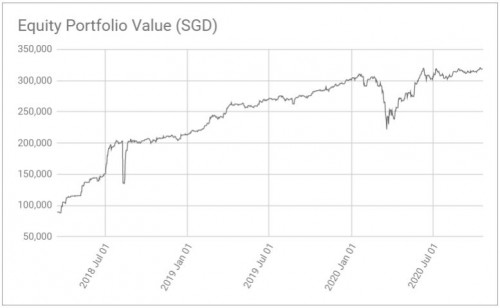 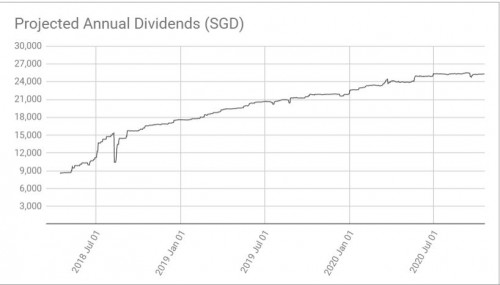 This post has been edited by Havoc Knightmare: Oct 19 2020, 08:12 PM polarzbearz liked this post
|
|
|
Oct 19 2020, 09:42 PM
|
|
Senior Member
4,816 posts Joined: Apr 2007
|
QUOTE(Havoc Knightmare @ Oct 19 2020, 08:03 PM) You have a great thing going there, though I'm wondering why don't you move to Google Sheets, since Google Sheets is superior in so many ways. Dang, that's actually pretty neat! Personally I thought about it a few times but was too lazy to re-do everything again on Google Sheets and that kinda held me back For instance, my portfolio file on google sheets is able to save my end-of-day portfolio value, without having to open the file at all. Google scripts can be automated to be triggered on a time basis, without requiring one to open the file on a daily basis and pressing macro buttons. So I get a summary of how my portfolio of stocks on Bursa, SGX and HKEX have evolved over the last 3+ years as per the chart below. All without pressing buttons and running macros. I only have to key into my sheet my trades and dividends received, with google sheets taking care of everything else. Maybe I should really spend some time and look into it  My snapshot is only as good as the times I remember to refresh it My snapshot is only as good as the times I remember to refresh it  There's some obvious "holes" on certain month when I forgot to even open the sheet There's some obvious "holes" on certain month when I forgot to even open the sheet  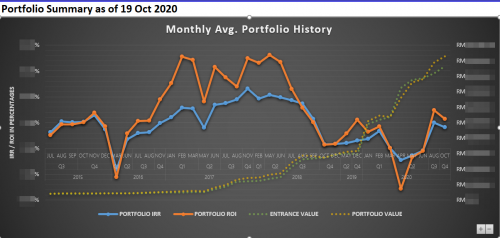 |
|
|
Oct 19 2020, 10:05 PM
|
|
Senior Member
1,205 posts Joined: Feb 2006 From: Kuala Lumpur
|
QUOTE(polarzbearz @ Oct 19 2020, 09:42 PM) Dang, that's actually pretty neat! Personally I thought about it a few times but was too lazy to re-do everything again on Google Sheets and that kinda held me back Yeah, with google sheets you will never have to open the sheet just to run macros. You just need to check in every now and then to correct any errors since google sheets doesn't fetch data correctly occasionally and you end up with #error cell outputs. Maybe I should really spend some time and look into it My snapshot is only as good as the times I remember to refresh it There's some obvious "holes" on certain month when I forgot to even open the sheet My current sheet is derived from this Singaporean blogger's work since I have little knowledge in programming languages - https://investmentmoats.com/StockPortfolioT...menttracker.php Perhaps you can use his sheet as a blueprint to work with. cucumber liked this post
|
|
|
Oct 19 2020, 10:21 PM
|
|
Senior Member
2,210 posts Joined: Jan 2018
|
QUOTE(polarzbearz @ Oct 19 2020, 12:38 PM) For those interested, can also use my spreadsheet. I published it for free initially for fundsupermart users but over time I've moved on to other vehicles (incl. Malaysia / Foreign stocks) Wow that dedication! The spreadsheet might be quite heavy though. Links in my signature or read more here: https://forum.lowyat.net/index.php?showtopi...&#entry98487565  |
|
|
Oct 19 2020, 11:11 PM
|
|
Senior Member
2,406 posts Joined: Jul 2010 From: bandar Sunway
|
QUOTE(Yggdrasil @ Oct 16 2020, 07:45 PM) I think Google doesn't have permission to pull from Malaysia exchange. I manage to use klse.i3investor.com to pull the prices but as some has mentioned the formula keeps on changing sometimes it’s up,sometimes it’s downIt can't pull from Japan exchange too. You need to pull from other websites. Yeah not sure why but I managed to pull from investing.com |
|
|
Oct 19 2020, 11:25 PM
|
|
Senior Member
2,210 posts Joined: Jan 2018
|
QUOTE(ryan18 @ Oct 19 2020, 11:11 PM) I manage to use klse.i3investor.com to pull the prices but as some has mentioned the formula keeps on changing sometimes it’s up,sometimes it’s down Solution already mentioned here:https://forum.lowyat.net/index.php?showtopi...post&p=95692476 Use IFERROR( ...link with up... , ...link with down...) This means if Google fetch the link with up and it's an error, it will revert to link with down. Disadvantage is it's a long formula. |
|
|
Oct 26 2020, 04:00 PM
|
|
Senior Member
779 posts Joined: Apr 2008 From: Petaling Jaya
|
Hi there, i wondering is there any method or insert any code to make it auto refresh within few second/minute instead of manual refresh it?
|
|
|
Oct 26 2020, 04:17 PM
|
|
Senior Member
2,210 posts Joined: Jan 2018
|
QUOTE(babychai @ Oct 26 2020, 04:00 PM) Hi there, i wondering is there any method or insert any code to make it auto refresh within few second/minute instead of manual refresh it? You can easily Google this.. |
|
|
Oct 30 2020, 05:21 AM
Show posts by this member only | IPv6 | Post
#58
|
|
Probation
1 posts Joined: Oct 2020
|
QUOTE(Yggdrasil @ Mar 4 2020, 02:50 PM) The code is for Sheets. For Excel, you need to import the data from the link. I am still having trouble doing this. Could you be so kind to help me out? It keeps showing N/A. And it says content imported is empty. https://pictr.com/images/2020/10/30/7MOy35.png https://pictr.com/images/2020/10/30/7MOXjV.png https://pictr.com/images/2020/10/30/7MOKpv.md.png |
|
|
Oct 30 2020, 12:35 PM
Show posts by this member only | IPv6 | Post
#59
|
|
Senior Member
2,210 posts Joined: Jan 2018
|
QUOTE(trader8833 @ Oct 30 2020, 05:21 AM) I am still having trouble doing this. Could you be so kind to help me out? It keeps showing N/A. And it says content imported is empty. N/A because Bloomberg website doesn't allow "scrapping" figures or Google's website having problem retrieving.<a href='https://pictr.com/images/2020/10/30/7MOy35.png' target='_blank'>https://pictr.com/images/2020/10/30/7MOy35.png </a> <a href='https://pictr.com/images/2020/10/30/7MOXjV.png' target='_blank'>https://pictr.com/images/2020/10/30/7MOXjV.png </a> <a href='https://pictr.com/images/2020/10/30/7MOKpv.md.png' target='_blank'>https://pictr.com/images/2020/10/30/7MOKpv.md.png </a> Extract from klsescreener instead. CODE =importxml("https://www.klsescreener.com/v2/stocks/view/5176","//span[@id='price']") |
|
|
Sep 8 2021, 07:23 PM
|
|
Junior Member
5 posts Joined: Apr 2011
|
hihi, i had created a webpage mainly to cater this google sheet problem. Feel free to test it out and let me know any feedbacks =)
www.mybuku555.com |
|
|
Oct 23 2021, 02:43 AM
|
|
Probation
4 posts Joined: Oct 2021
|
May I know the code to pull out the 52w from klsescreener?
|
|
|
Oct 23 2021, 11:37 AM
|
|
Probation
4 posts Joined: Oct 2021
|
Below code is to import the price.
If I want to import the 52w info, why to do it? Thank you in advance. https://pictr.com/images/2021/10/23/BL49Z6.md.jpg |
|
|
Oct 23 2021, 12:44 PM
|
|
Probation
3 posts Joined: Oct 2021
|
what a good sharing on this.
|
|
|
Oct 23 2021, 11:35 PM
Show posts by this member only | IPv6 | Post
#64
|
|
Junior Member
821 posts Joined: Jun 2005
|
QUOTE(calvinkcl @ Oct 23 2021, 11:37 AM) Below code is to import the price. If I want to import the 52w info, why to do it? Thank you in advance. <a href='https://pictr.com/images/2021/10/23/BL49Z6.md.jpg' target='_blank'>https://pictr.com/images/2021/10/23/BL49Z6.md.jpg </a> CODE =index(IMPORTXML("https://www.klsescreener.com/v2/stocks/view/5176", "//div[@class ='table-responsive']//table[1]/tbody/tr[7]/td[2]"),1) calvinkcl liked this post
|
|
|
Oct 23 2021, 11:50 PM
|
|
Junior Member
821 posts Joined: Jun 2005
|
QUOTE(calvinkcl @ Oct 23 2021, 02:43 AM) May I know the code to pull out the 52w from klsescreener? Like this to keep it simple.CODE =index(IMPORTXML("https://www.klsescreener.com/v2/stocks/view/5176", "//tr[7]/td[2]"),1) calvinkcl liked this post
|
|
|
Nov 3 2021, 02:05 AM
|
|
Probation
4 posts Joined: Oct 2021
|
Hi Bro & Sis, I wish to get the price different with the (xxx%) beside it, what is the code?
|
|
|
Nov 3 2021, 10:34 AM
|
|
Probation
4 posts Joined: Oct 2021
|
Hi buddies, I am import the data from klsescreener.
When i import that price different everyday, it comes with % up or down. How to remove it. How to amend to to remove the % up or down that beside the price different. Thanks in advance! |
|
|
Mar 1 2022, 10:59 AM
|
|
Senior Member
3,076 posts Joined: Jan 2008
|
QUOTE(Yggdrasil @ Mar 4 2020, 03:04 PM) bmwcaddy This option was good to use for 2 years. Today i3 upgraded their site and can't pluck the latest price from there.Rough guide how to get the data. Clean up later if you want. Excel 1. Copy URL. 2. In Excel, go to Data. 3. Paste link. 4. Navigate to the info you want. Easy way is to just import the whole table and hide the sheet we don't want. Click load. 5. It will appear like this. 6. Clean up if you want. My putting a master sheet with what you want to see and the other data in another sheet like this. 7. Click refresh all when you want to get latest data. Thank you Yggdrasil for showing us this option. |
|
|
Mar 26 2022, 07:34 PM
Show posts by this member only | IPv6 | Post
#69
|
|
Junior Member
22 posts Joined: Sep 2010
|
Does anyone have an updated method to pull price data for KLSE stocks? The old method suggested in this thread no longer works after i3investor updated their website
|
|
|
Mar 28 2022, 10:17 AM
|
|
Senior Member
3,076 posts Joined: Jan 2008
|
QUOTE(kenalex555 @ Mar 26 2022, 07:34 PM) Does anyone have an updated method to pull price data for KLSE stocks? The old method suggested in this thread no longer works after i3investor updated their website You create a portfolio like Philips Farms in I3.https://klse.i3investor.com/servlets/pfs/120720.jsp Then you import the data from I3. |
|
|
Apr 7 2022, 10:40 AM
Show posts by this member only | IPv6 | Post
#71
|

Junior Member
35 posts Joined: Dec 2012
|
QUOTE(cucubud @ Mar 28 2022, 10:17 AM) You create a portfolio like Philips Farms in I3. How do you go about doing this?https://klse.i3investor.com/servlets/pfs/120720.jsp Then you import the data from I3. |
|
|
Apr 7 2022, 01:45 PM
|
|
Senior Member
3,076 posts Joined: Jan 2008
|
QUOTE(Van Der Shah @ Apr 7 2022, 10:40 AM) How do you go about doing this? 1. Register a user id in i3.2. Sign in and create a portfolio with the stocks you want to get the price. 3. Make that portfolio a Transaction Type and a Shared Access Type. 4. You import the link of that portfolio to your Excel spreadsheet where you can pluck the price of the stock you created. |
|
|
Apr 24 2022, 10:52 PM
Show posts by this member only | IPv6 | Post
#73
|
|
Junior Member
821 posts Joined: Jun 2005
|
If you're using Google Sheets Here's the new code : CODE =index(ImportXML("https://klse.i3investor.com/web/stock/overview/1155?randomstring", "//div[contains(@id, 'stock-price-info')]//p[2]"), 1, 1) 126126 liked this post
|
|
|
Sep 29 2022, 02:39 PM
Show posts by this member only | IPv6 | Post
#74
|
|
Newbie
1 posts Joined: Feb 2015
|
Hi,
I want to extract Debt to Cash ratio from klsescreener into my Google sheet, tried many methods but still unsuccessful, anyone can help ? |
|
|
Feb 26 2024, 11:22 AM
Show posts by this member only | IPv6 | Post
#75
|
|
Junior Member
77 posts Joined: Jan 2011
|
Hello, have been using i3investor to pull bursa prices for sheets, but recently the prices are no longer updated.
Anyone has the most recent code? Or any other ways to pull live prices on sheets? |
|
|
Feb 26 2024, 03:32 PM
Show posts by this member only | IPv6 | Post
#76
|
|
Junior Member
821 posts Joined: Jun 2005
|
QUOTE(126126 @ Feb 26 2024, 11:22 AM) Hello, have been using i3investor to pull bursa prices for sheets, but recently the prices are no longer updated. Could you share the code you were using? I had the same problem a few days ago, I just modified the url a bit and it worked. Yahoo however is not working, page is down.Anyone has the most recent code? Or any other ways to pull live prices on sheets? |
|
|
Feb 26 2024, 09:48 PM
Show posts by this member only | IPv6 | Post
#77
|
|
Junior Member
77 posts Joined: Jan 2011
|
QUOTE(cucumber @ Apr 24 2022, 10:52 PM) If you're using Google Sheets Here's the new code : CODE =index(ImportXML("https://klse.i3investor.com/web/stock/overview/1155?randomstring", "//div[contains(@id, 'stock-price-info')]//p[2]"), 1, 1) QUOTE(cucumber @ Feb 26 2024, 03:32 PM) Could you share the code you were using? I had the same problem a few days ago, I just modified the url a bit and it worked. Yahoo however is not working, page is down. Hey I was using the code you shared in 2022. But i just checked back sheets just now and it was working again. Was down for the past few days thought need a new code. Thanks again  |
|
|
Nov 14 2024, 10:28 AM
Show posts by this member only | IPv6 | Post
#78
|
|
Junior Member
77 posts Joined: Jan 2011
|
QUOTE(cucumber @ Feb 26 2024, 03:32 PM) Could you share the code you were using? I had the same problem a few days ago, I just modified the url a bit and it worked. Yahoo however is not working, page is down. Hello, looks like the code has been down for the past few weeks. Anyone has the new code to pull recent prices from i3 website or any other sites? |
|
|
Feb 12 2025, 09:36 AM
Show posts by this member only | IPv6 | Post
#79
|
|
Junior Member
821 posts Joined: Jun 2005
|
QUOTE(126126 @ Nov 14 2024, 10:28 AM) Hello, looks like the code has been down for the past few weeks. Anyone has the new code to pull recent prices from i3 website or any other sites? I cannot get it to work either with KLSE stocks. Tried various methods. It stopped working for me the past week. US stock still ok using Google Finance.If anyone found a way to extract KLSE stock price in Google Sheets kindly share here. |
|
|
Feb 23 2025, 04:14 PM
|
|
Junior Member
43 posts Joined: Sep 2010
|
same here bro. Not able to scrape KLSE stock price into Google Sheet. Appreciate anyone able to do it to share the code.
Thanks in advance. |
|
|
Mar 4 2025, 09:48 AM
|
|
Newbie
7 posts Joined: Feb 2010
|
Eg... for the green Telco provider.. CODE =importxml("https://www.klsescreener.com/v2/stocks/view/8672","//span[@id='price']") This post has been edited by jegan80: Mar 4 2025, 09:50 AM cucumber liked this post
|
|
|
Mar 9 2025, 04:09 PM
|
|
Junior Member
43 posts Joined: Sep 2010
|
QUOTE(jegan80 @ Mar 4 2025, 09:48 AM) Eg... for the green Telco provider.. Thanks man. This works for my klse stocks. Cheers!CODE =importxml("https://www.klsescreener.com/v2/stocks/view/8672","//span[@id='price']") jegan80 liked this post
|
|
|
Mar 13 2025, 10:37 AM
Show posts by this member only | IPv6 | Post
#83
|

Junior Member
192 posts Joined: Jul 2008 
|
QUOTE(cucumber @ Apr 24 2022, 10:52 PM) If you're using Google Sheets Anybody got the latest code ?Here's the new code : CODE =index(ImportXML("https://klse.i3investor.com/web/stock/overview/1155?randomstring", "//div[contains(@id, 'stock-price-info')]//p[2]"), 1, 1) |
|
|
Mar 15 2025, 03:16 PM
Show posts by this member only | IPv6 | Post
#84
|
|
Junior Member
587 posts Joined: May 2016
|
Recently I wanted to create a simple spreadsheets for certain HKEx stocks- daily opening, closing, high, low and volume. Ask deepseek and am astounded it solved my problem in less than 10 minutes. Link google sheet with google finance and from there expanded the spreadsheet to include 52w h&l, price difference and % difference.
|
|
|
Mar 15 2025, 03:17 PM
Show posts by this member only | IPv6 | Post
#85
|
|
Junior Member
587 posts Joined: May 2016
|
QUOTE(b787 @ Mar 13 2025, 10:37 AM) Anybody got the latest code ? Try using deepseek, I find it easier and faster to get answers rather than chatgpt. |
|
|
Mar 26 2025, 12:36 PM
Show posts by this member only | IPv6 | Post
#86
|
|
Junior Member
821 posts Joined: Jun 2005
|
QUOTE(jegan80 @ Mar 4 2025, 09:48 AM) Eg... for the green Telco provider.. This works. Thank you ma manCODE =importxml("https://www.klsescreener.com/v2/stocks/view/8672","//span[@id='price']") |
| Change to: |  0.0483sec 0.0483sec
 1.16 1.16
 6 queries 6 queries
 GZIP Disabled GZIP Disabled
Time is now: 21st December 2025 - 12:36 AM |
 Quote
Quote