Welcome Guest ( Log In | Register )

Outline · [ Standard ] · Linear+

 DIY cheap 8800 fan replacement, update 21/07/07

views
     
SUSAllnGap
post Jul 21 2007, 09:51 AM

[ Modding with Passion(tm) ]
*******
Senior Member
4,561 posts

Joined: Jan 2003
From: Penangites


hey man....so this is how you play with fans tongue.gif

quite creative and effective, really....


those blowers you see there, the function is to push hot air out of the casing, this is the best way to do it since that area is usually spaced restricted....

the method of mounting the fan on top of the graphics card definitely works !!

i've been thinking of modding my 1900xtx with a XP-90C on top of it, maybe next year.....
SUSAllnGap
post Jul 22 2007, 09:12 PM

[ Modding with Passion(tm) ]
*******
Senior Member
4,561 posts

Joined: Jan 2003
From: Penangites


QUOTE(Doom @ Jul 22 2007, 12:32 AM)
I think basically at 40 cfm is already the best the cooler could be benefit from having more airflow than stock fan ...

Even if equipped with higher CFM fan it just won't works better since the ability of the heat pipes to transfer heat from the GPU to the fins is limited ...

So even with more airflow it just won't do any better ...

but at leasts the card is idle at 55c which is pretty good ... what about the load condition .. is there any difference with higher and lower CFM fans ??
*
actually this depends.....i mean 80mm fans arent that powerful, and also the heatpipe might be 1 or 2pcs only, hence not going do transfer that much heat......

but what he can do is to remove the stock heatsink and reapply good thermal paste on it....once you open the stock heatsink, you'll see how they use the cheapo white thermal paste on you >1k card shakehead.gif


QUOTE(extremeocer @ Jul 22 2007, 07:27 PM)
here's my DIY:

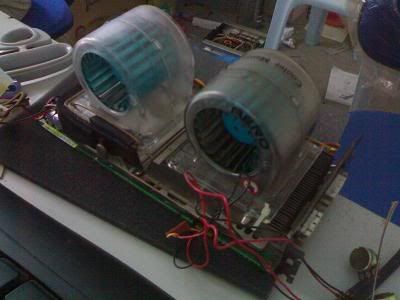
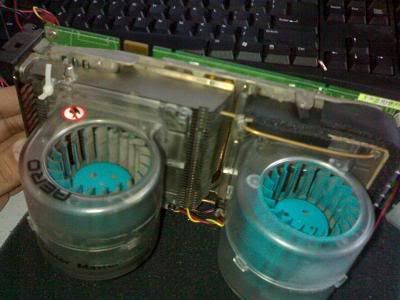
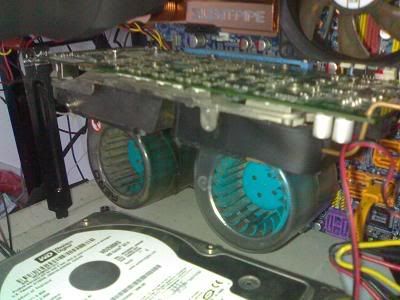
Same took out the cover....but added 2 Cooler Master Aero fans ( both running at 12V 0.9A)

Messy cables....some fan controller wires
user posted image

user posted image

user posted image

Mounted onto my DQ6
user posted image

Havent test run it yet.....will do it later.... rclxms.gif
*
i dont think that's gonna work well........this is because that fan from CM is not running as it is supposed to....first of all, blowers should look like a snail shape, with the air coming out of the end......for this case, the air is not concentrated, and therefor the direction of the air is screwed....

SUSAllnGap
post Jul 25 2007, 09:37 PM

[ Modding with Passion(tm) ]
*******
Senior Member
4,561 posts

Joined: Jan 2003
From: Penangites


QUOTE(mADmAN @ Jul 25 2007, 07:36 PM)
i have an idea... but involves alot of noise...

u know how some people cable tie 2x120mm fans together to a PCI slot bracket to make a DIY PCI fan card? do the same thing but use Delta FFB1212EHE fans instead. only thing is, theyre 38mm and not 25mm thick...so i dunno how itll fit onto the PCI slot cover. and of course leave the shroud open. point the fans directly to the Heatsink.

other than the power of the fans, main reason i recommend those fans are the static blades on the fan....it will help centralise the air coming out of the fan and drastically reduce the centre dead zone common on other fans and concentrate the air better.

if noise is an issue, u can always make a 12v / 7v switch for it (provided ur FFB can run at 7v) so u can have power when u need it and more silence with just a flick of a switch. 12v / 5v switch can be made oso...but not all FFBs can run at 5v...7v should be able to run i guess...best to test first.

only issues i see are...

1/ noise - but can do the switch thingy
2/ open shroud - the heat will probably be dumped into the case and not out..
3/ 38mm thickness - not sure how to tie it to a PCI slot cover.

other than this method..there are some users in the 8800 thread who uses a PCI fan blower (like the evercool fox-2) whos reported results by just placing the fan 1 slot away from the GC. the shroud etc are left stock. even the vent holes are left open. im planning on trying this method when i have the chance.
*
mADmAN, just to show ya my collections of fans laugh.gif come and beat my 150mm fan ya laugh.gif

user posted image
user posted image
user posted image


ok, spamming over....

actually i had some evil plan of my own, XP-90C on my 1900XTX together with some 30mm Copal Japan fans blowing on the rams......should outperform a lot of coolers out there....

1piece of 92mm card should be able to fit the whole heatsink area nicely..... wink.gif

This post has been edited by AllnGap: Jul 25 2007, 09:40 PM
SUSAllnGap
post Jul 31 2007, 08:39 AM

[ Modding with Passion(tm) ]
*******
Senior Member
4,561 posts

Joined: Jan 2003
From: Penangites


QUOTE(styloe @ Jul 28 2007, 01:49 AM)
Wow the wans ur holding looks nice....can it mounted on the 88 ka?afraid whether if its too heavy  sweat.gif

xp120 also nice wat  brows.gif not that heavy but mounting wud be a problem  hmm.gif

xp120 + ur bling2 fan = SUPER NICE temps n mods  laugh.gif
*
QUOTE(Doom @ Jul 29 2007, 12:09 AM)
Apart from weight issue, those none norm setup should perform very well ...

so far still have no gut to take out the stock heatsink .....
*
weight issue will not be an issue if you are able to fabricate a bracket to support the weight of the heatsink

you might wanna use chopsticks as temporary stands to hold the weight laugh.gif


QUOTE(HaHaNoCluE @ Jul 31 2007, 12:55 AM)
no nid so much, i tried using an adda 120mm fan n place it near the hsf of my 8800gts (ori fan n hsf cover was opened)... the temp lowered to 47... but adding more fans doesn't make things different even when load... max load with this setup is very very cool... 66 max..! o ya, it was raining n i think the room temp might drop 1 or 2 degree...
*
as i told you before, open up the graphics card and re apply good thermal paste on it......they are using the cheapo white thermal paste on it


Change to:
| Lo-Fi Version
0.0164sec    0.72    7 queries    GZIP Disabled
Time is now: 8th December 2025 - 04:13 PM