Welcome Guest ( Log In | Register )

Outline · [ Standard ] · Linear+

 DIY cheap 8800 fan replacement, update 21/07/07

views
     
TSHaHaNoCluE
post Jul 21 2007, 02:28 AM, updated 19y ago

Newbie
****
Senior Member
628 posts

Joined: Oct 2006


err since i'm waiting for my gpu block so i guess i might try out some stupid idea to cool down my 8800gts... using rivatuner to max the ori fan to 100% max speed does help cool down my gpu from 59 to 53 but i'm worry like many other owners of this card that a replacement fan is very near to impossible or too expensive to obtain in future... so it might be easier if i attach a fan to the outside of the cover might help further cooling it n a ormal fan is cheaper than the ori nvidia fan anyway...

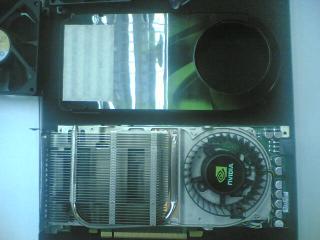
1st, i remove the cover (4 screws) of the hsf and remove the ori fan (3 screws) from the heat sink... the fan is made by delta (made in china) - more detail of the fan will be added soon... n reinstall the cover...
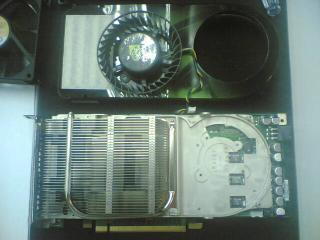
Attached Image

Attached Image

Attached Image

the blowhole of the ori fan is 70mm, so i've prepared some fans (all brand new) i've bought to try on it...

1) orbix 70mm x 70mm x 15mm (3-pin rpm support, 3900rpm)
2) cooler master 80mm x 80mm x 25mm (3-pin rpm support)
3) delta 80mm x 80mm x 25mm (molex no rpm support)
4) delta 92mm x 92mm x 25mm (3-pin rpm support)
5) amd ori 60mm fan (3-pin rpm support)
6) sunon 92mm x 92mm x 25mm (3-pin rpm support)

i set all fans to max rpm to try if they can out perform the ori fan of the gts... the ori fan has a heavy n large motor but the max rpm is only 2,700rpm...

Attached Image

well, i thought i wanna make a bracket to bolt these fans on the gpu but it'll take me longer time for this little test, so i use masking tape instead n it made the whole process a lot easier as it's very easy to be clean off...
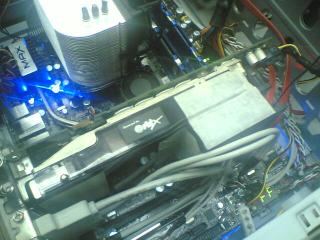
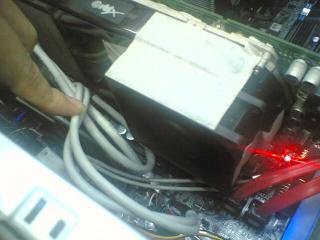
Attached Image

Attached Image

i'll try to get more info on the fans as i wanna know if high cfm fans will help cool the gpu better or if the restriction of the ori heat sink + the small blow hole won't benefit from highr cfm fans at all...

testing will be done in aircond room with room temp of 27 to 28 degree celsius... so the result should be pretty accurate i guess... temp will be taken with rivatuner... i might run a 3d scan with atitool for 10 minutes for each fan test... so v can roughly predict what's the temp when it's working (not fully load i guess)...


...................................................................................................................................................................idle
1) orbix 70mm x 70mm x 15mm (3-pin rpm support, 3,900rpm, 27.5CFM, 0.16A)..............................................52 degree celsius
2) cooler master A8025-18CB-3BN-F1 80mm x 80mm x 25mm (3-pin rpm support, 1,800rpm, 22.8CFM, 0.12A)...61 degree celcius
3) delta AFB0812VH 80mm x 80mm x 25mm (molex no rpm support, 3,600rpm, 42.0CFM, 0.26A) from AllnGap...53 degree celcius
4) delta AUB0912VH 92mm x 92mm x 25mm (3-pin rpm support, 3,800rpm, 67.8CFM, 0.40A) from AllnGap.........54 degree celcius
5) amd ori 60mm fan (3-pin rpm support, cannot use coz too small)
6) sunon 92mm x 92mm x 25mm (3-pin rpm support, 2,600rpm, 48.5CFM, 0.20A).............................................54 degree celcius
7) original nvidia blower fan, delta BFB1012L (4-pin rpm support, 2,700rpm, 19.0CFM, 0.48A).............................54 degree celcius

i seems like the hsf itself has high restriction of air flow, it doesn't improve much from the advantage of higher air flow fans... the cooler master 80mm fan perform badly, maybe due to that it's low noise n very weak air flow... fans with bigger size have another flaw in this test as the original hsf cover blowhole is on 70mm diameter, so that might restrict more air being push into the hsf... maybe i'll buy a fan adapter such as 80mm to 70mm n 92mm to 70mm, if it's available (anyone slling???)...

actually delta does produce blower fan with same BFB1020L motor, so if we figure out how to dismantle the motor, so we should be able to find replacement for future... link to the blower fan http://www.delta.com.tw/product/cp/dcfans/...B97x94x33mm.pdf

will continue again tomolo... icon_rolleyes.gif

- atitool artifact scan for 10 minutes (load temp)
- dual fan (with ori fan running at both 60% n 100%) idle n load temp

This post has been edited by HaHaNoCluE: Jul 21 2007, 08:21 PM
styloe
post Jul 21 2007, 02:38 AM

6 sTaR wORkaHOLic JuNKie
******
Senior Member
1,242 posts

Joined: Aug 2005
From: Sila Mampir,JB sTaTus:GTX 680 SLI


LoL maybe change the title CHEAPSKATE MOD!!

elcheapo mode hell as long as it works bravo my fren...

update on the temp?maybe can do bling2 mod...hehe
sopen2003
post Jul 21 2007, 04:34 AM

Casual
***
Junior Member
384 posts

Joined: Mar 2006
From: kl


bro, ur 8800gts, it's galaxy??
SUSAllnGap
post Jul 21 2007, 09:51 AM

[ Modding with Passion(tm) ]
*******
Senior Member
4,561 posts

Joined: Jan 2003
From: Penangites


hey man....so this is how you play with fans tongue.gif

quite creative and effective, really....


those blowers you see there, the function is to push hot air out of the casing, this is the best way to do it since that area is usually spaced restricted....

the method of mounting the fan on top of the graphics card definitely works !!

i've been thinking of modding my 1900xtx with a XP-90C on top of it, maybe next year.....
TSHaHaNoCluE
post Jul 21 2007, 12:08 PM

Newbie
****
Senior Member
628 posts

Joined: Oct 2006


QUOTE(styloe @ Jul 21 2007, 02:38 AM)
LoL maybe change the title CHEAPSKATE MOD!!

elcheapo mode hell as long as it works bravo my fren...

update on the temp?maybe can do bling2 mod...hehe
*
err no bling bling lar coz i'm testing either it'll work better onot only if using this cheap idea... lol... allngap not free to make me those led he's selling so maybe wait till he's free... wink.gif

QUOTE(sopen2003 @ Jul 21 2007, 04:34 AM)
bro, ur 8800gts, it's galaxy??
*
ehhh.. how u know??? it's not written on the gpu oso... u using the same 1??? thumbup.gif


QUOTE(AllnGap @ Jul 21 2007, 09:51 AM)
hey man....so this is how you play with fans  tongue.gif

quite creative and effective, really....
those blowers you see there, the function is to push hot air out of the casing, this is the best way to do it since that area is usually spaced restricted....

the method of mounting the fan on top of the graphics card definitely works !!

i've been thinking of modding my 1900xtx with a XP-90C on top of it, maybe next year.....
*
rclxms.gif my fans supplier... dunno lar... i bought many of them for spare n testing lor... hahahaha... yaya the xp-90c does seems like a good candidate... just fabricate the adapter bracket for gpu then ok liao... hehehehe...
sopen2003
post Jul 21 2007, 04:57 PM

Casual
***
Junior Member
384 posts

Joined: Mar 2006
From: kl


QUOTE(HaHaNoCluE @ Jul 21 2007, 12:08 PM)

ehhh.. how u know??? it's not written on the gpu oso... u using the same 1???  thumbup.gif

*
hehe brows.gif not using it yet.. plan to buy it.. really hard to find galaxy 8800gts 320mb pic, no net.. so how this card performing. ok?? btw, found in net, leadtek 8800gts 320mb. design also good n nice looking huhuh drool.gif
TSHaHaNoCluE
post Jul 21 2007, 08:19 PM

Newbie
****
Senior Member
628 posts

Joined: Oct 2006


it came as factory oced, so no need worry if u oc it then they don't cover warranty... but it's all same no matter what brand coz they all made by same factory... at rm1,1k+, it's a good deal...
sopen2003
post Jul 21 2007, 08:35 PM

Casual
***
Junior Member
384 posts

Joined: Mar 2006
From: kl


QUOTE(HaHaNoCluE @ Jul 21 2007, 08:19 PM)
it came as factory oced, so no need worry if u oc it then they don't cover warranty... but it's all same no matter what brand coz they all made by same factory... at rm1,1k+, it's a good deal...
*
so bro, how ur DIY?? it's ok??..

btw, just my opinion..

ori fan.. air flow is like this..

_ _ _ _ _ _ _
i########i <<~~~
i########i <<~~~
i#8800GTS#i <<~~~ ORI FAN
i########i <<~~~
i########i <<~~~

how about, if just leave the ori fan there.. just add an additional fan on top of heat sink, direct to 8800 proc... no need to put the cover..


Doom
post Jul 22 2007, 12:32 AM

Doom"s here >_<"
*******
Senior Member
4,496 posts

Joined: Apr 2005
From: KL


I think basically at 40 cfm is already the best the cooler could be benefit from having more airflow than stock fan ...

Even if equipped with higher CFM fan it just won't works better since the ability of the heat pipes to transfer heat from the GPU to the fins is limited ...

So even with more airflow it just won't do any better ...

but at leasts the card is idle at 55c which is pretty good ... what about the load condition .. is there any difference with higher and lower CFM fans ??


TSHaHaNoCluE
post Jul 22 2007, 01:47 AM

Newbie
****
Senior Member
628 posts

Joined: Oct 2006


the idle temp shown above with all the fans set at max rpm... so idle at 55 or less degree is achievable especially in air cond room (28 degree)... i've tried the idea running with dual fan without the cover but it doesn't perform any better but getting worst (57 degree celcius)... i'll try running dual fan but with the ori fan stay at wher it is n the 2nd fan is attached outside the cover just like i was testing... hope it'll perform better...

i'll try both idea with load too (atitool artifact scan)... it's might not fully load the gpu but it's heavy enough... let's hope i can do the rest of the test during these 2 days... notworthy.gif
Doom
post Jul 22 2007, 03:19 PM

Doom"s here >_<"
*******
Senior Member
4,496 posts

Joined: Apr 2005
From: KL


hmm .. actually if u have fan at the side of the card it would cool down the PCB, RAM and other resistor better ..

While the Cooler does the job for the CORE, MEM and Part of the transistors..
extremeocer
post Jul 22 2007, 07:27 PM

Casual
***
Junior Member
302 posts

Joined: Jun 2007
From: Johor


here's my DIY:

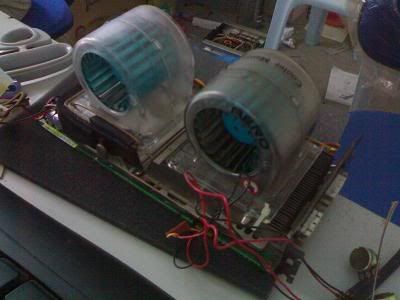
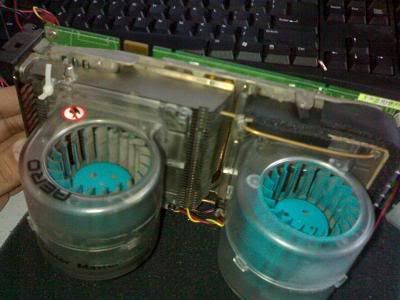
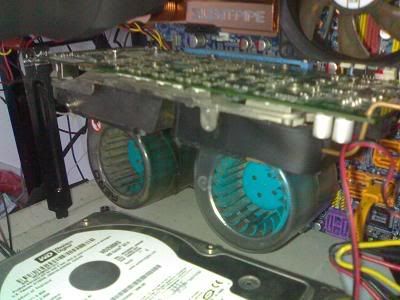
Same took out the cover....but added 2 Cooler Master Aero fans ( both running at 12V 0.9A)

Messy cables....some fan controller wires
user posted image

user posted image

user posted image

Mounted onto my DQ6
user posted image

Havent test run it yet.....will do it later.... rclxms.gif

This post has been edited by extremeocer: Jul 22 2007, 07:31 PM
SUSAllnGap
post Jul 22 2007, 09:12 PM

[ Modding with Passion(tm) ]
*******
Senior Member
4,561 posts

Joined: Jan 2003
From: Penangites


QUOTE(Doom @ Jul 22 2007, 12:32 AM)
I think basically at 40 cfm is already the best the cooler could be benefit from having more airflow than stock fan ...

Even if equipped with higher CFM fan it just won't works better since the ability of the heat pipes to transfer heat from the GPU to the fins is limited ...

So even with more airflow it just won't do any better ...

but at leasts the card is idle at 55c which is pretty good ... what about the load condition .. is there any difference with higher and lower CFM fans ??
*
actually this depends.....i mean 80mm fans arent that powerful, and also the heatpipe might be 1 or 2pcs only, hence not going do transfer that much heat......

but what he can do is to remove the stock heatsink and reapply good thermal paste on it....once you open the stock heatsink, you'll see how they use the cheapo white thermal paste on you >1k card shakehead.gif


QUOTE(extremeocer @ Jul 22 2007, 07:27 PM)
here's my DIY:

Same took out the cover....but added 2 Cooler Master Aero fans ( both running at 12V 0.9A)

Messy cables....some fan controller wires
user posted image

user posted image

user posted image

Mounted onto my DQ6
user posted image

Havent test run it yet.....will do it later.... rclxms.gif
*
i dont think that's gonna work well........this is because that fan from CM is not running as it is supposed to....first of all, blowers should look like a snail shape, with the air coming out of the end......for this case, the air is not concentrated, and therefor the direction of the air is screwed....

extremeocer
post Jul 22 2007, 09:26 PM

Casual
***
Junior Member
302 posts

Joined: Jun 2007
From: Johor


doesn't matter with the direction of airflow...all i want is just to cool the card further as my rig is open design...no casing....it's hooked up on my cascade.
sopen2003
post Jul 22 2007, 11:18 PM

Casual
***
Junior Member
384 posts

Joined: Mar 2006
From: kl


QUOTE(extremeocer @ Jul 22 2007, 09:26 PM)
doesn't matter with the direction of airflow...all i want is just to cool the card further as my rig is open design...no casing....it's hooked up on my cascade.
*
nice diy on ur gc.. brows.gif u hook up the fan using cable tie, and cable only?? strong enough rclxub.gif .. so how the result??
extremeocer
post Jul 22 2007, 11:47 PM

Casual
***
Junior Member
302 posts

Joined: Jun 2007
From: Johor


QUOTE(sopen2003 @ Jul 22 2007, 11:18 PM)
nice diy on ur gc..  brows.gif  u hook up the fan using cable tie, and cable only?? strong enough  rclxub.gif .. so how the result??
*
I secured it with cable tie and copper wire. Solid...

performance wise i will test later...rather occupied now.
TSHaHaNoCluE
post Jul 23 2007, 01:54 AM

Newbie
****
Senior Member
628 posts

Joined: Oct 2006


coool... the fans do looks ver nice indeed but mine is a close case test... so i still need the hot air to exit through the rear exhaust of the ori hsf...

extremeocer, hehe, we can exchange some ideas here...
extremeocer
post Jul 23 2007, 03:43 AM

Casual
***
Junior Member
302 posts

Joined: Jun 2007
From: Johor


QUOTE(HaHaNoCluE @ Jul 23 2007, 01:54 AM)
coool... the fans do looks ver nice indeed but mine is a close case test... so i still need the hot air to exit through the rear exhaust of the ori hsf...

extremeocer, hehe, we can exchange some ideas here...
*
Here's my result

After an hour on CSS:
Card is running at 650/1000

Default HSF
idle 60c load 75c

Default heatsink w/ Aero fan
idle 49c load 60c

No prob bro, ideas are meant to be exchanged anyway. tongue.gif
styloe
post Jul 23 2007, 03:49 AM

6 sTaR wORkaHOLic JuNKie
******
Senior Member
1,242 posts

Joined: Aug 2005
From: Sila Mampir,JB sTaTus:GTX 680 SLI


QUOTE(extremeocer @ Jul 23 2007, 03:43 AM)
Here's my result

After an hour on CSS:
Card is running at 650/1000

Default HSF
idle 60c load 75c

Default heatsink w/ Aero fan
idle 49c load 60c

No prob bro, ideas are meant to be exchanged anyway.  tongue.gif
*
wow bro tats a major diff in temperature shocking.gif nice.... drool.gif

too bad ur using open case.wanna know close case temp sweat.gif
sopen2003
post Jul 23 2007, 05:14 AM

Casual
***
Junior Member
384 posts

Joined: Mar 2006
From: kl


QUOTE(extremeocer @ Jul 23 2007, 03:43 AM)
Here's my result

After an hour on CSS:
Card is running at 650/1000

Default HSF
idle 60c load 75c

Default heatsink w/ Aero fan
idle 49c load 60c

No prob bro, ideas are meant to be exchanged anyway.  tongue.gif
*
brows.gif good result brows.gif

yup, ideas is something to share on.. heheh.. icon_rolleyes.gif
slash
post Jul 23 2007, 11:17 PM

Warcraft 3 Champion - Lan Party 2003
******
Senior Member
1,081 posts

Joined: Jan 2003


those fans u used have different blow directions compared to the original delta fan leh... the original delta fan takes air from surroundings and directs the air to the left. while the replacement fans just directs the air down.
extremeocer
post Jul 23 2007, 11:23 PM

Casual
***
Junior Member
302 posts

Joined: Jun 2007
From: Johor


QUOTE(slash @ Jul 23 2007, 11:17 PM)
those fans u used have different blow directions compared to the original delta fan leh... the original delta fan takes air from surroundings and directs the air to the left. while the replacement fans just directs the air down.
*
not really...i am using centrifugal fans....performance wise, better than the original Delta. i might try changing to a 80mm Delta screamer to see the difference.
TSHaHaNoCluE
post Jul 24 2007, 03:12 AM

Newbie
****
Senior Member
628 posts

Joined: Oct 2006


i tried take off the hsf cover n test the setup open bench style but this time i was using 120mm high cfm fan (adda fan oso from AllnGap) blowing directly to the gpu, the result 47 degree celsius... but i think this is only good if user wanna run benchmark testing... using setup like that for 24/7 is not appropriate unless u stay alone, no pet, no family visiting, no gf... still figuring out how to make the coolng more effective n easier + cheaper so that most users can just do it easily without fearing that they will easily void the warranty....
Doom
post Jul 25 2007, 01:25 PM

Doom"s here >_<"
*******
Senior Member
4,496 posts

Joined: Apr 2005
From: KL


I wonder this work on my X2900 or not .. it;s pretty noisy during load..

Anyway ... running naked is really not that practical since anything fall on the card would have it gone case and RMA claim as well ...
extremeocer
post Jul 25 2007, 07:07 PM

Casual
***
Junior Member
302 posts

Joined: Jun 2007
From: Johor


QUOTE(Doom @ Jul 25 2007, 01:25 PM)
I wonder this work on my X2900 or not .. it;s pretty noisy during load..

Anyway ... running naked is really not that practical since anything fall on the card would have it gone case and RMA claim as well ...
*
it works on any card...but you'll have to try diff type of fans...see which one suit your card best.

Waddaya mean by running naked? I dun think anything will fall on the card...i dun see how when everything is secured firmly.
mADmAN
post Jul 25 2007, 07:36 PM

10k Club
********
All Stars
10,530 posts

Joined: Nov 2004
From: Petaling Jaya & Mid Valley


QUOTE(HaHaNoCluE @ Jul 24 2007, 03:12 AM)
i tried take off the hsf cover n test the setup open bench style but this time i was using 120mm high cfm fan (adda fan oso from AllnGap) blowing directly to the gpu, the result 47 degree celsius... but i think this is only good if user wanna run benchmark testing... using setup like that for 24/7 is not appropriate unless u stay alone, no pet, no family visiting, no gf... still figuring out how to make the coolng more effective n easier + cheaper so that most users can just do it easily without fearing that they will easily void the warranty....
*
i have an idea... but involves alot of noise...

u know how some people cable tie 2x120mm fans together to a PCI slot bracket to make a DIY PCI fan card? do the same thing but use Delta FFB1212EHE fans instead. only thing is, theyre 38mm and not 25mm thick...so i dunno how itll fit onto the PCI slot cover. and of course leave the shroud open. point the fans directly to the Heatsink.

other than the power of the fans, main reason i recommend those fans are the static blades on the fan....it will help centralise the air coming out of the fan and drastically reduce the centre dead zone common on other fans and concentrate the air better.

if noise is an issue, u can always make a 12v / 7v switch for it (provided ur FFB can run at 7v) so u can have power when u need it and more silence with just a flick of a switch. 12v / 5v switch can be made oso...but not all FFBs can run at 5v...7v should be able to run i guess...best to test first.

only issues i see are...

1/ noise - but can do the switch thingy
2/ open shroud - the heat will probably be dumped into the case and not out..
3/ 38mm thickness - not sure how to tie it to a PCI slot cover.

other than this method..there are some users in the 8800 thread who uses a PCI fan blower (like the evercool fox-2) whos reported results by just placing the fan 1 slot away from the GC. the shroud etc are left stock. even the vent holes are left open. im planning on trying this method when i have the chance.
SUSAllnGap
post Jul 25 2007, 09:37 PM

[ Modding with Passion(tm) ]
*******
Senior Member
4,561 posts

Joined: Jan 2003
From: Penangites


QUOTE(mADmAN @ Jul 25 2007, 07:36 PM)
i have an idea... but involves alot of noise...

u know how some people cable tie 2x120mm fans together to a PCI slot bracket to make a DIY PCI fan card? do the same thing but use Delta FFB1212EHE fans instead. only thing is, theyre 38mm and not 25mm thick...so i dunno how itll fit onto the PCI slot cover. and of course leave the shroud open. point the fans directly to the Heatsink.

other than the power of the fans, main reason i recommend those fans are the static blades on the fan....it will help centralise the air coming out of the fan and drastically reduce the centre dead zone common on other fans and concentrate the air better.

if noise is an issue, u can always make a 12v / 7v switch for it (provided ur FFB can run at 7v) so u can have power when u need it and more silence with just a flick of a switch. 12v / 5v switch can be made oso...but not all FFBs can run at 5v...7v should be able to run i guess...best to test first.

only issues i see are...

1/ noise - but can do the switch thingy
2/ open shroud - the heat will probably be dumped into the case and not out..
3/ 38mm thickness - not sure how to tie it to a PCI slot cover.

other than this method..there are some users in the 8800 thread who uses a PCI fan blower (like the evercool fox-2) whos reported results by just placing the fan 1 slot away from the GC. the shroud etc are left stock. even the vent holes are left open. im planning on trying this method when i have the chance.
*
mADmAN, just to show ya my collections of fans laugh.gif come and beat my 150mm fan ya laugh.gif

user posted image
user posted image
user posted image


ok, spamming over....

actually i had some evil plan of my own, XP-90C on my 1900XTX together with some 30mm Copal Japan fans blowing on the rams......should outperform a lot of coolers out there....

1piece of 92mm card should be able to fit the whole heatsink area nicely..... wink.gif

This post has been edited by AllnGap: Jul 25 2007, 09:40 PM
Doom
post Jul 27 2007, 11:29 PM

Doom"s here >_<"
*******
Senior Member
4,496 posts

Joined: Apr 2005
From: KL


Will try the Idea when got free time to take out the entire card and the blower fan that really kills my ears ....
styloe
post Jul 28 2007, 01:49 AM

6 sTaR wORkaHOLic JuNKie
******
Senior Member
1,242 posts

Joined: Aug 2005
From: Sila Mampir,JB sTaTus:GTX 680 SLI


QUOTE(AllnGap @ Jul 25 2007, 09:37 PM)

actually i had some evil plan of my own, XP-90C on my 1900XTX together with some 30mm Copal Japan fans blowing on the rams......should outperform a lot of coolers out there....

1piece of 92mm card should be able to fit the whole heatsink area nicely.....  wink.gif
*
Wow the wans ur holding looks nice....can it mounted on the 88 ka?afraid whether if its too heavy sweat.gif

xp120 also nice wat brows.gif not that heavy but mounting wud be a problem hmm.gif

xp120 + ur bling2 fan = SUPER NICE temps n mods laugh.gif
Doom
post Jul 29 2007, 12:09 AM

Doom"s here >_<"
*******
Senior Member
4,496 posts

Joined: Apr 2005
From: KL


Apart from weight issue, those none norm setup should perform very well ...

so far still have no gut to take out the stock heatsink .....
TSHaHaNoCluE
post Jul 31 2007, 12:55 AM

Newbie
****
Senior Member
628 posts

Joined: Oct 2006


no nid so much, i tried using an adda 120mm fan n place it near the hsf of my 8800gts (ori fan n hsf cover was opened)... the temp lowered to 47... but adding more fans doesn't make things different even when load... max load with this setup is very very cool... 66 max..! o ya, it was raining n i think the room temp might drop 1 or 2 degree...
SUSAllnGap
post Jul 31 2007, 08:39 AM

[ Modding with Passion(tm) ]
*******
Senior Member
4,561 posts

Joined: Jan 2003
From: Penangites


QUOTE(styloe @ Jul 28 2007, 01:49 AM)
Wow the wans ur holding looks nice....can it mounted on the 88 ka?afraid whether if its too heavy  sweat.gif

xp120 also nice wat  brows.gif not that heavy but mounting wud be a problem  hmm.gif

xp120 + ur bling2 fan = SUPER NICE temps n mods  laugh.gif
*
QUOTE(Doom @ Jul 29 2007, 12:09 AM)
Apart from weight issue, those none norm setup should perform very well ...

so far still have no gut to take out the stock heatsink .....
*
weight issue will not be an issue if you are able to fabricate a bracket to support the weight of the heatsink

you might wanna use chopsticks as temporary stands to hold the weight laugh.gif


QUOTE(HaHaNoCluE @ Jul 31 2007, 12:55 AM)
no nid so much, i tried using an adda 120mm fan n place it near the hsf of my 8800gts (ori fan n hsf cover was opened)... the temp lowered to 47... but adding more fans doesn't make things different even when load... max load with this setup is very very cool... 66 max..! o ya, it was raining n i think the room temp might drop 1 or 2 degree...
*
as i told you before, open up the graphics card and re apply good thermal paste on it......they are using the cheapo white thermal paste on it
TSHaHaNoCluE
post Jul 31 2007, 12:03 PM

Newbie
****
Senior Member
628 posts

Joined: Oct 2006


it's on arctic mx-1 now...
yahn
post Aug 25 2007, 03:24 PM

Getting Started
**
Junior Member
70 posts

Joined: Jun 2007
From: Kuching,Sarawak.


woo..nice mod bro.. rclxms.gif but i think is better if using vizo dual pci fan,coz it look more cool with the bling bling led.. thumbup.gif
hehee:)
post Aug 26 2007, 12:24 PM

Getting Started
**
Junior Member
238 posts

Joined: Jan 2003
From: -warranty void-
actually you can turn the fan speed at Nvidia control panel up to 80% ,but not the bios or other software cause the nVidia driver will just override other setting.
significant improvement form 80c(before) 60c(after)
100% speed was meaningless due to minor improvement from 80% speed to 100% speed....and the noise is loud...
just a little tuning without any hard mod for those are not good in modding.....
TSHaHaNoCluE
post Aug 27 2007, 12:56 AM

Newbie
****
Senior Member
628 posts

Joined: Oct 2006


but a lot of users juz worry that if the ori fan running at 80% rpm, after long run, it'll die... so some users they wanna try to add another fan as substitude to the ori fan in hope it might improve the temp n lower noise too... in fact yes, as tried, a 70mm fan with not much noise n not too high cfm does imrove by lowering the temp at some significant degree n better at load too... since most 8800 users r actually removing the cover of their stock hsf for cleaning purpose, so taking out the fans isn't much of a job either... hehehe... btw, it doesn't looks pretty... laugh.gif


yahn
post Aug 27 2007, 08:27 AM

Getting Started
**
Junior Member
70 posts

Joined: Jun 2007
From: Kuching,Sarawak.


hehe...just wan to ask if the ori fan is die,is there any warranty for tat fan.. sweat.gif
TSHaHaNoCluE
post Aug 27 2007, 02:51 PM

Newbie
****
Senior Member
628 posts

Joined: Oct 2006


as far as i know, no 1 kills their fan yet, unless defected product which mean the fan itself start off production with defaction, too much bearing play, too much friction, etc...

the fan is made by delta, ther's a blower that uses the same motor as the ori 8800 fan but the cheapest that can be found selling online is USD29.00 which i think is a bit overkill...

yahn
post Aug 27 2007, 04:25 PM

Getting Started
**
Junior Member
70 posts

Joined: Jun 2007
From: Kuching,Sarawak.


QUOTE(HaHaNoCluE @ Aug 27 2007, 02:51 PM)
as far as i know, no 1 kills their fan yet, unless defected product which mean the fan itself start off production with defaction, too much bearing play, too much friction, etc...

the fan is made by delta, ther's a blower that uses the same motor as the ori 8800 fan but the cheapest that can be found selling online is USD29.00 which i think is a bit overkill...
*
wat...USD29.00X3.5=rm 101.50... shocking.gif for just a fan...

badguy86
post Aug 27 2007, 08:21 PM

Getting Started
**
Junior Member
292 posts

Joined: Sep 2006
From: Kuching, Sarawak, Malaysia


QUOTE(yahn @ Aug 27 2007, 04:25 PM)
wat...USD29.00X3.5=rm 101.50... shocking.gif for just a fan...
*
So you better don't do any thing stupid to your fan, if you still want to use it, "yahn bro"!. unsure.gif
hehee:)
post Aug 30 2007, 08:55 PM

Getting Started
**
Junior Member
238 posts

Joined: Jan 2003
From: -warranty void-
QUOTE(HaHaNoCluE @ Aug 27 2007, 12:56 AM)
but a lot of users juz worry that if the ori fan running at 80% rpm, after long run, it'll die... so some users they wanna try to add another fan as substitude to the ori fan in hope it might improve the temp n lower noise too... in fact yes, as tried, a 70mm fan with not much noise n not too high cfm does imrove by lowering the temp at some significant degree n better at load too... since most 8800 users r actually removing the cover of their stock hsf for cleaning purpose, so taking out the fans isn't much of a job either... hehehe... btw, it doesn't looks pretty... laugh.gif
*
anyway ....bro i like the way you treat your PC parts....and the graphic card....you know it was safe to load the card with temp 75-85C...but you still not satisfy ...keep modding....i was once did like you i know it's fun....after i water my 8800GTX i hard Vmod it as well..... laugh.gif ....and still keep stare at the card try to find more mods to improve yet it prove nothing....hehee......this is how we love PC parts...

This post has been edited by hehee:): Aug 30 2007, 08:57 PM
TSHaHaNoCluE
post Aug 31 2007, 02:30 PM

Newbie
****
Senior Member
628 posts

Joined: Oct 2006


QUOTE(hehee:) @ Aug 30 2007, 08:55 PM)
anyway ....bro i like the way you treat your PC parts....and the graphic card....you know it was safe to load the card with temp 75-85C...but you still not satisfy ...keep modding....i was once did like you i know it's fun....after i water my 8800GTX i hard Vmod it as well..... laugh.gif ....and still keep stare at the card try to find more mods to improve yet it prove nothing....hehee......this is how we love PC parts...
*
the 8800 is now watercooled... idle at 40'c n load at max near 50'c... not yet vmod, but i guess a good pump of vcore n vdimm will improve the stability when oc kaw kaw... now i can run at 675/900... but i dunno y my vram doens't let me go for more... maybe a bit vdimm adjustment will do... wher do u find the VR for vmod??? can't find them in sabah... old or new parts, i dun care... i still wondering how can i make my old p4 631 n x700 to look n run better... :lol

cooling the gpu actually help a lot to keep the case temp down... as u all know when case temp up, every temp will keep climbing up... so i'm trying to keep the hot air out, n keep the noise down too, juz can't stand it if ther's too much noise... tongue.gif
hehee:)
post Sep 4 2007, 01:03 AM

Getting Started
**
Junior Member
238 posts

Joined: Jan 2003
From: -warranty void-
QUOTE(HaHaNoCluE @ Aug 31 2007, 02:30 PM)
the 8800 is now watercooled... idle at 40'c n load at max near 50'c... not yet vmod, but i guess a good pump of vcore n vdimm will improve the stability when oc kaw kaw... now i can run at 675/900... but i dunno y my vram doens't let me go for more... maybe a bit vdimm adjustment will do... wher do u find the VR for vmod??? can't find them in sabah... old or new parts, i dun care... i still wondering how can i make my old p4 631 n x700 to look n run better... :lol

cooling the gpu actually help a lot to keep the case temp down... as u all know when case temp up, every temp will keep climbing up... so i'm trying to keep the hot air out, n keep the noise down too, juz can't stand it if ther's too much noise...  tongue.gif
*
my casing was sexy.....naked....dun care bout the temp...just make sure every part are ok ok....hehee
you need proper cooling for GC-RAM in order to OC the GC-RAM...get better/or bigger ram sink then blow with fan under it...
i manage to do 730/1120 suicide run
675/1020(no Vmod) daily idle=42c atitool artifact scan 2 hours=44C (no AC environment)
i manage to get it near my local electronic parts shop...wat value you need maybe i can help to get some for you ...but it's bit costly...RM5-6.50/pc


Attached thumbnail(s)
Attached Image
Reuben
post Jan 3 2008, 02:51 PM

Firo
****
Senior Member
667 posts

Joined: Oct 2006
From: Sarawak


QUOTE(mADmAN @ Jul 25 2007, 07:36 PM)
other than this method..there are some users in the 8800 thread who uses a PCI fan blower (like the evercool fox-2) whos reported results by just placing the fan 1 slot away from the GC. the shroud etc are left stock. even the vent holes are left open. im planning on trying this method when i have the chance.
*
I am using this method and yes it does cool temperatures by a few C but gawd it's friggin noisy and makes my otherwise silent computer a whiny beast.
mADmAN
post Jan 3 2008, 03:06 PM

10k Club
********
All Stars
10,530 posts

Joined: Nov 2004
From: Petaling Jaya & Mid Valley


QUOTE(Reuben @ Jan 3 2008, 02:51 PM)
I am using this method and yes it does cool temperatures by a few C but gawd it's friggin noisy and makes my otherwise silent computer a whiny beast.
*
u could try running the fan @ 5 or 7V to help slow it down if it bothers u...

im also doing this now (using RM10 cheapo pci blower from ALL IT) and yeah its brought 10C down.... but i place mine right next to the GC. noise wise not too bothered coz i have other fans in there that are louder.
IcEMoCHa
post Jan 3 2008, 06:58 PM

~本田~
******
Senior Member
1,988 posts

Joined: Aug 2005
From: Puchong, Selangor


getting my accelero s1 + a fan on it..


Change to:
| Lo-Fi Version
0.0304sec    0.39    6 queries    GZIP Disabled
Time is now: 9th December 2025 - 06:21 PM