Outline ·
[ Standard ] ·
Linear+
Can’t remotely access router
|
TSyongtjunkit
|
 Mar 1 2020, 06:50 PM, updated 6y ago Mar 1 2020, 06:50 PM, updated 6y ago
|

|
Hi, I’m having an issue where I can’t access the router outside my house WiFi, already switched to public IP, using ASUS ddns, enabled remote access on the ASUS router app
Even using pc to remote via ddns also cannot work
The router is the Asus RTAC68U
This post has been edited by yongtjunkit: Mar 1 2020, 07:07 PM
|
|
|
|
|
|
TSyongtjunkit
|
Mar 1 2020, 07:49 PM
|
|
|
QUOTE(soonwai @ Mar 1 2020, 07:22 PM) Router on Unifi? Accessing from where? Try using a different port. Maxis fiber( on maxis infra), what do you mean by a different port? |
|
|
|
|
|
TSyongtjunkit
|
Mar 1 2020, 08:45 PM
|
|
|
QUOTE(AV_2018 @ Mar 1 2020, 08:07 PM) Probably he means try a different TCP port number. Some ISPs may block certain ports from being used. Any suggestion on which port to use? The default one is 8443, tried 8423, 2883 and it still doesn't work was able to use this tool to test if the DDNS gets to the right IP, which it did http://iplookup.asus.com/nslookup.phpalso next to the DDNS, got this logo  This post has been edited by yongtjunkit: Mar 1 2020, 08:53 PM This post has been edited by yongtjunkit: Mar 1 2020, 08:53 PM |
|
|
|
|
|
TSyongtjunkit
|
Mar 1 2020, 08:49 PM
|
|
|
QUOTE(moe_01 @ Mar 1 2020, 08:48 PM) this a new setup? or suddenly stop working? new setup, just switched to public IP this afternoon |
|
|
|
|
|
TSyongtjunkit
|
Mar 1 2020, 08:50 PM
|
|
|
QUOTE(soonwai @ Mar 1 2020, 07:22 PM) Router on Unifi? Accessing from where? Try using a different port. Accessing from mobile data( umobile, maxis ) also cannot work |
|
|
|
|
|
TSyongtjunkit
|
Mar 1 2020, 09:22 PM
|
|
|
QUOTE(AV_2018 @ Mar 1 2020, 09:18 PM) No suggestion... I never enable WAN access on my AC68U. 🤔, by any chance cascading router counts as double NAT, used the maxis router to assign public IP to the ASUS router( maxis and ASUS router both got the same public IP)both got 121.122.6x.xx |
|
|
|
|
|
TSyongtjunkit
|
Mar 1 2020, 10:53 PM
|
|
|
QUOTE(blacktubi @ Mar 1 2020, 10:00 PM) Why you are dialing PPPOE on your Maxis router instead of ASUS? ' Try using an open port checker. QUOTE(AV_2018 @ Mar 1 2020, 10:32 PM) Your setup seems unusual and likely to cause issues. The Asus should be the one doing PPPoE and obtaining the WAN IP from ISP. Because Astro IPTV somehow still uses 2 vlans( 1 for live TV, 1 for the internet) therefore to have the decoder working properly(live TV and VOD working), I need to combine both vlans which the maxis router apparently does combine both Vlans Or is there a way to make the ASUS router as the main router and somehow merge vlan 11 and 17 to get the full functionality on the Astro decoder? This post has been edited by yongtjunkit: Mar 1 2020, 11:07 PM |
|
|
|
|
|
TSyongtjunkit
|
Mar 1 2020, 11:02 PM
|
|
|
QUOTE(blacktubi @ Mar 1 2020, 10:00 PM) Why you are dialing PPPOE on your Maxis router instead of ASUS? ' Try using an open port checker. Using port checker and I got connection timed out/ no connection |
|
|
|
|
|
TSyongtjunkit
|
Mar 1 2020, 11:12 PM
|
|
|
QUOTE(moe_01 @ Mar 1 2020, 10:19 PM) never tried but can try telnet <your_publicIP> <Port> and see if port open.. If telnet on local network it would connect instantly, if via mobile data, doesn’t seem to connect |
|
|
|
|
|
TSyongtjunkit
|
Mar 1 2020, 11:45 PM
|
|
|
QUOTE(blacktubi @ Mar 1 2020, 11:29 PM) DMZ from the Maxis router to ASUS than port forward properly on ASUS. No way to get Astro VLAN out from ASUS. I think I’m using DMZ all the time, already assigned public IP to the ASUS router 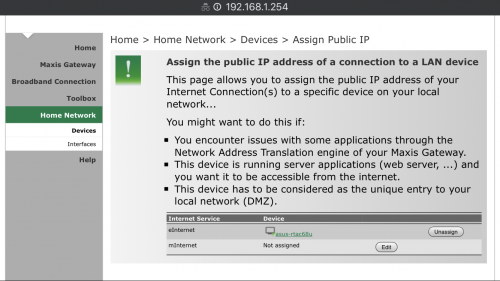 This post has been edited by yongtjunkit: Mar 2 2020, 08:20 AM This post has been edited by yongtjunkit: Mar 2 2020, 08:20 AM |
|
|
|
|
|
TSyongtjunkit
|
Mar 2 2020, 07:07 AM
|
|
|
QUOTE(blacktubi @ Mar 1 2020, 11:29 PM) DMZ from the Maxis router to ASUS than port forward properly on ASUS. No way to get Astro VLAN out from ASUS. Just tried port forwarding, still doesn't seem to work common ports appear to be closed as well  This post has been edited by yongtjunkit: Mar 2 2020, 07:12 AM This post has been edited by yongtjunkit: Mar 2 2020, 07:12 AM |
|
|
|
|
|
TSyongtjunkit
|
Mar 2 2020, 10:48 AM
|
|
|
QUOTE(blacktubi @ Mar 1 2020, 11:29 PM) DMZ from the Maxis router to ASUS than port forward properly on ASUS. No way to get Astro VLAN out from ASUS. When I tried connecting directly to the modem, it works but not when there's the maxis router in between |
|
|
|
|
|
TSyongtjunkit
|
Mar 2 2020, 11:04 AM
|
|
|
QUOTE(AV_2018 @ Mar 2 2020, 11:01 AM) Is it possible to bridge the Internet VLAN on the Maxis then do the PPPoE on the Asus? Bridging as if? Clicking on disconnect on PPPOE and dial PPPOE on the ASUS router? If this the case how will the astro decoder get internet for VOD? |
|
|
|
|
|
TSyongtjunkit
|
Mar 2 2020, 11:19 AM
|
|
|
QUOTE(AV_2018 @ Mar 2 2020, 11:10 AM) Ah okay... After reading again I see how 'special' is this Astro setup... Don't think I can help anymore. Yup, kinda annoyed by this where they separate Vlans, and using their router(maxis router) to bridge them and enable every single lan port on the maxis router to plug in Astro STB, even unifi TV stopped using vlans on their latest unifi TV box Thanks for the suggestion anyway |
|
|
|
|



 Quote
Quote

 0.0214sec
 0.49
0.49
 6 queries
 GZIP Disabled