Welcome Guest ( Log In | Register )

Outline · [ Standard ] · Linear+

 embedded C programming, any1 know bout GUI_Font16_1HK ??

views
     
TSgoolie
post Jul 20 2007, 05:40 PM, updated 19y ago

Enthusiast
*****
Senior Member
795 posts

Joined: Nov 2004


recently i face with the difficulties on how to display the chinese character??
b4 that, i used to convert chinese character to utf-8 code to enabe that computer can read the input data..
but there have no display of chinese character as my expected output...wat is the exact problem?

The chinese charater that suppose to be displayed is like that "李大伟"(chinese char) for "\xE6\x9D\x8E"(utf-8 code)

Is it GUI_Font16_1HK a proportional font that used to display the chinese character?
but i found that it will have compile error which is the GUI_Font16_1HK is undefined...
How to be sure that GUI_Font16_1HK is defined properly while i have defined it in GUI.h already??


....
....

#include "GUI.h"

static const char * _apStrings[] = {
"Chinese:",
"\xE6\x9D\x8E",

};


void MainTask(void) {
int i;
GUI_Init();
GUI_SetFont(&GUI_Font16_1HK);
GUI_UC_SetEncodeUTF8();
for (i = 0; i < GUI_COUNTOF(_apStrings); i++) {
GUI_DispString(_apStrings[i]);
GUI_DispNextLine();
}
while(1) {
GUI_Delay(500);
}
}

......
......

This post has been edited by goolie: Jul 20 2007, 05:41 PM
mokona_modoki
post Jul 20 2007, 06:15 PM

Getting Started
**
Junior Member
267 posts

Joined: Jul 2006


Maybe the font required 16 bit encoding, try utf-16
anthony_yio
post Jul 23 2007, 07:40 PM

........
Group Icon
Elite
1,828 posts

Joined: Jan 2003


QUOTE(goolie @ Jul 20 2007, 05:40 PM)
recently i face with the difficulties on how to display the chinese character??
b4 that, i used to convert chinese character to utf-8 code to enabe that computer can read the input data..
but there have no display of chinese character as my expected output...wat is the exact problem?

The chinese charater that suppose to be displayed is like that "李大伟"(chinese char) for "\xE6\x9D\x8E"(utf-8 code)

Is it GUI_Font16_1HK a proportional font that used to display the chinese character?
but i found that it will have compile error which is the GUI_Font16_1HK is undefined...
How to be sure that GUI_Font16_1HK is defined properly while i have defined it in GUI.h already??
....
....

#include "GUI.h"

static const char * _apStrings[] = {
"Chinese:",
"\xE6\x9D\x8E",

};
void MainTask(void) {
int i;
GUI_Init();
GUI_SetFont(&GUI_Font16_1HK);
GUI_UC_SetEncodeUTF8();
for (i = 0; i < GUI_COUNTOF(_apStrings); i++) {
GUI_DispString(_apStrings[i]);
GUI_DispNextLine();
}
while(1) {
GUI_Delay(500);
}
}

......
......
*
Refering the http://www.micrium.com/products/gui/fonts.html

QUOTE
As µC/GUI does not include any Unicode character set with the basic package, it is the developper's responsibility to supply it. Micrium offers the µC/GUI-FontConverter tool if you have a font set that you want to use but it is not a bitmap font (see the µC/GUI-FontConverter page). Please contact Micrium or your distributor, as we may already have the character set that you need.
So, I guess that is not the font for it.

FlierMateI
post Sep 9 2022, 08:53 PM

New Member
*
Validating
12 posts

Joined: Sep 2022
(Sorry for hijacking this post.)

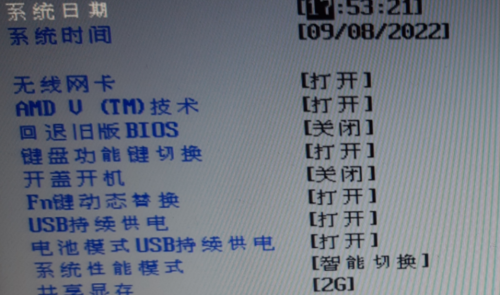
It is the same for BIOS setup screen, to display Chinese character as 8x16 (or even 8x8) rectangle bitmap font.

Unlike in Windows, there is no Unicode character set there, I guess Lenovo engineering team have to draw each ideogram one by one. As you can see, the Chinese font is ugly and not even in size but still recognizable.

user posted image
15cm
post Sep 9 2022, 10:56 PM

Casual
***
Junior Member
423 posts

Joined: Apr 2022
wow 16 year old thread
angch
post Sep 10 2022, 10:41 AM

On my way
****
Junior Member
636 posts

Joined: Jul 2006
QUOTE(FlierMateI @ Sep 9 2022, 08:53 PM)
(Sorry for hijacking this post.)

It is the same for BIOS setup screen, to display Chinese character as 8x16 (or even 8x8) rectangle bitmap font.

Unlike in Windows, there is no Unicode character set there, I guess Lenovo engineering team have to draw each ideogram one by one. As you can see, the Chinese font is ugly and not even in size but still recognizable.

user posted image
*
I guess it make sense that this is an old thread and lots of folks didn't go through the https://en.wikipedia.org/wiki/ETen_Chinese_System era.

Didn't remember what we used last time, but it's hooked TSR on top of DOS, using 2 bytes encoding per char. This is before unicode and the fun fun Big5 vs GB stuff.

Lots of fun discovering characters that wasn't handled by the encoding and have to use substitutes. Or dealing with fake characters that never existed at all. Ugh.

Related: https://stackoverflow.com/questions/6688636...embedded-system

This post has been edited by angch: Sep 10 2022, 10:48 AM
FlierMateI
post Sep 10 2022, 01:04 PM

New Member
*
Validating
12 posts

Joined: Sep 2022
QUOTE(angch @ Sep 10 2022, 10:41 AM)
I guess it make sense that this is an old thread and lots of folks didn't go through the ETen_Chinese_System era.

Didn't remember what we used last time, but it's hooked TSR on top of DOS, using 2 bytes encoding per char. This is before unicode and the fun fun Big5 vs GB stuff.

Lots of fun discovering characters that wasn't handled by the encoding and have to use substitutes. Or dealing with fake characters that never existed at all. Ugh.

*
Yeah, ETen, but I use Chinese Star (not an OS anyway) at that time. I remember the GB and Big5 as well, hah.

I looked into the SO link you gave, I think the embedded system might have limited memory to fit all Chinese characters (such as my Arduino board only comes with 32KB flash, 2KB sram, and 1KB eeprom), that's why there was one comment there:

QUOTE
It can generate a glyph set from Unicode translation text - generating only the glyphs necessary to render the provided text.


It is the same with the BIOS screen I uploaded yesterday, as I think it just comes with necessary glyphs for the provided text, not with the entire Chinese character set. BIOS has limited memory too?
flashang
post Sep 11 2022, 11:07 AM

Casual
***
Junior Member
355 posts

Joined: Aug 2021


QUOTE(FlierMateI @ Sep 10 2022, 01:04 PM)
Yeah, ETen, but I use Chinese Star (not an OS anyway) at that time. I remember the GB and Big5 as well, hah.

I looked into the SO link you gave, I think the embedded system might have limited memory to fit all Chinese characters (such as my Arduino board only comes with 32KB flash, 2KB sram, and 1KB eeprom), that's why there was one comment there:
It is the same with the BIOS screen I uploaded yesterday, as I think it just comes with necessary glyphs for the provided text, not with the entire Chinese character set. BIOS has limited memory too?
*
i always recommend read hardware spec and documentation.
especially if work closely with hardware.

BIOS - Wikipedia

https://en.m.wikipedia.org/wiki/BIOS

smile.gif


Change to:
| Lo-Fi Version
0.0221sec    0.92    5 queries    GZIP Disabled
Time is now: 25th December 2025 - 12:18 AM