

 Feb 24 2020, 01:56 PM


CODE
% go run main.go
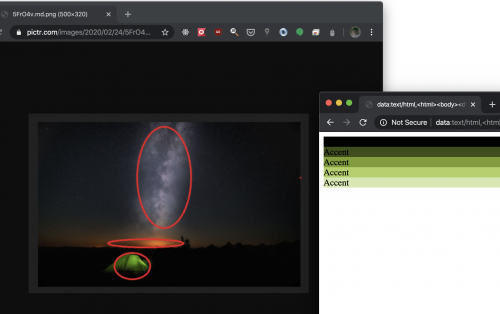
Copy paste this to browser:
data:text/html,<html><body><div%20style='background:%23000000;'>Accent</div><div%20style='background:%231c2e04;'>Accent</div><div%20style='background:%23385d08;'>Accent</div><div%20style='background:%23558c0c;'>Accent</div><div%20style='background:%2371ba11;'>Accent</div><div%20style='background:%238ee915;'>Accent</div><div%20style='background:%23a4ed44;'>Accent</div><div%20style='background:%23bbf272;'>Accent</div><div%20style='background:%23d1f6a1;'>Accent</div><div%20style='background:%23e8fad0;'>Accent</div><div%20style='background:%23fefffe;'>Accent</div></body></html>
Copy paste this to browser:
data:text/html,<html><body><div%20style='background:%23000000;'>Accent</div><div%20style='background:%231c2e04;'>Accent</div><div%20style='background:%23385d08;'>Accent</div><div%20style='background:%23558c0c;'>Accent</div><div%20style='background:%2371ba11;'>Accent</div><div%20style='background:%238ee915;'>Accent</div><div%20style='background:%23a4ed44;'>Accent</div><div%20style='background:%23bbf272;'>Accent</div><div%20style='background:%23d1f6a1;'>Accent</div><div%20style='background:%23e8fad0;'>Accent</div><div%20style='background:%23fefffe;'>Accent</div></body></html>
Fixed.
Convert all pixels to HSL (Hue, Saturation, Lightness). Find the interesting hues. Don't care lightness, but use lightness to find which *hue* sticks out from the image. Once you found the top (hue, saturation), print out 10 versions of it in different lightness, in RGB space.
Easy peasy. Next!
This post has been edited by angch: Feb 24 2020, 02:30 PM
 Quote
Quote

 0.0731sec
 0.52
0.52
 7 queries
 GZIP Disabled