

QUOTE(bao5221 @ Feb 19 2020, 12:51 PM)
Anyones Know Asus RT-AC88U Import set can use in Malaysia?

Just need to know how to do setting. Local one menu got selection already 
Unifi Asus RT-AC88U Import set Malaysia can use ?, Asus RT-AC88U Import set
|
|
 Feb 20 2020, 10:19 AM Feb 20 2020, 10:19 AM
Return to original view | Post
#1
|
 
Senior Member
7,938 posts Joined: Mar 2014 
|
QUOTE(bao5221 @ Feb 19 2020, 12:51 PM) Anyones Know Asus RT-AC88U Import set can use in Malaysia? Just need to know how to do setting. Local one menu got selection already |
|
|
|
|
|
Feb 20 2020, 02:59 PM
Return to original view | Post
#2
|
|
Senior Member
7,938 posts Joined: Mar 2014
|
QUOTE(junclj @ Feb 20 2020, 02:52 PM) I was trying to say that the router meant for Malaysia, you can just select Unifi, Maxis, whatever; but imported one not for Malaysia market you need to set many parameter manually. |
|
|
Feb 20 2020, 03:06 PM
Return to original view | Post
#3
|
|
Senior Member
7,938 posts Joined: Mar 2014
|
QUOTE(junclj @ Feb 20 2020, 03:01 PM) Imported set is quite easy actually, just login your pppoe id and password, then go to IPTV settings change to Unifi-Home. Then you can go online already. You meant imported model not for Malaysia market has Unifi-Home selection? Unless it is flashed with Malaysia firmware I doubt ....  |
|
|
Feb 20 2020, 03:31 PM
Return to original view | Post
#4
|
|
Senior Member
7,938 posts Joined: Mar 2014
|
QUOTE(junclj @ Feb 20 2020, 03:28 PM) Asus router is using global firmware, just the BIOS inside of the router was locked to different region. The China set only has 2 languages, Simplified Chinese and English only and the wifi region was set to China region as default. However, you can change to Asia or Australia region for the wifi. I see. Thanks for detail explanation.Probably every countries are using different bands on their own country optical fiber broadband. When you connect the Asus router to a Unifi BTU, it will automatic show up Unifi-Home, Unifi Business, Maxis-Home, Maxis Business in the IPTV settings. If you connect to TIME BTU, the router may showing up TIME-Home and TIME-Business too. Since TIME is using the different band, so my router does not showing up TIME in the IPTV list. Just pick your ISP, then done and ready to enjoy and surf your internet. 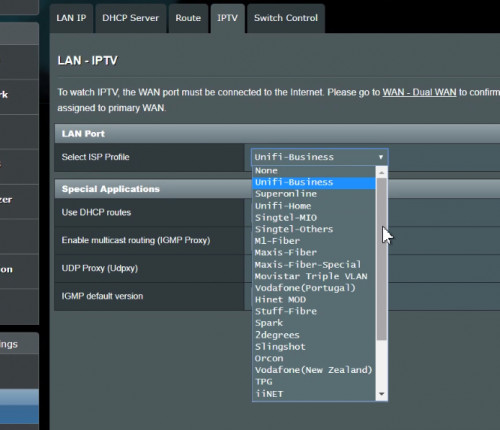 |
| Change to: |  0.0171sec 0.0171sec
 0.57 0.57
 6 queries 6 queries
 GZIP Disabled GZIP Disabled
Time is now: 18th December 2025 - 08:23 PM |
 Quote
Quote