

QUOTE(SR20 @ Feb 22 2021, 10:13 AM)
Bro, from the previous white box can use this method? 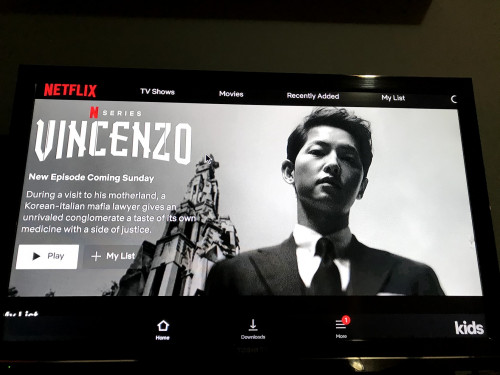
This morning accidently upgraded the OS 😭😭
Unifi Plus Box, All about Unifi Box discussion
|
|
 Aug 28 2021, 06:36 PM Aug 28 2021, 06:36 PM
Show posts by this member only | IPv6 | Post
#561
|
 
Senior Member
1,949 posts Joined: Nov 2006 From: village land   
|
QUOTE(SR20 @ Feb 22 2021, 10:13 AM) Bro, from the previous white box can use this method? This morning accidently upgraded the OS 😭😭 |
|
|
|
|
|
Aug 31 2021, 06:17 PM
|

Junior Member
369 posts Joined: Sep 2018
|
unifi plus box, android 10. 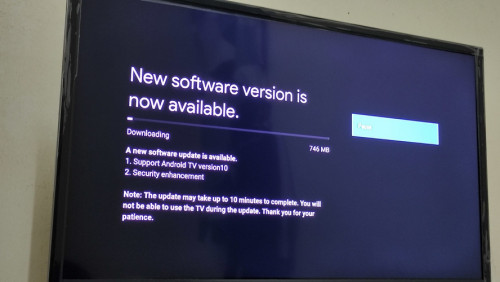 John42 liked this post
|
|
|
Aug 31 2021, 06:24 PM
Show posts by this member only | IPv6 | Post
#563
|

Senior Member
4,167 posts Joined: Mar 2012 From: Kuala Lumpur   
|
QUOTE(amirul hafizz @ Aug 31 2021, 06:17 PM) unifi plus box, android 10. Got any button to cancel update or any method to rollback Android 9? |
|
|
Aug 31 2021, 06:27 PM
|
|
Junior Member
369 posts Joined: Sep 2018
|
QUOTE(JuneResources @ Aug 31 2021, 06:24 PM) Got any button to cancel update or any method to rollback Android 9? this update you can make manual or auto update. i just update manual. |
|
|
Aug 31 2021, 06:42 PM
Show posts by this member only | IPv6 | Post
#565
|
|
Senior Member
4,167 posts Joined: Mar 2012 From: Kuala Lumpur
|
QUOTE(amirul hafizz @ Aug 31 2021, 06:27 PM) this update you can make manual or auto update. i just update manual. Any method to permanently disable update instead of keep pop out whether update or not? |
|
|
Aug 31 2021, 08:17 PM
|
|
Junior Member
369 posts Joined: Sep 2018
|
QUOTE(JuneResources @ Aug 31 2021, 06:42 PM) Any method to permanently disable update instead of keep pop out whether update or not? you can't disable update. please don't click update on the setting box. after update my unifi plus box don't have any sound. i press volume on my remote tv and upb remote, still can't hear any voice. i already call tm unifi. |
|
|
|
|
|
Sep 1 2021, 09:30 AM
Show posts by this member only | IPv6 | Post
#567
|

Senior Member
846 posts Joined: Oct 2006
|
QUOTE(amirul hafizz @ Aug 31 2021, 08:17 PM) you can't disable update. please don't click update on the setting box. after update my unifi plus box don't have any sound. i press volume on my remote tv and upb remote, still can't hear any voice. i already call tm unifi. I just update to android 10 without any problem all work perfect.This post has been edited by mun88: Sep 1 2021, 02:14 PM |
|
|
Sep 1 2021, 04:06 PM
|
|
Senior Member
4,167 posts Joined: Mar 2012 From: Kuala Lumpur
|
QUOTE(amirul hafizz @ Aug 31 2021, 08:17 PM) you can't disable update. please don't click update on the setting box. after update my unifi plus box don't have any sound. i press volume on my remote tv and upb remote, still can't hear any voice. i already call tm unifi. I believe one day the box itself "secretly" update during you watch TV...N then if you switch off your box and turn on, tadada... Android 10...  Time to dump to dustbin if out of warranty...  |
|
|
Sep 1 2021, 04:13 PM
Show posts by this member only | IPv6 | Post
#569
|
|
Junior Member
256 posts Joined: Aug 2019
|
QUOTE(John42 @ May 16 2021, 07:36 PM) Is not only you. I have fought with Menara TM network teams since last September. Till now they couldn't solve the issue. At last I got my rebates and happy to cover the cost for unifi plus box. Even for the unifi plus box, the android security patch update is at version 5 August 2019 😑. Nvidia TV shield Pro is at Dec 2020 version and Mi box S at Jan 2021 version. I would blame TM for not pushing the manufacturer "Skyworth" to release the update. At last they pushed the update to Android 10 🙃 android security patch still at 5 December 2020 which is kinda older considering other android box already at version 2021. Other than that, the update is smooth without any issues. I did not receive any notification for the update. I just check manually for the update then boom its there. I wish they will release Google TV interface like how Nvidia TV shield Pro has it eventhough they are still on Android 9. |
|
|
Sep 1 2021, 07:35 PM
Show posts by this member only | IPv6 | Post
#570
|
|
Junior Member
149 posts Joined: Jul 2012
|
I manually updated my box to the latest update. Biggest mistake. Before the update I was able to enable developer tools and enable USB debugging so that I can use adb to sideload apps into the plus box. Steps taken from here: https://androidrepublica.com/2020/03/cara-i...unifi-plus-box/ I had everything I needed for my setup: - Cloudflare WARP - Disney+ (not hotstar) - Peacock - Paramount+ - Netflix mobile version (because the plus box can't open the default Netflix app) - HBO Max After the update, I noticed it wouldn't connect to WiFi. I traced the problem to an incorrect date/time setting on the box. Today is 1st Sept but for some reason after the update the date went all the way back to Jan 25th. I couldn't change the date too because it's greyed out. I resorted to factory resetting the device, which was a big mistake. Aside from removing all my sideloaded apps, the reset did fix the date and time problem, but still couldn't connect to WiFi. So I just switch to LAN. That's when I discovered that any attempts to enable USB debugging on the Unifi Plus Box would be greeted by a password prompt which I do not have. Before the update, USB debugging can be enabled without any prompts for password. I think the firmware update is to prevent users from sideloading apps into the box. Luckily I have an unopened box of Chromecast with Google TV sitting around. The Unifi Plus Box is going back into its box and will be replaced by the Chromecast. John42 liked this post
|
|
|
Sep 2 2021, 12:03 AM
|

Newbie
0 posts Joined: Mar 2012
|
is there anyone manage to sideload app in UPB with android 10?does anyone know the password to enable usb debug?
|
|
|
Sep 2 2021, 09:04 AM
Show posts by this member only | IPv6 | Post
#572
|
|
Senior Member
846 posts Joined: Oct 2006
|
QUOTE(jimmychangas @ Sep 1 2021, 07:35 PM) I manually updated my box to the latest update. Biggest mistake. Why you manual update? Is auto update! Is your own mistake !! I do not have this problem, all work perfect, wifi ok, sideload app ok, this update never off my usb debugBefore the update I was able to enable developer tools and enable USB debugging so that I can use adb to sideload apps into the plus box. Steps taken from here: https://androidrepublica.com/2020/03/cara-i...unifi-plus-box/ I had everything I needed for my setup: - Cloudflare WARP - Disney+ (not hotstar) - Peacock - Paramount+ - Netflix mobile version (because the plus box can't open the default Netflix app) - HBO Max After the update, I noticed it wouldn't connect to WiFi. I traced the problem to an incorrect date/time setting on the box. Today is 1st Sept but for some reason after the update the date went all the way back to Jan 25th. I couldn't change the date too because it's greyed out. I resorted to factory resetting the device, which was a big mistake. Aside from removing all my sideloaded apps, the reset did fix the date and time problem, but still couldn't connect to WiFi. So I just switch to LAN. That's when I discovered that any attempts to enable USB debugging on the Unifi Plus Box would be greeted by a password prompt which I do not have. Before the update, USB debugging can be enabled without any prompts for password. I think the firmware update is to prevent users from sideloading apps into the box. Luckily I have an unopened box of Chromecast with Google TV sitting around. The Unifi Plus Box is going back into its box and will be replaced by the Chromecast. |
|
|
Sep 2 2021, 09:32 AM
|
|
Junior Member
149 posts Joined: Jul 2012
|
QUOTE(mun88 @ Sep 2 2021, 09:04 AM) Why you manual update? Is auto update! Is your own mistake !! I do not have this problem, all work perfect, wifi ok, sideload app ok, this update never off my usb debug good for you bro. Remember don't factory reset it that's all  |
|
|
|
|
|
Sep 2 2021, 09:44 AM
|
|
Junior Member
149 posts Joined: Jul 2012
|
QUOTE(amonreyz @ Sep 2 2021, 12:03 AM) is there anyone manage to sideload app in UPB with android 10?does anyone know the password to enable usb debug? parking... i also want to know the password |
|
|
Sep 2 2021, 10:26 PM
Show posts by this member only | IPv6 | Post
#575
|
|
Junior Member
256 posts Joined: Aug 2019
|
QUOTE(jimmychangas @ Sep 1 2021, 07:35 PM) I manually updated my box to the latest update. Biggest mistake. Damn so the problem occurs because you factory reset it.... Well for my case I can download the expressvpn and download the app you have mentioned without any issues.Before the update I was able to enable developer tools and enable USB debugging so that I can use adb to sideload apps into the plus box. Steps taken from here: https://androidrepublica.com/2020/03/cara-i...unifi-plus-box/ I had everything I needed for my setup: - Cloudflare WARP - Disney+ (not hotstar) - Peacock - Paramount+ - Netflix mobile version (because the plus box can't open the default Netflix app) - HBO Max After the update, I noticed it wouldn't connect to WiFi. I traced the problem to an incorrect date/time setting on the box. Today is 1st Sept but for some reason after the update the date went all the way back to Jan 25th. I couldn't change the date too because it's greyed out. I resorted to factory resetting the device, which was a big mistake. Aside from removing all my sideloaded apps, the reset did fix the date and time problem, but still couldn't connect to WiFi. So I just switch to LAN. That's when I discovered that any attempts to enable USB debugging on the Unifi Plus Box would be greeted by a password prompt which I do not have. Before the update, USB debugging can be enabled without any prompts for password. I think the firmware update is to prevent users from sideloading apps into the box. Luckily I have an unopened box of Chromecast with Google TV sitting around. The Unifi Plus Box is going back into its box and will be replaced by the Chromecast. |
|
|
Sep 3 2021, 01:01 AM
|
|
Junior Member
912 posts Joined: Nov 2014
|
QUOTE(jimmychangas @ Sep 1 2021, 07:35 PM) I manually updated my box to the latest update. Biggest mistake. I deliberately checked the upb after i updated 2 days ago. Luckily that USB debugging still remains enabled. Of course i don't disabled and enabled it again.Before the update I was able to enable developer tools and enable USB debugging so that I can use adb to sideload apps into the plus box. Steps taken from here: https://androidrepublica.com/2020/03/cara-i...unifi-plus-box/ I had everything I needed for my setup: - Cloudflare WARP - Disney+ (not hotstar) - Peacock - Paramount+ - Netflix mobile version (because the plus box can't open the default Netflix app) - HBO Max After the update, I noticed it wouldn't connect to WiFi. I traced the problem to an incorrect date/time setting on the box. Today is 1st Sept but for some reason after the update the date went all the way back to Jan 25th. I couldn't change the date too because it's greyed out. I resorted to factory resetting the device, which was a big mistake. Aside from removing all my sideloaded apps, the reset did fix the date and time problem, but still couldn't connect to WiFi. So I just switch to LAN. That's when I discovered that any attempts to enable USB debugging on the Unifi Plus Box would be greeted by a password prompt which I do not have. Before the update, USB debugging can be enabled without any prompts for password. I think the firmware update is to prevent users from sideloading apps into the box. Luckily I have an unopened box of Chromecast with Google TV sitting around. The Unifi Plus Box is going back into its box and will be replaced by the Chromecast. |
|
|
Sep 3 2021, 09:33 AM
|
|
Junior Member
149 posts Joined: Jul 2012
|
QUOTE(John42 @ Sep 2 2021, 10:26 PM) Damn so the problem occurs because you factory reset it.... Well for my case I can download the expressvpn and download the app you have mentioned without any issues. yeah, in my case the date/time was f**ked and i can't friggin' change it because it was greyed out! No choice but to reset it, felt like it was a trap lol |
|
|
Sep 3 2021, 09:33 AM
|
|
Junior Member
149 posts Joined: Jul 2012
|
QUOTE(ideaplus @ Sep 3 2021, 01:01 AM) I deliberately checked the upb after i updated 2 days ago. Luckily that USB debugging still remains enabled. Of course i don't disabled and enabled it again. make sure you don't factory reset it hahaha |
|
|
Sep 3 2021, 01:23 PM
|

Junior Member
562 posts Joined: Oct 2012 From: Out of the world...
|
QUOTE(jimmychangas @ Sep 1 2021, 07:35 PM) I manually updated my box to the latest update. Biggest mistake. Just sharing in case anyone had similar time/date setting greyed out problem as jimmychangas and USB debugging is enabled, can try run following adb command to enable/disable the automatic time settings:-Before the update I was able to enable developer tools and enable USB debugging so that I can use adb to sideload apps into the plus box. Steps taken from here: https://androidrepublica.com/2020/03/cara-i...unifi-plus-box/ I had everything I needed for my setup: - Cloudflare WARP - Disney+ (not hotstar) - Peacock - Paramount+ - Netflix mobile version (because the plus box can't open the default Netflix app) - HBO Max After the update, I noticed it wouldn't connect to WiFi. I traced the problem to an incorrect date/time setting on the box. Today is 1st Sept but for some reason after the update the date went all the way back to Jan 25th. I couldn't change the date too because it's greyed out. I resorted to factory resetting the device, which was a big mistake. Aside from removing all my sideloaded apps, the reset did fix the date and time problem, but still couldn't connect to WiFi. So I just switch to LAN. That's when I discovered that any attempts to enable USB debugging on the Unifi Plus Box would be greeted by a password prompt which I do not have. Before the update, USB debugging can be enabled without any prompts for password. I think the firmware update is to prevent users from sideloading apps into the box. Luckily I have an unopened box of Chromecast with Google TV sitting around. The Unifi Plus Box is going back into its box and will be replaced by the Chromecast. 1. To disable: CODE adb shell settings put global auto_time 0 2. To enable: CODE adb shell settings put global auto_time 1 Note: remove 'adb shell' if using Remote ADB Shell app Hopefully, the command will resync the time/date. Another possible solution would be to temporary auto-connect to other network(Ex: mobile hotspot) after reboot. This post has been edited by juzmafia: Sep 3 2021, 02:53 PM jimmychangas liked this post
|
|
|
Sep 3 2021, 01:59 PM
|
|
Junior Member
912 posts Joined: Nov 2014
|
QUOTE(jimmychangas @ Sep 3 2021, 09:33 AM) make sure you don't factory reset it hahaha Haha, I won't factory reset it if unnecessary. |
| Change to: |  0.0248sec 0.0248sec
 0.44 0.44
 6 queries 6 queries
 GZIP Disabled GZIP Disabled
Time is now: 2nd December 2025 - 08:47 PM |
 Quote
Quote