

 Dec 21 2019, 10:59 AM, updated 5y ago


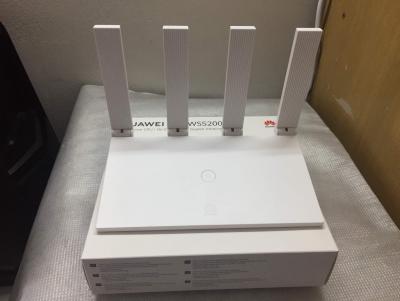

Official webpage: https://consumer.huawei.com/my/smart-home/ws5200/
Huawei Wi-Fi WS5200 AC1200 Gigabit Wireless Router.
Dual-Core 800MHz or Quad Core 1GHz CPU - Equipped with HUAWEI Gigahome processor, breaking the CPU bottleneck, Wi-Fi performance is significantly improved compared to the previous generation: 2.4GHz Wi-Fi is improved 60%, and 5GHz Wi-Fi is improved 25%. 128M large RAM with strong CPU, can meet more stable equipment online at the same time.
Four 5-dBi Antennas - Four high-performance 5-dBi broadened antennas are reasonably located after precise testing to reduce the interference of same frequency. The LDPC weak signal correction algorithm is also used to keep you fast after passing through walls.
Gigabit Ethernet Ports - The FE router has gradually failed to meet the needs of high bandwidth of users, while WS5200 V2 with full GE ports design can meet the access requirements for 100+Mbps broadband users.
Easier setup In 3-Step - 1. Connect the router’s Wi-Fi and browsing any website will open the configuration page automatically; 2. Input your PPPoE account (Skip when DHCP mode); 3. Input your own Wi-Fi name & password, and all is done.
Supported Router modes: Wireless Router, Wireless AP & Wireless Repeater.
Huawei Wi-Fi WS5200 v2 (Dual Core 800Mhz)
Huawei Wi-Fi WS5200 2019 (Quad Core 1GHz)
Suggested Retail Price = RM169
Promotion Sales at Lazada / Shopee / Huawei official store = RM99 (cheaper with discount voucher)
Speedtest using CAT6. Unifi 800Mbps

Setup using the web browser


Select option 2: Manually configure network

Insert the Unifi user id & password. Enable the VLAN


IPTV setup

Setup using smart phone app.


Login using browser to setup IPTV VLAN (refer to the above "IPTV setup"
This post has been edited by ldragon: Dec 24 2019, 07:11 PM
 Quote
Quote


 0.0317sec
 0.56
0.56
 6 queries
 GZIP Disabled