

hi all sifu ,
interested in getting an xbox series x ,
wondering how to purchase games ?
any shop can recommend to buy the console?
thanks
Xbox Series X, The next Xbox generation
Xbox Series X, The next Xbox generation
|
|
 Nov 17 2020, 07:08 PM Nov 17 2020, 07:08 PM
Return to original view | Post
#1
|
 
Junior Member
496 posts Joined: Sep 2008 
|
hi all sifu ,
interested in getting an xbox series x , wondering how to purchase games ? any shop can recommend to buy the console? thanks |
|
|
|
|
|
Nov 18 2020, 05:03 PM
Return to original view | Post
#2
|
|
Junior Member
496 posts Joined: Sep 2008
|
QUOTE(IccyAsd @ Nov 18 2020, 07:56 AM) Most of us here would be buying digital games during sale, some may buy it new but with gamepass buying games would be at the minimal. would malaysia credit card works on microsoft store ?Not many shops bring in physical xbox games.  thanks |
|
|
Feb 5 2021, 07:20 PM
Return to original view | Post
#3
|
|
Junior Member
496 posts Joined: Sep 2008
|
Hi all ,
considering getting a xbox series x been using ps4 for a while , need sifu help here to clear some question : 1) I have a hotmail account , create xbox id using the email ? xbox region setting is set in the xbox series x software ? 2) purchasing games seems expensive and troublesome any sifu here using xbox entirely playing free games from xbox game pass ? sufficient ? 3) any sifu here successfully use Malaysia credit card for xbox content purchase? Thanks |
|
|
Feb 6 2021, 02:19 PM
Return to original view | Post
#4
|
|
Junior Member
496 posts Joined: Sep 2008
|
QUOTE(doket @ Feb 6 2021, 12:52 PM) u can use hotmail to create xbox profile. region can choose when u register the profile. after created profile then in xbox can switch region anytimes but this profile main country will still same. switch region is for access content in different regions thanks for infopurchasing games also same as ps4, ps5. prices not much different. xbox game pass dont mean free games. think like u pay netflix or spotify montly. when u buy game pass then can play any games include in game pass... if want to buy content, better use gift card reload to your account. depand on what region the profile been register, u need that country currencies... any seller / website can recommend to buy gift card ? thanks |
|
|
Feb 6 2021, 02:21 PM
Return to original view | Post
#5
|
|
Junior Member
496 posts Joined: Sep 2008
|
QUOTE(ahucks @ Feb 6 2021, 09:43 AM) yes no problem, im using BigPay to purchase anything from the store. hi , While most malaysian gone crazy about ps5 i bought xbox instead haha. Replaced my aging xbox one. Love it. Powerful. Sleek and simple design. Skipped ps5 due to bulky design. Waiting for ps5 pro or 2nd hand 😄 since all my games still can play on ps4. I like xbox Quick resume feature and most XS game run in full native 4K which is great coz some game in ps5 can run only in 1800p. Enhanced version of last gen games also great. Love the fidelity details. FH4 now run in native 4K actually since xbox one x but i dont have that coz buy ps4 pro instead. And now with 1SGD for 3 months game pass. I can play lots of games and with xbox can support more than 1 extended storage i can connect up to 3 hdd and store all the games there. Which is better than ps which only can support only 1 extended storage in 1 time. So xbox become my main console again. Scalper price? Not an issue xbox not officially sell here 🤣🤣 thanks for the info 1sgd for 3 months ? where to purchase this ? the xbox game pass once purchase is it tied to the xbox account region ? |
|
|
Feb 6 2021, 02:27 PM
Return to original view | Post
#6
|
|
Junior Member
496 posts Joined: Sep 2008
|
QUOTE(doket @ Feb 6 2021, 12:52 PM) u can use hotmail to create xbox profile. region can choose when u register the profile. after created profile then in xbox can switch region anytimes but this profile main country will still same. switch region is for access content in different regions ok , purchasing games also same as ps4, ps5. prices not much different. xbox game pass dont mean free games. think like u pay netflix or spotify montly. when u buy game pass then can play any games include in game pass... if want to buy content, better use gift card reload to your account. depand on what region the profile been register, u need that country currencies... what is the best region to set to ? US ? I notice some seller selling the xbox game pass stated US does that mean the game pass will work only if my region is set US ? thanks |
|
|
|
|
|
Feb 6 2021, 09:05 PM
Return to original view | Post
#7
|
|
Junior Member
496 posts Joined: Sep 2008
|
QUOTE(doket @ Feb 6 2021, 06:55 PM) this guy sell quiet cheap and its usa gift card and can only use on usa account. thanks a lot for the info https://shopee.com.my/product/13749935/7026009395 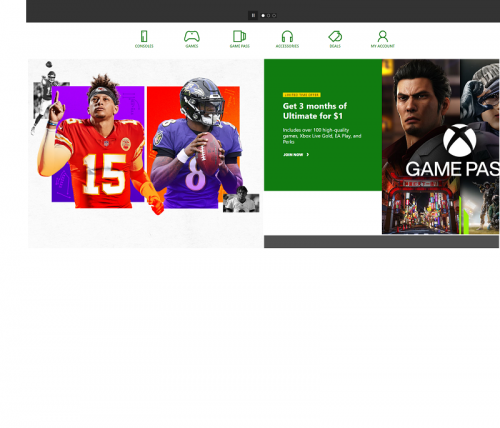 can get it on xbox.com or on xbox console. offer only for new member. base on the region u switch, like singapore is 1sgd or usa is 1usd, like that... after 3 months have to pay full prices. or u can just buy xbox live gold up to 3 years then join the xbox game pass, your remain gold will convert to xbox game pass... i think the best region to set is usa. but in xbox can change to any other region and buy their contents but need that region currencies...  |
|
|
Feb 9 2021, 03:20 PM
Return to original view | Post
#8
|
|
Junior Member
496 posts Joined: Sep 2008
|
just bought a xbox series x
purchase gift card to purchase game pass ultimate thanks to ahucks and doket for explaining how it works |
|
|
Feb 10 2021, 08:58 PM
Return to original view | Post
#9
|
|
Junior Member
496 posts Joined: Sep 2008
|
any idea where can get xbox series x controller original charge and play kit ?
thanks |
|
|
Feb 11 2021, 03:13 PM
Return to original view | Post
#10
|
|
Junior Member
496 posts Joined: Sep 2008
|
QUOTE(tripleB @ Feb 11 2021, 12:34 AM) The play and charge kit is technically just a rechargeable battery kit and a USB cable. I have 2 of them for Xbox One. The rechargeable battery can be inserted into an Xbox Series controller without problems. The only difference is the Xbox One kit came with a Micro USB cable, while the Series kit comes with a USB C cable. If you are having trouble finding the Xbox Series kit, just get the Xbox One version, then use a USB C cable to charge it. thanks a lot , just ordered it I found someone selling the Xbox One kit here. https://shopee.com.my/Xbox-One-Wireless-Con...AiABEgIZxfD_BwE This post has been edited by yibaandre: Feb 11 2021, 03:13 PM tripleB liked this post
|
|
|
Feb 12 2021, 02:43 PM
Return to original view | Post
#11
|
|
Junior Member
496 posts Joined: Sep 2008
|
any sifu here have both the xbox one and the xbox series x controller ?
just want some opinion , the xbox series x controller seems a little small hand tired after a while , I have a xbox 360 controller - way bigger more comfortable. just want to know if the xbox one controller is bigger than the xbox series x ones ? |
|
|
Feb 12 2021, 06:03 PM
Return to original view | Post
#12
|
|
Junior Member
496 posts Joined: Sep 2008
|
QUOTE(tripleB @ Feb 12 2021, 04:31 PM) It's slightly smaller than the Xbox One controller. But not by much. They just reduced the face area slightly. Try comparing it to the 360 face area, which is actually even smaller. In my opinion the 360 controller feels the most comfortable to hold. I would call it the greatest controller of all time if not for the Dpad. The transforming Dpad fixes that issue for me. nice collection you have there The original Xbox One controller is not as good or as comfortable as the 360 controller for me. The thumbsticks have been raised slightly, meaning yout thumbs don't rest as naturally as on the 360 controller. The bumpers also are angled slightly differently from the 360 controller. Moving your index fingers between the triggers and the bumpers feel a bit awkward. The triggers are also raised compares to the 360 controllers. Try pulling in the trigger fully. You can see that the "hat" on the trigger is visible. On the 360, the trigger is almost fully flush. A revision of the Xbox One controller fixes the Dpad and also adds Bluetooth support. Otherwise it feels the same as the original Xbox One controller. The Series controller is actually a slight variation of the Xbox One controller. It has the same ergonomics as the Xbox One controller, with the same thumbstick height and angled bumpers as the Xbox One controller. It also has the same trigger design. If you've used an Xbox One controller before, the Series controllers actually feel exactly the same. Only the Dpad has once again been changed. Basically you are too used to the 360 controller, just like me. Over time I got comfortable enough using the Xbox One controller, but I still prefer the 360 controller. I try using my xbox 360 controller via pc streaming from xbox series x but streaming to windows 10 not supported any way to use xbox 360 controller or is there a third party more bigger comfortable controller for xbox series x ? |
|
|
Feb 12 2021, 09:42 PM
Return to original view | Post
#13
|
|
Junior Member
496 posts Joined: Sep 2008
|
QUOTE(tripleB @ Feb 12 2021, 08:42 PM) You sure can use Xbox 360 controllers on Xbox One and Series X/S thanks a lot https://www.brookaccessory.com/detail/59327520/ Brook has a product called the Wingman XB. It converts PS3/PS4/Switch/Xbox One/Xbox 360 controllers to be used on Xbox One / Xbox 360 / Xbox Series X/S. Here I'm using my Xbox 360 wireless controller on my Xbox One X. You do need the Xbox 360 Wireless Receiver for PC though. It doesn't even have to be the original one. I'm just using those China made 3rd party receivers. Just plug the converter in the USB port. Then plug the wireless receiver into the converter. Then press the sync button on the receiver and controller. And it will pair each other. Alternatively you can use a wired 360 controller. Just plug the wired controller into the converter. That's it.  found a seller at shopee selling this , though shipeed from China can recommend a seller ? thanks This post has been edited by yibaandre: Feb 12 2021, 09:43 PM |
|
|
|
|
|
Feb 18 2021, 01:39 PM
Return to original view | Post
#14
|
|
Junior Member
496 posts Joined: Sep 2008
|
QUOTE(LegendLee @ Feb 18 2021, 11:03 AM) I use the Microsoft rechargeable battery pack. hi , Had it for my Xbox one controller. Just removed and placed it into the series controller. can share link where to purchase the microsoft rechargeable battery pack ? thanks |
|
|
Feb 18 2021, 06:31 PM
Return to original view | Post
#15
|
|
Junior Member
496 posts Joined: Sep 2008
|
QUOTE(ahucks @ Feb 8 2021, 10:48 AM) ya i swap with my laying around 3 pin plug wire. settle which shop you buy from ?and the shop i bought give me 1 yr warranty. got receipt stated 1 yr warranty. 1 year , is it mean they send back to supplier ( but with charge ) ? |
|
|
Mar 6 2021, 03:38 PM
Return to original view | Post
#16
|
|
Junior Member
496 posts Joined: Sep 2008
|
hi all sifu ,
bought the brook wingman xb as per sifu here recommend , could not get it to work on xbox series x. already upgrade to latest firmware. try with xbox 360 controller with wireless receiver , ps4 controller , all same. for the xbox 360 controller , it work for one time only , after reboot then no work anymore. is there any steps / anything I miss ? any sifu here bought and use it successfully on their xbox series x ? thanks |
|
|
Mar 6 2021, 08:48 PM
Return to original view | Post
#17
|
|
Junior Member
496 posts Joined: Sep 2008
|
QUOTE(tripleB @ Mar 6 2021, 07:03 PM) So you also got it then. There's no special step for me to be honest. I just tested again on my Xbox One X. For the 360 controller, I connect the Wingman XB to the console USB port, then the wireless receiver into the Wigman XB. Then I just pair the devices by pressing the sync button on the controller and the console. hi bro ,I also tried with a Dualshock 4. First I connect the Wingman XB to the console USB port. Then I plug the Dualshock 4 to the Wingman XB using a micro USB cable. If you leave the cable connected, you can play it like a wired controller. If you unplug the micro USB connector from the Dualshock 4, you can now use it wirelessly. I don't have a Series X to test with unfortunately. Where are you located bro? Maybe we can test out your console with my Wingman XB? Or my console with your Wingman XB? yes , now I recalled , you are the sifu who recommend me this adapter. I am at Cheras / Kajang I start to suspect the product itself have issue.Maybe I will test with xbox 360 to confirm this first. I also use the same step , only once the controller works , after reboot , no more works. |
|
|
Mar 7 2021, 04:07 PM
Return to original view | Post
#18
|
|
Junior Member
496 posts Joined: Sep 2008
|
QUOTE(tripleB @ Mar 6 2021, 10:35 PM) When you connect it to the console USB port, do the blue LEDs light up at all? If it doesn't, it might be faulty. Since you also have a 360, go ahead and test it out on the 360 too. the light is on , need to test first on xbox 360 , if still same it might be faulty |
|
|
Mar 7 2021, 09:50 PM
Return to original view | Post
#19
|
|
Junior Member
496 posts Joined: Sep 2008
|
QUOTE(tripleB @ Mar 6 2021, 07:03 PM) So you also got it then. There's no special step for me to be honest. I just tested again on my Xbox One X. For the 360 controller, I connect the Wingman XB to the console USB port, then the wireless receiver into the Wigman XB. Then I just pair the devices by pressing the sync button on the controller and the console. hi ,I also tried with a Dualshock 4. First I connect the Wingman XB to the console USB port. Then I plug the Dualshock 4 to the Wingman XB using a micro USB cable. If you leave the cable connected, you can play it like a wired controller. If you unplug the micro USB connector from the Dualshock 4, you can now use it wirelessly. I don't have a Series X to test with unfortunately. Where are you located bro? Maybe we can test out your console with my Wingman XB? Or my console with your Wingman XB? just a update , tested with xbox 360 with ps3 controller everything works fine for the ds4 on xbox one , do you press the "ps" button or "ps" button plus share button after unplug from cable ? thanks |
| Change to: |  0.0312sec 0.0312sec
 0.46 0.46
 7 queries 7 queries
 GZIP Disabled GZIP Disabled
Time is now: 1st December 2025 - 05:51 PM |
 Quote
Quote