Welcome Guest ( Log In | Register )

Bump Topic Topic Closed RSS Feed

Outline · [ Standard ] · Linear+

Unifi Official TM UniFi High Speed Broadband Thread V38, READ 1ST PAGE FOR TURBO SPEED INFO!

views
     
yongtjunkit
post Jul 26 2020, 06:53 PM

Look at all my stars!!
*******
Senior Member
2,516 posts

Joined: Mar 2016
Hi, for new unifi installation, does unifi still provides the tplink ac1200 for new installation and is it possible to request for an FWS during installation(by tm) since I’ve heard that TM doesn’t provide FWS anymore
yongtjunkit
post Jul 27 2020, 06:53 AM

Look at all my stars!!
*******
Senior Member
2,516 posts

Joined: Mar 2016
QUOTE(zellleonhart @ Jul 27 2020, 12:22 AM)
Just got my new 300mbps unifi installed last week. I received a Netis router instead. I asked the technician to install my TP-Link C6 instead lol. No more TP-Link provided by TM
*
I see, installation wise, how does Tm install? I heard that they install fiber cable direct from the pole without any socket anymore, is that true?
yongtjunkit
post Aug 16 2020, 02:03 PM

Look at all my stars!!
*******
Senior Member
2,516 posts

Joined: Mar 2016
Hi, is it possible to negotiate with the unifi installer for non standard install( above celling, FWS) before they come to my house and install unifi(to get them ready beforehand)?

This post has been edited by yongtjunkit: Aug 16 2020, 05:28 PM
yongtjunkit
post Aug 19 2020, 10:22 PM

Look at all my stars!!
*******
Senior Member
2,516 posts

Joined: Mar 2016
Hi,, facing an odd issue with unifi application

My house unit number is not in the unifi system but my next door neighbor can install unifi and the unifi tiang is just next to my house

Any way to get TM to update their database seems like they left out my house from their database ?

My area only have unifi infra in 2019,, currently 2 fiber infra in my area(maxis- for years before unifi came, unifi HSBB)

This post has been edited by yongtjunkit: Aug 19 2020, 10:24 PM
yongtjunkit
post Aug 20 2020, 12:34 PM

Look at all my stars!!
*******
Senior Member
2,516 posts

Joined: Mar 2016
QUOTE(tomastan4134 @ Aug 20 2020, 09:04 AM)
this you need to go to your state TM HQ  find the manager,    then tell them to update. 

i face this issue before. 

the reason is.  depending on street number and the unifi distribution pole.    your that distribution pole  not many residents apply for it .  so they leave it there un-commercialized.

you need to talk to the manager.  get TM to commercialized that particular distribution box (the box with serial number writing on the box). 

this may take up to 2 months  since TM  need to do test and validation for that particular box.  then only they update it on their system,  then only you can apply. 

if you go to any TM point to apply.  they just tell you cannot apply since your house number not in the system.    they cant do anything also.
need state TM HQ manager to push the commercialization .
*
I do actually see that the nearest DP is in use by few of my neighbors around my house
yongtjunkit
post Aug 22 2020, 08:01 AM

Look at all my stars!!
*******
Senior Member
2,516 posts

Joined: Mar 2016
QUOTE(YoungMan @ Aug 20 2020, 09:50 AM)
This need to go to TM HQ to apply. Cannot apply through online system. Remember, go to TMPoint not deeler or agent.
You can only view it in your bill. Cannot view realtime usage.
*
QUOTE(muscaa @ Aug 20 2020, 10:57 AM)
you can go to the nearest TMpoint to apply for Unifi
They will get it done for you
*
Noticed that TM point isn’t open on weekends,, kinda inconvenient to go to TM point, unless I can call them?

QUOTE(heLL_bOy @ Aug 20 2020, 12:43 PM)
just sent feedback direct to MCMC

i also facing similar issue and went tmpoint apply but their database show its full. but it was not full at all.
*
QUOTE(ideaplus @ Aug 20 2020, 01:33 PM)
Similar with my case. I checked with TM point and they said port full but I saw few fibre were pulled out from dp to my neighbour and not fully yet. I tried application twice and still got the same answer. I just snapped pictures with dp and the distance with my house and lodge case via mcmc. I got the reply the next 2 days from tm point stated got port already and they can proceed my application. Then all proceed as usual.
*
Received a message from TM stating that they were “investigating” the issue,, hopefully it gets resolved quickly since I actually submitted my application via a dealer
yongtjunkit
post Aug 23 2020, 07:49 PM

Look at all my stars!!
*******
Senior Member
2,516 posts

Joined: Mar 2016
Hi, is this a TM office or a dealer ?

https://www.facebook.com/unifiTMPetalingJaya/

It even list unifitmpj@tm.com.my as the email address
yongtjunkit
post Aug 28 2020, 01:33 PM

Look at all my stars!!
*******
Senior Member
2,516 posts

Joined: Mar 2016
Hi,, for new installation(haven’t install yet), how do I obtain the pppoe username and password?

Can I ask from the installer?
yongtjunkit
post Oct 15 2020, 11:29 AM

Look at all my stars!!
*******
Senior Member
2,516 posts

Joined: Mar 2016
QUOTE(cannavaro @ Oct 15 2020, 10:10 AM)
I remember someone posting (quite a while back) that he was charged x amount just to pull the cable from the pole to his house because the nearest pole is like 50 meters away  sweat.gif
*
Weird, according to the latest installation guide, it should be free

https://unifi.com.my/installation/allaboard.pdf

My house 60m of outdoor fiber cable is also free
yongtjunkit
post Oct 18 2020, 07:38 AM

Look at all my stars!!
*******
Senior Member
2,516 posts

Joined: Mar 2016
QUOTE(Clan204 @ Oct 18 2020, 03:53 AM)
asking for new subs, do you got free 30 days trial? or need to pay also?
*
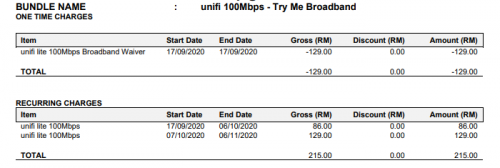
Got free trial but for new sub need to pay for 2 month bill usually but with the free trial the 1st 30day is free trial, need to pay the remaining day only depending on billing cycle ( for my case)

Here an example:
user posted image

This post has been edited by yongtjunkit: Oct 18 2020, 09:52 AM
yongtjunkit
post Oct 22 2020, 08:00 PM

Look at all my stars!!
*******
Senior Member
2,516 posts

Joined: Mar 2016
QUOTE(blacktubi @ Oct 22 2020, 06:37 PM)
I agree, thie Az-Tech is probably the worst router TM ever given. It's not even the real Aztech.

I wonder how why they award the contract to this company.  icon_idea.gif
*
hmm.gif,, it’s even worse than the netis router?
yongtjunkit
post Oct 22 2020, 10:03 PM

Look at all my stars!!
*******
Senior Member
2,516 posts

Joined: Mar 2016
QUOTE(Candy12 @ Oct 22 2020, 10:00 PM)
It's some rebadged OEM China modem with some firmware customization.

You know the type of unbranded models thrown around on Lazada/Alibaba straight off the factories just to clear stocks to 3rd world countries such as Cambodia, India and Myanmar/Bangladesh?
*
hmm.gif rarely heard about unbranded model tbh,, since like I’m mainly used to brands like tplink, ASUS, etc
yongtjunkit
post Oct 22 2020, 10:13 PM

Look at all my stars!!
*******
Senior Member
2,516 posts

Joined: Mar 2016
QUOTE(Candy12 @ Oct 22 2020, 10:09 PM)
Lots of unbranded 4G modems and routers on sale from China OEM factories sold on Lazada/Alibaba.
Sometimes you can get good hardware stuffs but the firmware/customization support is also something important to note.

They usually advertise very impressive specs and hardware but the software usually non existent just like those Android TV boxes.No Widevine/Netflix licensing, no certification from Google and the launchers half cooked one.

Buy at your own risk.
*
Isn't TM router running some sort of TM firmware?

Like what I can tell from the netis router that I got it has the @unifi name hardcoded into it and also standard TM equipment default password(tmadmin,etc)

This post has been edited by yongtjunkit: Oct 22 2020, 10:15 PM
yongtjunkit
post Oct 23 2020, 01:56 AM

Look at all my stars!!
*******
Senior Member
2,516 posts

Joined: Mar 2016
QUOTE(Maxieos @ Oct 22 2020, 11:13 PM)
Does the free trial still available to apply ? I though end already?
*
Nope,, extended till further notice

you may pm me/refer to the link in signature to apply


QUOTE(Maxieos @ Oct 22 2020, 11:13 PM)
Unifi TV , how does it look like ? Which 100mbps doesn't include the unifi TV ? does it already have free dect phone ?
*
100mbps(rm129 - Without UnifiTV plus box) comes with free unifi TV channels only and viewable via the unifi play TV app on mobile phone( no unifi TV STb/unifi tv plus box included)

Tm doesn't include dect phone with new installation anymore,, you may use any phone that uses RJ11 port to use the VOIP fuction

QUOTE(Maxieos @ Oct 22 2020, 11:13 PM)
How much they charge for conduit ? if expensive compare buying outside if i remember around rm20 for 10m ?
*
You may refer to https://unifi.com.my/installation/allaboard.pdf for the installation charges

This post has been edited by yongtjunkit: Oct 23 2020, 02:22 AM
yongtjunkit
post Oct 23 2020, 08:09 AM

Look at all my stars!!
*******
Senior Member
2,516 posts

Joined: Mar 2016
QUOTE(Maxieos @ Oct 23 2020, 06:28 AM)
-So once apply , it will automatically charge as 2nd month payment ?
*
Once apply it would charge the 2nd month bill at a discount since the free trial covers the 1st 30 days like in the screenshot below

user posted image

QUOTE(Maxieos @ Oct 23 2020, 06:28 AM)
-If the 100mbps doesn't have setup box plus and dect phone , does show disadvantage for subscriber ? though the benefits of free 1 month trial = save rm129. Not sure both dect or setupbox cost rm129.
Can just plug normal phone such as rj11
» Click to show Spoiler - click again to hide... «
Those phone requite power line to light up.
*
It really depends if you would be using those services, some people don't really use them so it doesn't really make a difference for them

you can plug any phone that uses RJ11 and it should work even with the corded landline phone

user posted image

QUOTE(Maxieos @ Oct 23 2020, 06:28 AM)
-If tm didn't provide free box , can I just buy from any cheap White unifi setup box (with remote) and plugin it in and login ?
*
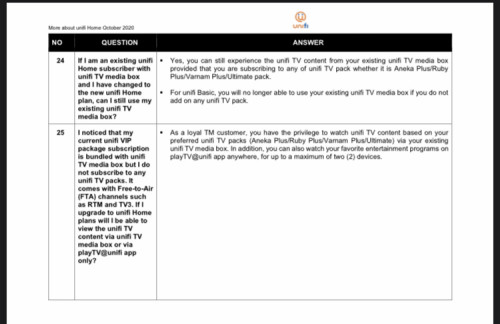
I'm not too sure about that but according to their FAQ, seems like it's not possible to do so unless you subscribe to a unifi TV package

user posted image
Source: https://unifi.com.my/sites/default/files/pa...ber%20-2020.pdf

QUOTE(Maxieos @ Oct 23 2020, 06:28 AM)
-Never mention on conduit in meter but only raceway casing rm2.5 or it is rm66 the ceiling ?
*
yup, 1st 50m is included for raceway to cover the 1st 50m of fiber cable that is included(for internal cabling), rm66 is if you want to install it in the celling( optional installation)

QUOTE(Maxieos @ Oct 23 2020, 06:28 AM)
Actually , now how many type of unifi router they give out ? Can we choose ? which one is better ?
D-link orange yellow , Silver router , TP-link balck with 2 , 4 antenna and Cylinder shape router , white Aztech router what else did they give out ?
*
I'm not too sure about that but as far as I know TM stop giving out D-link router, silver TM router, TP link router,, now I belive they are giving out the netis router( what I got when I installed mine in august 2020) or AZ-Tech router
user posted image

AZ-Tech router
user posted image

Unfortunately you can't choose which router you want. The best router is to buy your own router, refer to this thread for router recomendation: https://forum.lowyat.net/topic/4658096

This post has been edited by yongtjunkit: Oct 23 2020, 10:43 AM
yongtjunkit
post Oct 23 2020, 09:43 AM

Look at all my stars!!
*******
Senior Member
2,516 posts

Joined: Mar 2016
QUOTE(sonotme @ Oct 23 2020, 09:23 AM)
My unifi plan recently jumped also just like others here.
If i wanna downgrade to the 100mbps (without unifiTV), can i still watch the channels on my current box?
*
According to their FAQ it doesn’t seem possible unless you subscribe to a unifi TV pack, not too sure though since it’s not a unifi basic plan

Made a correction to the quoted post

user posted image
Source: https://unifi.com.my/sites/default/files/pa...ber%20-2020.pdf

This post has been edited by yongtjunkit: Oct 23 2020, 09:44 AM
yongtjunkit
post Oct 23 2020, 11:33 PM

Look at all my stars!!
*******
Senior Member
2,516 posts

Joined: Mar 2016
QUOTE(Maxieos @ Oct 23 2020, 10:34 PM)
There are still few question i do no understand yet.Want to learn a more about unifi fiber stuff and recent changes.

-So the The discount is automatically.Then i do not need to request for 1 month free trail.
*
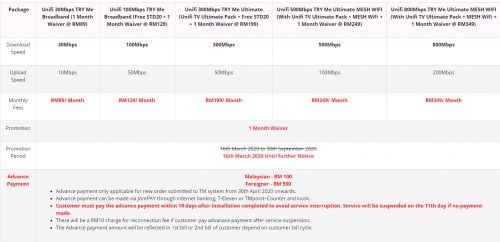
Yes, the discount is for new customer

Discount available till 31/10 not till further notice
user posted image

QUOTE(Maxieos @ Oct 23 2020, 10:34 PM)
-About the phone , since it's running rj11 that plug in to the BTU , if BTU is turn off when at night to save power means the phone also get turn off ? no power ? BTU must on 24/7 ? so what happen if BTU spoil or lightning strike ?
Last time smyx light strike modem spoil.
*
Yup,, if the modem is offline then no voip, btu must on 24/7 if you want voip 24/7


QUOTE(Maxieos @ Oct 23 2020, 10:34 PM)
-As for router , I am not sure , blacktubi recommend many model especially asus.My condition is , iiremember correctly , last time TM can access our PC and router and change setting like remote PC.Will they steal all the CC when we use shope or laz online buying ?
If like that , can we just flash into TM router to stock router firmware patches or custom firmware to prevent TM to change our setting ?
*
I don't think you can easily just flash a custom firmware on any TM router, the only one from TM as far as I know can flash custom firmware is the TP link C1200 which TM doesn't provide anymore.
https://forum.lowyat.net/topic/4497511

Tm can remote access into their own modem and router to change settings if needed, As far as I know TM doesn't steal things like cc information, but no matter what router you use/whichever ISP you use,, your internet activity may be visible to them
user posted image

QUOTE(Maxieos @ Oct 23 2020, 10:34 PM)
Usage for router , normally just youtube and video conferencing for study 4-5.What is the advantages on Asus router vs TM stock router beside wifi strength ? since house is small no stories less not many walls even old spoil linkys or tp router is fine on wifi.Maybe on stmyx speed but unifi speed is different , 100mbps and do i need mesh ?
*
Usually 3rd party routers ( assuming you brought the right one based on your budget) are better than those free router given by ISP.

Depending on the model, you may get additional features such as Antivirus/QOS/Bandwith limiter/VPN/etc.

For mesh wifi, it depends on many factors such as your house size, how many floors,etc

QUOTE(blacktubi @ Sep 17 2018, 05:08 PM)
When to use mesh WiFi

Consider getting a mesh WiFi system if your property is bigger than 1500 square feet or having more than a floor.

A best case solution is to have a unit of mesh node on each floor of your property.

When not to use mesh WiFi

If you are staying is a single storey property less than 1500 sq ft, a mesh WiFi will cause more harm than good.

The huge signal overlap will introduce roaming issue. Besides, when the distance is smaller, connecting directly to the main router will give better speed then connecting to mesh node.

But, it will still be useful if your property have some weird layout (narrow and long rectangle).
*
Source: https://forum.lowyat.net/topic/4658096

For 100 mbps,, you'll need to use 5ghz wifi band to take advantage of the 100mbps speed for devices that can only connect to 2.4ghz wifi,, those devices may not be able to take advantage of 100mbps speed.

This post has been edited by yongtjunkit: Oct 24 2020, 03:12 PM

yongtjunkit
post Nov 2 2020, 12:47 PM

Look at all my stars!!
*******
Senior Member
2,516 posts

Joined: Mar 2016
QUOTE(shinjay @ Nov 2 2020, 12:17 PM)
Good news for those who just ended their 2 years free upgraded promo, initially I planned to switch to maxis RM149, 300mbps,
so visited TM point today to give transfer ID, but being told that for existing customer there is a new package starting today which is

RM139 for 300mbps but without the aneka TV package, just basic TV package.
RM119 for 100mbps also without the TV package

To skip all the hastle I just maintain the RM139, since the router given from Maxis is still C5v.
*
I guess this is for those who wants to switch to other ISP?

and not for those who are currently in contract?

currently paying rm129 for 100mbps and still in 2 yr contract

This post has been edited by yongtjunkit: Nov 2 2020, 12:48 PM
yongtjunkit
post Nov 5 2020, 10:12 PM

Look at all my stars!!
*******
Senior Member
2,516 posts

Joined: Mar 2016
QUOTE(QuantumEdge @ Nov 5 2020, 09:38 PM)
user posted image
Hmm, saw many of my friends 100mbps plan had ruby plus pack included for free
While mine is empty.... is it because they're upgraded from streamyx while I'm a new subscriber hence no hypptv package?
*
TM revised their package and for 100mbps ( without unifi TV ultimate pack + unifi TV plus box) there’s only the free unifi TV channel included

This post has been edited by yongtjunkit: Nov 5 2020, 10:14 PM
yongtjunkit
post Nov 13 2020, 02:59 PM

Look at all my stars!!
*******
Senior Member
2,516 posts

Joined: Mar 2016
QUOTE(xDjWanNabex @ Nov 13 2020, 02:57 PM)
im using a RT-N12HP_B1 Asus router, and when i do speedtest i get nothing more then 40mb.
Today the TM technician came and used his router and got 100mbps....wondering if my router really spoilt/rate limiting (but i cant find any options to unlock)

anyone use similar model?
*
The router doesn’t support 100mbps, you’ll need to upgrade it to support 100 mbps

The router you mentioned only have 2.4ghz,, you’ll need to use 5ghz (wireless ac or newer preferably) to get 100mbps


Refer to this thread for WiFi router recommendations: https://forum.lowyat.net/topic/4658096

This post has been edited by yongtjunkit: Nov 13 2020, 03:01 PM

2 Pages  1 2 >Top
Topic ClosedOptions
 

Change to:
| Lo-Fi Version
0.0327sec    0.36    7 queries    GZIP Disabled
Time is now: 14th December 2025 - 06:29 PM