Welcome Guest ( Log In | Register )

Bump Topic Topic Closed RSS Feed

Outline · [ Standard ] · Linear+

Unifi Official TM UniFi High Speed Broadband Thread V38, READ 1ST PAGE FOR TURBO SPEED INFO!

views
     
winter01942
post Dec 30 2020, 08:11 PM

Rating 5/5
*****
Senior Member
857 posts

Joined: Oct 2009


QUOTE(haturaya @ Dec 29 2020, 06:52 PM)
After using this setup for nearly a year, TM did something on their end, causing issues with VLAN 600. No longer receiving anything on VLAN 600. I lodged a report, TM sent 2 technicians. After nearly half & hour, still no solution. I suggest to them, push VLAN 600 to ONU LAN 2 instead. So they reconfigure the ONU and walla VLAN 600 on ONU LAN 2.
*
Just had the same thing happen to my Mikrotik setup as well

From yesterday onwards HyppTV was totally dead, no longer receiving anything from VLAN 600.
(Connection has been sketchy for the whole year, usually needing few resets on the STB to work)

Tried to tinker with the BTU unit but no success, hopefully can get them to come and set up in the same way as yours.

glad I found this information here thumbsup.gif thumbsup.gif


winter01942
post Dec 31 2020, 10:20 AM

Rating 5/5
*****
Senior Member
857 posts

Joined: Oct 2009


QUOTE(ahlong @ Dec 30 2020, 09:02 PM)
Im using hAP AC2 too.. but after STB (hypptv-whitebox) upgrade, its hard to established LAN to 100mbps for the 1st onward STB boot.. iif set auto-nego (everything default on hAP AC2), it only connected to 10mbps.. STB need 100mbps.. if i unset the auto-nego and only select 100M (full), it will retry until can established to 100M.. but it cant for now.. need to cabut lan cable, reconnect just it can success 100M.. reported to TM about this.. they cant proceed to my request like previous user here, direct vlan600 to BTU..

i already test with my previous MikroTik RB951, no problem at all.. happened only with my hAP AC2.. tried check incase the lan port kaput, everything ok connecting with other device..
*
I didn't really investigate previously, but always needed to reboot STB many times, maybe due to the 10/100 mbps you mentioned, showing the green "Network unreachable" screen during boot

I'm still using the ancient silver STB

QUOTE(soonwai @ Dec 31 2020, 12:22 AM)
Wonder if only certain area affected. Maybe the PPPoE concentrator misconfig or somehow made incompatible with Mikrotik.

I'm in Sungai Long. PPPoE Scan shows I'm using ibse01.bgi. I believe bgi is Bangi.

haturaya you're in Shah Alam. Is yours ibse02.klg ?

winter01942, ahlong, what about you guys?
*
ibse04.wmu for me, Setapak area

my assumption was PPPoE is separate from the IPTV?

RB2011 btw

This post has been edited by winter01942: Dec 31 2020, 10:23 AM
winter01942
post Dec 31 2020, 01:06 PM

Rating 5/5
*****
Senior Member
857 posts

Joined: Oct 2009


QUOTE(hjack @ Dec 31 2020, 12:25 PM)
Guys, i tot STB always refer to Tv box not modem ?  sweat.gif  sweat.gif
*
yup Set Top Box (STB) = TV Box
winter01942
post Dec 31 2020, 02:48 PM

Rating 5/5
*****
Senior Member
857 posts

Joined: Oct 2009


QUOTE(Pop The Bubbles @ Dec 31 2020, 01:56 PM)
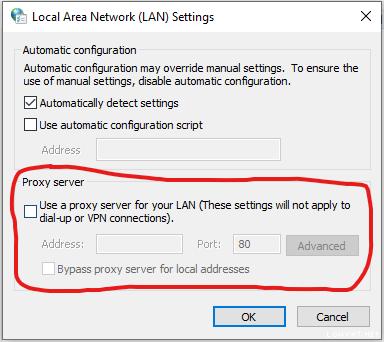
Hi, anyone know why some of the pc unable to connect to the internet in the similar network.

I was only able to connect with the internet with automatically detect settings for proxy server is turned off for the affected pc.

Was able to ping Google or YouTube even if the browser shows no internet.

The unaffected pc is remained with automatically proxy server turned on.

Kinda weird as the problem just arised yesterday with no software or hardware changed.

Not sure if this is related to unifi.
*
do you mean that the PC that cannot connect has a proxy set up?

Attached Image

from what i know there are malware that will try to set this proxy up, but I'm not 100% sure for your case

Topic ClosedOptions
 

Change to:
| Lo-Fi Version
0.1742sec    0.41    7 queries    GZIP Disabled
Time is now: 5th December 2025 - 01:13 PM