Welcome Guest ( Log In | Register )

Bump Topic Topic Closed RSS Feed

Outline · [ Standard ] · Linear+

Unifi Official TM UniFi High Speed Broadband Thread V38, READ 1ST PAGE FOR TURBO SPEED INFO!

views
     
shahie
post Nov 23 2020, 07:07 AM

On my way
****
Junior Member
506 posts

Joined: Feb 2005
QUOTE(RiriRuruRara @ Nov 23 2020, 02:37 AM)
Hi I am using unifi black color router archer c1200? How do I get access to the page you post there? Sorry I don't know these things...
*
his using either Mikrotik or Cisco, you need those managed router to do that, correct me.
shahie
post Nov 23 2020, 04:28 PM

On my way
****
Junior Member
506 posts

Joined: Feb 2005
QUOTE(tyja @ Nov 23 2020, 04:22 PM)
hello guys,
today, i just install 500mb package. i'm using deco m5. the problem is, on wifi, i only get 250mb max. even between deco, at the end of the other deco, is my pc, hook up on wired. still same, only 250mb. is deco my limit at 250 only? if yes, do i need m9 plus in order for me to get 500mb?
*
Are you setup from BTU/ONU direct to Deco unit 1? or via other wifi router first? if yes, use laptop/pc to plug the CAT6 LAN from 2nd port on deco 1 to measure the speed. if you also get 250mbps, just call TM, problem on the TM side. of ok, than your networking is not strong enough to dispatch that speed.

This post has been edited by shahie: Nov 23 2020, 04:34 PM
shahie
post Nov 23 2020, 09:20 PM

On my way
****
Junior Member
506 posts

Joined: Feb 2005
QUOTE(tyja @ Nov 23 2020, 05:52 PM)
On QOS setting, mine is standard. no high priority
my setup is direct btu. on deco apps, download 480 upload 100. only on wifi is 250. i check back, my all device connection is 2.4g. i try disable, 2.4g and leave 5g. wifi can go to 360mb. but not all my device cant connect to 5g. is there anyway i can specific which device connect to 2.4g or 5g?
another thing, how to check connection speed between deco? what speed each satelite use?
*
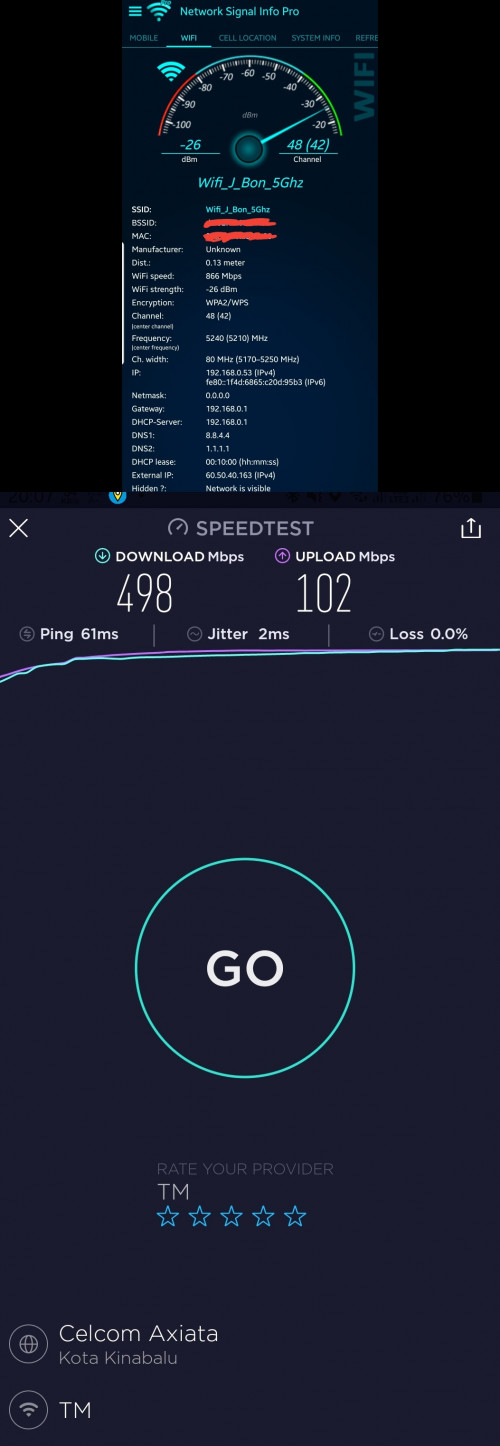
i'm on unifi 500Mbps too. using mikrotik RB4011igs+RM wired for main router. Deco M9 plus as an wired AP, configured as ethernet backhaul (star network).

since my wifi speed came to my note 20U 866mbps, i can get nearly 500Mbps on wifi.

user posted image

This post has been edited by shahie: Nov 23 2020, 10:01 PM
shahie
post Dec 1 2020, 06:29 AM

On my way
****
Junior Member
506 posts

Joined: Feb 2005
QUOTE(fewbirds @ Dec 1 2020, 01:54 AM)
Hi guys...

I've the following equipment & unifi plan:
Unifi Plan: unifi advance plus 500Mbps (with RM70 discount - not sure if the disc matters)
BTU: Huawei HG8240w
Router: TP-Link Archer AC1900
Receiver: TP Link Archer T4U AC1200

I'm only getting 50-250mbps download speed on wifi. Not sure why i'm not getting the advertised speed - maybe it's the discount? or my equipment? Appreciate if someone could help me with this.
*
what about speed if using LAN direct to your Pc/laptop with gigabit LAN? in my experience, you need a more powerful router to deal with 500mbps on wifi! example those with 1ghz quad core processor & 512mb RAM as a minimum spec. TPlink deco mesh x60 as an example and using ethernet backhaul to the second AP unit.

This post has been edited by shahie: Dec 1 2020, 06:33 AM
shahie
post Dec 8 2020, 10:50 AM

On my way
****
Junior Member
506 posts

Joined: Feb 2005
QUOTE(chinkw1 @ Dec 8 2020, 10:36 AM)
I m on unifi 100mbps rm129/month.

If I get unifi 300mbps now, how much per month pls?
*
https://unifi.com.my/personal/home/fibre-broadband
shahie
post Dec 10 2020, 09:02 AM

On my way
****
Junior Member
506 posts

Joined: Feb 2005
QUOTE(xCryptik @ Dec 9 2020, 05:32 PM)
I still using D-Link 850L for 2 people heavy usage for gaming + torrent. Never turn off for few months. I guess maybe less user that's why the router still survived so long. Haha.
*
agreed.... every day your router less work load too, no stress on handling more traffic data and demand... lol
shahie
post Dec 23 2020, 02:47 PM

On my way
****
Junior Member
506 posts

Joined: Feb 2005
QUOTE(Morpheus2be @ Dec 23 2020, 11:07 AM)
Submitted request to upgrade package to TM. Its been 2 weeks. Lol. GFG. Want to give money also dont want. doh.gif  doh.gif
*
on this situation, online is much more slower than manual! my experience that day, waiting until day 5 after they called me for verification, but still no PONR order created. at last i went to TM, within 2 hours i can see order created and another hour, i enjoy my new speed already.

This post has been edited by shahie: Dec 23 2020, 02:47 PM
shahie
post Dec 23 2020, 07:43 PM

On my way
****
Junior Member
506 posts

Joined: Feb 2005
QUOTE(Morpheus2be @ Dec 23 2020, 07:16 PM)
My case, they already called to confirm upgrade but said they will courier the Deco m9 mesh and unifi tv equipment. I suppose, once received, someone will come to do installation?

I think my current equipment can handle the upgrade right? Now on 100Mbps plan using Huawei AX3 router. Upgrading to 500Mbps plan.
*
did you enjoy the new speed now? your router huawei AX3 should be ok for 500mbps. just install yourself the unifi tv box.
shahie
post Dec 24 2020, 12:33 PM

On my way
****
Junior Member
506 posts

Joined: Feb 2005
QUOTE(pokchik @ Dec 24 2020, 08:16 AM)
Nice. What is your main reason for upgrading?
Tempted to, but the RM249/mth is a bit  sweat.gif
*
actually, 500Mbps package consider worth, RM249/month for 2 years, since TM giving Mesh M9+ worth Rm900. if we just divide 900/24 = 37.5, and if we calculate the package itself 500Mbps with ultimate unifi tv only (249 - 37.5) = RM211.50 as compare to Rm199 for 300mbps. you pay Rm12.50 monthly additional for the extra 200mbps. make sense ka? lol

This post has been edited by shahie: Dec 24 2020, 12:35 PM
shahie
post Dec 24 2020, 05:22 PM

On my way
****
Junior Member
506 posts

Joined: Feb 2005
QUOTE(Morpheus2be @ Dec 24 2020, 09:18 AM)
Mesh and unifi tv box still haven't arrived. Can I just ask for the package upgrade 1st if it just requires configuration at TM side?
*
my case, TM immediately upgrade my speed first, within a few hours after PONR has been created, only then they deliver the mesh M9+ to my address.
shahie
post Dec 25 2020, 09:42 AM

On my way
****
Junior Member
506 posts

Joined: Feb 2005
QUOTE(powerwoot @ Dec 25 2020, 09:15 AM)
This is especially to certain kampung2 area, if you can see FDP hanging around schools, balai raya, community halls and complexes, gov agencies complexes or any, the chance for the public to get your fibres pull from these unit is almost impossible ya. I've been told that these DPs paid to TM by the gov to that particular building.
Same as my case, after a year the DP unutilized by the school, I urged TM to open to the public and at last they agreed to open it.
*
agreed. government fully bare the cost for the infrastructure which included in the project cost similar to the extension of the electricty and water supply.
shahie
post Dec 25 2020, 01:53 PM

On my way
****
Junior Member
506 posts

Joined: Feb 2005
QUOTE(hizad @ Dec 25 2020, 12:16 PM)
Need advise. Just upgraded from Unifi Air to 800 Mbps just an indulgence to myself. However my home infrastructures are 7 years old. For me to achieve maximum output should I change all my ethernet cables to Cat7? I found out that i need to change my desktop network card from 10/100mbps to 10gbps.

Currently from the router :
1. one the ethernet cable is connected to my desktop pc which only receive 100mbps max download.

2. one ethernet cable is connected to Deco M5 which only receive 500mbps max download.

3.  The last ethernet 30m ethernet cable is connected to my Amplifi HD for wired streaming purposes which only receives 100mbps max download

Appreciate advise for me to achieve max potential. Thanks
*
sound like you still have all the Cat5 networking, yes...upgrade to cat6 is sufficient already and it a must since you have the 800mbps connection. don't forget the main router too, you really need the powerful machine to deal with that speed.

This post has been edited by shahie: Dec 25 2020, 01:55 PM
shahie
post Dec 25 2020, 02:36 PM

On my way
****
Junior Member
506 posts

Joined: Feb 2005
QUOTE(hizad @ Dec 25 2020, 02:20 PM)
Thanks. Currently i am using TPLink A10 AC2600 router. Is it good enough? Supposably 2.4G @ 800 mbps and 5G at 1200 mbps
*
wow... only dual core chipset sir, you need more powerful quad core chipset machine like tplink deco x60, tplink Ax20, asus Ax86u, to deal with 800mbps on 5ghz band. unless you not worry much on the speed you get as long as you got the internet connection. lol

http://en.techinfodepot.shoutwiki.com/wiki...LINK_Archer_A10

This post has been edited by shahie: Dec 25 2020, 02:51 PM
shahie
post Dec 29 2020, 05:11 PM

On my way
****
Junior Member
506 posts

Joined: Feb 2005
QUOTE(haturaya @ Dec 27 2020, 06:55 PM)
My port 2 changed for HyppTV because they have problem with my Mikrotik router. All these while it's been working fine, until one day, no more VLAN 600. Something that they did on their end. Lodged a report, technician came but they can't solve it, so I request to push VLAN 600 straight to Port 2.  sweat.gif

Port 1 - Mikrotik router
Port 2 - HyppTV box
Port 3 - x
Port 4 - x

Save one port on my Mikrotik router & no need to handle VLAN 600.  thumbsup.gif
*
Since you are using mikrotik, the VLAN600 for the unifi connection we manual create it. how come no more and gone? you set it back if gone? similar to hypptv which is Vlan500 and also we manually set it.
shahie
post Dec 29 2020, 10:59 PM

On my way
****
Junior Member
506 posts

Joined: Feb 2005
QUOTE(haturaya @ Dec 29 2020, 06:52 PM)
TM is using VLAN 500 for Internet and VLAN 600 for the HyppTV. For my Mikrotik, no longer need to handle VLAN 600 since VLAN 600 goes through LAN 2 on TM ONU.

My Mikrotik only need to handle VLAN 500.  biggrin.gif

Before this, my setup was

TM ONU LAN 1 -> Mikrotik SFP1

Mikrotik Eth 1 - 9 -> my home wired & wireless network
Mikrotik Eth 10 -> HypTV box (VLAN 600)

After using this setup for nearly a year, TM did something on their end, causing issues with VLAN 600. No longer receiving anything on VLAN 600. I lodged a report, TM sent 2 technicians. After nearly half & hour, still no solution. I suggest to them, push VLAN 600 to ONU LAN 2 instead. So they reconfigure the ONU and walla VLAN 600 on ONU LAN 2.

Now my setup is

TM ONU LAN 1 -> Mikrotik SFP1
TM ONU LAN 2 -> HyppTV box

Mikrotik Eth 1 - 10 -> my home wired & wireless network
*
sorry.. correction... Vlan500 for the internet connection instead of 600. btw, any benefits using SFP port as an input from ONU? currently i'm using LAN1 as my input. tq

Topic ClosedOptions
 

Change to:
| Lo-Fi Version
0.1863sec    0.53    7 queries    GZIP Disabled
Time is now: 2nd December 2025 - 04:45 AM