Welcome Guest ( Log In | Register )

Bump Topic Topic Closed RSS Feed

Outline · [ Standard ] · Linear+

Unifi Official TM UniFi High Speed Broadband Thread V38, READ 1ST PAGE FOR TURBO SPEED INFO!

views
     
lukemanz
post Nov 10 2019, 11:19 AM

Getting Started
**
Junior Member
249 posts

Joined: Aug 2009
QUOTE(kucau @ Nov 10 2019, 07:52 AM)
Is there any place i can buy 2nd hand btu?
*
You need to make sure the BTU type is the same company as the stolen one
Previous BTU can only be used by the same company as it is locked that type.
I think there are 3 company, fiberhome, alcatellucent/nokia and huawei.
The new BTU is universal, means can be used on all 3 company
But the older BTU is company spesific

Then call tm to reconfigure, rm53 only

This post has been edited by lukemanz: Nov 10 2019, 12:03 PM
lukemanz
post Dec 17 2019, 07:02 PM

Getting Started
**
Junior Member
249 posts

Joined: Aug 2009
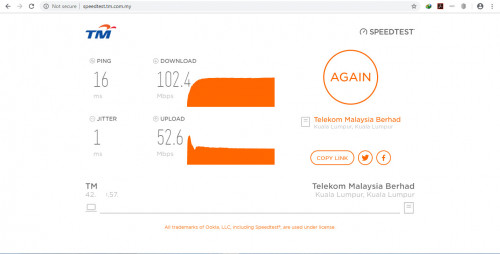
Today I did some speedtest and my ping has been change from single digit (6ms - 8ms) to two digit (16ms - 17ms).
Anyone experiencing the same?

user posted image
lukemanz
post Dec 17 2019, 09:52 PM

Getting Started
**
Junior Member
249 posts

Joined: Aug 2009
QUOTE(sHawTY @ Dec 17 2019, 08:58 PM)
Kau speedtest guna Ethernet cable or WiFi
If WiFi, test again using Ethernet cable
WiFi always add a bit of latency especially if you live in a crowded area

*
Test both using LAN and wifi, both similar double digit ping
lukemanz
post Dec 18 2019, 03:17 PM

Getting Started
**
Junior Member
249 posts

Joined: Aug 2009
QUOTE(lukemanz @ Dec 17 2019, 07:02 PM)
Today I did some speedtest and my ping has been change from single digit (6ms - 8ms) to  two digit (16ms - 17ms).
Anyone experiencing the same?

user posted image
*
Okay, found the culprit which is antivirus.
Disable antivirus give me back 1 digit ping (6ms-7ms) cool2.gif
lukemanz
post Dec 30 2019, 01:19 PM

Getting Started
**
Junior Member
249 posts

Joined: Aug 2009
QUOTE(y4ng @ Dec 30 2019, 12:21 PM)
ok thanks for the answers. I must tell myself 2 years very fast over one...
*
What speed and what is the monthly fee of your package?
lukemanz
post Dec 30 2019, 05:27 PM

Getting Started
**
Junior Member
249 posts

Joined: Aug 2009
QUOTE(y4ng @ Dec 30 2019, 01:48 PM)
then sure la no turbo. Turbo for those subscribe 10Mbps @rm129 then turbo to 100Mbps @rm129
lukemanz
post Jan 19 2020, 11:58 PM

Getting Started
**
Junior Member
249 posts

Joined: Aug 2009
QUOTE(QuantumEdge @ Jan 19 2020, 10:34 PM)
user posted image
If only TIME doesnt have to avoid landed property due to "some reason" from TM
*
Please dont spread false rumour. Any ISP can invest fiber on landed properties without any restriction from MCMC or TM if they are willing to.
TIME has coverage on landed property, example Sime Darby Elmina and Ecoworld Eco Grandeur.
The problem is they are not willing to invest. Even TM if the major shareholder is not Khazanah, they will not put their money to put fiber infra at rural and outskirt area becoz the time taken for ROI will be beyond 10 to 20 years
lukemanz
post Jan 20 2020, 09:24 PM

Getting Started
**
Junior Member
249 posts

Joined: Aug 2009
QUOTE(QuantumEdge @ Jan 20 2020, 08:46 AM)
My bad, thought they're not allowed to venture into existing market of TM
Still, if only our national fiber backbone is managed by TIME…
*
Wrong again, existing market of TM can be tapped by any ISP including TIME if they are willing to invest.
There are many, many, many high rise apartment previously on TM VDSL then TIME put fiber infra whistling.gif
lukemanz
post Jan 30 2020, 12:04 AM

Getting Started
**
Junior Member
249 posts

Joined: Aug 2009
Someone share this: https://www.linkedin.com/posts/zakwanbuang_...6281190400-6pac

Attached Image
lukemanz
post Jan 30 2020, 08:56 PM

Getting Started
**
Junior Member
249 posts

Joined: Aug 2009
QUOTE(siles1991 @ Jan 30 2020, 03:06 PM)
I live in a condominium which was done building in 2006 and was fibre ready at the time. Bandar Utama area.
*
You should check whether your condo is fiber or VDSL
If fiber, you should claim that 500Mbps Turbo from TM and clawback rebates from Jan2019 until Jan2020 rclxm9.gif

This post has been edited by lukemanz: Jan 30 2020, 08:56 PM
lukemanz
post Feb 25 2020, 01:53 PM

Getting Started
**
Junior Member
249 posts

Joined: Aug 2009
QUOTE(wailing81 @ Feb 24 2020, 03:36 PM)
i am shifting home soon. just wondering is there any difference for the installation of fiber optic to home now compare to 10 years ago?
previously i had one black color cable connected to one box, then from the box laying out the white color cable into my house.

going to renovate soon, any advise on how to lay the cable in the house?
thanks
*
You need to check the location of TM Fiber DP whether it is in front of your house or at the back alley.
From there, pull fiber with protection to a room/location that you choose to put the TM modem and network switches.
Make sure the room/location have enough power supply points.

Then from the room/location, as per sHawTY mention, pull CAT7 (lowest CAT5e) Ethernet cable all around the house so you will have Ethernet ports in every room and suitable places to mount access point.
Also, if you plan to use hypptv, smart tv, NAS, IP based CCTV, printers or any equipment that rely on IP address, pull CAT7 Ethernet cable to their respective location too
lukemanz
post Mar 9 2020, 09:29 PM

Getting Started
**
Junior Member
249 posts

Joined: Aug 2009
QUOTE(tydell @ Mar 9 2020, 01:18 PM)
Sharing my experience with Unifi so that all of you could learn something.

I have unifi 100 mbps still under contract. I moved to a new place. New place don't have unifi, as Time build the infrastructure here and also got free internet for 2 years.

I called 100 and tell them my intention to terminate. The agent ask for a reason. I told him I'm moving out and the new place don't have unifi services. I ask about early termination fee, he said should be waived since no service available. He asked me to request for termination in online portal. This is like a 30 days notice to them. I am also asked to return BTU once I got SMS from TM.

Got SMS, return the BTU. Then the agent at TMPoint asked me to wait for final bill. I said I want to request for waiver for the final bill (which is the early termination fee) because my new area don't have Unifi service. She said need to wait for the final bill first then request. I said ok and leave.

Few day later I got final bill and it is RM 1200 ++. This is ridiculous but not worry at the time because the first agent said I could request for waiver.
I call them up again and the agent ask for RELOCATION FORM. I said there is no relocation form because I know there is no Unifi service. I also ask why the first agent didn't mention anything about RELOCATION FORM? Typical answer is he don't know, different department. I told him, here is my current address please check if there is any service. He said please email my request.

On another note, I am Unifi customer since 2012. in 2018 I already subscribed to 100 mbps, paying about 190. Same year they have this turbo upgrade 800mbps.
The only thing that I got new from this upgrade is new BTU and new Dlink router. I still have hypp TV box from 2012 and they said it is not part of the upgrade. Don't matter to me as I never watched them.
I use auto debit to pay my bills since beginning. So my payment was never late in fact always on time.

Even though the turbo upgrade is 800mbps, but the Dlink router they provided cannot even go to that speed. I could get 800 on cable but who uses cable?
The best I could get is around 400-500 on wifi. I call them up and ask about this, they said the guaranteed speed is only on cable. I wish I know earlier but what can I do?
Anyhow I downgrade my internet to 100 mbps for about 129. Because of this, contract renewed for 2 years.

Back to the story, when I got the final bill, I forgot to cancel my auto debit and they debited the RM 1200++ from my card. I'm so furious because apparently they can debit which ever amount for what ever reason.
Clearly this is not bill payment. There may be something in TOS but my advise to all you now, STOP YOUR AUTODEBIT NOW! JUST MAKE A REMINDER ON YOUR PHONE.

Not much I can do about autodebit now, because my account already terminated the portal no longer have the option to cancel autodebit.

I have exchanged so many email with them now and still no resolution on my waiver. They still insist on the relocation form. Every single time, the person who replied the email are different person.
One person even recommended that even if Unifi not available at the area, there are possibility Streamyx is available. So the recommendation is to subscribe to streamyx to avoid paying the penalty.
I replied, this is probably the stupidest recommendation that I have heard.. How you are assigned to a customer service is a mystery. Do you even read your own answer? I said why should I go for Streamyx which is an inferior internet service from 20 years ago and stuck with bad internet connection and also bad service in 2020? I have 1gbps speed now and you want me to go for streamyx? This guy clearly don't have common sense.

Later other person replied and apologize for the inconveniences. They are working on second level management on this case and will get back to me in 15 days.
Even if got the waiver, it may take longer for me to get back my money. Even if I don't get the refund, its fine at least I don't have to deal with them anymore.

So take whatever lesson you can learn from my story here.
I summarized below.

1. Think carefully before you upgrade the speed. Check for other services like Maxis or TM, they have flat early termination fee, so less headache.
2. CANCEL YOUR AUTODEBIT NO MATTER WHAT YOUR REASONS. RM 2 rebate is too insignificant nowadays.
3. If you have been a loyal customer to TM for a very long time and think that they will treat better? You never late on your payments? It is a myth. They are like any other companies.
4. Before you cancel make sure you read the TOS. Relocation form is a must to avoid all of these nonsense.
5. The customer service agent don't know everything. You need to be on top of everything.
6. Don't subscribed to Unifi if you have a choice.
*
Dont wait for TM. It will not be solve even after more than 30days.

The fastest and trusted solution will be doing the aduan SKMM https://aduan.skmm.gov.my/
lukemanz
post Mar 12 2020, 04:19 PM

Getting Started
**
Junior Member
249 posts

Joined: Aug 2009
QUOTE(Nightstalker93 @ Mar 11 2020, 09:48 PM)
Hi guys,

Unifi said my condo Union Heights port is full so cannot install unifi. I have already done thumbprint verification to launch a report at TMpoint. No coverage for Time, Celcom & Digi fibre. Maxis of course won’t have since they use TM infrastructure. Any advice on what to do next?

Headache no fibre internet...previous house nicely enjoy 100mbps fibre
*
You need to search around you block, whether there are any alternative DP, then check the free ports of the DP.
If got free ports, then request to apply using the free ports.

TM DP:
https://forum.lowyat.net/index.php?showtopi...post&p=56896126
lukemanz
post Mar 18 2020, 10:12 PM

Getting Started
**
Junior Member
249 posts

Joined: Aug 2009
https://www.maybank2u.com.my/maybank2u/mala...tm-cleanup.page?

QUOTE
Dear Valued Customers,

Please be informed that TM is currently working on the database clean-up exercise. Due to this exercise, the following payments to Streamyx and Unifi accounts via Maybank2u will be terminated and removed effective 11th April 2020.

    Bill Payment Payees “Telekom – Streamyx” & “Telekom Malaysia Berhad – UniFi”
    Recurring and Future Payments
    Registered Favorite

Please make your bill payment by select “TM-unifi Home, Streamyx & Voice” and key in your respective TM bill account number.
lukemanz
post Mar 19 2020, 12:47 PM

Getting Started
**
Junior Member
249 posts

Joined: Aug 2009
QUOTE(MGM @ Mar 19 2020, 08:56 AM)
Please make your bill payment by select “TM-unifi Home, Streamyx & Voice” and key in your respective TM bill account number.

Can't find this payee in the list when I want to add as favourite.
*
Search for 'TM' , dont search for 'Telekom'
lukemanz
post Mar 19 2020, 08:40 PM

Getting Started
**
Junior Member
249 posts

Joined: Aug 2009
QUOTE(MGM @ Mar 19 2020, 01:47 PM)
Can find if use via one time payment but not when I want to add it as favorite without paying.
*
https://www.maybank2u.com.my/maybank2u/mala...-new-payee.page?
lukemanz
post Mar 28 2020, 01:28 PM

Getting Started
**
Junior Member
249 posts

Joined: Aug 2009
QUOTE(ListenToTheWind @ Mar 28 2020, 01:19 PM)
Unifi to Facebook/Shopee are extremely slow

While it's normal on Maxis.
*
Me using Cloudflare DNS below solve the problem for Facebook and Twitter:

Cloudflare:
For IPv4: 1.1.1.1 and 1.0.0.1
For IPv6: 2606:4700:4700::1111 and 2606:4700:4700::100
lukemanz
post Mar 28 2020, 01:42 PM

Getting Started
**
Junior Member
249 posts

Joined: Aug 2009
QUOTE(ListenToTheWind @ Mar 28 2020, 01:30 PM)
Awesome! That fixed all the problems!
*
Sorry, missing 1 at the end:

For IPv6: 2606:4700:4700::1111 and 2606:4700:4700::1001
lukemanz
post Mar 28 2020, 03:01 PM

Getting Started
**
Junior Member
249 posts

Joined: Aug 2009
QUOTE(bukulima @ Mar 28 2020, 02:32 PM)
too much load on public dns seems like changing to private dns will help ist?
*
Dont know, never tried private dns
lukemanz
post Mar 30 2020, 10:41 AM

Getting Started
**
Junior Member
249 posts

Joined: Aug 2009
QUOTE(Orpheus1120 @ Mar 30 2020, 02:55 AM)
It sounds like some of you are surprised that TM throttles bandwidth? How can congestion happens everyday at a predetermined time? lol

Of course TM will deny. With the current MCO and everyone at home, TM will not be able handle the additional load since more than likely they oversold their bandwidth in the first place and has never invested in any upgrades of their infrastructure.

Of course they can't admit they throttle you. Would you admit if you are them? lmao
*
As much as I like to criticize TM, your accusations was totally dumb founded.
Any ISP in Malaysia can only control speed in Malaysia, they dont control speed outside Malaysia.
Why is other ISP got no routing and speed issue? Coz they got smaller number of subscriber and not unlimited.
If they got similar number of subscriber and unlimited, they will coz similar routing and speed issue.
As per what many forumer in this thread suggested, you can subscribe paid vpn to get better routing and speed outside Malaysia.


2 Pages  1 2 >Top
Topic ClosedOptions
 

Change to:
| Lo-Fi Version
0.2135sec    0.56    7 queries    GZIP Disabled
Time is now: 5th December 2025 - 03:58 PM