Welcome Guest ( Log In | Register )

Bump Topic Topic Closed RSS Feed

Outline · [ Standard ] · Linear+

Unifi Official TM UniFi High Speed Broadband Thread V38, READ 1ST PAGE FOR TURBO SPEED INFO!

views
     
loonsave
post Nov 27 2019, 04:27 PM

Regular
******
Senior Member
1,635 posts

Joined: May 2005


QUOTE(taqu @ Nov 27 2019, 02:57 PM)
Trying to make it short:

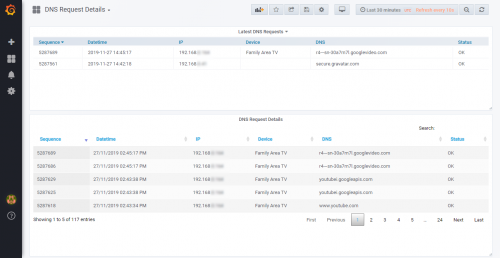
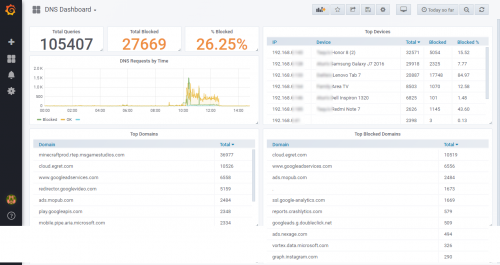
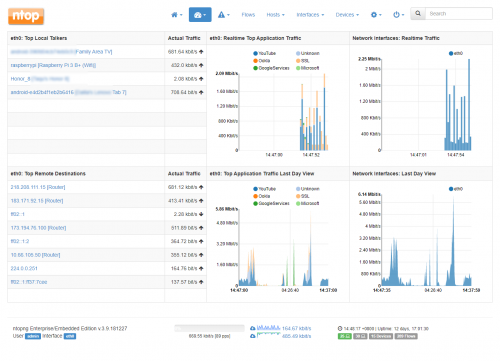
1. I use a switch (TP-Link TL-SG108E) that mirrors all traffic from my router to Raspberry Pi running ntopng traffic monitor app.
2. ntopng has almost everything I want except detail DNS requests monitoring. To do that, I send my router's DNS requests log to a syslog server on Raspberry Pi, which is processed using a custom Java app I created. Note: My router (D-Link DIR-868L) uses custom firmware (Tomato) that can send its syslog to a remote server.
3. I wrote another custom Java app to find out device names using data from both ntopng and my router's DHCP lease.
4. Data from both ntopng and my custom processed data displayed on Grafana dashboard as in the screenshot.

Luckily I have sufficient technical skills to pull this off. Most people would simply buy a high-end router or setup Ubiquiti Unifi system. Very glad to be able to do this
biggrin.gif

Some more:

user posted image
user posted image
user posted image
*
Hardly see grafana not in dark theme tongue.gif
loonsave
post Apr 9 2020, 11:17 AM

Regular
******
Senior Member
1,635 posts

Joined: May 2005


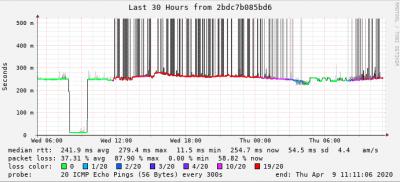
I am tracing some sites that using Cloudflare, apparently UniFi have huge packet loss to some of the CF IP. Both IP 104.24.x.x and 104.31.x.x belongs to Cloudflare.

https://www.cloudflare.com/ips/

Massive packet loss to 104.24.x.x
Attached Image

No Packet loss to 104.31.x.x
Attached Image

From the graph above, the packet loss started at 11:40am yesterday, and back to normal around 4:30am today. But it started loss again at 8am. Suspect the International routing for some IP ranges affected in TM.

This post has been edited by loonsave: Apr 9 2020, 11:19 AM
loonsave
post Apr 9 2020, 11:29 AM

Regular
******
Senior Member
1,635 posts

Joined: May 2005


QUOTE(michaelkkl @ Apr 9 2020, 11:20 AM)
Please refer to post before.
Cloudflare sites load better over IPv6.
Enable your IPv6.
*
I am just giving some info on the problem. I have IPv6 enabled on my different subnet. tongue.gif
loonsave
post Apr 10 2020, 10:25 AM

Regular
******
Senior Member
1,635 posts

Joined: May 2005


QUOTE(SilentVampire @ Apr 10 2020, 03:07 AM)
This should be the main issue why the Internet is quite slow these past few days. Since it is already public, I'm actually aware of this and the fault actually occurred at 11am on 8th April 2020, which is two days ago.  I'm a network engineer working in an enterprise MNC that are involved in maintenance and configuration of IPLC services for enterprise clients, and we get direct updates from the companies that manage these subsea cables, so I do know the inside scoop.

Anyway, since then, traffic have been affected for our clients, both local and international. It is no surprise that home users would be affected too. ETR will usually take about two to three weeks. Just wait till it is better, and hope that there is no delays. Per the article, they have rerouted the circuits, but it won't be as fast.
*
So this explained why my smokeping graph started broken around 11:30am on 8 April 2020. biggrin.gif
I believed due to the segment 3 was broken, most traffic rerouted to Singapore and caused the congestion.
Thanks for your info. notworthy.gif
loonsave
post Apr 15 2020, 10:27 AM

Regular
******
Senior Member
1,635 posts

Joined: May 2005


QUOTE(DecaPix @ Apr 15 2020, 08:41 AM)
Why dont you just call TM to come change the Modem for free?
*
All installation, network and service restoration activities at customer premises are postponed and will resume after the MCO ends.

Topic ClosedOptions
 

Change to:
| Lo-Fi Version
0.2123sec    0.44    7 queries    GZIP Disabled
Time is now: 5th December 2025 - 09:36 AM