


https://www.maxis.com.my/broadband/maxis-fibre/#step2
P.s - I'm not an agent😁
This post has been edited by jcws87: Oct 24 2020, 10:34 PM
Unifi Official TM UniFi High Speed Broadband Thread V38, READ 1ST PAGE FOR TURBO SPEED INFO!
|
|
 Oct 24 2020, 10:33 PM Oct 24 2020, 10:33 PM
Return to original view | IPv6 | Post
#1
|
 
Junior Member
218 posts Joined: Aug 2020  
|
Hi all. I'm new to Unifi thread. I saw currently all are concerning about the Unifi turbo promotion ending. Maybe this might help. Maxis promo upgrade 100Mbps to 300Mbps at RM129. I come across this promo just few minute ago. But it tie with Astro Bundle though.
https://www.maxis.com.my/broadband/maxis-fibre/#step2 P.s - I'm not an agent😁 This post has been edited by jcws87: Oct 24 2020, 10:34 PM |
|
|
|
|
|
Nov 12 2020, 09:44 AM
Return to original view | IPv6 | Post
#2
|
|
Junior Member
218 posts Joined: Aug 2020
|
Youtube was experiencing some problem as stated in The Star -
https://www.thestar.com.my/news/world/2020/...ror-on-platform |
|
|
Nov 21 2020, 09:29 PM
Return to original view | Post
#3
|
|
Junior Member
218 posts Joined: Aug 2020
|
Unifi have once again providing Huawei ONU EchoLife HG8240H5 to new cust.
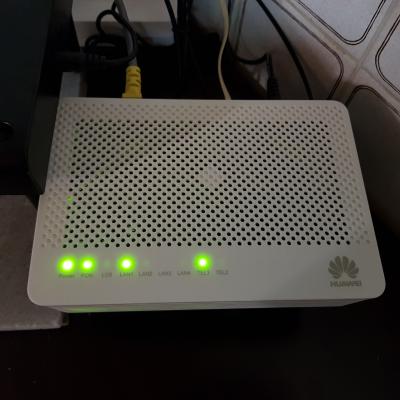
And also now providing Netis router DL4480V2. 
|
|
|
Nov 21 2020, 11:57 PM
Return to original view | IPv6 | Post
#4
|
|
Junior Member
218 posts Joined: Aug 2020
|
QUOTE(lowck @ Nov 21 2020, 11:17 PM) i replace my router to tp-link AX20 already dlink dir842 wireless coverage so weak I too have brought Archer AX20 but having problem in setting up, even i have follow tp-link guide. Haiz |
|
|
Nov 22 2020, 02:14 AM
Return to original view | Post
#5
|
|
Junior Member
218 posts Joined: Aug 2020
|
QUOTE(QuantumEdge @ Nov 22 2020, 12:00 AM) AX20 user here, no problem setting up on my side. Had to use a browser instead of the mobile app as you cant setup VLAN with app. 😂😂 After press reset button and re-do the step, now can use already😅 |
|
|
Nov 22 2020, 03:21 PM
Return to original view | Post
#6
|
|
Junior Member
218 posts Joined: Aug 2020
|
QUOTE(Max @ Nov 22 2020, 12:36 PM) Using this btu from.2018 also.. Router dlink 842 if not wrong. » Click to show Spoiler - click again to hide... « QUOTE(yongtjunkit @ Nov 22 2020, 12:37 PM) That's actually HG8240H not HG8240H5 Yup, mine was HG8240H5 (install 21.11.2020)TM HG8240H looks like this 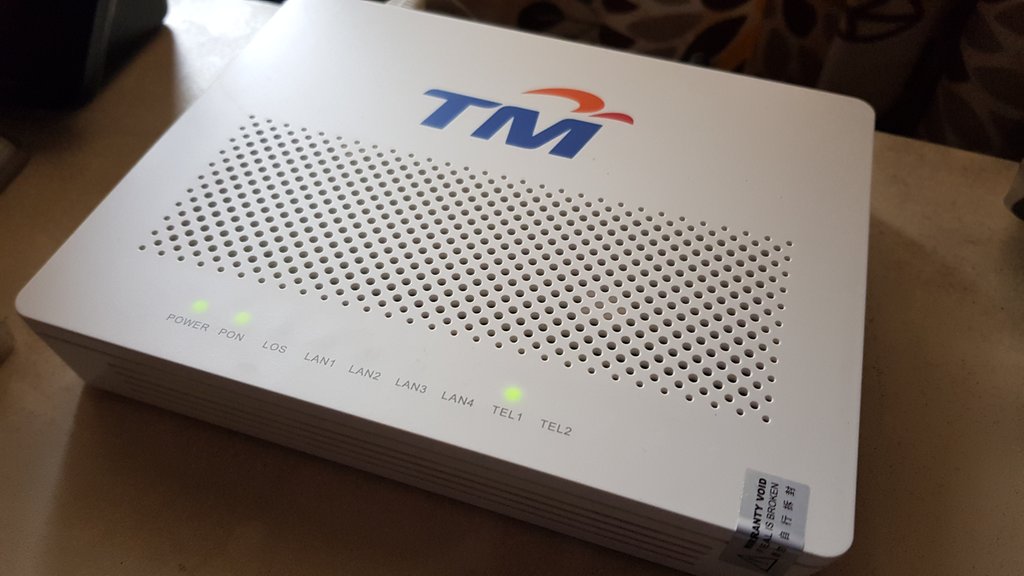 TM HG8240H5 looks like this  |
|
|
|
|
|
Nov 28 2020, 01:22 AM
Return to original view | Post
#7
|
|
Junior Member
218 posts Joined: Aug 2020
|
It seem Celcom have just started offering the 300mbps and 500mbps package. And it including an AX router for new customer. 300mbps - RM140/mth 500mbps - RM200/mth https://www.celcom.com.my/personal/broadban...lcom-home-fibre https://www.soyacincau.com/2020/11/26/celco...00mbps-500mbps/ cannavaro liked this post
|
|
|
Nov 28 2020, 10:21 AM
Return to original view | Post
#8
|
|
Junior Member
218 posts Joined: Aug 2020
|
QUOTE(YoungMan @ Nov 28 2020, 09:55 AM) Read somewhere they gave Tplink AX10. Yup, mention in soyacincau article. Unifi should start offering cheaper package to all it customer. For example, 100mbps @ RM99 and 300mbps @ RM129. |
|
|
Nov 30 2020, 02:20 AM
Return to original view | Post
#9
|
|
Junior Member
218 posts Joined: Aug 2020
|
QUOTE(ckimsem @ Nov 29 2020, 11:16 PM) No, I'm using unifi now. My home just got coverage for unifi fiber in OCT 2020, and so just started my contract. My house area too have just started having unifi coverage, to be precise 20/11/2020. Thought Maxis website show not coverage but eventually u can get it via visiting Maxis centre (got info on 23/11/2020 can already register with Maxis for my area).When I checked for Celcom/Maxis fiber coverage on their websites, it shows my home is not in coverage. Strange though, Maxis did call to me to offer their fiber internet. |
|
|
Nov 30 2020, 11:14 AM
Return to original view | Post
#10
|
|
Junior Member
218 posts Joined: Aug 2020
|
QUOTE(ckimsem @ Nov 30 2020, 09:30 AM) Unifi technicians said my home location required for "tanam tiang" when they came to check the "port" thing. Read Here Thought u house was on "special" required for TM to tanam tiang but eventually if the service is underutilize or got request by other isp, TM will allow it (atleast it can collect rental fee from other isp - my point-of-view). Maybe, that's the reason other fiber ISPs does not have coverage for my home because I think TM may not install posts for others except Unifi itself. When I check now, only DiGi shows availibility at my area, yet it's not confirmed whether or not my home included :confused: . Like my area, Maxis website also show no coverage (my area is newly rollout) but 1 person i know able to apply for maxis and have it install the next day after applying. Until now i check on Maxis website still no coverage. Candy12 liked this post
|
|
|
Dec 12 2020, 12:10 PM
Return to original view | Post
#11
|
|
Junior Member
218 posts Joined: Aug 2020
|
QUOTE(akhito @ Dec 11 2020, 06:11 PM) oh ppoe password will not be given in the list of pw. Ok noted TM might gv Tp-link C1200 too (my neighbour got it last 2 week during installation). . I will monitor the router performances 1st, hope get Netis instead of Aztech. I heard aztech wifi signal very weak. . I will monitor the router performances 1st, hope get Netis instead of Aztech. I heard aztech wifi signal very weak. |
|
|
Dec 27 2020, 04:36 PM
Return to original view | Post
#12
|
|
Junior Member
218 posts Joined: Aug 2020
|
QUOTE(myroy @ Dec 27 2020, 03:52 PM) I just sign up for 100Mbps Unifi w/o Unifi plus box which is RM 129/month I notice during installation they didnt gave me the telephone, and if I check on the website it stated So if I attached phone (got from my previous maxis fibre), will my phone auto connected? or need a few setting change? QUOTE(YoungMan @ Dec 27 2020, 04:09 PM) Yes it is free calls nationwide but TM do not provide you the phone. You can attach any phone to the BTU and start enjoying the calls. Those who do not have phone can either buy outside or buy from TM. I'm sharing from my own experience. TM no longer provide free phone to new customer. You can either used back any phone u have or buy a new one as stated by YoungMan. But you cant straight away enjoy the call as I was told by the installer we need to wait atleast 24h for it to calibrate and if after 24h the BTU light still blinking, it already mean the phone that is connected is not suitable for that brand BTU (like my neighbour using non-TM cordless phone having connecting problem. He call TM 100 to lodge complaint and send a tech to see. The tech tell my neighbour the Huawei BTU couldnt support that cordless phone model and replace it with ZTE BTU & it's works). |
|
|
Dec 27 2020, 04:39 PM
Return to original view | Post
#13
|
|
Junior Member
218 posts Joined: Aug 2020
|
QUOTE(myroy @ Dec 27 2020, 04:16 PM) any setting need to be done from router/modem? No special setting require. Just plug-in to the BTU Tel1 or Tel2. Does the Tel light at BTU blinking?i did try plugin but my phone not even charging |
|
|
Dec 27 2020, 07:23 PM
Return to original view | Post
#14
|
|
Junior Member
218 posts Joined: Aug 2020
|
QUOTE(myroy @ Dec 27 2020, 05:10 PM) nope What is ur BTU brand? And is ur phone a dect or wat type?nothing happen This post has been edited by jcws87: Dec 27 2020, 07:46 PM |
|
|
Dec 27 2020, 09:54 PM
Return to original view | Post
#15
|
|
Junior Member
218 posts Joined: Aug 2020
|
QUOTE(myroy @ Dec 27 2020, 09:43 PM) Here is my phone type What is the BTU/ONU/Modem brand that Unifi provide? Did you plug-in your Dect phone to the current supply?received from my previous Maxis Fibre Home  As so far not even switch on |
|
Topic ClosedOptions
|
| Change to: |  0.0387sec 0.0387sec
 0.32 0.32
 7 queries 7 queries
 GZIP Disabled GZIP Disabled
Time is now: 9th December 2025 - 05:51 PM |
 Quote
Quote