Welcome Guest ( Log In | Register )

Bump Topic Topic Closed RSS Feed

Outline · [ Standard ] · Linear+

Unifi Official TM UniFi High Speed Broadband Thread V38, READ 1ST PAGE FOR TURBO SPEED INFO!

views
     
eternity4av
post May 7 2020, 08:10 AM

♥ ♥ ♥ taeyeon
*******
Senior Member
2,270 posts

Joined: Nov 2004
anyone can share their WiFi/Router for Unifi 800Mbps, that has approx 1800 sq ft space? As there were so many new routers out there, such as WiFi 6 and Mesh types, I'm not sure which will be the best options.
eternity4av
post May 17 2020, 09:39 AM

♥ ♥ ♥ taeyeon
*******
Senior Member
2,270 posts

Joined: Nov 2004
unifi 800Mbps - Super Value YEP 2019 is my current package, seems like this promo is permanent right? I'm paying RM250 a month for this though.


eternity4av
post May 17 2020, 07:48 PM

♥ ♥ ♥ taeyeon
*******
Senior Member
2,270 posts

Joined: Nov 2004
Attached Image
eternity4av
post May 18 2020, 07:51 AM

♥ ♥ ♥ taeyeon
*******
Senior Member
2,270 posts

Joined: Nov 2004
so what's the fastest speed from Unifi now? 800Mbps? Got beyond that?
eternity4av
post Jul 9 2020, 07:17 AM

♥ ♥ ♥ taeyeon
*******
Senior Member
2,270 posts

Joined: Nov 2004
does anyone using tp link ax20? my wifi speed was only hitting 100-300 mbps on unifi 800, which pretty much the same as the stock ac1200. please help
eternity4av
post Jul 9 2020, 01:09 PM

♥ ♥ ♥ taeyeon
*******
Senior Member
2,270 posts

Joined: Nov 2004
QUOTE(cannavaro @ Jul 9 2020, 10:10 AM)
What device did you use to test? Could be device wifi limitation
*
samsung galaxy s10+ wifi 6, iphone 7 plus, dell inspiron 13 7373 2-in-1 laptop, samsung galaxy a5 2017, samsung galaxy a8 2018, iphone 6 plus


QUOTE(wanttobuylaptop @ Jul 9 2020, 12:25 PM)
because you should not buy WIFI 6 router now unless all your device are wifi 6 capable
see spec page bottom

2. Claims about 802.11ax Wi-Fi technology are based on comparisons of the expected maximum theoretical data rates for one spatial stream using 802.11ax at 160 MHz (1201 Mbps) as opposed to one spatial stream using 802.11ac at 80 MHz (433 Mbps) as documented in IEEE 802.11ax draft 3.0 spec and IEEE 802.11-2016 wireless standard specifications, and require the use of similarly configured 802.11ax wireless network routers.

your router ONLY  support max AC speed of 433 Mbps, and your unifi is 800Mbps
unless your devices are wifi 6 capable, half of ur 800Mbps is wasted
seriously anyone suggest for AX router please come with all disclaimer on the performance.

see my explanation on wifi 6 albeit is for different router.

» Click to show Spoiler - click again to hide... «

*
yes, but strange thing is my samsung galaxy s10+ is wifi 6 ready, but i only can hit 500mbps, it's weird.

eternity4av
post Jul 9 2020, 01:49 PM

♥ ♥ ♥ taeyeon
*******
Senior Member
2,270 posts

Joined: Nov 2004
QUOTE(firdausbhari @ Jul 9 2020, 01:27 PM)
» Click to show Spoiler - click again to hide... «

Who knows in the future he will upgrade to AX devices.

Why would anyone buy an AC if u can get AX around same price with better specs and features.
*
yes, but that senior has a valid point, but the router that he recommends really premium pricing unfortunately and for AX20, AX50, and AX10 is currently in promo. and I get it for RM279 from RM429. and with RM279 I don't think I can get any AC routers that able to tank that amount of WiFi speed.
eternity4av
post Jul 10 2020, 11:29 AM

♥ ♥ ♥ taeyeon
*******
Senior Member
2,270 posts

Joined: Nov 2004
QUOTE(wanttobuylaptop @ Jul 9 2020, 12:25 PM)
because you should not buy WIFI 6 router now unless all your device are wifi 6 capable
see spec page bottom

2. Claims about 802.11ax Wi-Fi technology are based on comparisons of the expected maximum theoretical data rates for one spatial stream using 802.11ax at 160 MHz (1201 Mbps) as opposed to one spatial stream using 802.11ac at 80 MHz (433 Mbps) as documented in IEEE 802.11ax draft 3.0 spec and IEEE 802.11-2016 wireless standard specifications, and require the use of similarly configured 802.11ax wireless network routers.

your router ONLY  support max AC speed of 433 Mbps, and your unifi is 800Mbps
unless your devices are wifi 6 capable, half of ur 800Mbps is wasted
seriously anyone suggest for AX router please come with all disclaimer on the performance.

see my explanation on wifi 6 albeit is for different router.

» Click to show Spoiler - click again to hide... «

*
Hi senior, will the problem will be solved if swap it with AX50 since its higher range model?

eternity4av
post Jul 10 2020, 01:48 PM

♥ ♥ ♥ taeyeon
*******
Senior Member
2,270 posts

Joined: Nov 2004
QUOTE(wanttobuylaptop @ Jul 10 2020, 12:13 PM)
ur device is wifi 6, i think you should get full 800 Mbps tho
AX50 of course faster as it is 2x2
but if using AC it supports up to 867Mbps only.
ur AX20, did you set your channel band to at least 80mhz?
where is ur old tplink ac1200?
clean the dust and test with ac1200 and see your speed.
*
My 2.4GHz settings
Attached Image

My 5GHz settings
Attached Image
I've changed the channel band from Auto to 80Mhz, as you recommended, and the speed is still the same.

TP-Link AC1200 is still with me, but I'm hoping to try to solve this AX20, if not I will just go exchange and top up RM20 for AX50.
eternity4av
post Jul 10 2020, 04:55 PM

♥ ♥ ♥ taeyeon
*******
Senior Member
2,270 posts

Joined: Nov 2004
QUOTE(wanttobuylaptop @ Jul 10 2020, 04:21 PM)
try with ur AC1200 and see speed result
let confirm there is no problem with ur line 1st
and the 5 ghz mode select ax only?
*
But the line if using wired it’s more than 800mbps, so WiFi is more towards the router itself right ? The 5ghz mode is mixed though as per the screenshot.
eternity4av
post Jul 12 2020, 10:12 AM

♥ ♥ ♥ taeyeon
*******
Senior Member
2,270 posts

Joined: Nov 2004
hi fellow seniors, it's me again. so Harvey Norman did give me options to exchange my TP-Link AX20 with any higher end router of my preference by paying the top-up.

My Unifi Line : 800Mbps.
My goal : to hit maximize download/stream speed on my WiFi Devices (Laptop / Smartphone in my bedroom) same floor with Router.

Herewith is the few Options that I shortlisted as below:-
A) TP Link AX50 - future proof, and wifi 6 and I own a Galaxy S10+ which WiFi 6
B) Asus RT-AC86U AC2900 Gaming Router
C) TP-Link Deco M9 Plus AC2200 2 Pack

On the same time, I need HyppTV as well.

Can you advise which options suits me the most?

Many thanks.
eternity4av
post Jul 13 2020, 03:04 PM

♥ ♥ ♥ taeyeon
*******
Senior Member
2,270 posts

Joined: Nov 2004
QUOTE(wanttobuylaptop @ Jul 12 2020, 11:51 PM)
A: read blacktubi review https://www.blacktubi.com/review/tp-link-ar...han_Wireless_AC
take note on no one mesh feature
B: i have talk enough about ac86u
C: you probably cant get max 800Mbps on m9 while the other 2 can, but out of 3, this gives you the best wifi coverage

all three local set should have no problem for hypptv
*
Ok I've picked M9 and yes you're right, the speed is lower in comparison with the two. even with AX20. so lesson learnt. but now the issue I'm currently facing is on M9 I've used all my lan port, but my desktop which is just beside the router dont have lan port to connect to, any advise?
eternity4av
post Jul 13 2020, 07:00 PM

♥ ♥ ♥ taeyeon
*******
Senior Member
2,270 posts

Joined: Nov 2004
QUOTE(soonwai @ Jul 13 2020, 06:20 PM)
Yeah, biggest M9 problem is if the 2nd port is used for HyppTV, that's it. gg.

If you're stuck with the M9, can use another router and just use the M9 as APs. But that's additional cost and M9(in AP mode) has a problem with activating its DHCP server when it detects no other DHCP server on the network (such as when you reboot your main router) which is really stupid.
*
Yes, I'm all GG. I only have my original TP Link AC1200 with it, and I've also realized that speediest from M9 is not really consistent and stable in comparison with AC1200 or even AX20. Lesson learnt, while I was researching, there were some hope by attaching a switch to M9, but I wasn't sure how does the IPTV / Modem will work with just two port if one has to go the switches.
eternity4av
post Jul 14 2020, 07:38 PM

♥ ♥ ♥ taeyeon
*******
Senior Member
2,270 posts

Joined: Nov 2004
QUOTE(wanttobuylaptop @ Jul 14 2020, 05:26 PM)
sell ur m9 plus and get others maybe...
or get a single deco x60, if there is anyone selling 1 that is...
however, x60 also only have 2 lan ports tho...
*
yeah i most likely will do that. but not so soon. maybe use this deco for quite some time, and realized ax20 is really not bad.
eternity4av
post Sep 27 2020, 10:21 AM

♥ ♥ ♥ taeyeon
*******
Senior Member
2,270 posts

Joined: Nov 2004
is it worth it to pay rm20 extra for unifi box for the rest 2 years? my mum is heavy reliant on standard 8tv for hokkien dramas.
eternity4av
post Sep 28 2020, 07:57 AM

♥ ♥ ♥ taeyeon
*******
Senior Member
2,270 posts

Joined: Nov 2004
QUOTE(QuantumEdge @ Sep 27 2020, 11:43 AM)
Absolutely no, just get a LongTV box from shopee/lazada
More channels than Astro+Unifi TV combined
*
thanks, urm, but i think those longtv requires chinese to navigate, as we're banana, so stock look or feel that resembles unifi tv will be best
eternity4av
post Oct 29 2020, 10:02 AM

♥ ♥ ♥ taeyeon
*******
Senior Member
2,270 posts

Joined: Nov 2004
QUOTE(sHawTY @ Oct 22 2020, 06:34 AM)
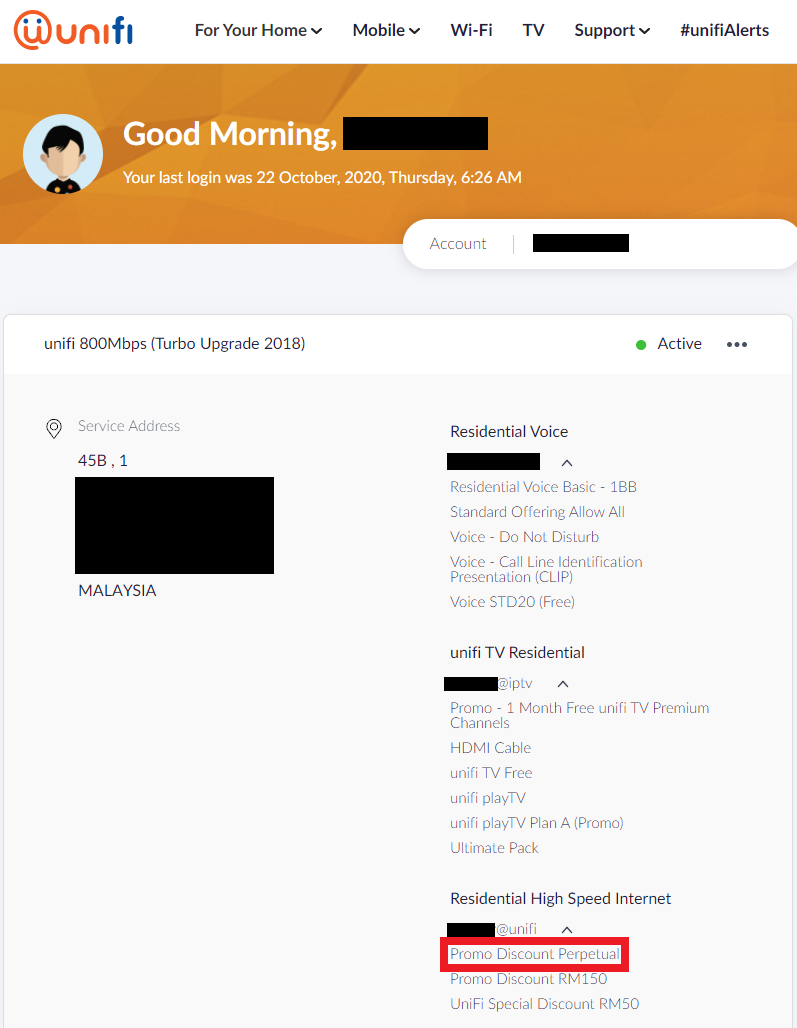
If you don't see the "Promo Discount Perpetual", then yes, the free upgrade for you will end

Everyone that has the Perpetual discount stated in their account will continue enjoying the discount forever

user posted image
*
how much you're paying for this?

mine as below:-
Promo Discount RM150
Promo Discount Perpetual
100% Discount Internet

but still at RM253.45

Topic ClosedOptions
 

Change to:
| Lo-Fi Version
0.0359sec    0.52    7 queries    GZIP Disabled
Time is now: 13th December 2025 - 07:44 PM