Welcome Guest ( Log In | Register )

Bump Topic Topic Closed RSS Feed

Outline · [ Standard ] · Linear+

Unifi Official TM UniFi High Speed Broadband Thread V38, READ 1ST PAGE FOR TURBO SPEED INFO!

views
     
Moogle Stiltzkin
post Jan 5 2020, 06:11 PM

Look at all my stars!!
*******
Senior Member
4,455 posts

Joined: Jan 2003
QUOTE(pierrechoong @ Jan 5 2020, 01:38 PM)
Hi sifus,

I have just purchased an Asus ac 86u router as advised. Tried to setup and all went well until i realized when i plug in my lan cable to connect my alarm none of the 4 lan network led is lit up. No connection was detected from the lan port. (internet is working fine just that the lan port seems not working)

Tried all 4 lan port, reset the unit and even disable aiprotection and firewall, still did not help.

I then tried with the supplied router by unifi and it was working.

Did I get a lemon unit with all 4 lan port not working?

Sifus, any thoughts?

Also if I am able to upgrade this router during the exchange, which Asus router should i go for which does not have any heating issues at all? Read a bit and came to realized that ac 86u has lots of heating issues.

Hope sifus can help me out.

Thanks.
*
not sure about the ac86u, but it's smaller sibling the ac68u has cooling issues. performance sure, until you keep it running long enough the temps will throttle the speed till it eventually disconnect the internet or it's really slow.

Had to install a fan for it....

i would instead suggest get a pfsense router and pair with a ubiquiti ap. or perhaps the reviews and ensure that the router cooling is sufficient for long usage.


Moogle Stiltzkin
post Mar 18 2020, 10:16 AM

Look at all my stars!!
*******
Senior Member
4,455 posts

Joined: Jan 2003
QUOTE(pakji @ Mar 17 2020, 10:52 PM)
Please Buy ASUS Router i using ASUS RT-AC68U almost prefect smooth
if you are going to be recommending this router, please be aware this model has a heating issue. if you use it long enough and under load, it will overheat then the speed will slow down a lot, also to the point you may have internet dropping.

solution is to use a fan on it, which will reduce temps to working temp conditions. but this requires using a separate fan......

i would rather recommend investing in a pfsense DIY router with decent specs, and good cooling so you can achieve better results in terms of security features, performance. for wifi you would need an additional purchase of a wireless AP e.g. ubiquiti AP is good, but there are probably cheaper options.


QUOTE(Jjuggler @ Mar 17 2020, 11:11 PM)
» Click to show Spoiler - click again to hide... «


Just buy RT-AX56U @ RM439.00 only. Asus AC68U is not worthy as per current date as we are moving towards WiFi 7 (802.11be) era
*
https://www.smallnetbuilder.com/wireless/wi...-6-router-ofdma


Yes asus router is ok, especially once you install rt merlin firmware on it
https://www.asuswrt-merlin.net/


ease of use and setup, a Asus router with rt merlin. For better performance, security but requires a bit more knowledge to configure (youtube helps) get a pfsense diy router (there are also prebuilt pfsense routers online for purchase).


This post has been edited by Moogle Stiltzkin: Mar 18 2020, 10:23 AM
Moogle Stiltzkin
post Mar 20 2020, 07:06 AM

Look at all my stars!!
*******
Senior Member
4,455 posts

Joined: Jan 2003
QUOTE
I have to partially disagree with you. Yes, the AC68U has heating issue, but it don't really slows down my network. I am a heavy internet user. I used USB fans before, but I ditch them out since it is a wear and tear process.


QUOTE(pakji @ Mar 18 2020, 01:39 PM)
my own router ASUS RT-AC68U not much heating i never use USB FAN my old router few years already running strong and speed never had slow almost prefect full speed via LAN Cable
i am sure that model ASUS RT-AC86U heating issue confined
*
i was not lying about heating issue. My own observation with my OWN ac68u is temps of 80 and slightly more, after extended usage. i leave my router on 24/7

And i notice internet and performance issues, and worse case, disconnections. And this always happens once temps hit 80 ish + hmm.gif

if you check the internet, a bunch of people also noted some issue with temp for some of these units. To the point where people had to tinker with their router to get the cooling sorted out. thats why i stopped recommending this model ages ago because of this.

https://www.snbforums.com/threads/rt-ac68u-...eratures.17418/

https://www.reddit.com/r/HomeNetworking/com...er_getting_hot/


QUOTE
The current best entry-level router solution is non-other than the AX56U.

Text marked bolded:

Thank you brother for pointing out the advantages of using asus-merlin over asuswrt. Well, I prefer ASUS router not only for their longitivity, but for their firmware flexibility as well. Below are the screenshots of the scripts I am currently running in my AC68U (flashed with Asus-Merlin fw):


the thing with asus is, last time they were last on security to the point they got into trouble with the FTC
https://arstechnica.com/information-technol...outer-security/


but things have come a long way. RT merlin especially has helped improve on the asus router firmware on the side. this is why whenever using asus router i would use his firmware.

pfsense if you have sufficient specs, you can also enable pfsnort, suricata and all the other security features, if you want next level. but it takes it takes a bit more knowledge to setup.

asus router with rt merlin firmware is easiest to setup especially with Unifi, there is a pulldown setting for unifi ISP in settings too (something you won't get with pfsense which you have to do everything manually).


I haven't check the latest benchmark, but you may be right about the AX56U. Shouldn't be getting old models anyways, because rt merlin will eventually stop developing firmware for older models, so best get a newer model that he will support for quite a while.

but that said, if i were to get my next router, i rather look into a pfsense solution. but i realize it's not for everybody if they aren't willing to put in the time to configure it hmm.gif


Asus router does have AIsecurity, but from a privacy standpoint is it safe? rolleyes.gif But if you want to tinker there is some sort of work around.
https://www.snbforums.com/threads/384-6-now...ro.48202/page-3

https://www.bbc.com/news/technology-50315544


This post has been edited by Moogle Stiltzkin: Mar 20 2020, 07:20 AM
Moogle Stiltzkin
post Mar 20 2020, 03:16 PM

Look at all my stars!!
*******
Senior Member
4,455 posts

Joined: Jan 2003
QUOTE(Jjuggler @ Mar 20 2020, 02:59 PM)
Buy a new AX56U router since it is retailed below than RM450, it will be a good addition to make your AC68U as a mesh node via AiMesh feature. From there you can plug in LAN cable to the node to your pc/laptop.  biggrin.gif
*
QUOTE
Just be aware this is only a two stream router. When/if you have AX devices this might not matter, but if you have any 3+ stream AC devices they will actually be slower with this router than a 3+ stream AC router. Same with the RT-AX58U.
https://www.snbforums.com/threads/ax56u.61607/

Moogle Stiltzkin
post Mar 23 2020, 03:30 PM

Look at all my stars!!
*******
Senior Member
4,455 posts

Joined: Jan 2003
PIA SG VPN server is kinda bad since the new company take them over though.... nobody should be using PIA these days.

This post has been edited by Moogle Stiltzkin: Mar 23 2020, 09:54 PM
Moogle Stiltzkin
post Apr 2 2020, 03:33 PM

Look at all my stars!!
*******
Senior Member
4,455 posts

Joined: Jan 2003
QUOTE(koja6049 @ Apr 1 2020, 11:52 PM)
free vpn, proton.
*
worked for russia lost ark.

it's possible to keep renew using throw away email, the trial lasts roughly a week? but if you are gonna use it that much pay for subscription vpn.

i think that surfshark MIGHT be good hmm.gif
Moogle Stiltzkin
post Jun 19 2020, 02:24 PM

Look at all my stars!!
*******
Senior Member
4,455 posts

Joined: Jan 2003
QUOTE(xhakox @ Jun 19 2020, 12:53 PM)
The think is it happens like 3-4 time in an hour. Even the technician mentioned that yesterday itself I experienced about 22 disconnections. That's really weird.
*
did you check your router temperature? i used a different router model, but last time it was slow, connection dropped, or it reboot, i noticed the temps were unusually high. something you should check if only to rule out.

also when was the last time you update router firmware? hmm.gif
https://www.forbes.com/sites/kateoflahertyu...s/#45310ee82cb0


out of all the brands, dlink is probably the worse when it comes to security patches puke.gif

if you want a reliable router, get a NUC and install pfsense on it. prices can range from Rm600 (atom or celeron) to Rm1200 (intel I3) depending on what you require (vpn? suricata? very high speed broadband100 mbps? 800 mbps?)

This post has been edited by Moogle Stiltzkin: Jun 19 2020, 02:27 PM
Moogle Stiltzkin
post Jun 20 2020, 12:16 PM

Look at all my stars!!
*******
Senior Member
4,455 posts

Joined: Jan 2003
QUOTE(xhakox @ Jun 19 2020, 03:12 PM)
I've already updated my router to the latest firmware when I first received. FYI, it is a TP-LINK AX50 AX3000. Just got it yesterday.

How do I check the temperature?
I tak suspect that it's a faulty router. Heat, probably.

Or am I missing something during set up?
*
not sure about your router model, but my asus using rt-merlin there is a temperature monitor for it. shows the wireless ap and the cpu temps hmm.gif
Moogle Stiltzkin
post Jun 20 2020, 12:18 PM

Look at all my stars!!
*******
Senior Member
4,455 posts

Joined: Jan 2003
QUOTE(pshong @ Jun 20 2020, 11:02 AM)
Noted with thanks...
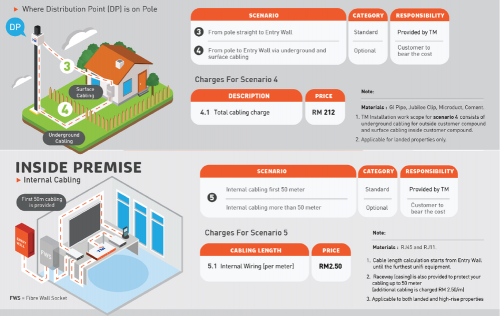
but the standard installation for the optic cable is 15meter or 50meter?

user posted image
*
this video also explains somethings


he even demonstrates what happens when you bend those fiber optic cables (ideally you don't want them to bend if possible.

This post has been edited by Moogle Stiltzkin: Jun 21 2020, 01:36 PM
Moogle Stiltzkin
post Jun 21 2020, 01:40 PM

Look at all my stars!!
*******
Senior Member
4,455 posts

Joined: Jan 2003
QUOTE(soonwai @ Jun 20 2020, 03:22 PM)
Compulsory HyppTV has never been an issue for me. It's been there since the beginning. It's a triple play service right? I never had Astro so I was actually looking forward to HyppTV. But I feel
not everyone wants hypptv (but more importantly, they don't want to pay for it). i personally don't use it. but because it's bundled into the service, they probably think you should pay for it as part of your isp package. this kind of practise is called bundling & tying which is pretty much anti consumer practise
https://en.wikipedia.org/wiki/Tying_(commerce)

just an example
https://competitioncommission.mu/wp-content...lic-Version.pdf


this is how they can get you to pay for crap, compared to if it were optional, chances are people would not subscribe for it (and instead opt for netflix using vpn to get around the limited library if you used without vpn).

that said, the broadband prices have been coming down in recent years compared to before.

if it's ok for you fine, but doesn't mean it's right for the rest of us who don't want to pay for that iptv bundle puke.gif

This post has been edited by Moogle Stiltzkin: Jun 21 2020, 01:50 PM
Moogle Stiltzkin
post Jun 21 2020, 03:27 PM

Look at all my stars!!
*******
Senior Member
4,455 posts

Joined: Jan 2003
QUOTE(soonwai @ Jun 20 2020, 03:22 PM)
Compulsory HyppTV has never been an issue for me. It's been there since the beginning. It's a triple play service right? I never had Astro so I was actually looking forward to HyppTV. But I feel
QUOTE(soonwai @ Jun 21 2020, 02:13 PM)
OK for me never means it's OK for you. Unless I know you well enough to make that assumption. Isn't that always the case with anything & everything? bangwall.gif
well sending out a blanket statement "i'm fine with paying for hypptv, no problem at all" making it seem like paying for a bundled service is ok, kinda sends the wrong message is my point. there is a lot more to it that you left out or considered trivial but is important to many others. that said to each his own, i didn't demean you for your choice if you thought that was my intent rolleyes.gif

This post has been edited by Moogle Stiltzkin: Jun 21 2020, 03:35 PM
Moogle Stiltzkin
post Jun 24 2020, 01:30 PM

Look at all my stars!!
*******
Senior Member
4,455 posts

Joined: Jan 2003
QUOTE(Daniel Hyuuga @ Jun 24 2020, 12:24 AM)
Unfortunately ISP has rights to do so, but would only illegal; like Unifi bars your rights to enjoy any other IPTV other than Unifi TV when subscribing Internet Service; this automatically & straightforward violates Antitrust. Antitrust is there to protect market so market can be run fairly and doesn't create upperhand dominance, not really to protect consumers.

If it were really illegal for consumers, other ISP/NGO would have challenge this over the court, but never happens and will never happen.
*
guess it comes down to which country you reside in that offers the best pro consumer rights protection. EU perhaps? hmm.gif

https://heinonline.org/HOL/LandingPage?hand...div=8&id=&page=


at least eu fought for gpdr to their credit.


whether it is okay in malaysia or not legally speaking based on current laws, it shouldn't be sad.gif

maybe if there were many options they couldn't pull that crap bangwall.gif


any updates whether any new ISPs are allowed to operate in Malaysia? wasn't there some news a while back about this hmm.gif what happened to that. supposedly their offerings would be cheaper and for a similar or better speed than what we are getting.

This post has been edited by Moogle Stiltzkin: Jun 24 2020, 01:34 PM
Moogle Stiltzkin
post Jul 6 2020, 06:51 AM

Look at all my stars!!
*******
Senior Member
4,455 posts

Joined: Jan 2003
QUOTE(cannavaro @ Jun 30 2020, 08:20 AM)
here's how it looks like, xD
so how, are you gonna upgrade your ssd to pcie 4 nvme m.2 ssd? hmm.gif is it needed? i see you're getting your full 800 mbps, but at same time ssd is 100%
https://www.gigacalculator.com/converters/c...-mbps-to-mb.php


QUOTE
Interface SATA III PCIe 3.0 x4 PCIe 4.0 x4
Bandwidth 750 MB/s 3.94 GB/s 7.88 GB/s


QUOTE
Inland Performance PCIe 4.0 x4 NVMe SSD
[Budget PCIe Gen4 SSD, Performs similar to other Gen4 SSDs]
This is probably the cheapest PCIe 4.0 NVMe SSD that you can buy for your computer. It is a product of Microcenter, which is a very popular computer store in America. The SSD uses the 3D TLC NAND Flash memory and the Phison PS5016-E16 controller, along with the DDR4 cache. It offers read and write speed of up to 5000 MB/s and up to 4300 MB/s respectively. The drive is available in 1TB and 2TB capacities and has an endurance rating of 1800 TBW and 3600 TBW respectively.


https://graphicscardhub.com/best-nvme-pcie-4-ssd/


what is the proper setup for this. seems like SSD download is a must. but storing on SSD is a bit expensive, so after download, the torrent has to move the file to the cheaper price per gig hdd for storage. in some torrent clients you are able to download to a temporary location e.g. your ssd, then after it completes, auto move to the HDD location.

but won't that cause deletions on ssd that wears it out? qlc is gonna wear out fast won't it confused.gif

This post has been edited by Moogle Stiltzkin: Jul 6 2020, 07:07 AM
Moogle Stiltzkin
post Jul 7 2020, 10:49 AM

Look at all my stars!!
*******
Senior Member
4,455 posts

Joined: Jan 2003
QUOTE(cba5566 @ Jul 6 2020, 07:19 PM)
ssd is not design for torrent use...can't cater for download and upload activity.
Better buy normal harddisk for torrent use....and it can last for longer time.

Some torrent file need many hours to complete the 100% file.
Sometimes u need to upload to others...here comes the pain for ssd...
They are people out there already try ssd for p2p.
ssd will spoil faster ....
*
can fully utilize 800 mbps broadband download using HDD ? hmm.gif

this guy is using a ssd. if hdd how?


found one article talking about 10Gbps broadband requirements shocking.gif
https://www.hardwarezone.com.sg/feature-get...need-make-first

This post has been edited by Moogle Stiltzkin: Jul 7 2020, 10:55 AM
Moogle Stiltzkin
post Jul 7 2020, 12:00 PM

Look at all my stars!!
*******
Senior Member
4,455 posts

Joined: Jan 2003
Got any vpn that can support 800mbps o-O: ?

with Mullvad vpn i can do 100 mbps just fine. even US server can reach at least 85 mbps

This post has been edited by Moogle Stiltzkin: Jul 7 2020, 12:01 PM
Moogle Stiltzkin
post Jul 7 2020, 12:36 PM

Look at all my stars!!
*******
Senior Member
4,455 posts

Joined: Jan 2003
QUOTE(go626201 @ Jul 7 2020, 12:18 PM)
Normal VPN protocol cant run so high speed.
I thought Mullvad got wireguard protocol?
Try that protocol 1st?
Maybe Mullvad cap max speed for every user to fair use. (Or that server only support 100mbps only,maybe u can try change another country server)

Now should be only Wireguard protocol can run so high speed.
Shadowsocks protocol probably can but i not sure. (This protocol no common,since it is used for china user to pass GFW)

If you find a Non-limitation wireguard service,and the connection between your device and the wireguard service is good,then fully utilize the speed is possible. (I confirmed this works)
i didn't opt for wireguard because...
https://restoreprivacy.com/wireguard/

wireguard technically suppose to be fastest, but for me the privacy risk trade off is not worth it.

mullvad does say they accounted for the issues, but still, openvpn just works with little worry.


also us server for netflix us for better content
https://www.techinasia.com/compared-netflix...ults-surprising
https://www.comparitech.com/blog/vpn-privac...netflix-region/

user posted image


that said mullvad is not best for streaming (because of blacklisting). i just merely use as example sometimes you need to stick to certain countries depending on your circumstance.


well i mean i don't have 800mbps. i'm using 100mbps, so i only know it's fine for that.

but if later in future i do upgrade to 800mbps, i want to know if anyone who actually knows can confirm if vpn can handle that kind of speed? if can't then not worth it for me. i use vpn most of the time (i don't turn off unless i'm gaming) so.... no point getting faster broadband if vpn can't handle hmm.gif

This post has been edited by Moogle Stiltzkin: Jul 7 2020, 12:48 PM
Moogle Stiltzkin
post Jul 7 2020, 12:58 PM

Look at all my stars!!
*******
Senior Member
4,455 posts

Joined: Jan 2003
QUOTE(go626201 @ Jul 7 2020, 12:50 PM)
Then no choice, wireguard is the latest,fastest vpn protocol.

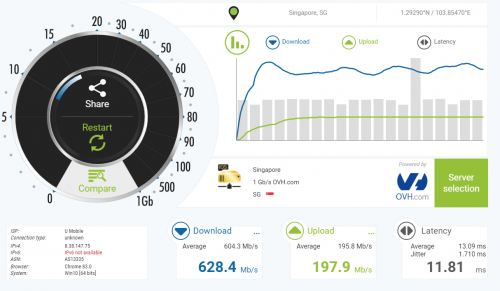
With CF Warp
ISP is wrong,so ignore the ISP. (Wireguard can saturated almost full speed of a server)
user posted image

Just saw ur edit
I can only say without Wireguard,i dont think it can run more than 300mbps.
Since the encryption already reduce speed and need to also consider the cpu usage.
To be clear,i am not saying other protocol cant run full speed ,i mean normally it cant run so fast.
*
thx notworthy.gif

warp... is that the cloudflare vpn?

https://www.vpnmentor.com/reviews/warp-by-cloudflare/


any good ? hmm.gif
https://thatoneprivacysite.net/#detailed-vpn-comparison

well i guess in that situation still better than no vpn. nice to see it can hit 600-700 mbps at least nod.gif

QUOTE
Best of all, you can use WARP entirely for free with no data or bandwidth limits.
free vpn? whats the catch confused.gif

QUOTE
Unlike most VPNs, WARP does not assign you a new IP address when you connect. WARP encrypts your data, but it does not mask your real IP address from the websites you visit.


then was is the point? for torrent you need to mask your ip ohmy.gif


This post has been edited by Moogle Stiltzkin: Jul 7 2020, 01:03 PM
Moogle Stiltzkin
post Oct 14 2020, 08:50 AM

Look at all my stars!!
*******
Senior Member
4,455 posts

Joined: Jan 2003
QUOTE(QuantumEdge @ Oct 14 2020, 12:51 AM)
Just let the unifi installer do the work, my house is also landed and they quote me RM150 for pole>ceiling>through the wall and out.
They're giving out newer version of the Nokia BTU I think (since 2~3 months ago), no more Huawei. But still depends on individual installer/TmPoint's stock.
[attachmentid=10631326]
*
is it possible to request swapping the old btu for new? hmm.gif or do they charge a fee for that. or not allowed?

and is it better than the huawei one?
» Click to show Spoiler - click again to hide... «


This post has been edited by Moogle Stiltzkin: Oct 14 2020, 08:53 AM
Moogle Stiltzkin
post Oct 14 2020, 02:48 PM

Look at all my stars!!
*******
Senior Member
4,455 posts

Joined: Jan 2003
QUOTE(QuantumEdge @ Oct 14 2020, 10:18 AM)
Hmm only when it died, cause TM provides lifetime warranty for it...
It runs a bit cooler than Huawei's BTU and that's the only difference  mega_shok.gif
*
QUOTE(sHawTY @ Oct 14 2020, 10:36 AM)
Unless you can proof the the BTU is dying or faulty, totally not allowed
*
QUOTE(Candy12 @ Oct 14 2020, 02:18 PM)
The probably quietly swapped it when the customer complaint and found out the FiberHome OLT wasn't compatible with other branded modems compared to Nokia/Huawei OLTs which the newer ones can now support multi vendor CPEs. Special case for this subscriber.

There are still old FiberHome OLTs in service installed during the first phase of the HSBB in TM exchanges which first got FTTH such as in TTDI, PJ and Subang areas.
*
o i see, so basically nothing worth bothering about, thx for the info hmm.gif

i recently just upgraded to a qotom pfsense i3 5005u, so if got free upgrade i am ready at least nod.gif
Moogle Stiltzkin
post Dec 24 2020, 08:09 AM

Look at all my stars!!
*******
Senior Member
4,455 posts

Joined: Jan 2003
QUOTE(ckimsem @ Dec 22 2020, 07:54 PM)
Yes, it’s for 3 months only, yet it’s still cheaper than Unifi thereafter.
300mbps = Celcom @ RM149 ; Unifi  @ RM199
500mbps = Celcom @ RM179 ; Unifi @ RM249

Furthermore, as soonwai said, Celcom gives AX router which is much better than router provided by Unifi.
However, Unifi comes with Unifi playTV, it’s not worth if you don’t watch it.
*
r these prices perpetual ? or they revert back to a more expensive price later on? hmm.gif

also how is the latency like on celcom? any uptime issues?


these days i have not many issues with tmnut. but if can jumpship to something for cheaper with no issues, then i probly would nod.gif

2 Pages  1 2 >Top
Topic ClosedOptions
 

Change to:
| Lo-Fi Version
0.0372sec    0.34    7 queries    GZIP Disabled
Time is now: 2nd December 2025 - 09:38 AM