

QUOTE(amirul hafizz @ Nov 15 2019, 10:30 PM)
coming soon...
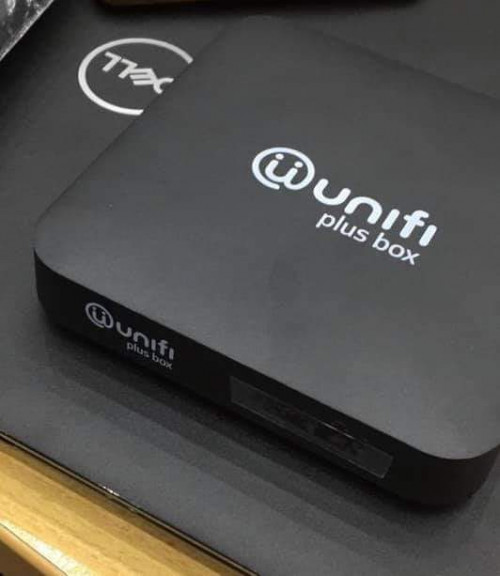

4K?Unifi Official TM UniFi High Speed Broadband Thread V38, READ 1ST PAGE FOR TURBO SPEED INFO!
|
|
 Nov 15 2019, 11:50 PM Nov 15 2019, 11:50 PM
Return to original view | IPv6 | Post
#1
|
 
Senior Member
1,725 posts Joined: Jan 2003 
|
QUOTE(amirul hafizz @ Nov 15 2019, 10:30 PM) coming soon... 4K? |
|
|
|
|
|
Nov 16 2019, 01:19 AM
Return to original view | IPv6 | Post
#2
|
|
Senior Member
1,725 posts Joined: Jan 2003
|
QUOTE(pakji @ Nov 16 2019, 12:43 AM) any leak coming soon 800mbps unifi Bizi waiting 100Mbps Free upgrade turbo to 800Mbps 800Mbps (800Mbps download/upload 200Mbps) DECT phone included Simple Voice Plus 70 ✔ Free Calls worth RM70 Beyond call rates ✔ Free calls Fixed to Fixed lines ✔ 8 sen/min to Mobile Contract 24 months Pay Nothing until 31 December 2019. RM349/month* |
|
|
Nov 21 2019, 02:21 AM
Return to original view | IPv6 | Post
#3
|
|
Senior Member
1,725 posts Joined: Jan 2003
|
QUOTE(eqmal197 @ Nov 20 2019, 09:15 AM) Hello all, IPTV working meant router was working, which also meant BTU and fibre optics was working as well.My internet sometimes lost connection but IPTV works normal. Need to restart BTU and router. It happened almost everyday at least once. Sometimes more than once. Oneof my friend says my connection maybe always lost session but not sure true or not. Have highlighted this to TM during their customer survey calls but dunno if they take the action. I dun wan to lodge report as they sure required me to be at home but im always not availabale (tak senang) - anyone experience this connection loss before? Restart all equiptment then all fine then happened again - got anything to do with router? Currently use TM router. The tall black one Current package is 500mb jumbo channel. if you need to restart both BTU and router to made internet working again, and if restart only the router the internet still not working, meant the fault wasn't at the router. |
|
|
Dec 12 2019, 07:39 PM
Return to original view | IPv6 | Post
#4
|
|
Senior Member
1,725 posts Joined: Jan 2003
|
there is a new unifi playtv apps version 1.2.8
new highest bitrate 4.8mbps instead 2.4mbps and 1.2mbps previously. not more Forced Malay Subtitles, Turn On/Off able Malay, Chinese Subtitles. but not all Programs have subtitles available. support multi channel viewing at the same time support screenshot and GIF capture etc just that unifi playtv for PC still haven't working after they take it down recently during playtv System Upgrade. https://play.google.com/store/apps/details?id=com.tm.playtv This post has been edited by Alpha_Tay: Dec 13 2019, 06:39 AM |
|
|
Dec 13 2019, 06:32 AM
Return to original view | IPv6 | Post
#5
|
|
Senior Member
1,725 posts Joined: Jan 2003
|
QUOTE(taqu @ Dec 12 2019, 08:32 PM)  From my observation, bandwidth with new PlayTV app seems higher. 5.6 Mbps average. Too bad some channels lack subtitles in the app. |
|
|
Dec 13 2019, 07:38 AM
Return to original view | IPv6 | Post
#6
|
|
Senior Member
1,725 posts Joined: Jan 2003
|
QUOTE(taqu @ Dec 13 2019, 07:22 AM) Some channels eg Paramount have no sub at all. Some channels eg Fox Family Movies have subs in STB but no subs in the app. new apps or old apps? |
|
|
|
|
|
Dec 16 2019, 06:20 PM
Return to original view | IPv6 | Post
#7
|
|
Senior Member
1,725 posts Joined: Jan 2003
|
the unifi playTV for PC website is up, login is working, but watching/viewing doesn't work yet, and the FAQ claim still work on IE11 only.
https://playtv.unifi.com.my/EPG/WEBTV/index.html#/home QUOTE(Alpha_Tay @ Dec 12 2019, 07:39 PM) there is a new unifi playtv apps version 1.2.8 new highest bitrate 4.8mbps instead 2.4mbps and 1.2mbps previously. not more Forced Malay Subtitles, Turn On/Off able Malay, Chinese Subtitles. but not all Programs have subtitles available. support multi channel viewing at the same time support screenshot and GIF capture etc just that unifi playtv for PC still haven't working after they take it down recently during playtv System Upgrade. https://play.google.com/store/apps/details?id=com.tm.playtv |
|
|
Dec 17 2019, 09:41 AM
Return to original view | IPv6 | Post
#8
|
|
Senior Member
1,725 posts Joined: Jan 2003
|
according to unifi live chat,
Jumbo Lite to Aneka Plus Pack starting 15th Nov 2019, We will notify customers through SMS. The Jumbo Lite pack customers will receive the SMS starting from 25 November onwards. those subscribe to YEP or not would also switch from Jumbo Lite to Aneka Plus Pack. i didn't receive such sms. i check my accounts few days ago, both Jumbo Lite and Aneka Plus Pack still listed, but today Jumbo Lite is gone. i watch BBC Earth included at Jumbo Lite Package few days ago with new unifi playtv android apps without problem. QUOTE(wiraone @ Dec 13 2019, 08:33 PM) Damn Unifi, I shouldn't fell on this pay nothing thingy, now they've moved me from Jumbo Lite to Aneka Plus and I lost few documentary channels from it. Grr... and I'm stuck for the next 2 years. QUOTE(Alpha_Tay @ Dec 12 2019, 07:39 PM) there is a new unifi playtv apps version 1.2.8 new highest bitrate 4.8mbps instead 2.4mbps and 1.2mbps previously. not more Forced Malay Subtitles, Turn On/Off able Malay, Chinese Subtitles. but not all Programs have subtitles available. support multi channel viewing at the same time support screenshot and GIF capture etc just that unifi playtv for PC still haven't working after they take it down recently during playtv System Upgrade. https://play.google.com/store/apps/details?id=com.tm.playtv |
|
|
Feb 25 2020, 03:14 PM
Return to original view | IPv6 | Post
#9
|
|
Senior Member
1,725 posts Joined: Jan 2003
|
just heard a new fibre optics unifi 100mbps installation, receive Huawei HG8240H5 ONT, but Netis DL4480V1 Router with VDSL2 modem function included, the installer probably run out of router, so they use the Netis DL4480V1 Router for fibre optics unifi installation, as a wifi router, without using the VDSL2 modem function.
|
|
|
Mar 24 2020, 02:12 PM
Return to original view | IPv6 | Post
#10
|
|
Senior Member
1,725 posts Joined: Jan 2003
|
QUOTE(sky96 @ Mar 24 2020, 12:32 PM) hi sifus, may i know what tower is this? my area should get unifi by this April, but after MCO idk we'll get unifi by that time. also this tower related to unifi or not? thank you hehe 4G Tower with Fibre Backhaul Manhole, but never saw the 3 Integrated Lamp Pole before.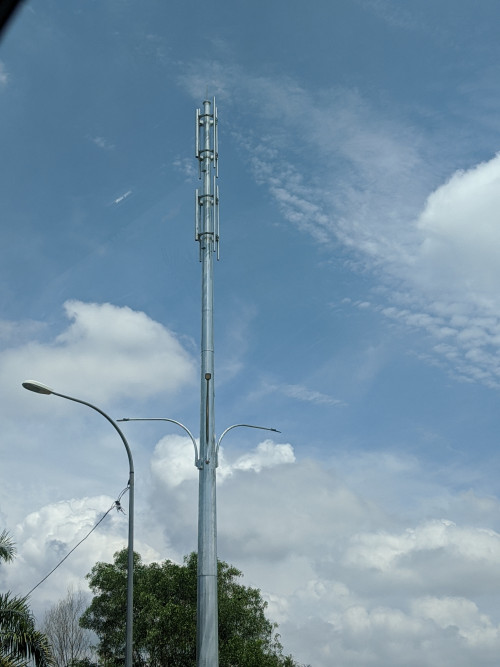 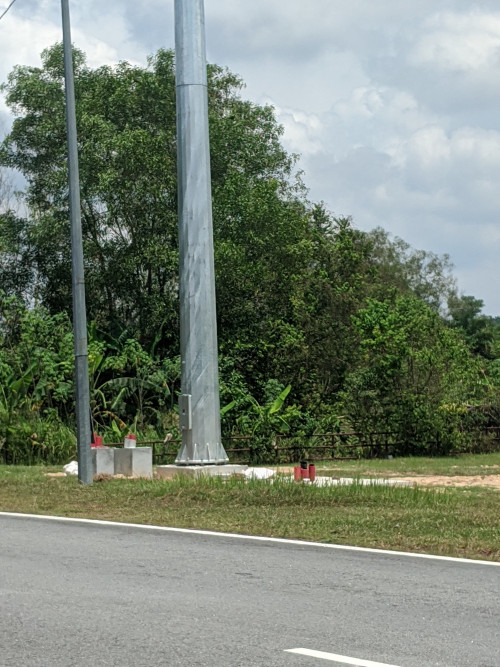 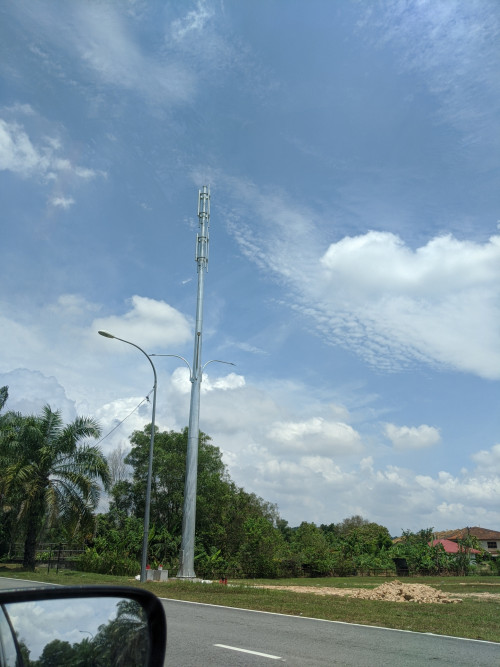 |
|
|
Apr 3 2020, 07:12 PM
Return to original view | Post
#11
|
|
Senior Member
1,725 posts Joined: Jan 2003
|
QUOTE(Alpha_Tay @ Apr 3 2020, 07:12 PM) DIR-842 Firmware Release Notes This post has been edited by Alpha_Tay: Apr 3 2020, 07:43 PMFirmware: 3.13B09 Hotfix Hardware: Cx Date: December 23, 2019 Problems Resolved: - CVE-2019-18852 - Hard-coded telnet credentials 3rd Party Report Information:- https://nvd.nist.gov/vuln/detail/CVE-2019-18852 DISCLAIMER: Please note that this is a device beta software, beta firmware, or hot-fix release which is still undergoing final testing before its official release. The beta software, beta firmware, or hot-fix is provided on an “as is” and “as available” basis and the user assumes all risk and liability for use thereof. D-Link does not provide any warranties, whether express or implied, as to the suitability or usability of the beta firmware. D-Link will not be liable for any loss, whether such loss is direct, indirect, special or consequential, suffered by any party as a result of their use of the beta firmware. ftp://ftp2.dlink.com/SECURITY_ADVISEMENTS...3B09_HOTFIX.pdf ftp://ftp2.dlink.com/SECURITY_ADVISEMENTS...3B09_HOTFIX.zip https://support.dlink.com/ProductInfo.aspx?m=DIR-842 D-Link Corporation confidential DIR-842 Firmware Release Notes Firmware: FW v3.13 Hardware: Rev. C x Data:2019/11/1 Note: • The firmware version is advanced to v3.1 3 • The firmware v3.1 3 must be upgraded from the transitional version of firmware v3.02 b03 _middle Problem Resolved: • Fix ipv6 issue in special environment Enhancements: • Support WPA3/ SAE • Force user to setup admin password during wizard flow. • Support tftpd64. ---------------------- END ---------------------- http://pmdap.dlink.com.tw/PMD/GetAgileFile...0724E7;27239.0; http://pmdap.dlink.com.tw/PMD/GetAgileFile...0724E7;27239.0; D-Link Corporation confidential DIR-842 Firmware Release Notes Firmware: FW v3.02 Hardware: Rev. C x Data:2018/07/20 Note: The firmware v3.02 is the transitiona l version for upgrading to v3.10b005 or later version. ---------------------- END ---------------------- http://pmdap.dlink.com.tw/PMD/GetAgileFile...7575E7;13898.0; http://pmdap.dlink.com.tw/PMD/GetAgileFile...7575E7;13898.0; https://tsd.dlink.com.tw/ should be compatible with unifi D-Link DIR-842, same firmware as from D-Link malaysia website. https://www.dlink.com.my/DIR-842/ https://www.dlink.com.sg/wp-content/uploads...1_FW310b051.zip https://www.dlink.com.my/DIR-842/ Certification ID: WFA70905 Date of Last Certification July 25, 2019 Model Number DIR-842 Product Identifier(s) DIR-843 A1 (SKU) Hardware Version Product: C1, Wi-Fi Component: C1 Firmware Version Product: 3.13, Wi-Fi Component: 3.13 Summary of Certifications PROGRAM Wi-Fi CERTIFIED™ a, b, g, n, ac WPA™ - Personal WPA2™ - Personal WPA3™ - Personal http://certifications.prod.wi-fi.org/pdf/c...ad?cid=WFA70905 |
|
|
Apr 17 2020, 09:29 PM
Return to original view | Post
#12
|
|
Senior Member
1,725 posts Joined: Jan 2003
|
QUOTE(soonwai @ Apr 17 2020, 04:38 PM) Hmmm, friend's house in Damansara Heights, yesterday lightning strike, Huawei BTU rosak. thunder came from tnb power cable?TM came and changed the BTU this afternoon. I thought MCO cannot come? Or rich people exempted? |
|
|
Apr 21 2020, 11:46 AM
Return to original view | IPv6 | Post
#13
|
|
Senior Member
1,725 posts Joined: Jan 2003
|
Author
TM Group 𝗧𝗲𝗿𝗸𝗶𝗻𝗶: Berkenaan kerja-kerja penyelenggaraan berkala pada sistem dasar laut AAG (17 hingga 21 April, 2020). Sukacita dimaklumkan kerja-kerja penyelenggaraan telah selesai sepenuhnya pada jam 4 pagi, 21 April, 2020. ---- 𝗟𝗮𝘁𝗲𝘀𝘁: Status update on the planned maintenance works done on the AAG submarine cable system (17 to 21 April 2020) We are happy to inform that the planned maintenance works have been fully completed at 4am, 21 April 2020. 1 Like · Reply · See Translation · 14m https://www.facebook.com/myTMgroup/posts/517020775654625 |
|
|
|
|
|
Jun 15 2020, 04:56 PM
Return to original view | IPv6 | Post
#14
|
|
Senior Member
1,725 posts Joined: Jan 2003
|
it seem there is some bug at the unifi D-Link DIR-850L router 2.12TM firmware release at 2019, Dahua imou Ip Camera Cloud Live Stream would Disconnect 99% of time, While LAN and Wifi Live Stream still working 100% of time, but 6 Models, 4 Brands of newer and older generation Ip Camera Cloud Live Stream would still working well 100% of time.
tried to reset and reconfig/setting manually without config backup and upload unifi D-Link DIR-850L router, bug issue still happen. tried to Enable UPnP: ; IPv4 Multicast Streams: ; IPv6 Multicast Streams: ; Application Level Gateway (ALG) Configuration ; PPTP: ; IPSec (VPN): ; RTSP: ; SIP: ; and Multiple Port Forwarding, work a while and Cloud Disconnect again. Enable DMZ: work but didn't spend the times to test it for how long, but DMZ work for only single device/IP. Tested Dahua imou Ip Camera Cloud Live Stream with TP-Link Deco M4 v2 Latest Firmware 190917 , working 100% of time. more Detail Report here : https://forum.lowyat.net/index.php?showtopi...&#entry97021190 subscribe and install unifi fibre 30mbps at December 2017, the unifi D-Link DIR-850L router came with newer Default Firmware 2.09TM , the Sticker at the plastic router casing and package box bottom has Firmware 2.09TM written, the big multiple Realtek Chipset security issue was fixed with this Default Firmware. never tried to play with different Region firmware upload & install manually with this router, the only firmware upgrade done was 2.10TM and 2.12TM , at router web interface Check for New Firmware. tried to Flash unifi D-Link DIR-850L with newest international Firmware 2.23 with lastest fixes, 1st Boot to D-Link Router Recovery Mode and flash Middle Firmware DIR850LB1_FW210WWb03.bin , then router web interface Upgrade Manually DIR850LB1_FW220WWb03.bin , then DIR850LB1_FW223WWb01.bin , after that Restore To Factory Default Settings and reconfig/setting manually without config backup and upload. https://forum.lowyat.net/index.php?showtopi...&#entry86448823 http://forums.dlink.com/index.php?topic=44909.0 ftp://ftp2.dlink.com/SECURITY_ADVISEMENTS...CH_v2.20B03.zip http://pmdap.dlink.com.tw/PMD/GetAgileFile...3494E7;19623.0; http://pmdap.dlink.com.tw/PMD/GetAgileFile...0064E7;15877.0; ftp://ftp2.dlink.com/PRODUCTS/DIR-850L/RE...BM8_WW_BETA.zip with Latest international Firmware 2.23 , all [Dahua imou Ip Camera Cloud Live Stream would Disconnect 99% of time] issue was gone, now Dahua imou Ip Camera Cloud Cloud Live Stream was working 100% of time, same as all other [6 Models, 4 Brands of newer and older generation Ip Camera Cloud Live Stream would still working well 100% of time.] with all setting turned off [UPnP: ; IPv4 Multicast Streams: ; IPv6 Multicast Streams: ; Application Level Gateway (ALG) Configuration ; PPTP: ; IPSec (VPN): ; RTSP: ; SIP: ; Multiple Port Forwarding ; DMZ] another issue happen since 2.12TM firmware also gone, System Log E-Mail, now it's also working 100% of time. this issue doesn't happen at 2.10TM firmware. https://forum.lowyat.net/index.php?showtopi...&#entry92708171 https://forum.lowyat.net/index.php?showtopi...&#entry92708161 https://forum.lowyat.net/index.php?showtopi...&#entry92708142 the D-Link DIR-850L international firmware doesn't have TM TR-069 and other customization, router web interface is much smoother. |
|
|
Jun 16 2020, 03:28 AM
Return to original view | IPv6 | Post
#15
|
|
Senior Member
1,725 posts Joined: Jan 2003
|
QUOTE(SilentVampire @ Jun 15 2020, 08:09 PM) Honestly, just get your own router. With all the time you waste on the rubbish bin router, you could have got a decent router. it's once one of the unifi supplied router, it's worth the research. |
|
|
Jun 29 2020, 10:00 PM
Return to original view | IPv6 | Post
#16
|
|
Senior Member
1,725 posts Joined: Jan 2003
|
anybody register unifi Bonanza 30Mbps RM139 after 2 years contract RM199 during 2017 year end, then turbo upgraded 300Mbps, and didn't subscribe to Year End Promo 2019 PAY NOTHING free 3 months 2 years contract, that would change the RM139 to Perpetual, did their package price RM139 become RM199 after 2 years contract expired around 2019/2020?
|
|
|
Jun 30 2020, 01:05 AM
Return to original view | IPv6 | Post
#17
|
|
Senior Member
1,725 posts Joined: Jan 2003
|
QUOTE(tungfunglaw @ Jun 29 2020, 10:08 PM) Me. Contracted ended on Jan this year. Still paying rm140+. TM probably cannot rise price without risk getting another around of angry reponse from customer. No Perpetual discount but got the followings: Promo Discount 24 Months Promo Discount RM70 |
|
|
Jul 18 2020, 03:11 PM
Return to original view | IPv6 | Post
#18
|
|
Senior Member
1,725 posts Joined: Jan 2003
|
if down around midnight and backup few long or short hours later, that's maintenance/upgrade.
QUOTE(y500 @ Jul 18 2020, 01:11 AM) Unifi jb down? QUOTE(SammoG @ Jul 18 2020, 01:24 AM) Unifi gombak down? Land line also dead. QUOTE(wanttobuylaptop @ Jul 18 2020, 01:50 AM) alright, there are massive report now in various areas of johor bahru having connection issues QUOTE(y500 @ Jul 18 2020, 08:37 AM) back to normal around 2:30 am. |
|
|
Jul 20 2020, 01:25 AM
Return to original view | IPv6 | Post
#19
|
|
Senior Member
1,725 posts Joined: Jan 2003
|
AX20 can get 800mbps download 200mbps upload over LAN with only 10%-20% CPU Usage.
even Deco M4 can get 800mbps download 200mbps upload over LAN, but not that stable and smooth. |
|
|
Jul 20 2020, 10:00 PM
Return to original view | IPv6 | Post
#20
|
|
Senior Member
1,725 posts Joined: Jan 2003
|
just realise that unifi given C1200 have this firmware version, never update it manually, but not sure and forgot is it came with this firmware or the firmware was update by TM TR-069 , however this firmware version was not available at internet. unifi biz fibre RM139 100mbps install at 2019 September.
1.0.0 Build 20190805 rel.22215 (EU) Archer C1200 v1.0 also, even after router restart automatically or manually, the ipv4 would still stay the same, for multiple months, but ipv6 would change every restart. fibre modem is Huawei HG8240H5 ONT if want to change ipv4, have to restart router "many" multiple times during period of few hours. but the next ipv4 would still stay the same even after router restart. |
|
Topic ClosedOptions
|
| Change to: |  0.0283sec 0.0283sec
 0.95 0.95
 7 queries 7 queries
 GZIP Disabled GZIP Disabled
Time is now: 1st December 2025 - 03:17 PM |
 Quote
Quote