

QUOTE(kaizer_x @ Apr 22 2020, 10:06 PM)
Anyone experiencing slow apps update on iphone? Mine was too slow. Changw US vpn speed got better

Everything is slow 😢Unifi Official TM UniFi High Speed Broadband Thread V38, READ 1ST PAGE FOR TURBO SPEED INFO!
|
|
 Apr 22 2020, 10:15 PM Apr 22 2020, 10:15 PM
Return to original view | IPv6 | Post
#41
|
 
Junior Member
363 posts Joined: Sep 2014  
|
QUOTE(kaizer_x @ Apr 22 2020, 10:06 PM) Anyone experiencing slow apps update on iphone? Mine was too slow. Changw US vpn speed got better Everything is slow 😢 |
|
|
|
|
|
Apr 22 2020, 11:06 PM
Return to original view | IPv6 | Post
#42
|
|
Junior Member
363 posts Joined: Sep 2014
|
My internet went off again, seems to be an IPV6 failure? I'm not sure, but my internet has never disconnected before, especially not twice a day.
Any help would be great 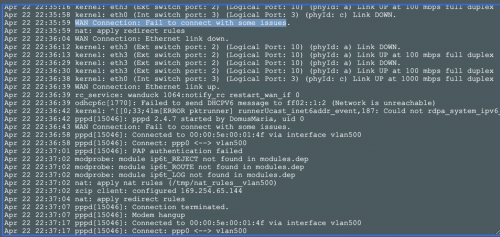 |
|
|
May 1 2020, 12:53 PM
Return to original view | IPv6 | Post
#43
|
|
Junior Member
363 posts Joined: Sep 2014
|
Hey gus
Anyone having sporadic issues with instagram ? For me when I am watching people’s stories, every few minutes I reach a story that just refuses to load until I click the account name or skip the story Using ipv6 with both cloudflare dns. And on the 218 ip range now |
|
|
May 4 2020, 03:58 PM
Return to original view | IPv6 | Post
#44
|
|
Junior Member
363 posts Joined: Sep 2014
|
QUOTE(saltykopi @ May 4 2020, 02:50 PM) Anyone using unifi currently having issues connecting to websites like netflix.com or reddit.com, other websites are fine but some give a refused connection I am having issues with Netflix too, suddenly and randomly refusing to load. On google dns for ipv6 and ipv4. Fast.com shows 600mbps but Netflix network test on an Ethernet connected tv fails 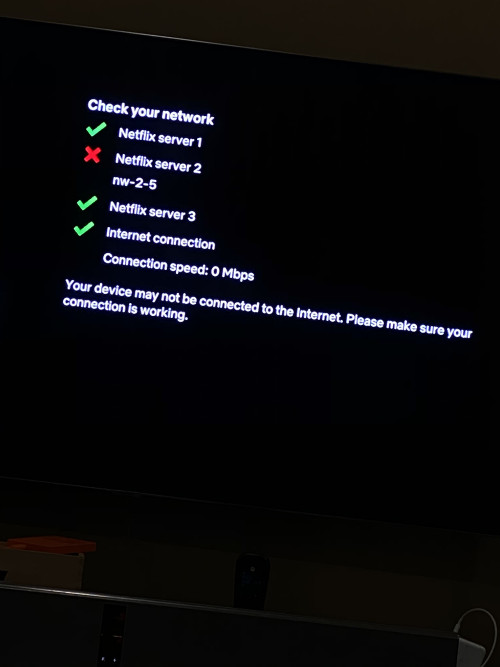 |
|
|
May 5 2020, 12:35 AM
Return to original view | Post
#45
|
|
Junior Member
363 posts Joined: Sep 2014
|
Anybody else facing additional hops when trying to access google ? It’s happening on both ivp6 and 4.
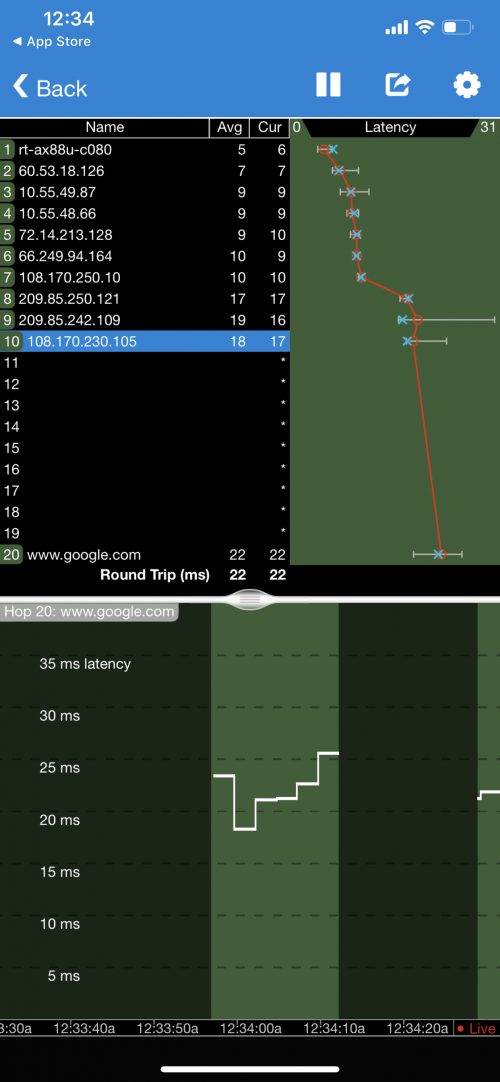 |
|
|
May 5 2020, 02:42 PM
Return to original view | Post
#46
|
|
Junior Member
363 posts Joined: Sep 2014
|
QUOTE(mamakap @ May 5 2020, 01:00 PM) I too facing similar issue, I can't access some site as well. What did TM did on there network??? Yapp Speedtest also keeps failing to certain servers like shinjiru. Works the second time though. Ping to webe server is also 200+. Rest also higher ping than normal |
|
|
|
|
|
May 7 2020, 12:50 PM
Return to original view | IPv6 | Post
#47
|
|
Junior Member
363 posts Joined: Sep 2014
|
QUOTE(eternity4av @ May 7 2020, 08:10 AM) anyone can share their WiFi/Router for Unifi 800Mbps, that has approx 1800 sq ft space? As there were so many new routers out there, such as WiFi 6 and Mesh types, I'm not sure which will be the best options. My house is 6500 sqft with 3000sft built up. One end I use an AX88U as it is nearer to most of my data intensive gadgets. It is connected through Ethernet backhaul to an AC86U. Both of them are capable of reaching 800mbps on my 11 Pro. Still have not noticed any benefit to WiFi 6, it’s sometimes even less stable for me 😂 |
|
|
May 7 2020, 08:58 PM
Return to original view | IPv6 | Post
#48
|
|
Junior Member
363 posts Joined: Sep 2014
|
QUOTE(viruz @ May 7 2020, 06:32 PM) Is unifi capping torrent speed? I download from private torrents with very healthy seeds but my speed seems to max at around 6-8MB/s, or maybe I mess up with the setting of utorrent? Nope, mine managed to get 60mb/s today. |
|
|
May 7 2020, 11:36 PM
Return to original view | IPv6 | Post
#49
|
|
Junior Member
363 posts Joined: Sep 2014
|
QUOTE(viruz @ May 7 2020, 09:27 PM) That is great, I only manage to get 8-10mb/s. i'm on mac so i use transmissionAny setting on utorrent? the only settings i changed was to prefer encrypted peers, global maximum connections to 2000 and 600 for new transfers. this is on wifi though, not sure the speed if wired |
|
|
May 9 2020, 01:46 AM
Return to original view | IPv6 | Post
#50
|
|
Junior Member
363 posts Joined: Sep 2014
|
QUOTE(sleed @ May 8 2020, 10:50 PM) Is the range for the AX good? I was planing to get one for my house to add on to boost the speed. Currently I am using 2 units of AC88U for my house 8600sqft build up. It’s very good in terms of speed on the 5ghz band, have noticed random disconnections before but seems to be resolved with a WAN Mac clone 2.4ghz on WiFi 6 is really bad most of the time. Before router firmware update could never get above 1mbps on my iPhone 11 even when next to it. Now can get about 100 but I can feel the lag and processing when using 2.4ghz on the WiFi 6. Was using tplink E4 before and 2.4ghz and 5ghz felt similar in their zippyness. |
|
|
May 14 2020, 01:21 PM
Return to original view | IPv6 | Post
#51
|
|
Junior Member
363 posts Joined: Sep 2014
|
Anyone having issues accessing epic games store? I can access the website after multiple tries but cant sign in on the app.
No issues with Maxis mobile data |
|
|
May 16 2020, 01:11 PM
Return to original view | IPv6 | Post
#52
|
|
Junior Member
363 posts Joined: Sep 2014
|
Helloo, does anyone know how to overcome the slowness to Apple servers without using a VPN? I noticed my App Store being very slow to load and download but didn’t think much of it.
But today I’m trying to reinstall macOS but it’s taking more than 6 hours to download but fails in between too. Tried resetting but AppStore and it is still the same |
|
|
May 29 2020, 07:15 PM
Return to original view | IPv6 | Post
#53
|
|
Junior Member
363 posts Joined: Sep 2014
|
Hi guys, I’m in the PJ area today and I noticed that my white huawei modem suddenly reseted by itself
I first noticed my internet not working, and my router said that the network cable was unplugged whereas the telephone light on the modem was blinking and the house phone wasn’t working Why would this happen ya ? Is it a modem or Unifi issue ? |
|
|
|
|
|
Jun 2 2020, 07:48 PM
Return to original view | IPv6 | Post
#54
|
|
Junior Member
363 posts Joined: Sep 2014
|
QUOTE(jonibooi @ Jun 2 2020, 06:34 PM) Anyone having issues accessing netflix today? videos load fine but the website itself doesn't load properly. No problem with Netflix but internet feels so slow and laggy to all websites. Same thing on tv also, full on lag until reach a video. Network test shows unable to reach netflix server 1 I have IPV6 enabled and have reset modem and router but still same issue persists Controlling my tv from my phone also takes so long for the input to register But Speedtest still 700+ |
|
|
Jun 3 2020, 11:33 AM
Return to original view | Post
#55
|
|
Junior Member
363 posts Joined: Sep 2014
|
Hi guys, I keep losing my connecting once a day, and I’m not sure why.
I use an AX88U, and when the internet drops the lights on the modem looks normal. The wan port on the router is red and the webgui can’t be accessed for a while Does this look like a router or modem or isp issue ? 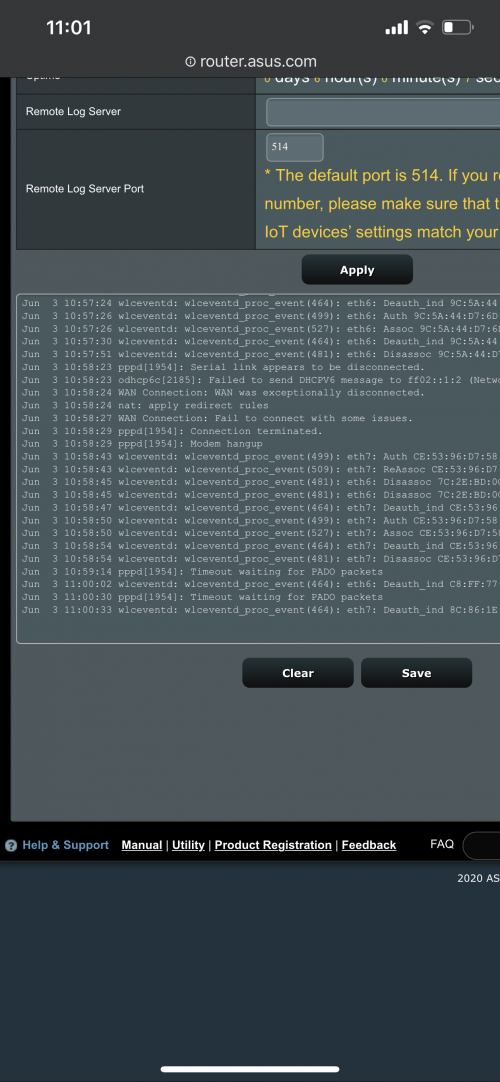 |
|
|
Jun 3 2020, 11:34 AM
Return to original view | Post
#56
|
|
Junior Member
363 posts Joined: Sep 2014
|
QUOTE(shaktiv8 @ Jun 3 2020, 11:33 AM) Hi guys, I keep losing my connecting once a day, and I’m not sure why. It’s also set to reset everyday at 5AM, so I don’t think it is only designed for about 8 hours of usage right ? I use an AX88U, and when the internet drops the lights on the modem looks normal. The wan port on the router is red and the webgui can’t be accessed for a while Does this look like a router or modem or isp issue ? |
|
|
Jun 8 2020, 10:22 PM
Return to original view | Post
#57
|
|
Junior Member
363 posts Joined: Sep 2014
|
Is anyone having trouble accessing Lazada on PC these last few days?
I keep getting this error even after changing the public ip address, no issues on phone on same wifi though  |
|
|
Jun 8 2020, 10:52 PM
Return to original view | Post
#58
|
|
Junior Member
363 posts Joined: Sep 2014
|
QUOTE(JohnLai @ Jun 8 2020, 10:33 PM) ......Well.....maybe you have some adblocker/firewall blocking port scan traffic from Lazada? No adblocker or noscript running, but I do have Bitdefender runningOr you have some "noscript" running? Thanks for the info, wonder why it was never a problem before |
|
|
Jun 9 2020, 07:22 PM
Return to original view | Post
#59
|
|
Junior Member
363 posts Joined: Sep 2014
|
QUOTE(Icehart @ Jun 9 2020, 10:16 AM) I have this issue when running on VPN. Nope not running a vpn, no adblocker or anything. Are you on a VPN? I’ve just set up my firewall since day one to block all incoming connections, could this be the sudden cause ? |
|
|
Jun 9 2020, 07:31 PM
Return to original view | Post
#60
|
|
Junior Member
363 posts Joined: Sep 2014
|
QUOTE(JohnLai @ Jun 8 2020, 10:55 PM) Hmmm......maybe you are running incognito mode or have some sort of tracking protection active? When the issue happens on chrome, I can't access lazada on Safari tooAnyway, for the port scan just now...in chronological order : https://www.bleepingcomputer.com/news/secur...ccess-programs/ https://www.bleepingcomputer.com/news/secur...their-visitors/ https://www.bleepingcomputer.com/news/secur...-on-most-sites/ I have always set up the firewall to block all incoming connections besides those needed for basic internet services, could this be the reason? I am also on cludflare's family malware and adult website protection dns |
|
Topic ClosedOptions
|
| Change to: |  0.0301sec 0.0301sec
 0.60 0.60
 7 queries 7 queries
 GZIP Disabled GZIP Disabled
Time is now: 9th December 2025 - 11:51 AM |
 Quote
Quote