Outline ·
[ Standard ] ·
Linear+
Unifi Official TM UniFi High Speed Broadband Thread V38, READ 1ST PAGE FOR TURBO SPEED INFO!
|
Fantasia
|
 Jun 4 2020, 10:46 PM Jun 4 2020, 10:46 PM
|

|
QUOTE(dadah @ Jun 4 2020, 09:33 PM) 5e should be no issue. I am also using 5e to tarik cable from game room to my bed room. Unfortunately it is not the case for my cable. I think the cable quality not good enough. You have anybody you know of can help me to tarik cable from 1st floor to ground floor? |
|
|
|
|
|
Fantasia
|
Jun 5 2020, 12:24 PM
|
|
|
QUOTE(Morning_Star @ Jun 5 2020, 12:50 AM) What was the old model # ? What is the new BTU model # ? My old BTU was Fibrehome AN5506 04B. Then they change to this yesterday. not sure what model. QUOTE(soonwai @ Jun 5 2020, 01:15 AM) Check the termination. How is your cable terminated? Keystones or plugs? The easiest way to go from 1000 to 100 is to terminate improperly. QUOTE(Max @ Jun 5 2020, 07:56 AM) 5e should be no problem. check the termination.. most probably thats the culprit.. as suggested.. even cat 6 also will down to 100mbps if termination not good.. Can check from these pictures?  |
|
|
|
|
|
Fantasia
|
Jun 5 2020, 01:27 PM
|
|
|
QUOTE(soonwai @ Jun 5 2020, 12:58 PM) Colour pairs (T-568B) looks OK. Are the photos of both ends of the cable? If not, check the other end too, they should be the same. The plug is not clamped down on the cable sleeve so it's possible that some of the individual wires are loose and not contacting well or shorting its neighbour. I don't suppose you have a cable tester. Yup, they are both ends of the cable. the first 2 pictures are the end in my room while the last 2 are the end in my living room. Yesterday the technicians came to check and he suggested me to change the cable altogether. I unfortunately have no contact for any contractor that can help me on this matter |
|
|
|
|
|
Fantasia
|
Jun 5 2020, 02:34 PM
|
|
|
QUOTE(Max @ Jun 5 2020, 02:24 PM) whoever done the crimping not pro ler.. crimp also not properly done..  Really?! It was done a few years ago by a TM technician. Can we fix this ourselves or have to call someone to do it for us? |
|
|
|
|
|
Fantasia
|
Jun 8 2020, 12:19 PM
|
|
|
QUOTE(leroy627 @ Jun 6 2020, 10:31 AM) That BTU looks like a different model than the HG8240H, could you take a picture of the underside? Should have sticker with model # there. EG8240H5 maybe? QUOTE(paulwong1983 @ Jun 6 2020, 10:15 PM) latest modem will be this device for both unifi & maxis fibre https://www.youtube.com/watch?v=QbaRDhpV3xIThis is the replacement unit model 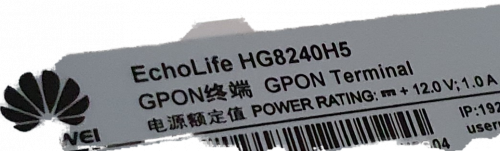 QUOTE(Max @ Jun 7 2020, 12:20 PM) ya lor.. looking at the crimped head.. if tugged hard the cable sure cabut at the connector there. the outer jacket should be crimped too inside the jack head. that cable can be re-jack. just cut the current head off and crimped properly new jack. if got IT friends can ask for help if he got crimper and head jack. Alright, I will go to some computer shop to see if they offer these kind of services. Thank you for your help =) |
|
|
|
|



 Quote
Quote
 0.2143sec
 0.50
0.50
 7 queries
 GZIP Disabled