

For 100mbps home package, unifi or maxis better at ampang, landed property?
Last time I use unifi, quite okay. Now not sure about maxis
Unifi Official TM UniFi High Speed Broadband Thread V38, READ 1ST PAGE FOR TURBO SPEED INFO!
Unifi Official TM UniFi High Speed Broadband Thread V38, READ 1ST PAGE FOR TURBO SPEED INFO!
|
|
 Jan 10 2020, 09:03 PM Jan 10 2020, 09:03 PM
Show posts by this member only | IPv6 | Post
#1081
|
 
Junior Member
503 posts Joined: Dec 2011 
|
For 100mbps home package, unifi or maxis better at ampang, landed property?
Last time I use unifi, quite okay. Now not sure about maxis |
|
|
|
|
|
Jan 10 2020, 09:54 PM
Show posts by this member only | IPv6 | Post
#1082
|

Junior Member
92 posts Joined: Feb 2017
|
Any reason why webpage load so slow when my ping is 4 ms, dl speed 300Mbps and upload speed 50Mbps?
|
|
|
Jan 10 2020, 10:00 PM
|
|
Senior Member
1,882 posts Joined: Sep 2017
|
QUOTE(culvers @ Jan 10 2020, 09:54 PM) Any reason why webpage load so slow when my ping is 4 ms, dl speed 300Mbps and upload speed 50Mbps? Try without ipv6, Most IPv6 connectivity with Unifi not good,only major sites can get optimized routing. |
|
|
Jan 10 2020, 10:10 PM
|
|
Junior Member
92 posts Joined: Feb 2017
|
QUOTE(go626201 @ Jan 10 2020, 10:00 PM) Try without ipv6, Most IPv6 connectivity with Unifi not good,only major sites can get optimized routing. Issue fixed. Thanks. |
|
|
Jan 10 2020, 10:26 PM
|

Junior Member
500 posts Joined: May 2008 
|
QUOTE(culvers @ Jan 10 2020, 09:54 PM) Any reason why webpage load so slow when my ping is 4 ms, dl speed 300Mbps and upload speed 50Mbps? Also problems with undersea cable so our internet routing will be bad |
|
|
Jan 11 2020, 12:25 AM
|

Senior Member
966 posts Joined: Apr 2016
|
Something happened to tm unifi sea cables again? China related stuffs like wangzhe, WeChat all slow like snails.
|
|
|
|
|
|
Jan 11 2020, 01:44 AM
|
 
Staff
72,797 posts Joined: Sep 2005 From: KUL 
|
QUOTE(prokiller1199 @ Jan 11 2020, 12:25 AM) Something happened to tm unifi sea cables again? China related stuffs like wangzhe, WeChat all slow like snails. So far OK, I was chatting on WeChat. Just tried Baidu and Taobao and pages load like normal. I'm using without IPv6. |
|
|
Jan 11 2020, 09:31 AM
|

Junior Member
46 posts Joined: Jan 2003
|
Anyone elses torrents bite the dust? Mine doesn't go beyond 5kiB/s in the last 3 days. Is this from the undersiput cable problem?
|
|
|
Jan 11 2020, 11:24 AM
Show posts by this member only | IPv6 | Post
#1089
|

Junior Member
216 posts Joined: Dec 2019
|
QUOTE(soonwai @ Jan 10 2020, 02:05 PM) Nice, welcome to the family. Hope the installation goes smoothly. Thankss bro...If got extra charge or special requirements, remember to nego to masuk his pocket, sure will be cheaper. Also get the installer’s number in case shit happens after he leaves. UI already called me, he will come later@noon. Hopefully installation will goes smoothly. I will. Haha |
|
|
Jan 11 2020, 11:25 AM
Show posts by this member only | IPv6 | Post
#1090
|
|
Junior Member
216 posts Joined: Dec 2019
|
QUOTE(CrimsonKing @ Jan 10 2020, 06:32 PM) Ayam new here too. Yoooooo. 🤣 |
|
|
Jan 11 2020, 01:42 PM
|

All Stars
11,456 posts Joined: Oct 2007 From: KL
|
QUOTE(Salamander @ Jan 11 2020, 09:31 AM) Anyone elses torrents bite the dust? Mine doesn't go beyond 5kiB/s in the last 3 days. Is this from the undersiput cable problem? Seems OK here. Just tried a min ago. 2.8GB public torrent. I'm sure it's a Linux distro of some sort. Max: 600Mbps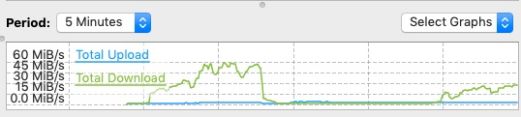 This post has been edited by soonwai: Jan 11 2020, 02:07 PM |
|
|
Jan 11 2020, 01:44 PM
|
|
Senior Member
1,386 posts Joined: Nov 2012
|
QUOTE(sonicbull @ Jan 10 2020, 09:03 PM) For 100mbps home package, unifi or maxis better at ampang, landed property? please don't not take maxis because a lot complaint you may check facebookLast time I use unifi, quite okay. Now not sure about maxis best use unifi if maxis problem like not working and line down you call maxis he will say will send technician 24hours after 24hours no call no come technician you call again maxis will say 48hours then after 48hours no call no come technician you call again keep same story keep waiting waiting waiting more delay delay delay like 1weeks or 2 weeks no internet you will get disappointed and very slow then technician come then fixed then they left then next time will get problem again and call complaint then slow slow keep wait wait wait noting internet see trouble don't not take maxis if you want take maxis you own risk tm unifi is good never hard problem if problem you call tm they will say will send technician 24hours then next day technician call want come home then 15-30min technician already come and fixed then no problem look like just less then 24hours very fast tm services |
|
|
Jan 11 2020, 01:45 PM
|
|
Senior Member
1,386 posts Joined: Nov 2012
|
QUOTE(Salamander @ Jan 11 2020, 09:31 AM) Anyone elses torrents bite the dust? Mine doesn't go beyond 5kiB/s in the last 3 days. Is this from the undersiput cable problem? no problem download torrent just 1.10pm almost complete and full speed take 5min-10min only |
|
|
|
|
|
Jan 11 2020, 02:06 PM
|
|
Junior Member
46 posts Joined: Jan 2003
|
QUOTE(soonwai @ Jan 11 2020, 01:42 PM) Seems OK here. Just tried a min ago. 2.8GB public torrent. I'm sure it's a Linux distro of some sort. Max: 600Mbps QUOTE(pakji @ Jan 11 2020, 01:45 PM) no problem download torrent just 1.10pm almost complete and full speed take 5min-10min only Strange, this only happened 3 days ago with no changes on my end (I did enable ipv6 like a day ago or so but no difference). I'll try changing ip's or something, this has never happened to me before where I get hard throttled like this. I'll test a pub distro.ROFLMAAOOOOOO!!!!! You guys are going to laugh about this.... I figured it out now.. A few days ago, I was getting frustrated with what I was using as a mouse pad surface because I like really slippery gliding surfaces. Anyways, I had got sick of using the current pad, and decided to use furniture polish on my table top just to make it glide smooth. I was also just cleaning the bottom of my mouse while it was still connected (it's a logitech g600) so when I was holding it while wiping the underside, I inadvertantly also click the left mouse click and dragged it over the screen while wiping. I saw that it had highlighted a bunch of icons and I just ignored it. I do have my torrent window up in the back, so it must have clipped it while I was cleaning because LO & BEHOLD, my download speed was set to 10 KiB/s lol. Lessons have been learned ladies & gentlemen   mystery solved! mystery solved!This post has been edited by Salamander: Jan 11 2020, 02:23 PM |
|
|
Jan 11 2020, 02:16 PM
|

Senior Member
2,546 posts Joined: Jan 2009 From: Cyberjaya
|
QUOTE(pakji @ Jan 11 2020, 01:44 PM) tm unifi is good never hard problem if problem you call tm they will say will send technician 24hours then next day technician call want come home then 15-30min technician already come and fixed then no problem look like just less then 24hours very fast tm services true datreported issue on Hypptv yesterday, got sms said tech will come next working day. today got call by tech ask if can come in next 15min. respek them doing good job  anyways, bought TP-Link Deco Mesh wifi model E4R. said to support hypptv , but does not. googled and found only higher end Deco model confirmed working by other users. tm tech came and tested with different router , is working. but not this model even setting up the vlan 600 / use the iptv malaysia-unifi profile , both cant. they bypass router, and plug directly to model (they call up to get the modem port to be usable for hypptv). overall good service  edit : * found review mentioned TP link deco E4 does not support hypptv as of may19 at that time * other deco model already got the update * still no firmware to fix that i suppose for E4 https://www.blacktubi.com/review/tp-link-deco-e4/ This post has been edited by mastering89: Jan 11 2020, 05:53 PM |
|
|
Jan 11 2020, 03:09 PM
|
|
Senior Member
1,386 posts Joined: Nov 2012
|
QUOTE(mastering89 @ Jan 11 2020, 02:16 PM) true dat yes same like me 15min hehereported issue on Hypptv yesterday, got sms said tech will come next working day. today got call by tech ask if can come in next 15min. respek them doing good job anyways, bought TP-Link Deco Mesh wifi model E4R. said to support hypptv , but does not. googled and found only higher end Deco model confirmed working by other users. tm tech came and tested with different router , is working. but not this model even setting up the vlan 600 / use the iptv malaysia-unifi profile , both cant. they bypass router, and plug directly to model (they call up to get the modem port to be usable for hypptv). overall good service first installed 30 may 2019 then 31 may 2019 i got MY BTU LOS i call tech installer he also told me 15min come then he come he told me fibre cable loss so he make fibre splicing then back PON then now no more LOS seen faster tm tech i like very good service prefect and speed always full 100mbps LAN Cable pc desktop |
|
|
Jan 11 2020, 04:13 PM
|

Senior Member
1,705 posts Joined: Jan 2003 From: Sepang - Putrajaya - Cyberjaya
|
QUOTE(mastering89 @ Jan 11 2020, 02:16 PM) true dat U r on vdsl or fiber? reported issue on Hypptv yesterday, got sms said tech will come next working day. today got call by tech ask if can come in next 15min. respek them doing good job :thumbsup: anyways, bought TP-Link Deco Mesh wifi model E4R. said to support hypptv , but does not. googled and found only higher end Deco model confirmed working by other users. tm tech came and tested with different router , is working. but not this model even setting up the vlan 600 / use the iptv malaysia-unifi profile , both cant. they bypass router, and plug directly to model (they call up to get the modem port to be usable for hypptv). overall good service I know vdsl can vlan direct in modem.. But in fiber modem seems impossible..? |
|
|
Jan 11 2020, 04:14 PM
|
|
All Stars
11,456 posts Joined: Oct 2007 From: KL
|
QUOTE(Salamander @ Jan 11 2020, 02:06 PM) Strange, this only happened 3 days ago with no changes on my end (I did enable ipv6 like a day ago or so but no difference). I'll try changing ip's or something, this has never happened to me before where I get hard throttled like this. I'll test a pub distro. LOL. It happens. I remember going to Motorola Senawang decades ago to help an engineer who could not get his Macintosh IIfx to turn on. Turns out the power cable was unplugged from the wall socket. I charge an hourly rate including travel time. ROFLMAAOOOOOO!!!!! You guys are going to laugh about this.... I figured it out now.. A few days ago, I was getting frustrated with what I was using as a mouse pad surface because I like really slippery gliding surfaces. Anyways, I had got sick of using the current pad, and decided to use furniture polish on my table top just to make it glide smooth. I was also just cleaning the bottom of my mouse while it was still connected (it's a logitech g600) so when I was holding it while wiping the underside, I inadvertantly also click the left mouse click and dragged it over the screen while wiping. I saw that it had highlighted a bunch of icons and I just ignored it. I do have my torrent window up in the back, so it must have clipped it while I was cleaning because LO & BEHOLD, my download speed was set to 10 KiB/s lol. Lessons have been learned ladies & gentlemen mystery solved! |
|
|
Jan 11 2020, 05:46 PM
|
|
Senior Member
2,546 posts Joined: Jan 2009 From: Cyberjaya
|
QUOTE(Max @ Jan 11 2020, 04:13 PM) U r on vdsl or fiber? im not sureI know vdsl can vlan direct in modem.. But in fiber modem seems impossible..? but mine is fiber and tech said modem port change need to be enabled by TM side (remotely) during that time he called their support to get permission & to get the port setting change remotely. another option he gave is use old tm router for internet & iptv and use my mesh router as AP. i said dowan. |
|
|
Jan 11 2020, 05:52 PM
|

Junior Member
351 posts Joined: Feb 2014 From: Miri
|
Just took unifi RM89 30MBPS package. When playing rocket league online wired / wireless, ping is consistently 300. I was the only guy connected to the internet. Anyone facing the same issue?
Other games like overcooked 2 and stardew valley also experienced lag. This post has been edited by Songchien: Jan 11 2020, 05:52 PM |
|
Topic ClosedOptions
|
| Change to: |  0.0246sec 0.0246sec
 0.25 0.25
 6 queries 6 queries
 GZIP Disabled GZIP Disabled
Time is now: 3rd December 2025 - 06:20 AM |
 Quote
Quote