

Lenovo laptops is it worth for money* (Ver 2), Please check out recent offers
|
|
 Dec 14 2019, 11:16 PM Dec 14 2019, 11:16 PM
Return to original view | Post
#41
|
 
Junior Member
113 posts Joined: Apr 2019  
|
my Ideapad came last week,.. thinking of upgrade ram and SSD,..but after watch below youtube,.. need to open up and kopek kopek,.. i scared liao,.. if some of the plastic clip koyak, will it void the warranty ??...
|
 Quote
Quote|
|
|
|
|
Dec 16 2019, 11:50 PM
Return to original view | Post
#42
|
|
Junior Member
113 posts Joined: Apr 2019
|
anyone know Ideapad L340 AMD 15 can put which type of internal SSD ??.. M.2 or NVMe ??
this youtube explain the different,.. but u can skip intro to 4:45 to save time on history explaining.. i found this M.2 very cheap wor,... 450 GB only rm245 ,...dunno can use on my L340 or not ??... https://shopee.com.my/M.2-SATA-256GB-128GB-...3911.2278172699 This post has been edited by Cincai lar: Dec 17 2019, 12:05 AM |
|
|
Dec 16 2019, 11:54 PM
Return to original view | Post
#43
|
|
Junior Member
113 posts Joined: Apr 2019
|
QUOTE(kuci_mayong @ Dec 16 2019, 11:51 PM) Ideapad L340 got two versions, the normal ideapad and the L340 Gaming. Which is yours? i think is normal Ideapad L340-15API, .. model: 81LW.. it's Ryzen 5,.. This post has been edited by Cincai lar: Dec 16 2019, 11:56 PM |
|
|
Dec 17 2019, 12:09 AM
Return to original view | Post
#44
|
|
Junior Member
113 posts Joined: Apr 2019
|
QUOTE(msacras @ Dec 16 2019, 11:55 PM) I thought they’re suppose to be the same? i want to buy this..M2 is previously known as NGFF, it’s the form factor of the small card sized stick NVME is the standard, as compared to the legacy SATA or mSATA. Specs wise the laptop should be running NVME card. But I not quite sure if the pins key will affect it or not here, didn’t take note on that when I open up mine. P/S: I’m correct in that sense, m2 is the form factor. The SATA one is the one having extra key hole on the pins, according to the video you posted. https://shopee.com.my/M.2-SATA-256GB-128GB-...3911.2278172699 but scared cannot work after read below.. https://forums.lenovo.com/t5/Lenovo-IdeaPad...SD/td-p/4527095 |
|
|
Dec 17 2019, 12:14 AM
Return to original view | Post
#45
|
|
Junior Member
113 posts Joined: Apr 2019
|
QUOTE(msacras @ Dec 16 2019, 11:55 PM) I thought they’re suppose to be the same? according to the video NVMe is faster read/write speed than M.2,.. 2100+MB/s for NVMe,.. 550MB/s for M.2,... i suppose NVMe would be more pricey,..M2 is previously known as NGFF, it’s the form factor of the small card sized stick NVME is the standard, as compared to the legacy SATA or mSATA. Specs wise the laptop should be running NVME card. But I not quite sure if the pins key will affect it or not here, didn’t take note on that when I open up mine. P/S: I’m correct in that sense, m2 is the form factor. The SATA one is the one having extra key hole on the pins, according to the video you posted. |
|
|
Dec 17 2019, 12:28 AM
Return to original view | Post
#46
|
|
Junior Member
113 posts Joined: Apr 2019
|
QUOTE(kuci_mayong @ Dec 17 2019, 12:15 AM) This is from the PSREF for ideapad L340-15API (but better you double check yourself). my Ideapad L340 already came with the 2.5 inch SATA SSD,... does this mean i can't put another SSD as a second drive ???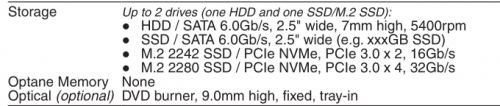 Means the M.2 slot in your laptop doesn't support SATA type M.2 SSD's which is your Goldenfir SSD. For example, if your M.2 supports SATA, it will be like the PSREF of the T495 below:  |
|
|
|
|
|
Dec 17 2019, 01:13 AM
Return to original view | Post
#47
|
|
Junior Member
113 posts Joined: Apr 2019
|
QUOTE(msacras @ Dec 17 2019, 12:33 AM) The wonders of L340 is that it can be a storage giant. By default there’s a 2.5” bay for HDD/SSD. Then there’s a M2 NVME SSD slot (can be occupied or not depend on your stock configurations). Lastly, you can swap out the DVD ROM bay for a 2.5” bay which again can mount a HDD/SSD there. This is the clone brother of L340, all be it lose out on USB-C port unlike L340. https://www.notebookcheck.net/Lenovo-V155-R...t.435036.0.html QUOTE(kuci_mayong @ Dec 17 2019, 12:49 AM) You can probably put a second 2.5 inch SSD where the DVD-ROM like what msacras said, but if you want to make you life easy, just get a M.2 nvme ssd like this one: i already got a DVD rom and 2.5" SATA SSD 128GB occupied on the slot,.. so it shouldn't be a problem for me to add a SSD card type of either M.2 or NVME ??https://www.lazada.com.my/products/adata-xp...s694868599.html |
|
|
Dec 17 2019, 01:16 AM
Return to original view | Post
#48
|
|
Junior Member
113 posts Joined: Apr 2019
|
QUOTE(kuci_mayong @ Dec 17 2019, 12:49 AM) You can probably put a second 2.5 inch SSD where the DVD-ROM like what msacras said, but if you want to make you life easy, just get a M.2 nvme ssd like this one: thanks for the recommendation,.. at least this one give 3 years warranty,... the one above from shopee only give 3 months,..https://www.lazada.com.my/products/adata-xp...s694868599.html any recommendation for 16GB ram sodimm ?? |
|
|
Dec 17 2019, 01:19 AM
Return to original view | Post
#49
|
|
Junior Member
113 posts Joined: Apr 2019
|
QUOTE(msacras @ Dec 17 2019, 01:15 AM) Yes, go ahead. okay,.. thanks a lot,..now shopping for ram,..Just like mentioned above, do get NVME SSD just to be sure that it will work (some port don’t have support for the legacy SATA), you also get to enjoy a far higher speed with that. |
|
|
Jan 1 2020, 05:20 PM
Return to original view | Post
#50
|
|
Junior Member
113 posts Joined: Apr 2019
|
QUOTE(Theoutspokenguy @ Dec 17 2019, 02:51 PM) I using 16gb ram Samsung 2666mhz seems okay. Very smooth for the price of rm189 worth every cent wah very cheap leh,.. i search mostly over rm230 and above,.. where u buy ??.. got link ?? |
|
|
Jan 1 2020, 05:27 PM
Return to original view | Post
#51
|
|
Junior Member
113 posts Joined: Apr 2019
|
QUOTE(msacras @ Dec 17 2019, 02:57 PM) L340 itself only RM1.5k, want to add a RAM that cost 1/3 of the laptop price meh? KEK. what i read the motherboard for L340 max can support 20 gig only,.. 4 gig solder + 16 gig sodimm... and 2400 mhz only,.. even u buy 2666 mhz still will clock down to 2400 mhz..Also, onboard only 4GB RAM, mean at most you get 8 GB of Dual channel RAM. Quite wasteful to put beyond 16GB into it. |
|
|
Jan 1 2020, 05:30 PM
Return to original view | Post
#52
|
|
Junior Member
113 posts Joined: Apr 2019
|
QUOTE(kuci_mayong @ Dec 31 2019, 08:11 PM) Some issues i have faced with my laptops, maybe others have faced it and know of a solution: maybe u turn on the battery saving mode,... which only charge between 55% to 61% only to prevent overcharging for battery preservation,..T495: Sometimes when put to charge (while laptop is turned off), the laptop does not charge, unless i turn on the laptop, then only it starts charging - I have not found a solution to this. Thinkbook 13s: Once put my laptop to sleep, after that, it cannot wake up. In the end, have to long press the power button to force a restart. |

| Change to: |  0.0625sec 0.0625sec
 0.50 0.50
 7 queries 7 queries
 GZIP Disabled GZIP Disabled
Time is now: 11th December 2025 - 04:20 PM |
All Rights Reserved © 2002- 2025 Vijandren Ramadass (~unite against racism~)
Powered by Invision Power Board © 2025 IPS, Inc.