
Welcome Guest ( Log In | Register )

Outline · [ Standard ] · Linear+

 SSD died all of a sudden?, Help needed

views
     
sHawTY
post Oct 12 2019, 08:07 PM

Frequent Reporter
********
All Stars
14,909 posts

Joined: Jul 2005

Why would you need to put your laptop to sleep when you're already using SSD
Windows + SSD bootup is really fast

I would understand people would do this in the past when we are still using HDD, but with the fast loading time on SSD, sleep is no longer required

Anyway, about your SSD, I believe the controller may be dead & there's nothing you can do about it
You can try plugging in that SSD on another computer to see if it can boot fine, if it does, then maybe the SATA controller on your laptop is dying
If it doesn't, then it's definitely the SSD

Lenovo Y580 was launched in 2012 which means your laptop would be between 6 ~ 7 years old. It's understandable if the SATA controller is also deteriorating

Also, make sure to disable this function the next time you are in Windows after replacing the SSD / replacing the laptop
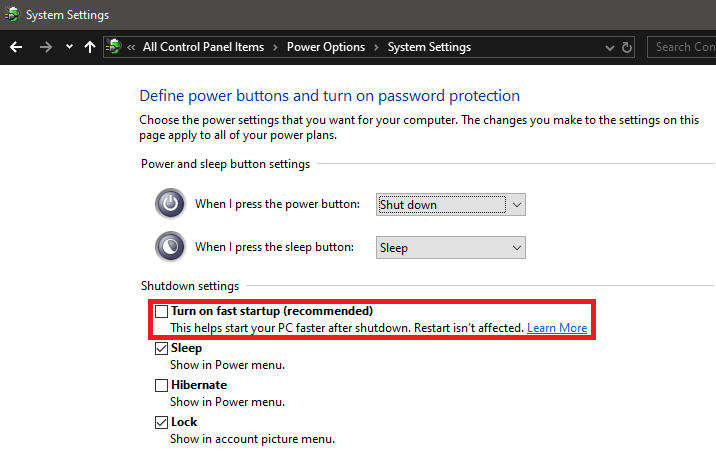
user posted image

This post has been edited by sHawTY: Oct 12 2019, 08:12 PM
sHawTY
post Oct 12 2019, 10:03 PM

Frequent Reporter
********
All Stars
14,909 posts

Joined: Jul 2005

QUOTE(ck.chunkeat @ Oct 12 2019, 08:15 PM)
not sata problem. i swapped the hdd in , still can use.
Can you boot into Windows with that HDD?
sHawTY
post Oct 12 2019, 11:26 PM

Frequent Reporter
********
All Stars
14,909 posts

Joined: Jul 2005

QUOTE(ck.chunkeat @ Oct 12 2019, 10:08 PM)
So yeah, i am able to boot into windows with the HDD replacing the SSD.
Then that simply means your SSD is dead, just have to replace it
Although there's not a lot of choices of mSATA SSD nowadays since most manufacturers have stopped producing mSATA SSD
Get Samsung 860 EVO. It's expensive but it's the only mSATA SSD that has DRAM Cache now

This post has been edited by sHawTY: Oct 12 2019, 11:28 PM


Change to:
| Lo-Fi Version
0.0123sec    0.25    6 queries    GZIP Disabled
Time is now: 7th December 2025 - 04:50 AM