Outline ·
[ Standard ] ·
Linear+
SSD died all of a sudden?, Help needed
|
TSck.chunkeat
|
 Oct 12 2019, 07:19 PM, updated 7y ago Oct 12 2019, 07:19 PM, updated 7y ago
|

|
So I have a plextor 128gb ssd that I bought and used since 2013. I'm using it on my y580 laptop with a hdd combo on windows 10. Yesterday it decided to die on me all of a sudden without any notice.
Need help from sifu sifu sekalian,
1) what can I try to revive my ssd?
2) If it is dead, why so sudden? I was even watching videos, surfing/gaming without any issue the night before. there isn't any symptom like crashing before this.
3) let me know if you need any more information.
Story below:
I mainly use my ssd as boot and only installed some seldomly used software on it. Games, movies, etc are all on HDD.
Yesterday when I'm back from work, I tried to log in my windows, but it hang at the log in page. I always just sleep my laptop, shutting down once every 1-2 week.
After it hang, i force shut down, and when i turn it on, it is stuck at the windows 10 logo with the loading animation in infinite loop.
Things that I have tried:
- hold F4 or F5 when booting will give a constant beep sound.
- use a windows 10 installation thumb drive to try to repair, but all the options are not working.
- restore from previous doesn't work.
- uninstall recent update doesnt work.
- troubleshoot startup problem will just leave it in infinite loop again.
- tried to install clean windows 10 doesn't work as it will just get stuck at 0%, copying window files.
- tried to reformat or delete the drive/partition at the windows installation, will result in hang.
- i don;t think anything got deleted as the file usage is the same.
- around 70gb space left. I didn't fully utilize this.
Now I boot into my hdd ( still have win 7 installed), temporarily can use the comp, can still surf chrome, play games, watch movie.
Here are a few things that i notice on my hdd win7:
- when i try to access the ssd through file explorer, it just tries to open but will not do anything. windows explorer have a loading bar on top and it will get stuck at around 95%.
- trying to right click > properties of the ssd also will give the same result.
- tried to open diskpart will get stuck also, it will open up a new cmd window but won't allow me to do anything in the window as it tries to load diskpart.exe
- the ssd is still recognized in BIOS.
- In device manager is showing my hdd and "Disk Drive", which is the ssd.
|
|
|
|
|
|
TSck.chunkeat
|
Oct 12 2019, 07:30 PM
|
|
|
QUOTE(chocobo7779 @ Oct 12 2019, 07:29 PM) Likely the NAND flash has failed or the controller itself has failed  can it fail without notice? usually when hdd dying, they will give signals right?  |
|
|
|
|
|
TSck.chunkeat
|
Oct 12 2019, 07:31 PM
|
|
|
QUOTE(DarshanDash @ Oct 12 2019, 07:30 PM) Have you tried using an app to check if your ssd is still alive or completely dead? https://www.hdsentinel.com/Also you can't do anything about a ssd that dies it's like if it's dead it's dead and i'm assuming you bought it in 2013 so it slowly degraded... Plus 7 years of life span is pretty long man.. My hard drive died within 2 years.. But do let us know with the app if the health is still 100% or less Yea i also thought it is about time. But if anything, i would expect my hdd which i have used for 2 years longer than the ssd to die first. Touch wood. Will try out the app and let you know. |
|
|
|
|
|
TSck.chunkeat
|
Oct 12 2019, 07:36 PM
|
|
|
What is the average life span for ssd?
|
|
|
|
|
|
TSck.chunkeat
|
Oct 12 2019, 08:15 PM
|
|
|
QUOTE(sHawTY @ Oct 12 2019, 08:07 PM) Why would you need to put your laptop to sleep when you're already using SSD Windows + SSD bootup is really fast I would understand people would do this in the past when we are still using HDD, but with the fast loading time on SSD, sleep is no longer required Anyway, about your SSD, I believe the controller may be dead & there's nothing you can do about it You can try plugging in that SSD on another computer to see if it can boot fine, if it does, then maybe the SATA controller on your laptop is dying If it doesn't, then it's definitely the SSD Lenovo Y580 was launched in 2012 which means your laptop would be between 6 ~ 7 years old. It's understandable if the SATA controller is also deteriorating Also, make sure to disable this function the next time you are in Windows after replacing the SSD / replacing the laptop 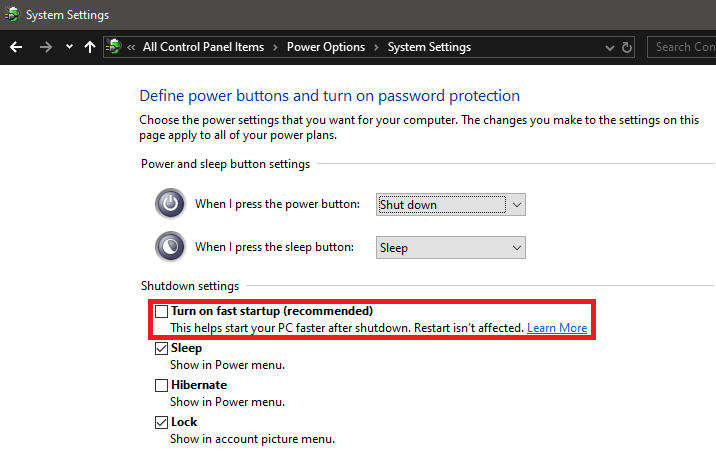 not sata problem. i swapped the hdd in , still can use. |
|
|
|
|
|
TSck.chunkeat
|
Oct 12 2019, 08:27 PM
|
|
|
QUOTE(DarshanDash @ Oct 12 2019, 07:30 PM) Have you tried using an app to check if your ssd is still alive or completely dead? https://www.hdsentinel.com/Also you can't do anything about a ssd that dies it's like if it's dead it's dead and i'm assuming you bought it in 2013 so it slowly degraded... Plus 7 years of life span is pretty long man.. My hard drive died within 2 years.. But do let us know with the app if the health is still 100% or less downloaded this app but when double click, nothing happen. |
|
|
|
|
|
TSck.chunkeat
|
Oct 12 2019, 10:08 PM
|
|
|
QUOTE(sHawTY @ Oct 12 2019, 10:03 PM) Can you boot into Windows with that HDD? I was using the original hdd that comes with the laptop with win7 just for storage purpose but I didn't reformat it incase of emergencies. I am using the hdd right now on the same SATA port , watched some movies , played some games and typing on chrome to reply your message. So yeah, i am able to boot into windows with the HDD replacing the SSD. |
|
|
|
|
|
TSck.chunkeat
|
Oct 13 2019, 09:51 AM
|
|
|
QUOTE(BTS1501 @ Oct 13 2019, 09:16 AM) you can connect both HDD and SSD and boot up both right ? If that is the case, boot up from HDD, install crystal disk info and then post the screenshot of the SSD SMART info, if you can get it. https://crystalmark.info/en/software/crystaldiskinfo/Most likely SSD is dead, and yes, when SSD die, it will just die off instantly. Only way to check is through smart info, your laptop should have turn on smart info alert in the bios I presume ? Hmm, for some reason, these softwares does not work. I have already installed them, but when I double click on it, nothing happens.. Same thing happened when I try to open HDSentinel that I installed earlier. Same like how diskpart doesn't load up at all for me. Is it that my HDD is also going to fail? |
|
|
|
|
|
TSck.chunkeat
|
Oct 13 2019, 02:09 PM
|
|
|
QUOTE(BTS1501 @ Oct 13 2019, 01:37 PM) Maybe you can try to remove the plextor ssd, boot to win 7 and run the crystal disk info/HDsentinel on just the HDD. HDD even if its failing the smart info will launch. Then clean the plextor ssd contact with eraser, put it back in and try again. Yep, i can open it with just the HDD plugged in. but my hdd health is unknown. But it got stuck again when i plug in SSD and try to refresh the app. Seems like the SSD really gone case. QUOTE(andrekua2 @ Oct 13 2019, 01:55 PM) I offered my condolences... I too had a SSD dying on me in a laptop before it was stolen. What I can say is that there will be a symptom which you will noticed (but probably wont pay too much attention to it) is that the laptop hang once in a while. I always let my company laptop 24/7 (left in on even when I leave my work). After 2years or so, sometimes I found the laptop hang when I returned to work the next day. For the first few times, I didnt really pay any attention and thought it was overheating since it is basically running a desktop chip in it. I even remove the backpanel and clean all the dirt while also reapplying new thermal paste. However it still hang just like before. Luckily for me, my sixth sense told me to at least back up once to my pendrive and guess what the drive was totally unbootable one day. I still loss some data but would have lost much more had I not back up the other day. Yea, but i didn't have any hang issue. This post has been edited by ck.chunkeat: Oct 13 2019, 02:10 PM |
|
|
|
|




 Quote
Quote

 0.0154sec
 0.45
0.45
 6 queries
 GZIP Disabled