Welcome Guest ( Log In | Register )

Outline · [ Standard ] · Linear+

> Worth upgrading to Unifi 300 mbps from 100 mbps?

views
     
TSCurrent Events guy
post Oct 5 2019, 07:32 AM, updated 7y ago

Enthusiast
*****
Junior Member
966 posts

Joined: Nov 2009
I have unifi 100 mbps which I signed up in Aug this year.
In this house, there's only me using it but occasionally wife uses it for streaming media.

Will 300 mbps be worth upgrading for an additional RM80?
I mostly use internet for online gaming.

Unfortunately, there isnt a capable competitor to Unifi in my area.
TSCurrent Events guy
post Oct 5 2019, 07:45 AM

Enthusiast
*****
Junior Member
966 posts

Joined: Nov 2009
QUOTE(Szzz @ Oct 5 2019, 07:44 AM)
100Mbps not enough for stream?

u stream 8K60p or something?
*
Stream is fine but sometimes netflix becomes pixelated.

I'm more interested in a better gaming experience.
TSCurrent Events guy
post Oct 5 2019, 07:49 AM

Enthusiast
*****
Junior Member
966 posts

Joined: Nov 2009
QUOTE(Jescon @ Oct 5 2019, 07:46 AM)
Streaming/online gaming = 100mbps is actually enough. Unless you got big family la, then the extra bandwidth would be needed, or you really need that extra download speed for whatever reason. The main problem with unifi is unstable bandwidth, and bad latency.

I never hear Time customers complain about these issues.
*
Unfortunately I dont have access to Time.

I'm wondering up to which point would 100 mbps be acceptable, content is getting bigger and higher resolution by the year.
TSCurrent Events guy
post Oct 5 2019, 07:50 AM

Enthusiast
*****
Junior Member
966 posts

Joined: Nov 2009
QUOTE(fabianz03 @ Oct 5 2019, 07:49 AM)
In fact jitter and latency is more important.
*
I take it that both are out of my control and reside solely under TM's responsibility?
TSCurrent Events guy
post Oct 5 2019, 08:26 AM

Enthusiast
*****
Junior Member
966 posts

Joined: Nov 2009
QUOTE(Szzz @ Oct 5 2019, 08:18 AM)
Netflix dont even use more than 30Mbps for 4k stream. If stream problem its your router.

Gaming you dont even need more than 10Mbps. Latency lag has nothing to do with bandwidth
*
I am using the default D-Link router.

Youre saying if I were to install something like the AC1200 Asus, my pixel streaming problems would be solved?
TSCurrent Events guy
post Oct 5 2019, 10:44 AM

Enthusiast
*****
Junior Member
966 posts

Joined: Nov 2009
QUOTE(soulseeker6187 @ Oct 5 2019, 10:18 AM)
No. U better upgrade ur equipment instead.
*
Which equipment in particular, the router? I could install an AC1200. There isnt much benefit going for more than that on a 100 mbps connection.
TSCurrent Events guy
post Oct 5 2019, 12:11 PM

Enthusiast
*****
Junior Member
966 posts

Joined: Nov 2009
QUOTE(ChristWolves @ Oct 5 2019, 12:06 PM)
Depends if your last-mile connectivity is copper or fibre. If it's copper, then you shall remain as 100Mbps as the max it can go is 30Mbps. If it's fibre, sky is the limit.

Nevertheless, please get high-end router like Netgear R7800 to get optimum speed n ping.
*
Here's the thing about getting a high end router, would it be wasted on a 100mbps connection?
TSCurrent Events guy
post Oct 6 2019, 12:20 AM

Enthusiast
*****
Junior Member
966 posts

Joined: Nov 2009
QUOTE(JimbeamofNRT @ Oct 6 2019, 12:05 AM)
from head ( TM ) latency already high then change router/package to 800mbps also no point lah boss
*
Would there be a point to buy a new router for less ping time then?

Also, good post about the 802.11ax, but is there any point to buying a router that provides 6Gbps if our ISPs for home use dont provide those speeds?
TSCurrent Events guy
post Oct 6 2019, 07:23 AM

Enthusiast
*****
Junior Member
966 posts

Joined: Nov 2009
QUOTE(JimbeamofNRT @ Oct 6 2019, 12:24 AM)
and I am sure our fiber provider will increase the speed later on. otherwise no point having wifi 6 then
*
I can get a router, but I wonder how much I should spend before I get diminishing returns on ping and latency.
To put it another way, what's the best router I can get now that would improve ping and latency over the default UNIFI D Link router.

I could get the R7800 Netgear or any 802.11ax router, however my concern is if I'll be able to utilize it fully within the lifespan of the router.
TM just introduced bandwith in the hundreds last year after it was available globally many years before that, how long until they can catch up to match the capacities offered by routers today?

QUOTE(littleprawn @ Oct 6 2019, 12:47 AM)

i staying in single storey so i guess i dont need subscribe their mesh wifi right if use meksis...?

*
If you want to get mesh, I can recommend the TP Link Deco M3/M5. I have both models, and they're great.

Even with the default TM D-Link router, I can get 100 mbps download consistently with upload of 50 - 70 mbps.



TSCurrent Events guy
post Oct 11 2019, 12:55 PM

Enthusiast
*****
Junior Member
966 posts

Joined: Nov 2009
QUOTE(happiesdog @ Oct 11 2019, 12:41 PM)
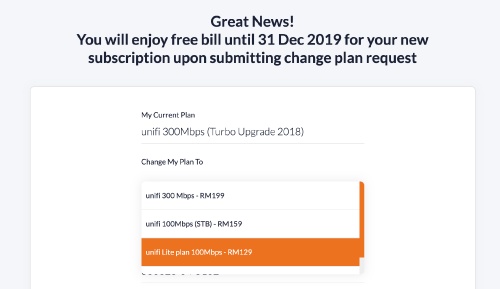
Need help guys. Any idea why is the 100mbps plan named as Unifi Lite instead of Unifi?

I thought Unifi Lite is the new name for Streamyx but the unifi chat specialist confirmed that this is fiber broadband.

user posted image
*
Unifi lite has no hyp TV.

It is still fiber broadband. This is my package right now.
TSCurrent Events guy
post Oct 25 2019, 11:26 PM

Enthusiast
*****
Junior Member
966 posts

Joined: Nov 2009
I got a relative who has a RM200 800mbps package that they want to get rid of

I have a RM130 100mbps package that has a 2 year contract

Can we swap packages?

Bump Topic Add ReplyOptions New Topic
 

Change to:
| Lo-Fi Version
0.0183sec    0.81    6 queries    GZIP Disabled
Time is now: 17th December 2025 - 03:09 PM