

Google still wants to work with Huawei. Google has applied for a license to continue to work with Huawei.
https://www.androidauthority.com/google-hua...cation-1087408/
Huawei Mate 30 / 30 Pro Discussion Thread, 720p @ 7680fps
Huawei Mate 30 / 30 Pro Discussion Thread, 720p @ 7680fps
|
|
 Mar 2 2020, 04:32 PM Mar 2 2020, 04:32 PM
Return to original view | IPv6 | Post
#121
|
 
All Stars
24,229 posts Joined: Mar 2007 From: Kuala Lumpur  
|
Google still wants to work with Huawei. Google has applied for a license to continue to work with Huawei.
https://www.androidauthority.com/google-hua...cation-1087408/ |
|
|
|
|
|
Mar 3 2020, 03:30 PM
Return to original view | IPv6 | Post
#122
|
|
All Stars
24,229 posts Joined: Mar 2007 From: Kuala Lumpur
|
QUOTE(donavan1986 @ Mar 3 2020, 07:54 AM) I have tried the GMS. It can't work. Hard reset your phone and reinstall everything again starting from Step 1. Make sure you don't miss anything.It always show device is not play protect certified. How can i do with this? Any sifu can help?  |
|
|
Mar 4 2020, 07:41 AM
Return to original view | Post
#123
|
|
All Stars
24,229 posts Joined: Mar 2007 From: Kuala Lumpur
|
QUOTE(iTzMooN @ Mar 3 2020, 10:38 PM) Google has recently make it harder for mate30 to use GMS. Nice tip. Try adding your GSF into https://www.google.com/android/uncertified You can get your GSF by using Device ID app. 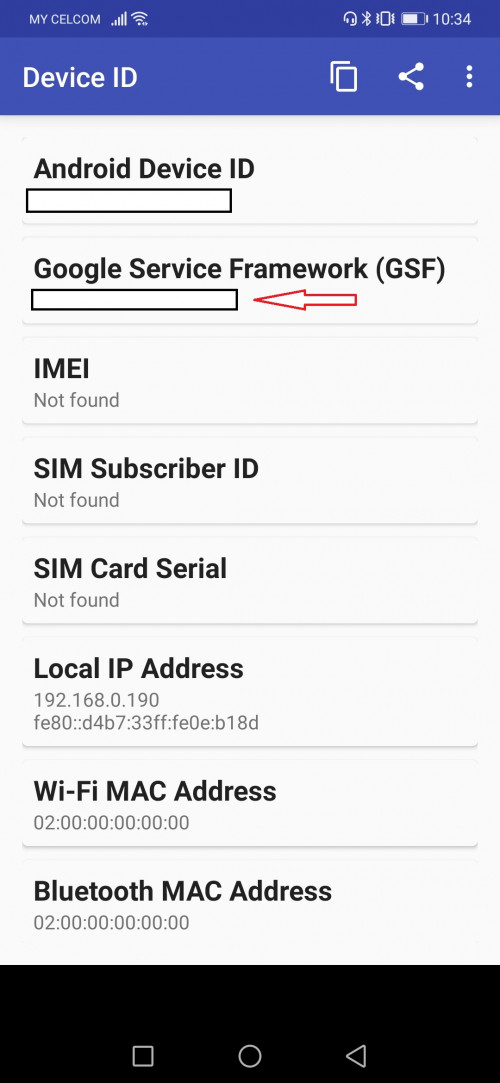 Donovan96 Do update here on your findings after you have tried. |
|
|
Mar 4 2020, 09:58 PM
Return to original view | IPv6 | Post
#124
|
|
All Stars
24,229 posts Joined: Mar 2007 From: Kuala Lumpur
|
QUOTE(skylinelover @ Mar 4 2020, 07:08 PM) What the waste🙈🙈 Seriously dude... do u know what you are talking about? Best phone ever in battery life but no android 10 aiya💥💥 We need 3 competitor not 2 in mega flagship yo🥳🥳  |
|
|
Mar 5 2020, 11:30 AM
Return to original view | IPv6 | Post
#125
|
|
All Stars
24,229 posts Joined: Mar 2007 From: Kuala Lumpur
|
QUOTE(jondevour @ Mar 5 2020, 01:12 AM) I am getting the same error message "device is not play protect certified" .Already reset phone and reinstalled everything , same issue.  QUOTE(donavan1986 @ Mar 5 2020, 07:48 AM) ok, will go visit to Huawei shop. Maybe both of you guys could refer to the below page for guide on how to overcome the above issue. https://www.xda-developers.com/how-to-fix-d...y-google-error/ |
|
|
Mar 6 2020, 06:50 PM
Return to original view | IPv6 | Post
#126
|
|
All Stars
24,229 posts Joined: Mar 2007 From: Kuala Lumpur
|
QUOTE(ExpZero @ Mar 5 2020, 07:12 PM) After we install GMS, it works like any other normal android phone right? We will be able to auto update GMS itself? No you don't need to auto update GMS. Once GMS is installed, Google play works like any other android phone. |
|
|
|
|
|
Mar 6 2020, 09:05 PM
Return to original view | IPv6 | Post
#127
|
|
All Stars
24,229 posts Joined: Mar 2007 From: Kuala Lumpur
|
QUOTE(ExpZero @ Mar 6 2020, 07:02 PM) Heard the Mate30 GMS got shutdown by google recently, is it true? Nope. Ours all still running.  |
|
|
Mar 9 2020, 03:56 PM
Return to original view | IPv6 | Post
#128
|
|
All Stars
24,229 posts Joined: Mar 2007 From: Kuala Lumpur
|
QUOTE(ExpZero @ Mar 9 2020, 03:51 PM) The latest reply in this thread shows otherwise 😔 Not my problem. |
|
|
Mar 10 2020, 06:37 PM
Return to original view | IPv6 | Post
#129
|
|
All Stars
24,229 posts Joined: Mar 2007 From: Kuala Lumpur
|
QUOTE(catsper @ Mar 10 2020, 02:07 PM) Can ignore the pop-up and use like normal? Any implication to daily experience? I'm not too sure if there is a workaround for this. But for now there is no such pop up on my unit. I sideloaded last year and so far touch wood nothing yet. But afraid to reset now. You can try the below though to see if this works. https://www.xda-developers.com/how-to-fix-d...y-google-error/ QUOTE(Alidavidsun @ Mar 10 2020, 02:57 PM) I installed GMS on end of Feb and so far everything working fine. Hope it'll maintain this way. Just dropped my phone hard just now. Luckily no cracks. There is no stock screen protector for the mate 30 pro. Did you bought yours second hand?Seems like there's a clear layer of plastic on the screen with 4 notches at each edge. That's the stock screen protector right? This post has been edited by TOMEI-R: Mar 10 2020, 06:39 PM |
|
|
Mar 10 2020, 11:48 PM
Return to original view | IPv6 | Post
#130
|
|
All Stars
24,229 posts Joined: Mar 2007 From: Kuala Lumpur
|
QUOTE(Alidavidsun @ Mar 10 2020, 11:10 PM) I bought it new from u mobile. Is there not a layer of plastic on your screen? Mine is quite obvious and can feel the layer when touching the notch area and the edges. Yours is 5G?[attachmentid=10446045] |
|
|
Mar 11 2020, 06:32 AM
Return to original view | Post
#131
|
|
All Stars
24,229 posts Joined: Mar 2007 From: Kuala Lumpur
|
QUOTE(Alidavidsun @ Mar 11 2020, 12:09 AM) Not all mate 30 pro are 5g equipped? 😅 Nope. |
|
|
Mar 11 2020, 11:49 AM
Return to original view | IPv6 | Post
#132
|
|
All Stars
24,229 posts Joined: Mar 2007 From: Kuala Lumpur
|
QUOTE(donavan1986 @ Mar 11 2020, 07:47 AM) Try this. no luck. still being block... QUOTE(droidtrix @ Mar 11 2020, 08:51 AM) tried several times No choice but to backup phone and try hard reset. Then have try to install GMS first and then install apps before restoring old data.but still has same issue.. almost all google apps are not working ..   |
|
|
Mar 11 2020, 07:07 PM
Return to original view | IPv6 | Post
#133
|
|
All Stars
24,229 posts Joined: Mar 2007 From: Kuala Lumpur
|
Guys... another workaround for the "Play Protect" issue. This time this is on the author's own Mate 30 Pro. Do give it a try.
https://www.technobaboy.com/2020/03/07/how-...tect-certified/ |
|
|
|
|
|
Mar 11 2020, 10:02 PM
Return to original view | IPv6 | Post
#134
|
|
All Stars
24,229 posts Joined: Mar 2007 From: Kuala Lumpur
|
"I tried and was able to install with " Not Certified" error, the trick is Install GMS through any method with DATA and Wifi turned off
install GMAIL using apk file rather than play store, after installing apk reboot and turn data on, log in gmail account using Gmail app and then open play store..... you will be able to install everything you want You can download Gmail apk from here: https://www.apkmirror.com/apk/google-inc/gmail/" Try this method guys. I found this workaround on xda forums. Worth trying since you have nothing to lose. |
|
|
Mar 12 2020, 10:52 AM
Return to original view | IPv6 | Post
#135
|
|
All Stars
24,229 posts Joined: Mar 2007 From: Kuala Lumpur
|
QUOTE(TOMEI-R @ Mar 11 2020, 10:02 PM) "I tried and was able to install with " Not Certified" error, the trick is Install GMS through any method with DATA and Wifi turned off Did anybody try this workaround? Do update here if it works to help other forummers.install GMAIL using apk file rather than play store, after installing apk reboot and turn data on, log in gmail account using Gmail app and then open play store..... you will be able to install everything you want You can download Gmail apk from here: https://www.apkmirror.com/apk/google-inc/gmail/" Try this method guys. I found this workaround on xda forums. Worth trying since you have nothing to lose. |
|
|
Mar 12 2020, 12:42 PM
Return to original view | IPv6 | Post
#136
|
|
All Stars
24,229 posts Joined: Mar 2007 From: Kuala Lumpur
|
QUOTE(Alidavidsun @ Mar 12 2020, 12:17 PM) I cheeked my play store and saw my device is not protected. But must of the stuff is working for now. I think I'll just leave it as it is for now Yes. All of our Google Playstore status would be as Not Protected but if everything is working fine, then just let it be. This issue only affects the newer batch of phones only. |
|
|
Mar 12 2020, 01:13 PM
Return to original view | IPv6 | Post
#137
|
|
All Stars
24,229 posts Joined: Mar 2007 From: Kuala Lumpur
|
QUOTE(droidtrix @ Mar 12 2020, 12:52 PM) its not working too.. now I m using without GMS app.. on other hand, I did downloaded APK on some apps which working fine like Google keyboard, whatsaapps, fb. Do try again when free. Seems like this is the only working method for now. for now its ok.. but its is bit trouble sum to check mail via browser . QUOTE(PeeEl @ Mar 12 2020, 12:54 PM) Please elaborate. Are you saying you only JUST sideloaded GMS and it’s working? Or you did that sometime ago and are not experiencing any glitch? TQ. They are new owners who just got the phone and after installing GMS, they are experiencing "Device is not Play Protect certified" error message keep popping up on their phones. This is already a known issue and it seems like Google is trying to put a stop to new devices being sideloaded with GMS.This post has been edited by TOMEI-R: Mar 12 2020, 01:14 PM |
|
|
Mar 13 2020, 05:12 PM
Return to original view | IPv6 | Post
#138
|
|
All Stars
24,229 posts Joined: Mar 2007 From: Kuala Lumpur
|
QUOTE(joyride997 @ Mar 13 2020, 03:04 PM) i think only new phones got issue. mine, i did it in Feb 2020. no issue. Same like most of us here. Hopefully Google wont try to pull some stunts now by disabling ours. QUOTE(PeeEl @ Mar 13 2020, 04:52 PM) Yes, that’s what I want confirmed. Actually, to be more precise...not just new phones. Side loading GMS does not work now, on any phone. Yup. I think its pretty much confirmed. I thought Google or rather the Americans are against Huawei only? I didn't know gms doesn't even work on other phones. Would custom roms be affected then? |
|
|
Mar 21 2020, 03:14 PM
Return to original view | Post
#139
|
|
All Stars
24,229 posts Joined: Mar 2007 From: Kuala Lumpur
|
QUOTE(chaukeng @ Mar 17 2020, 09:34 PM) The problem Is not with HMS. I can literally get any apps I want from sideloading. But plenty of those apps require Google play service to run. That is the way. Anyway I already traded in my 5G unit with a note 10 Plus. QUOTE(droidtrix @ Mar 17 2020, 10:09 PM) I just traded my mate 30 pro to OnePlus 7 pro 12gb/256gb MYSet... Wow..you guys throwing the towel so soon? I understand the annoyance though if you are u using the phone as your daily driver. |
|
|
Mar 21 2020, 04:57 PM
Return to original view | IPv6 | Post
#140
|
|
All Stars
24,229 posts Joined: Mar 2007 From: Kuala Lumpur
|
QUOTE(droidtrix @ Mar 21 2020, 04:22 PM) As i m using it as daily driver, i needed GMS badly therefore i switched to other device.. Welcome to the OP7 thread instead. |
| Change to: |  0.0875sec 0.0875sec
 0.60 0.60
 7 queries 7 queries
 GZIP Disabled GZIP Disabled
Time is now: 24th December 2025 - 04:28 PM |
 Quote
Quote