Welcome Guest ( Log In | Register )

Outline · [ Standard ] · Linear+

 20 cents DIY Grey Card for poor people, people like me....

views
     
TSAlamakLor
post Jul 5 2007, 12:35 AM, updated 19y ago

Look at all my stars!!
Group Icon
Elite
9,856 posts

Joined: Jan 2003
From: Kuala Lumpur, WP


Actually there was a DIY grey card thread but I didn't bother reviving it. Anyway, I made an 18% grey card using photoshop, setting the color to 18% CMYK, filled a 4X6" frame and had it developed using kodak royal paper - matt.

This is what 18% gray should show on histogram - middle ground:
user posted image

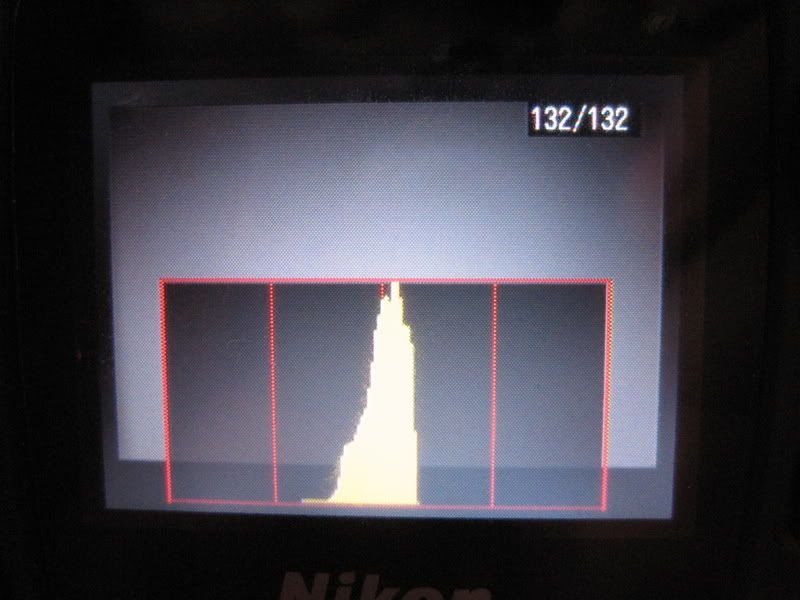
Here's what I got from the DIY card:
user posted image

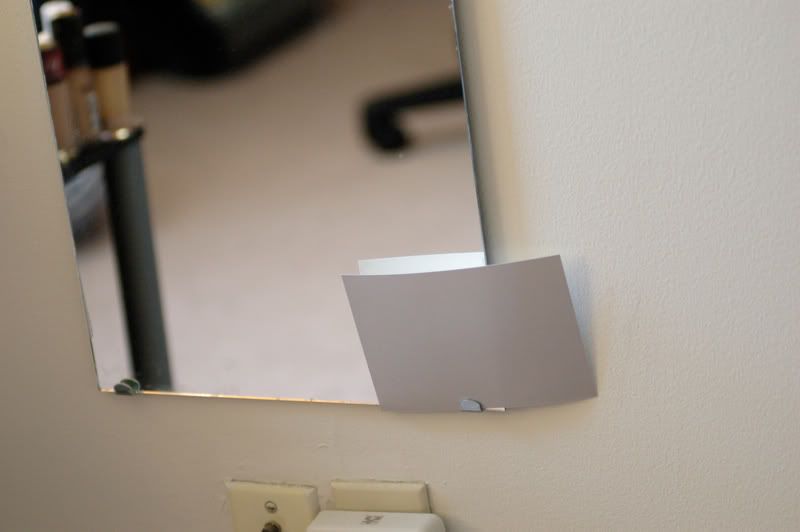
and here's how I measured it:
user posted image

Yes the picture is slightly crooked, and it does affect the reflection a little but there's no significant difference! My camera meter was jumping around 1/3 shutter speed, so you do get 1/3 stop accuracy with the card depending on how crooked it is tongue.gif. All for 20 cents, perfect for poor people like me.

For n00bs:
How to use it
1) Download the attatchment. It is a 4 X 6 Image, you can enlarge it to whatever size you want (quality doesn't matter, it's a flat color)

2) Send the picture to be developed by any shop. Have it developed on a matt paper.

3) Set your camera to spot metering.

4) Place the card beside your subject, aim your camera and meter the card, lock the EV, compose, and shoot.

5) You can also set WB using the 18% grey, or flip the picture over to set the WB to white.


Attached thumbnail(s)
Attached Image
valve_300b
post Jul 5 2007, 01:44 AM

Getting Started
**
Junior Member
212 posts

Joined: May 2006


One small note, even if you developed on kodak royal paper -matt, it can still come out to be different due to the chemical used to develop it.

thanks for sharing your discovery anyway smile.gif you will soon join crazySpeakers on his 'discovery'

erm, i should get 10K posts very soon

This post has been edited by valve_300b: Jul 5 2007, 01:44 AM
TSAlamakLor
post Jul 5 2007, 02:17 AM

Look at all my stars!!
Group Icon
Elite
9,856 posts

Joined: Jan 2003
From: Kuala Lumpur, WP


wow the troll found its way to photography section ohmy.gif

The most important thing is to ensure that your camera meter could obtain the same result that a proper grey card would provide - picture 1 vs 2.
empire23
post Jul 5 2007, 02:29 AM

Team Island Hopper
Group Icon
Staff
9,417 posts

Joined: Jan 2003
From: Bladin Point, Northern Territory
QUOTE(valve_300b @ Jul 5 2007, 01:44 AM)
One small note, even if you developed on kodak royal paper -matt, it can still come out to be different due to the chemical used to develop it.

thanks for sharing your discovery anyway smile.gif you will soon join crazySpeakers on his 'discovery'

erm, i should get 10K posts very soon
*
I think the ideal here like he said in the last post is consistency, or in basic measurement lingo, Calibration tongue.gif
osiris
post Jul 5 2007, 08:40 AM

Getting Started
**
Junior Member
77 posts

Joined: Jan 2003
actually, you know the kind of cardboard they use to line the shirts when they are still in a package? some of those actually have a gray that's quite close to 18% gray. you'll have to look though... not all are the same.
C-Fu
post Jul 5 2007, 09:34 AM

Ninja-Fu
******
Senior Member
1,051 posts

Joined: Apr 2005
From: Brisbane, QLD, Ostolia


why attach a .jpg pic instead of GIF? GIF is better suited for flat colour pics, not jpeg.
yrh0413
post Jul 5 2007, 10:06 AM

10k Club
********
All Stars
12,214 posts

Joined: Jan 2003
From: Singapore | Malaysia


tongue.gif I remember last time i only use Pringles caps
wKkaY
post Jul 5 2007, 10:52 AM

misutā supākoru
Group Icon
VIP
6,008 posts

Joined: Jan 2003
If you set your camera to auto-expose, of course you're going to get the histogram in picture 2 - you'll get that even with a white sheet of paper.
TSAlamakLor
post Jul 5 2007, 12:31 PM

Look at all my stars!!
Group Icon
Elite
9,856 posts

Joined: Jan 2003
From: Kuala Lumpur, WP


laugh.gif for those who doesn't even know what's the grey card for, it's best to read it up.

http://www.photography.ca/phototips/meter.html

If you can look at a scene, and set the exposure "manually", nobody would ever need a light meter. The "auto exposure" is precisely a built in light meter, measuring the reflected light, and providing you a proper combination of shutter speed when given an aperture value, and vice versa. All modes, besides manual mode, uses "auto exposure"

some extra info I replied on another forum for those who still dont know why to use a grey card
QUOTE
QUOTE(dj_mocok;3091175)
Up to this day, I still  never adjust my camera using grey card. Any significant difference?

The thing about using a grey card is that it allows your camera to meter the exact (relatively speaking) 18% grey so that pictures are all exposed in the right "zone". Basically you'd place the card beside your subject and spot meter the card, then do your thing - compose, shoot. This would give you a proper exposure of the subject.

On the other hand, if you use matrix metering to meter your subject, which say happens to be in a scene where there's a dramatic difference in contrast...i.e. black shirt, brown skin, very bright sky. The matrix metering will take all the exposure and average it to give you an 18% grey. It's basic math here, when you add an extreme value to the sample, the median will get skewed. Therefore, in such scenes, you'd often find your subject slightly under/over exposed.

However, if you want the brown skin tone to be properly exposed, you place the grey card beside the subject you want properly exposed, meter the card, and viola, your subject would now be properly exposed, but because the camera cannot capture the whole dynamic range, some of the extreme value will now be clipped.


This post has been edited by AlamakLor: Jul 5 2007, 12:50 PM
PcWork
post Jul 5 2007, 03:27 PM

Audio Phreak
*******
Senior Member
6,489 posts

Joined: Mar 2005
From: Serdang
this is great alamaklor.
i tried it today. and it seems work fine on my snap shoot nikon camera..
especially on yellow light condition.
=)
very nice. very cheap. very easy to do it.

arrsoo
post Jul 5 2007, 04:14 PM

On my way
****
Senior Member
600 posts

Joined: Oct 2004
aha, thank you so much...been looking for a grey card but couldn't find it, will definately give this a try but do i hv to in the first place look for a properly calibrated shop to develop it?

QUOTE
For n00bs:
How to use it
1) Download the attatchment. It is a 4 X 6 Image, you can enlarge it to whatever size you want (quality doesn't matter, it's a flat color)

2) Send the picture to be developed by any shop. Have it developed on a matt paper.

3) Set your camera to spot metering.

4) Place the card beside your subject, aim your camera and meter the card, lock the EV, compose, and shoot.

5) You can also set WB using the 18% grey, or flip the picture over to set the WB to white.


For the one in bold, is it that we should adjust our xposure till the histrogram shift to the middle??

wub.gif


bbtat
post Jul 5 2007, 05:07 PM

Getting Started
**
Junior Member
293 posts

Joined: Sep 2005


grey card for wat??? white balance adjust should use white paper, right??
is it for PnS Camera??
wKkaY
post Jul 5 2007, 06:16 PM

misutā supākoru
Group Icon
VIP
6,008 posts

Joined: Jan 2003
You missed my point. OK let's try approaching this another way.

You said, "The most important thing is to ensure that your camera meter could obtain the same result that a proper grey card would provide - picture 1 vs 2". How do you ensure that, without having a reference gray card on hand?
TSAlamakLor
post Jul 5 2007, 09:42 PM

Look at all my stars!!
Group Icon
Elite
9,856 posts

Joined: Jan 2003
From: Kuala Lumpur, WP


*btw, I made a mistake saying that it doesnt work with manual exposure, it actually does, you just have to ensure that whatever combination of SS and A you are using is exposed properly at 0ev. The only time I actually use manual mode is if I need to properly expose the background and light my subject with flash, and I usually rely on A/S mode to quickly get me the readings before I plug them into manual mode.

Picture 1 is a reference curve to the grey card, I do not need to have a grey card on hand as a reference but it'd sure help to clear some doubt. then again, if I had one on hand, I wouldn't bother diying it.

Picture 2 is the result of which one'd get with the diy grey card, which corresponds very well to the reference exposure a grey card would provide.

A white paper will not give you the same exposure, print the card, spot meter the grey vs white, you'd find the white to be around 1 stop brighter. Therefore, if you take a white paper and place it beside a subject that is equally pale, you'd find your subject washed out.

One caveat with the card is that the opacity is not 100% on the paper, and some light will pass through, thus affecting the measurement in some bright scenes still. I'm trying to figure out what to place behind the card to avoid this problem..hmm...


Added on July 5, 2007, 9:53 pm
QUOTE(arrsoo @ Jul 5 2007, 05:14 AM)
aha, thank you so much...been looking for a grey card but couldn't find it, will definately give this a try but do i hv to in the first place look for a properly calibrated shop to develop it?
For the one in bold, is it that we should adjust our xposure till the histrogram shift to the middle??

wub.gif
*
My assumption is that shops will have machines that are calibrated to certain ICC profile that give your pictures a fair representation of colors provided that you do not opt for the color enhancement "feature". You can always print 2 cards from 2 different shop and compare if they provide the same level of exposure when being measured.

Yup, you need to fill the whole frame with the grey card. Btw, you don't just "adjust" the camera so that the historgram is in the middle and be done with it. You need to do this everytime under different lighting conditions. i.e. if you took the grey card reading indoor, and use that setting outdoor, u'd find it is messed up.

Read the links that I posted, they explained better than I did.

oh btw, I forgot to mention this. Let us assume that you are really really poor tongue.gif, and cannot afford more than 1 diy grey card. Then you figured that your card is always slightly off center. You are pissed, but dont wanna spend more money in finding a proper paper and developer. Simply measure the card, and adjust ur exposure using the exposure compensation feature until the histogram shifts to the center.

i.e. if your grey card measured darker than 18% and falls a little behind middle. You compensated 2/3 EV exposure and now it is in the middle. So everytime to use the card as a meaurement guideline, you know you should compensate for 2/3 exposure to get it right. Only problem with this vs getting a grey card that'd give you a correct 18% right off the bat is that in the former case, you need to always adjust the exposure compensation after taking the reading, and if your camera doesnt have an exposure compensation button handy, you need to compensate the difference in manual mode, either through shutter speed/iso/aperture

This post has been edited by AlamakLor: Jul 6 2007, 01:38 AM

kelvinyam
post Jul 6 2007, 08:04 AM

May beauty be everywhere around me
******
Senior Member
1,766 posts

Joined: Jan 2003
From: Klang Valley


TSAlamakLor
post Jul 6 2007, 08:27 AM

Look at all my stars!!
Group Icon
Elite
9,856 posts

Joined: Jan 2003
From: Kuala Lumpur, WP


QUOTE(kelvinyam @ Jul 5 2007, 09:04 PM)
Correct me if I'm wrong... usually people use grey card when shooting portraits either indoor or outdoor, some who is richer even use those metering device to have a very accurate exposure.

However I wonder, with the current technology on digital cameras, especially the feature of multi segment metering, how important is metering with grey card? What would be the difference between metering using grey card and letting the cam to do it's work?
*
That'd of course depends on how particular you are with exposure. Grey card is poorman's best way to obtain ideal exposure since the camera's meter will be calibrated to 18% with it.

Here's a great article about it:
http://www.ephotozine.com/article/Guide-to...eld-light-meter

There's also illustration of pictures taken with exposure measurement under reflected light (what built in camera meter is based on) vs measurement under incident light.

I think for convenience, you'd probably just want to rely on matrix metering. Measure a frame where the light is most evenly lited, lock ev, and recompose.
arrsoo
post Jul 6 2007, 03:12 PM

On my way
****
Senior Member
600 posts

Joined: Oct 2004

wKkaY
post Jul 7 2007, 05:19 PM

misutā supākoru
Group Icon
VIP
6,008 posts

Joined: Jan 2003
QUOTE(AlamakLor @ Jul 5 2007, 11:42 PM)
A white paper will not give you the same exposure, print the card, spot meter the grey vs white, you'd find the white to be around 1 stop brighter..

.. So everytime to use the card as a meaurement guideline, you know you should compensate for 2/3 exposure to get it right..
*

Ahh ok, this is what I was getting at. If you're going to compensate anyway, why not skip the whole printing process and just use a white card from somewhere? Being a stop more reflective it should be usable in darker environments than the gray one will be smile.gif

QUOTE(kelvinyam @ Jul 6 2007, 10:04 AM)
However I wonder, with the current technology on digital cameras, especially the feature of multi segment metering, how important is metering with grey card? What would be the difference between metering using grey card and letting the cam to do it's work?
*

There are edge cases where the multi-segment metering will fail to make faithful exposures (as detailed in AlamakLor's posts above). In those cases, I guess it would be useful if your LCD review is broken and you needed some reference to compare to? I shoot on film, have a gray card but it usually stays unused due to improper technique that makes the shots go awry. I use the zone system instead.
jumanz
post Jul 7 2007, 11:29 PM

Getting Started
**
Junior Member
266 posts

Joined: Mar 2005


mm thanks for the tip noob here smile.gif means i wont need to cary a white card around to set the white balance is it ? straight away use spot metering to aim at the gry card then shoot?

for taking scene shots ? will it help ? or just for portrait only ?
sorry if i ask noob question . thanks
Andy0625
post Jul 8 2007, 12:45 PM

Certified Newbie
*******
Senior Member
3,910 posts

Joined: Jun 2005
From: Andy @ London.com Status: N/A


Wont the grey card spoilt the whole surrounding or object ?


Doesn't quite understand on how to use it. sad.gif

This post has been edited by Andy0625: Jul 8 2007, 12:56 PM

2 Pages  1 2 >Top
 

Change to:
| Lo-Fi Version
0.0208sec    0.19    6 queries    GZIP Disabled
Time is now: 22nd December 2025 - 04:04 AM