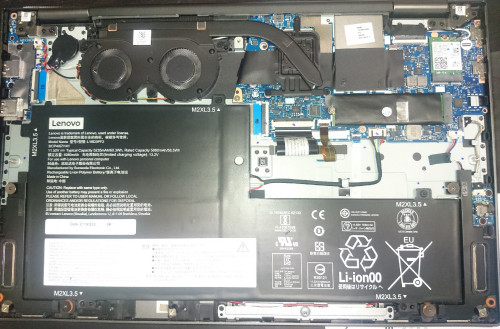
QUOTE(Benefon @ Nov 20 2019, 06:45 PM)
Change mind to C940 😂😂😂

Alright... Buy buy buy! 
Lenovo ThinkPad & IdeaPad Reviews thread, You guys can shares your stuffs here 😍
|
|
 Nov 20 2019, 06:48 PM Nov 20 2019, 06:48 PM
Show posts by this member only | IPv6 | Post
#341
|
 
All Stars
24,219 posts Joined: Mar 2007 From: Kuala Lumpur  
|
QUOTE(Benefon @ Nov 20 2019, 06:45 PM) Change mind to C940 😂😂😂 Alright... Buy buy buy! |
|
|
|
|
|
Nov 20 2019, 07:13 PM
|

Senior Member
4,800 posts Joined: Mar 2017
|
QUOTE(TOMEI-R @ Nov 20 2019, 06:48 PM) Alright... Buy buy buy! Bought already still wanna buy?🤬🤬🤬🤬🤬 |
|
|
Nov 20 2019, 08:56 PM
Show posts by this member only | IPv6 | Post
#343
|
|
Junior Member
808 posts Joined: May 2008
|
QUOTE(zainfeb13 @ Nov 19 2019, 07:54 PM) I would love to hear about T495s vs. X395 vs. ThinkBook 13s... Anyone can highlight the pros and cons? Would appreciate little help... QUOTE(Benefon @ Nov 19 2019, 11:27 PM) X395 can find my main page reviews I think if you need to decide you should go and test them all in store or watch some youtube reviews online. Maybe your local lenovo store has all these 3 models to test.T495s not much user here, cause the Ram is onboard and selling higher price to compare X395. T495 is another workhorse, can replace many midrange laptop, price is reasonable and ram upgradable. Thinkbook 13s cc to our bro kuci_mayong I have used the Thinkbook 13s also.. but not much reviews Personally I would go with T495s (among the 3 models you listed) mainly for the bigger screen and it has dual channel ram (advantage over the Thinkbook 13s which only has single channel RAM). I also prefer the Thinkpad built quality over the Thinkbook 13s. It also has USB-C charging which the ThinkBook 13s does not. Only cons is the fan will blow on the right, so if you use mouse on the right you will feel hot air. Thinkbook 13s overall is quite nice also and its benefit is the thinness of the laptop and the battery last really long. I have never had a laptop that can last so long. Although single channel RAM you can upgrade it to 32GB which is quite high for laptop in this price range. Personally I can get a whole afternoon out of it (like more than 6 hours) but other people and reviewers say they can get up to 9-11 hours. I also think the Intel processor handles display scaling and basic task like Chrome web browsing and PDF viewing much better that the AMD Ryzen processor (Sometimes you can see AMD laptop a bit jittery or notice some lag compared to the Intel laptop - at least for me). The display is HDR and it does seem a bit nicer because of the warmer colors, colors seem more accurate (aside from the yellow tint that goes away once you eyes have adapted to the screen - however not everyone likes yellow tint displays). One issue with my Thinkbook 13s is it got audio crackling on the left side speaker (its on and off issue). This post has been edited by kuci_mayong: Nov 20 2019, 09:04 PM |
|
|
Nov 21 2019, 04:00 PM
Show posts by this member only | IPv6 | Post
#344
|
|
All Stars
24,219 posts Joined: Mar 2007 From: Kuala Lumpur
|
QUOTE(Benefon @ Nov 20 2019, 07:13 PM) Bought already still wanna buy? Yes... 🤬🤬🤬🤬🤬  |
|
|
Nov 22 2019, 02:29 PM
|
|
Senior Member
4,800 posts Joined: Mar 2017
|
Just update my new AX200 and AX201 bought during double 11 from AliExpress.
 |
|
|
Nov 22 2019, 08:20 PM
|

Senior Member
5,987 posts Joined: Jan 2003 From: North Borneo & South Nihon/Nippon
|
QUOTE(BeastX @ Nov 20 2019, 05:52 PM) Today I unboxed my Yoga C740 (15): I jumped the gun with the wrong conclusion.... The LCD panel I got was actually the "VESA400 HDR with Dolby Vision™3, Touchscreen, 500 nits"....indeed a nice unexpected surprise when I cranked up to brightness to the max...C740(15), 10210U, 8GB, 512GB, 250nits FHD, on top of my E595 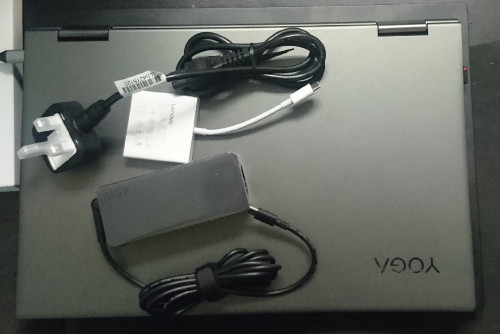 » Click to show Spoiler - click again to hide... « This post has been edited by BeastX: Nov 22 2019, 08:21 PM |
|
|
|
|
|
Nov 22 2019, 08:58 PM
|
|
Senior Member
4,800 posts Joined: Mar 2017
|
QUOTE(BeastX @ Nov 22 2019, 08:20 PM) I jumped the gun with the wrong conclusion.... The LCD panel I got was actually the "VESA400 HDR with Dolby Vision™3, Touchscreen, 500 nits"....indeed a nice unexpected surprise when I cranked up to brightness to the max... omg so nice   |
|
|
Nov 25 2019, 06:51 AM
|
|
Senior Member
4,800 posts Joined: Mar 2017
|
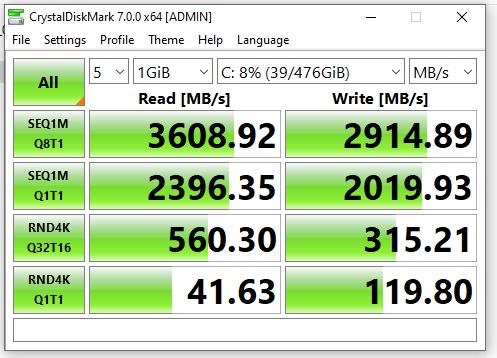
I am using with WD SN750 ssd now.
There’s not much different between Samsung 970 Evo plus. If your laptop background data still in running, the speed may reduces.   |
|
|
Nov 25 2019, 12:53 PM
Show posts by this member only | IPv6 | Post
#349
|
|
Junior Member
320 posts Joined: Jan 2013
|
Hi,
thinking of buying a Lenovo notebook to replace my Surface Pro 4. I have some questions as this is my first purchase of Lenovo product. 1) Is customer service and support of Lenovo Malaysia ok? 2) Whats the difference between Thinkbook 14s and Thinkbook 14? 3) Is there any shop in Penang which I can see the demo? |
|
|
Nov 25 2019, 12:58 PM
|
|
Senior Member
4,800 posts Joined: Mar 2017
|
QUOTE(glauncher @ Nov 25 2019, 12:53 PM) Hi, Except weight and graphic card wise maybe is battery.thinking of buying a Lenovo notebook to replace my Surface Pro 4. I have some questions as this is my first purchase of Lenovo product. 1) Is customer service and support of Lenovo Malaysia ok? 2) Whats the difference between Thinkbook 14s and Thinkbook 14? 3) Is there any shop in Penang which I can see the demo? 14 can able to use type C charger , 14s must be use the slim tips |
|
|
Nov 25 2019, 01:32 PM
|
|
Senior Member
5,987 posts Joined: Jan 2003 From: North Borneo & South Nihon/Nippon
|
QUOTE(glauncher @ Nov 25 2019, 12:53 PM) Hi, ThinkBook 14s:thinking of buying a Lenovo notebook to replace my Surface Pro 4. I have some questions as this is my first purchase of Lenovo product. 1) Is customer service and support of Lenovo Malaysia ok? 2) Whats the difference between Thinkbook 14s and Thinkbook 14? 3) Is there any shop in Penang which I can see the demo? Whiskey Lake 1 SODIMM slot Radeon 540X 2GB 1 NVME M2 ThinkBook 14: << though not available on the Lenovo MY site, not shipped/in market yet. Comet Lake 8GB soldered + 1 free slot (dual channel)<<assumed Radeon 625 4GB 1 NVME M2 + 1 SATA 45Wh battery with 2 drives, 57Wh battery with the NVME drive only. QUOTE(Benefon @ Nov 25 2019, 12:58 PM) Except weight and graphic card wise maybe is battery. Actually: Both 14 and 14s has slim-tip power ports.... and both has one usb-c 3.1 gen2 (10Gbps) that can do power delivery too, 14s however has an extra usb-c 3.1 gen1 (5Gbps)...14 can able to use type C charger , 14s must be use the slim tips This post has been edited by BeastX: Nov 25 2019, 01:50 PM |
|
|
Nov 25 2019, 11:18 PM
|
|
Senior Member
4,800 posts Joined: Mar 2017
|
Type C Baseus Magnetic Adapter
Make sure modify a bit, otherwise the male connector come out easily.  |
|
|
Nov 26 2019, 12:43 AM
Show posts by this member only | IPv6 | Post
#353
|
|
Newbie
43 posts Joined: Sep 2013
|
 Is this one same as 65w lenovo charger? For x395 |
|
|
|
|
|
Nov 26 2019, 07:03 AM
|
|
Senior Member
4,800 posts Joined: Mar 2017
|
QUOTE(sayyid_muammar @ Nov 26 2019, 12:43 AM) Is this one same as 65w lenovo charger? For x395 |
|
|
Nov 26 2019, 08:54 AM
|
|
Senior Member
4,800 posts Joined: Mar 2017
|
Deleted
This post has been edited by Benefon: Nov 26 2019, 08:54 AM |
|
|
Nov 26 2019, 11:37 PM
Show posts by this member only | IPv6 | Post
#356
|
|
Newbie
43 posts Joined: Sep 2013
|
QUOTE(Benefon @ Nov 26 2019, 07:03 AM) Can , 200 percentage can charged use any specific cable for 65w or just use any cable? |
|
|
Nov 27 2019, 12:18 AM
|
|
Senior Member
4,800 posts Joined: Mar 2017
|
QUOTE(sayyid_muammar @ Nov 26 2019, 11:37 PM) use any specific cable for 65w or just use any cable? Can search about Ugreen or Baseus type C cable for 100w or 60W one.SG$ 9.52 41% Off | Baseus USB Type C Cable To USB C Cable For Samsung S10 S9 USBC PD 60W Fast Charging Charger USB-C Type-C Cable For Xiaomi mi 9 8 https://s.click.aliexpress.com/e/DxRVi0la SG$ 4.91 16% Off | Baseus USB 3.1 Type C to USB C Cable for Huawei Samsung S9 S8 PD 100W Quick Charge 4.0 USB-C Fast Charger Cable for MacBook Pro https://s.click.aliexpress.com/e/kiDKoQA8 |
|
|
Nov 28 2019, 10:22 PM
Show posts by this member only | IPv6 | Post
#358
|

Senior Member
2,801 posts Joined: Jan 2003 From: Darul Aman
|
 this is the 3500 pro, in an x395, completing the pcmark10. no thermal throttling even though some of the CPU core hit 93deg intermittently. till now nobody tried yet with their higher spec 3700 would be interesting to see if 3700 can hit max without being bogged down by the cooling system sure this is a benchmark. but its pcmark. it tests the speed of normal daily computing tasks. if a PC gets bogged down by opening spreadsheet and word processing and web browsing, well something is amiss..  |
|
|
Nov 29 2019, 03:12 PM
Show posts by this member only | IPv6 | Post
#359
|

Senior Member
8,240 posts Joined: Apr 2017
|
QUOTE(paskal @ Nov 28 2019, 10:22 PM) this is the 3500 pro, in an x395, completing the pcmark10. Use AMD uProf for monitoring, hwinfo64 not reliable for AMD mobile APUsRun a series of Cinebench or run Aida64 to find out the thermal limit |
|
|
Nov 29 2019, 03:28 PM
|
|
Senior Member
2,801 posts Joined: Jan 2003 From: Darul Aman
|
QUOTE(ZM Fong @ Nov 29 2019, 03:12 PM) Use AMD uProf for monitoring, hwinfo64 not reliable for AMD mobile APUs cinebench or aida doesn't represent normal, general computing usage.Run a series of Cinebench or run Aida64 to find out the thermal limit CPU/GPU load using word processing and excel and photoshop is vastly different compared to cinebench and aida. pcmark is a more realistic benchmark to simulate normal daily computing load. but sure i'll check again with uprof to see if it throttles. |
| Change to: |  0.0195sec 0.0195sec
 0.30 0.30
 6 queries 6 queries
 GZIP Disabled GZIP Disabled
Time is now: 3rd December 2025 - 12:18 AM |
 Quote
Quote