I like the colour experience more on 5700XT when pairing with Benq EX3203R monitor.

Issue 1: With Strix 2080 (Gsync compatible on setting), I experienced Metro Exodus screen auto off before gameplay for 2 seconds on Benq EX3203R monitor. (but not recurring on 5700XT and during gameplay)
Issue 2: GPU-Z reported Hot Spot temperature >100 Celsius on Strix 5700XT! (I expect Asus' over-engineered cooling to perform better, but somehow disappointed.

Issue 3: Sometimes GPU Fan won't spin even after >55C, has to manually set Radeon WattMan GPU Fan Curve.
Issue 4: Asus Maximus X Hero M/B latest Aura Sync utility cannot detect 5700XT. (but can detect 2080)
Issue 5: From Youtube review, this card run 5 to 10 Celsius hotter than MSI Gaming X, Red Devil, Sapphire Nitro+ due to higher power consumption at load! Initially I chose Asus to hope their top of the line product can beat other manufacturers by lower temperature.

Recommendation:
1. If you want lower gaming temperature, try out Sapphire Nitro+ 5700XT/MSI Gaming X/Red Devil instead of Asus to see any improvement in gaming temperature as per claimed by Youtube reviews.
2. Use Gaming Profile instead to enjoy <80C temp but the trade off is to sacrifice few FPS loss.
I am more concern about gaming at high temperature on 5700XT. Hope upcoming Powercolor Liquid Devil may change the game.
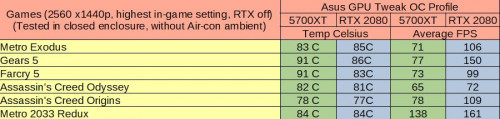
Here is my test results on Asus ROG Strix 5700XT/2080 O8G (Gaming Profile in SW, HW BIOS Performance Mode): (for Nvidia, RTX off, Nvidia Hairworks, PhysX enabled)

My RTX 2080 run hotter! Ridiculous? Will try RMA.
So RTX 2080 only win by 5-30FPS more, but with price double! 5700XT card is a sweeter choice, (FPS is playable at min 60FPS onwards) to pair with an affordable 1440p Freesync monitor!
Here is 3Dmark Time Spy Stress Test: (on 5700XT)
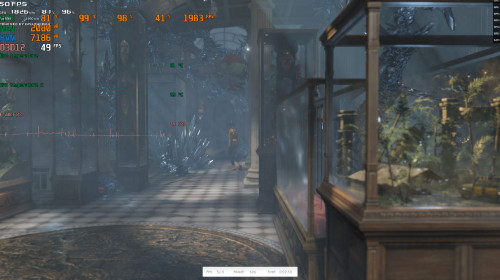
Here is 3Dmark Time Spy Stress Test: (on 2080)

Here is Radeon WattMan Manual Fan Curve Setting: (set to 30% is the sweet noise level I can tolerate)
 This post has been edited by weikunt: Oct 13 2019, 10:30 AM

 Aug 20 2019, 09:10 AM, updated 6y ago


 Quote
Quote

















 haha pangsai convinent race. I like PCMaster race

 0.0300sec
 0.22
0.22
 5 queries
 GZIP Disabled