Welcome Guest ( Log In | Register )

Bump Topic Topic Closed RSS Feed
33 Pages « < 7 8 9 10 11 > » Bottom

Outline · [ Standard ] · Linear+

> Lenovo AMD Laptops worth to buy?, Huge Sales at 11.11 (Citi45 end of Nov)

views
     
kuci_mayong
post Oct 11 2019, 02:03 PM

Enthusiast
*****
Junior Member
808 posts

Joined: May 2008
QUOTE(Benefon @ Oct 11 2019, 01:54 PM)
How u you get this maintenance data sheet?
Can I request for :
ThinkPad P53 and P1 Gen 2 and P43s

Thanks
*
I think you can try google

CODE
"Hardware Maintenance Manual" followed by “model name” of your laptop.


This post has been edited by kuci_mayong: Oct 11 2019, 02:05 PM
kuci_mayong
post Oct 11 2019, 02:07 PM

Enthusiast
*****
Junior Member
808 posts

Joined: May 2008
QUOTE(msacras @ Oct 11 2019, 02:05 PM)
Thank you
kuci_mayong
post Oct 11 2019, 02:12 PM

Enthusiast
*****
Junior Member
808 posts

Joined: May 2008
Start up time is 6 secs from the sec you press the on button, it automatically reads your fingerprint so you don’t have to scan again after the laptop has loaded the start screen.


kuci_mayong
post Oct 11 2019, 02:42 PM

Enthusiast
*****
Junior Member
808 posts

Joined: May 2008
QUOTE(Benefon @ Oct 11 2019, 02:17 PM)
Worth for money lah.
Because the laptop weight just 1.32kg only
Ultra portable laptop

List down Pros:
300nits FHD > TN HD panel
1.32kg only
Dual fan
Upgradable ram slot
Ssd is NVMe 2280 compatible

Cons
USB Square type of charging port, if come with type C port will be awesome.
The rest is unsure
*
Pros is definitely more than cons here, but here are some others I found:

Pros
- long battery life
- aluminum built

Cons
- no dual channel, only one ram slot
- keyboard not as nice as thinkpad according to some reviewers
- read somewhere fan noise is loud

Overall seems like thinkbook is more like E series thinkpad (even then E series is still better because you can pack more powerful specs), or an ideapad trying to be a thinkpad.

This post has been edited by kuci_mayong: Oct 11 2019, 02:43 PM
kuci_mayong
post Oct 11 2019, 03:00 PM

Enthusiast
*****
Junior Member
808 posts

Joined: May 2008
Was wondering what the IWL stands for in “ThinkBook 13s-IWL”. Finally got the answer.

CODE
The name IWL hints at what components Lenovo has included in the ThinkBook 13s. In this instance, IWL stands for Intel Whiskey Lake, with Lenovo offering the device with either a Core i5-8265U or Core i7-8565U processor.


This post has been edited by kuci_mayong: Oct 11 2019, 03:13 PM
kuci_mayong
post Oct 11 2019, 03:02 PM

Enthusiast
*****
Junior Member
808 posts

Joined: May 2008
Another Pros for the thinkbook 13s, upgradable to 32GB ram!

CODE
“The device comes with a single DDR4-2400 SO-DIMM slot, with 16 GB being the maximum volume of RAM that Lenovo offers. The device should be compatible with a 32 GB SO-DIMM module though.”


This post has been edited by kuci_mayong: Oct 11 2019, 03:14 PM
kuci_mayong
post Oct 11 2019, 03:10 PM

Enthusiast
*****
Junior Member
808 posts

Joined: May 2008
Thinkbook 13s has better battery life than x390.

CODE
Battery Life

The ThinkBook 13s-IWL has an ungenerous 45 Wh battery, although this capacity puts it on par with our comparison devices. Its low power gives it a respectable 9:05 hours in a practical Wi-Fi battery life test, during which we set the display to approximately 150 cd/m² and run a script that simulates the load required to render websites. The ThinkBook 13s-IWL only falls short of the ProBook 430 G6 here and proved more long-lasting than the more expensive ThinkPad X390. Our review unit still lasts about 7 hours in our Wi-Fi test at maximum screen brightness, which is impressive.


This post has been edited by kuci_mayong: Oct 11 2019, 03:11 PM
kuci_mayong
post Oct 11 2019, 03:21 PM

Enthusiast
*****
Junior Member
808 posts

Joined: May 2008
QUOTE(Benefon @ Oct 11 2019, 03:13 PM)
Great input 🤜🤛 thanks man
*
Yeap, can read entire review here. Solid laptop.

https://www.notebookcheck.net/Lenovo-ThinkB...t.428235.0.html
kuci_mayong
post Oct 11 2019, 03:24 PM

Enthusiast
*****
Junior Member
808 posts

Joined: May 2008
QUOTE(msacras @ Oct 11 2019, 03:17 PM)
It’s unofficial though, so until someone tried with a 32GB stick and working, presuming it’s topped at 16GB.
For AMD’s laptop, Lenovo named the SKUs with “API”, that’s how you differentiate if it’s Intel or AMD for Lenovo.
*
You are right, and to add, someone mentioned this in the comments of that article

CODE
Could you elaborate on upgrading the ram to 32 GB with only one DIMM slot on the motherboard? From searching online it seems that DDR4-2400 PC4-19200 modules only go up to 16 GB.

I recently bought a Thinkbook 14s and would like to upgrade the memory beyond 16 GB if that's possible.  


Also, good to know Lenovo’s naming convention, didn’t know all that before this.


This post has been edited by kuci_mayong: Oct 11 2019, 03:24 PM
kuci_mayong
post Oct 11 2019, 03:47 PM

Enthusiast
*****
Junior Member
808 posts

Joined: May 2008
QUOTE(msacras @ Oct 11 2019, 03:27 PM)
I only deduced the I stand for Intel and A stand for AMD.

Didn’t aware the WL is for the whiskeylake.

So I assume the PI of API is for Picasso.
*
Which model did you see API on? So far I only see the AMD models ending with the suffix “5” like X395.
kuci_mayong
post Oct 11 2019, 04:22 PM

Enthusiast
*****
Junior Member
808 posts

Joined: May 2008
QUOTE(msacras @ Oct 11 2019, 03:53 PM)
L340-15API
*
Lenovo IdeaPad L340-15API (this is different than Thinkpad L series). I think we can see a trend where Thinkpad they will use the suffix “5” to denote AMD, example T495.

But for the other series like Thinkbook and Ideapad, they will resort to IWL and API to denote between Intel and AMD processors.

And you must be right that the PI is Picasso in this case. Good eye.
kuci_mayong
post Oct 11 2019, 04:39 PM

Enthusiast
*****
Junior Member
808 posts

Joined: May 2008
QUOTE(msacras @ Oct 11 2019, 03:17 PM)
It’s unofficial though, so until someone tried with a 32GB stick and working, presuming it’s topped at 16GB.
*
Found another comment on a YouTube video, probably by the same guy. So it’s not able to be tested because you can’t really get single 32GB ddr4 ram sodimm on the mass market, probably too pricey at the moment.

CODE
Can you clarify how this laptop supports up to 32 GB of ram? The Thinkbook series laptops only have one DIMM slot and the ram modules (DDR4 2400 MT/s PC-19200) only go up to 16 GB as far as I know. I currently have a Thinkbook 14s with 8 GB of ram and I would like to increase the ram beyond 16 GB if possible.


Edit: seems can get one single 32GB stick, saw one on amazon.com and Shopee. This guy doesn’t know what he is saying.

https://www.amazon.com/Samsung-2666MHz-Memo...1/dp/B07N124XDS

https://shopee.com.my/Samsung-32GB-DDR4-266...0041.2312699848

This post has been edited by kuci_mayong: Oct 11 2019, 04:58 PM
kuci_mayong
post Oct 11 2019, 07:12 PM

Enthusiast
*****
Junior Member
808 posts

Joined: May 2008
QUOTE(ohman @ Oct 11 2019, 06:52 PM)
user posted image
*
QUOTE(Benefon @ Oct 11 2019, 07:00 PM)
Same as mine, after they get the bank authorisation code.
*
QUOTE(TOMEI-R @ Oct 11 2019, 07:05 PM)
Same here. Now 8 more weeks to go.  sweat.gif
*
Haven't got this email sad.gif
Hope they don't cancel on me. Am looking forward to this up to 32GB maxed RAM ultrabook.
kuci_mayong
post Oct 11 2019, 07:41 PM

Enthusiast
*****
Junior Member
808 posts

Joined: May 2008
QUOTE(TOMEI-R @ Oct 11 2019, 07:37 PM)
Sure got lar... this email is with the title "We're Processing your Order". Go check inside -System Details-.

Benefon Dont scare him please. dry.gif
*
Mine says "processing", if click system details, it goes to the OVP site where can see the shipment tracking, but even there the status is just "ordered".

Attached Image
kuci_mayong
post Oct 11 2019, 08:11 PM

Enthusiast
*****
Junior Member
808 posts

Joined: May 2008
QUOTE(ohman @ Oct 11 2019, 08:03 PM)
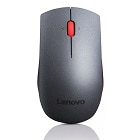
can someone share the photo of this mouse in real life?

user posted image
*
I'll share when I get back, but this is really bad mouse. Better you just gift it to someone else.

What you want is to buy silent mouse, wired or wireless. Just as long as silent.
kuci_mayong
post Oct 11 2019, 08:11 PM

Enthusiast
*****
Junior Member
808 posts

Joined: May 2008
QUOTE(rhytion @ Oct 11 2019, 07:59 PM)
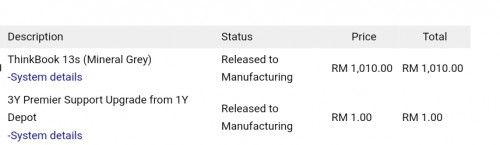
Go in and download any of the XML/HTML/CSV/Exel file, status will be shown inside. Mine also released to manufacturing
*
Aite thanks will check

kuci_mayong
post Oct 11 2019, 08:56 PM

Enthusiast
*****
Junior Member
808 posts

Joined: May 2008
QUOTE(kaiserreich @ Oct 11 2019, 08:54 PM)
In my haste to check out the other day, i forgot to add the 3year warranty. Not to mention no shopback

Now that they are really going ahead with fulfilling the order, I regret my actions.
*
Give the CS a call, no harm to try.
kuci_mayong
post Oct 11 2019, 09:15 PM

Enthusiast
*****
Junior Member
808 posts

Joined: May 2008
Just got a new email just now. Phew! "released to manufacturing".

Attached Image
kuci_mayong
post Oct 11 2019, 09:17 PM

Enthusiast
*****
Junior Member
808 posts

Joined: May 2008
QUOTE(andrwss @ Oct 11 2019, 09:07 PM)
They ship mouse n backpack from US, that's why need 8 weeks. Ship using UPS lol
*
will get mouse and bag by oct 18. don't think its 8 weeks.

Attached Image
kuci_mayong
post Oct 11 2019, 09:24 PM

Enthusiast
*****
Junior Member
808 posts

Joined: May 2008
QUOTE(kaiserreich @ Oct 11 2019, 08:54 PM)
In my haste to check out the other day, i forgot to add the 3year warranty. Not to mention no shopback

Now that they are really going ahead with fulfilling the order, I regret my actions.
*
QUOTE(TOMEI-R @ Oct 11 2019, 09:15 PM)
Ah.. At least you are one of the lucky ones who managed to buy.  icon_idea.gif Look at the bright side.
*
Just try give the CS a call, they might be able to help. Ask if you can add the warranty for rm1.

Let me tell you my experience last time buy the t495, i configured wrongly, called CS, CS helped me cancel the order and re-configured the model to my liking using the same discount code and price.

Anyways, even if cannot, you can always upgrade your warranty on the lenovo website, but must pay extra rm200++ for the lowest 2 year extended warranty option. you can see the pricing

https://www.lenovo.com/my/en/services/pc-se...anty-protection

33 Pages « < 7 8 9 10 11 > » 
Bump Topic Topic ClosedOptions New Topic
 

Change to:
| Lo-Fi Version
0.0973sec    0.32    7 queries    GZIP Disabled
Time is now: 3rd December 2025 - 01:31 AM