Welcome Guest ( Log In | Register )

Outline · [ Standard ] · Linear+

 Armaggeddon Pixxel Elite+ 4k panel, Noob review on the panel itself.

views
     
TSSmithmaster
post Jul 28 2019, 02:32 AM, updated 7y ago

Enthusiast
*****
Senior Member
776 posts

Joined: Jan 2011


Hi there

I recently bought this monitor 1 week ago. And I am going to share you my experience owning one of this monitor.
I am gonna put a disclaimer here that I am not professional and do not have the tools to do colour calibration and everything.
It is just my opinion and me eyeballing it. I will try to edit this for more further information that I left out

Here is goes:

Gaming Spec
Ryzen 7 1700 @3.8ghz
16GB running at 2933 Corsair
RX580 at 1450
1tb of A1000 NVME SSD

If it is important to know brows.gif

Monitor specs
Disclaimer: I copy and paste this but added extra info and remove those marketing ones
4K Ultra HD
Flat Screen Hard Coating
27" Screen Size
3840 x 2160 UHD 4K @ 60Hz
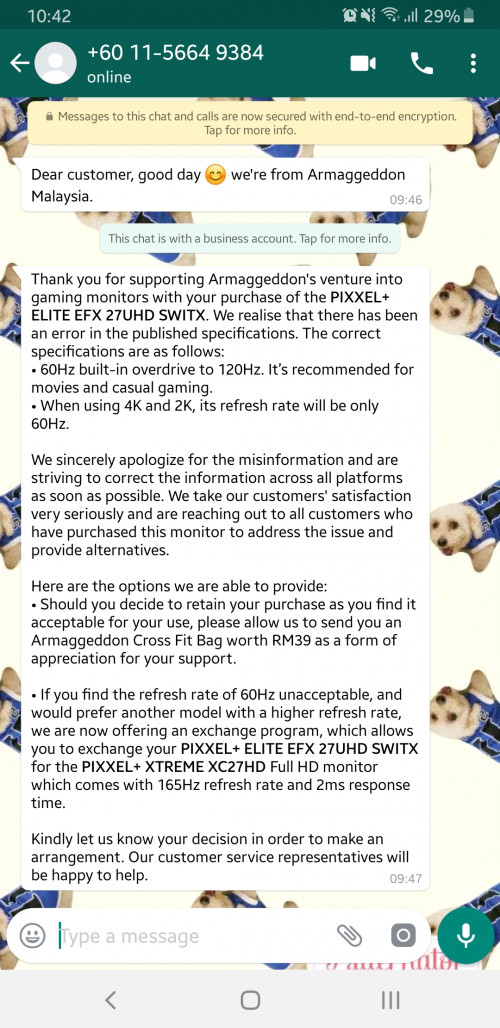
2560 x 1440 QHD 2K @ 144hz (Actually this have been corrected it is an 60hz panel oc to 120hz instead.)
1920 x 1080 FHD @144hz (same goes for this)
Panel: IPS
5ms Response Time
+15/ -5 Screen Tilt
15mm Frame
99% sRGB Gamut
Anti-Blue Ray
Flicker Free
NVIDIA G-SYNC
AMD FreeSync
3 HDMI (2x 1.4 | 1x 2.0)
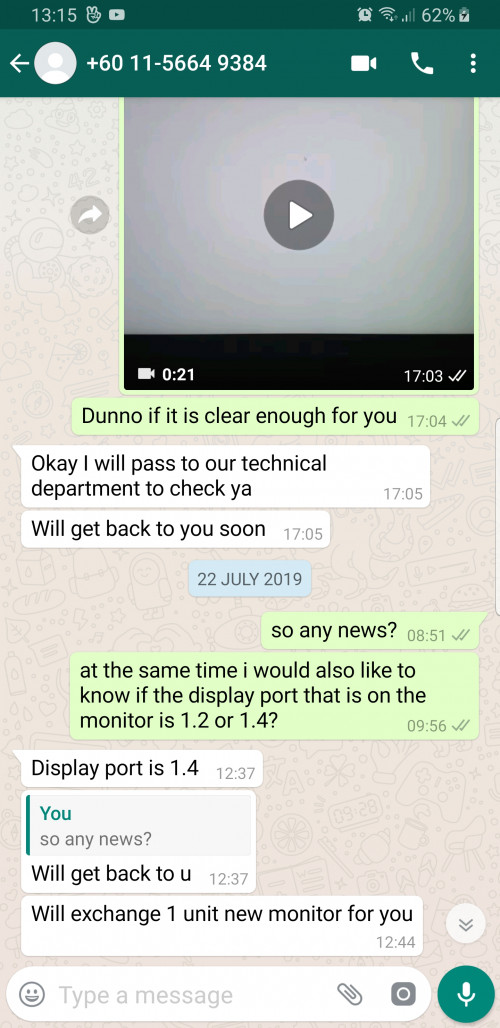
1 Display Port
VESA Wall Mount (optional)
3 Year Warranty (On-Site Pick Up - West Malaysia only)


CONTENT
The box come in with a display port cable , HDMI cable and also the power adapter (Two pin plug). However the stand, took me a while to get the stand into the monitor and they have vesa bracket should you need one (at additional cost)

Monitor IO
1x DP port (1.4 supposingly)
user posted image
user posted image
2x HDMI (1.4)
1x HDMI (2.0)

5 buttons for menu, changing monitor preset contrast." Lighteffect" button (not too sure what it does)(ah this turns on and off the light behind the monitor), Resolution switching button(to switch to 4k or 1440p or 1080p and On/Off

Review
I had 2 defective model because of dead pixel. Luckily they have a zero dead pixel policy within 7 days which I am quite happy with their customer service. On site pickup for West Malaysia as well for warranty
However it means I have tested 3 monitor by July 27.

The stand, Is a pain in the butt to put it in for the first time. Because you gotta use quite a large amount of force to push it in. And you are scared to break the panel but after installing, reinstalling is much more seemless.
The easy switch to change the monitor resolution (EDIT:They have multiple EDID table) :
1) FHD at 144hz
2) QHD @ 60hz
3) QHD @ 120hz
4) UHD @ 60hz
Confirmed that this monitor is actually just a 60hz overdrive to 120hz

In order to get it running at QHD/1440p at 144hz you gotta go to advance monitor setting and change to 144hz
Although it mentioned that it has thin bezel of 15mm however it is more like 18mm in all 4 areas. (Nick picking)


Is it sharp at 4k? Yes it is "quite" sharp at 4k, you are able to switch to either to 1440p 120hz/144hz or 1440p 60hz (freesync supported), 4k 60hz(Freesync supported) or 1080p 144hz
My video sources for 4k is from Youtube so if it is sharp there, I guess it is alright since I do not have an Netflix account or other 4k content.

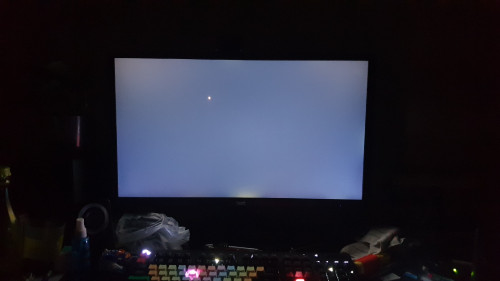
Since it is an IPS, the ips glow as they call it. Seriously I don't notice it when I was checking for dead pixels but in my camera(taken by s9+) it looks quite bad but that for you to decide. For me, I still cant see the glows.
user posted image

Was there ever ghosting that I have notice. Well I did not notice any ghosting but I admit I am quite ignorant on this. So take it with A TRUCKLOAD of Salt.


Problem
I found one major flaw on this monitor: 144hz is a no go. On all 3 monitor I have obtained. Only tested this on DP cable that they gave me and also only on DP
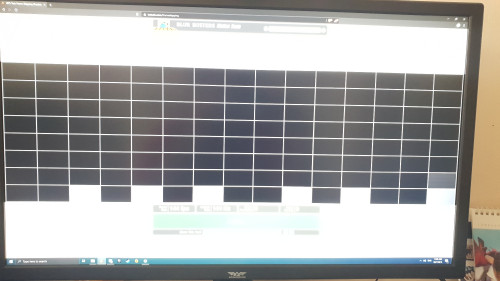
Whether it is 1440p or 1080p, @144hz there is a screen tearing on the bottom side of the monitor. Only at the bottom. On the first day of me getting this monitor, I did not notice it at first (I did notice it after watching the video cuz I was STARING CLOSELY) while playing game(Apex legend,WWZ,dota2) But when I watch video, there is at horrible horizontal tearing on all 3 monitor (was watching IZ*one violeta flower edition at 60hz). I tried some of solution like hardware acceleration enable and disable, Vsync my browser. But the tearing persist, not only that, it only happen on the bottom side of the monitor consistently. However I kept the monitor running now at 120hz and i don't notice it anywhere in the bottom panel.
If there is a way for me to upload video instead of to youtube please tell me.

The problem only can be seen if you full screen the video while if you watch it in theater mode, the top 80% or with the ciinema black bar on top and bottom, is fine. But the bottom 20/10% is not.
This actually tells me that the panel cannot handle 144hz but only at 120hz at best which is a turn off for people. I am not sure if it is only unique to my case where all 3 monitors have this issue or others did not face this issue or they are not as critical about this issue.
Video Link: https://1drv.ms/v/s!AiF-mOIo-HhqhkfeQufaAdx_nwm8
If you wondering about 4k, nope 4k is fine since it is 60hz. Like I said on top Only happen in 144hz regardless of 1440p or 1080p

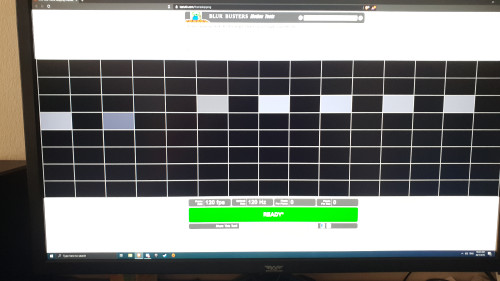
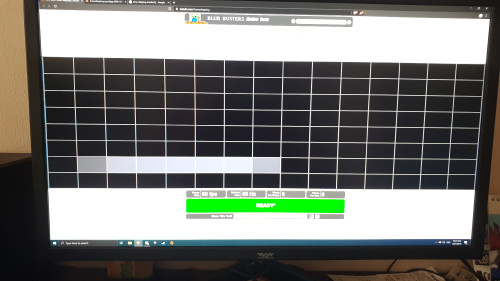
After additional testing (Thanks to lyn forumers)
Time skipping is apparent in this monitor.
user posted image
user posted image
user posted image

Conclusion
For RM 1.2k, yes it is a cheap monitor but it comes with a major problem, it doesn't do well enough in 144hz. Is it a turn off? To some, yes. To me, I dunno. I am still considering if i want this monitor or not. I mean 120hz is still a high enough refresh rate and I doubt I can run 144hz at 1440p nor I would be able to tell a difference
My 4k content is mainly coming from youtube for my KPOP enjoyment and it looks damn crispy

This monitor does hit my checkbox
27inch- Check
Natively support for 4k at 60hz - check
VESA mount - Only if you buy the bracket for additiional cost of RM 69
CHEAP - Check.

So it is up to you in the end if you can stand the annoying 144hz issue but if you are happy with 120hz for gaming and 4k for video consumption, sure you can jump the gun and get it. (Let me repeat again, this is a 60hz panel overclock to 120hz hence it explained the frame skipping)

If you only want 1440p at 144hz, I suggest looking at a slightly more expensive IPS panel by acer the VG271UP by Acer. Saw the review of the 2nd batch from rting. Quite okay.

(I have already decided to return the monitor as I prefer a 1440p panel with 144hz at a budget price.)

This post has been edited by Smithmaster: Aug 30 2019, 11:49 PM
TSSmithmaster
post Jul 28 2019, 08:45 AM

Enthusiast
*****
Senior Member
776 posts

Joined: Jan 2011


QUOTE(LarryPizzaGuy @ Jul 28 2019, 03:46 AM)
Great review!

Have you tried enabling either Freesync or Gsync (if you have an nvidia card) to minimize the screen tear?
*
Freesync is only available for 60hz and not for 144 nor 120hz. The distortion only happens at 144hz

QUOTE(JayceOoi @ Jul 28 2019, 08:34 AM)
So it is real 4K monitor?

BTW, do use camera to take photo. No point put screenshot. tongue.gif
*
I would said it is a real 4k monitor everything seems sharper in my eyes and it shows natively 4k in windows.

Ah I will reupload the photos. Hahaha forgotten that you cant tell a difference in a screenshot.
TSSmithmaster
post Jul 28 2019, 11:00 AM

Enthusiast
*****
Senior Member
776 posts

Joined: Jan 2011


QUOTE(cstkl1 @ Jul 28 2019, 09:27 AM)
Smithmaster
ok for first try

1.
bro u cannot have multiple native resolution on a panel.
native pixel means the number of pixels on the panel. native resolution means a 1:1 pixel fillrate on the panel.
so if this is 4k native.. a 1080p will take up 1:4 ( 1 pixel from gpu to 4 pixel on monitor) . 1440p.. this tricky. it will be 4:9

based ok few reviews of songram e240..
looks like this monitor has mutiple EDID tables. this is now da question mark. seems like scalar trickery here.

from what i know. refresh rate u cannot go above the native refresh rate at native resolution at lower resolution.
max is the oc range. if this is a 4k panel@60hz and it can do 144hz @1440p its only one way.. its a 4k panel thats actually 144hz but because it only comes with dp 1.2.. theres the limitation. think about it. if not ppl can run 1080p 240hz from their 1440p 165hz panels.

so hence da question on da panels native pixel rate.

2.
this monitor in SG etc had so many variation. there was a 4k 75hz... another one claiming HDR etc etc

3.
your 144hz could be issue from cheap dp cable. try to get a better one.

4.
if possible. can u set in amd driver no scaling. take pic with your phone on desktop icons with windows scaling set at 100%.

5.
video upload to googlr drive/one drive and share.

show u a scalar trickery on this monitor thats 1440p native
https://drive.google.com/open?id=1qZkchZj0S...p0j5FNHtW13Ze6M

will upload to youtube but it will take sometime for youtube to process it for higher resolution. so just wait


see how 150% everything at 4k looks sharp and passable.. but when i set at 100% windows scaling setting.. see how the V, W on the desktop goes whack..... on HDR things will go bonkers even more for 100% windows scaling.

tommorow i will bring my asus pg27q 4k60hz gsync monitor and show you the difference in a large dataset of excel spreadsheet video. the difference with trickery and real 1:1.
*
Thank you. I understand much better based on your explanation. Yes i believe that this has multiple EDID table which made windows recognize the monitor as either a 4k / 1440p / 1080p natively.
I will try your suggestion to see if it is a 4k panel that scaled down. Or 1440p panel to scale up.

For this monitor, it was suppose to have dp 1.4.

I will try to get a better dp cable but is there any particular brand that i should be getting?

I will set through amd software to prevent scaling. I will take a photo with my phone.

Will upload the issue of the tearing and share it to one drive.

Thank you again for educating.

TSSmithmaster
post Jul 28 2019, 01:35 PM

Enthusiast
*****
Senior Member
776 posts

Joined: Jan 2011


QUOTE(JayceOoi @ Jul 28 2019, 11:36 AM)
So it's not real 4K monitor after all... sad.gif
*
QUOTE(cstkl1 @ Jul 28 2019, 11:51 AM)
dont know yet.. he hasnt show any indication other than this eyes atm...

theres one more way.. i am not sure about this but u can have a try

the mouse dpi...

afaik moust dpi is based on pixel per inch on the screen.. a 4k vs 1440 at 1:1 native pixel .. when u set dpi like 800 u can see the difference

on scalar scaling.. u wont see any ...

again i am not sure how conclusive and accurate this test is
empire23
ini kita kena tanya abang ni...
*
how I get the displayport is 1.4 is I ask directly, it wasnt indicated in anywhere from whatsapp.

user posted image
user posted image

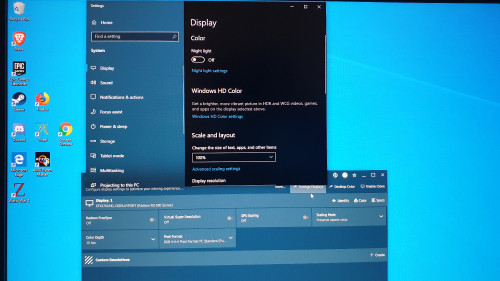
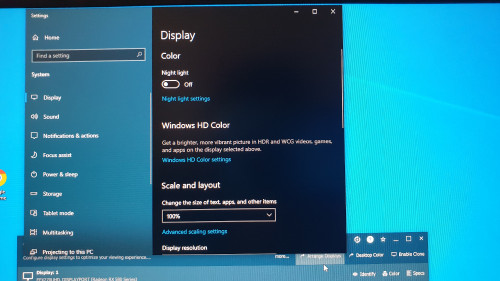
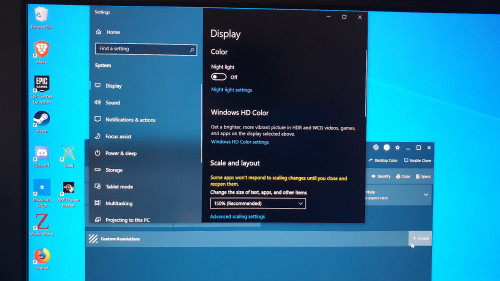
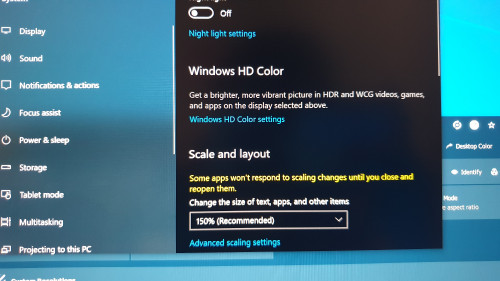
Okay, as for scaling, I make sure that at 4k there is no text scaling or anything. Not sure if i am doing it right or wrong but here goes.

user posted image
user posted image
user posted image
user posted image


TSSmithmaster
post Jul 28 2019, 07:54 PM

Enthusiast
*****
Senior Member
776 posts

Joined: Jan 2011


QUOTE(cstkl1 @ Jul 28 2019, 04:04 PM)
cant tell dude...
150% scaling 1 looks better than 100% scaling 1,3 and 150% scaling 3.. looks like your hand shaking since how can it look diff than 150% scaling 3.
but looks like legit 4k...

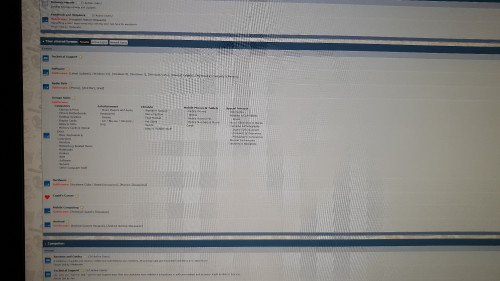
just take a picture with 100% scaling on lowyat forum main page https://forum.lowyat.net/
dat will confirm it...

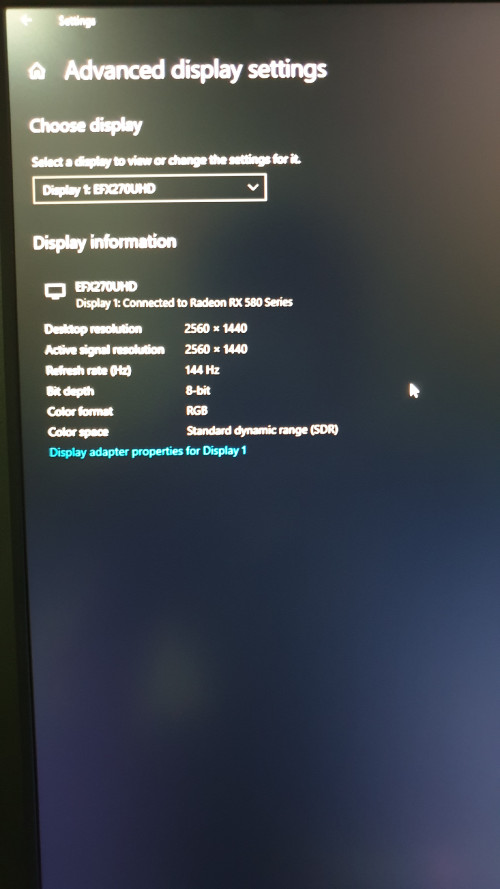
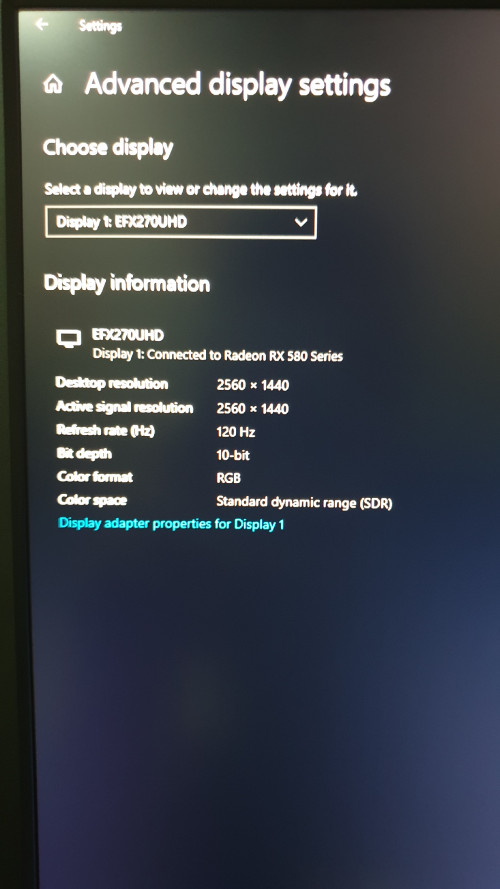
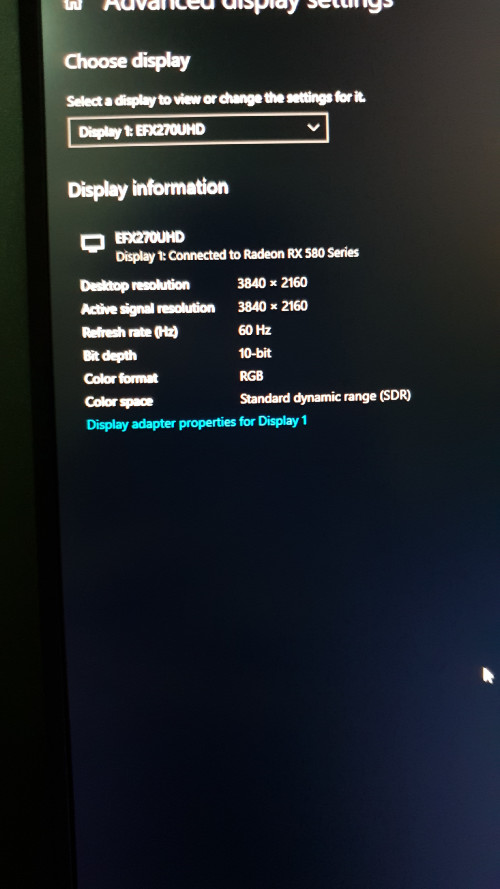
eh dude can u show in windows advance display properties is that a 8bit or 10bit...
this is a much more exciting news.
*
My phone camera refuse to focus
user posted image
user posted image


Sure thing on the colour bit.
Funny thou.
If set it to 120hz at 1440p, it will be 10bit but if i set it to 144hz 1440p it will be 8bit
At 4k 60hz it will be back to 10bit

user posted image
user posted image
user posted image


This post has been edited by Smithmaster: Jul 28 2019, 08:05 PM
TSSmithmaster
post Jul 28 2019, 08:37 PM

Enthusiast
*****
Senior Member
776 posts

Joined: Jan 2011


QUOTE(codenchips @ Jul 28 2019, 07:57 PM)
damn the light bleed is so bad!!!
*
Haha if you refer on the lastest photo, it is also because i have a ceiling light that is shining down as well and the monitor is reflecting it.
TSSmithmaster
post Jul 30 2019, 10:35 AM

Enthusiast
*****
Senior Member
776 posts

Joined: Jan 2011


QUOTE(abx123 @ Jul 29 2019, 12:13 AM)
Smithmaster Can the blue LED behind the monitor be turned off permanently?

and also just a rebrand from taoabo
*
This monitor back light can be turn off. I will reedit my review as well.

QUOTE(Free2k @ Jul 29 2019, 12:22 AM)
Did you manage to check if the 120hz is true 120hz with the UFO  frame skipping tests? From one of the reviews I saw of the Songren model, there was frame skipping from his model, but that was at 144hz, and many reports saying that its a 'fake' 144/120hz monitor only able to run at 60hz.

Here is the test:
https://www.testufo.com/frameskipping
*
at 120 and 144hertz there is a time skipped

QUOTE(cstkl1 @ Jul 29 2019, 08:31 PM)
data interesting.

i also dont believe its a proper 120/144. cause of what i said before.

but 4k ips 10bit at that price.. is damn good.
*
Unfortunately it is not a true 120hz monitor.
TSSmithmaster
post Jul 30 2019, 11:40 AM

Enthusiast
*****
Senior Member
776 posts

Joined: Jan 2011


QUOTE(goldfries @ Jul 29 2019, 11:07 PM)
Light bleed is often exaggerated on smartphone pics.
*
That is true. I don't seem to notice any glows but my phone seems to capture it.
TSSmithmaster
post Jul 30 2019, 12:37 PM

Enthusiast
*****
Senior Member
776 posts

Joined: Jan 2011


QUOTE(JayceOoi @ Jul 30 2019, 11:53 AM)
Don't care about 120Hz. So it is a real 4K monitor?  smile.gif
*
Video

You can judge it on your own accord. I feel it is a real 4k. I have upload a video but You can mute the sound, had song playing on the background.
This video is 4k taken in 100% scaling and I dont see any issue. all text are sharp.


TSSmithmaster
post Jul 30 2019, 02:07 PM

Enthusiast
*****
Senior Member
776 posts

Joined: Jan 2011


QUOTE(cstkl1 @ Jul 30 2019, 01:31 PM)
everything u shown so far shows its a proper 4k bro.. i got 3 screens now with a gsyns 1440p tn, gsync 4k 60 ips, gsync compataible 1440p ips.. ( tested that upscaling thing with this)...

and yours is definately same with that gsync 4k 60 ips except yours even better with a 10bit.

hmm talking about 10bit.. u sure yours cannot support HDR??
*
It has HDR. But the colour is so bad.
Thank you for confirming.
TSSmithmaster
post Aug 2 2019, 11:42 AM

Enthusiast
*****
Senior Member
776 posts

Joined: Jan 2011


QUOTE(LarryPizzaGuy @ Aug 2 2019, 11:18 AM)
user posted image

Just received this message from Armaggeddon this morning.
Does this mean the monitor isn't a true 120HZ or 144Hz panel?

Anyone got the same message as well?
*
Yes I received that too. Through my testing. It is not a true 120hz panel. Much worse for 144hz.
Its just a 60hz panel overclock to 120hz
TSSmithmaster
post Aug 2 2019, 02:08 PM

Enthusiast
*****
Senior Member
776 posts

Joined: Jan 2011


QUOTE(7cantona @ Aug 2 2019, 01:19 PM)
r u gonna exchange ?  hmm.gif  confused.gif
*
Considering, But I only use it to watch shows and play light games. I did not notice a frame skip during APEX LEJEN considering thats the most "competitive" game I play for now . But the 4k is damn syok thou haha. 1.2k ips 4k is very good deal.

QUOTE(Illsense @ Aug 2 2019, 01:34 PM)
https://shopee.com.my/(Pre-Order)-Armaggedd...0690.2587290714

There's a new model for pre-order.

27" 1080p
165Hz non OC?
Curved 2ms
For RM1299

Is this good? (Seems like? O.o)
*
you can try their monitor from their HQ if you around PJ. I message them, they said they have one in HQ.

QUOTE(LarryPizzaGuy @ Aug 2 2019, 01:47 PM)
This was offered in exchange for the Pixxel+.

The thing is... its a VA panel... color accuracy isn't as good as the IPS panel.

Plus its curved... your viewing angle will be limited compared to a flat panel. Won't be nice to watch movies on.

I'm still considering... worst come to worst, just refund.
*
If you are PJ area, you can try the monitor for yourself but for me i dun think i need 165hz, I ask if it is possible to downgrade instead.

This post has been edited by Smithmaster: Aug 2 2019, 02:09 PM
TSSmithmaster
post Aug 2 2019, 07:06 PM

Enthusiast
*****
Senior Member
776 posts

Joined: Jan 2011


QUOTE(Free2k @ Aug 2 2019, 05:40 PM)
Massive conjob. I was one of those who actually pounced on the opportunity. Thought multiple EDID tables. If this was possible, companies like Asus, Acer will be selling their monitors for 3k+++. I think this is absolutely unethical marketing.

Got the monitor delivered, instantly tested with frame skipping from UFO site and flagged it as a conjob. Packed it, and sent it back instantly.

I managed to get a refund though, no questions asked. So perhaps it was error from their manufacturing side?

Anyhow this monitor can be found on a Chinese website. Exact same design, same stand, same panel. Same complaints about it being a fake 144/120hz too.
*
Fortunately I commend the team working in Malaysia. They are good people. They will offer full refund if needed or exchange with something else to meet your expectation. Mine have dead pixel but they came over to my house even after working hours.
I guess the person who should be blame is the one in SG who is out sourcing this monitors xD

This post has been edited by Smithmaster: Aug 2 2019, 07:06 PM
TSSmithmaster
post Aug 2 2019, 07:10 PM

Enthusiast
*****
Senior Member
776 posts

Joined: Jan 2011


QUOTE(kujiro @ Aug 2 2019, 03:56 PM)
Thanks for the review, been eyeing on this but since there is lack of reviews, end up with Dell S2417DG.
*
Where did you get your S2417DG?
How is the colours since its a tn panel?
TSSmithmaster
post Aug 5 2019, 11:10 PM

Enthusiast
*****
Senior Member
776 posts

Joined: Jan 2011


QUOTE(Left4Dead2 @ Aug 5 2019, 02:29 PM)
Confirm got Nvidia Gysnc support ?
*
Its just Gsync Compatible
TSSmithmaster
post Aug 5 2019, 11:42 PM

Enthusiast
*****
Senior Member
776 posts

Joined: Jan 2011


QUOTE(cstkl1 @ Aug 5 2019, 12:16 PM)
tn panel tak boleh dude for color accuracy

example asus pg278q.. one of the first gsync monitors
it had excellent color range etc. but color accuracy you can forget it.. blue is not the blue you will get on ips or printing.

tn panels with gsync are still awesome for gaming.

gsyncs are nvidia inbuilt fpga modules into the monitor.
they are far superior that scalars that support freesync.
the price difference is just too much atm because for some reason nvidia cant do asic modules since all panels differ from each other than needs tweaking of their modules.

but for now with rtx gpus especially on 1440p nobody will be hitting under the freesync range.. so all good.
*
Well I dun really want colour accurate.
So as long as it is better than old days tn panel.
I mainly game casually but watch alot of youtube and kdrama
TSSmithmaster
post Aug 30 2019, 11:45 PM

Enthusiast
*****
Senior Member
776 posts

Joined: Jan 2011


QUOTE(potatocam @ Aug 29 2019, 04:34 PM)
bought this monitor together with the free soundbar
noticed that there was some light bleeding (gold-ish) especially the panel somewhere near the armaggeddon logo ...
a bit annoyed watching movies with black bars (top and bottom)
full screen movies or videos hardly can see it ...
*
You mean the center bottom area, correct? Yes that is the worst Glow ever.


Change to:
| Lo-Fi Version
0.0218sec    0.72    6 queries    GZIP Disabled
Time is now: 21st December 2025 - 08:31 AM